Lecture 1: The Changing Internet
Lecture 1 introduces the course, and reviews some of the material
covered in the Networks and Operating Systems Essentials course in
Level 2. It discusses what is a network protocol and the concept of
layering as a way of structuring networked systems. It reviews some
important aspect of the physical and data link layer; IPv4 and IPv6
and the operation of the network layer; the UDP and TCP transport
protocols; and the higher layers in the protocol stack. Finally,
it concludes by discussing some of the changes occurring in the
network and some of the challenges forcing such changes, to set
the scene for the later discussion.
Part 1: The Changing Internet
The first part of this lecture introduces the course. It reviews the
aims, objectives, and learning outcomes, and the structure of the
lectures and labs. It outlines the assessment scheme, and the dates
and topics for the assessed exercises. Recommended reading is given.
00:00:00.000
Welcome to Network Systems.
00:00:03.667
For those who don't know me,
00:00:05.400
my name is Colin Perkins,
00:00:07.000
I'm the lecturer and coordinator for this course.
00:00:10.433
In this first lecture, I'll review the aims,
00:00:13.333
objectives, and administration for the course.
00:00:16.433
Then I'll recap some of the material covered in
00:00:19.200
the Networks and Operating Systems Essentials
00:00:21.433
course in lecture 2.
00:00:23.433
Finally, I'll briefly introduce some of the
00:00:25.967
changes occurring in
00:00:27.133
the network to set the scene for the
00:00:29.033
remainder of the course.
00:00:32.700
In this first part of the lecture,
00:00:35.200
I'll start with some administrative details.
00:00:38.100
I'll talk about the aims,
00:00:39.600
objectives, and intended learning outcomes for the course.
00:00:43.266
I'll outline the content of the lectures and labs,
00:00:46.367
the timetable for the lectures and laboratory sessions,
00:00:49.367
and the structure of the assessed exercises and exam.
00:00:53.200
Finally, I'll highlight the recommended reading
00:00:55.567
for the course.
00:00:59.367
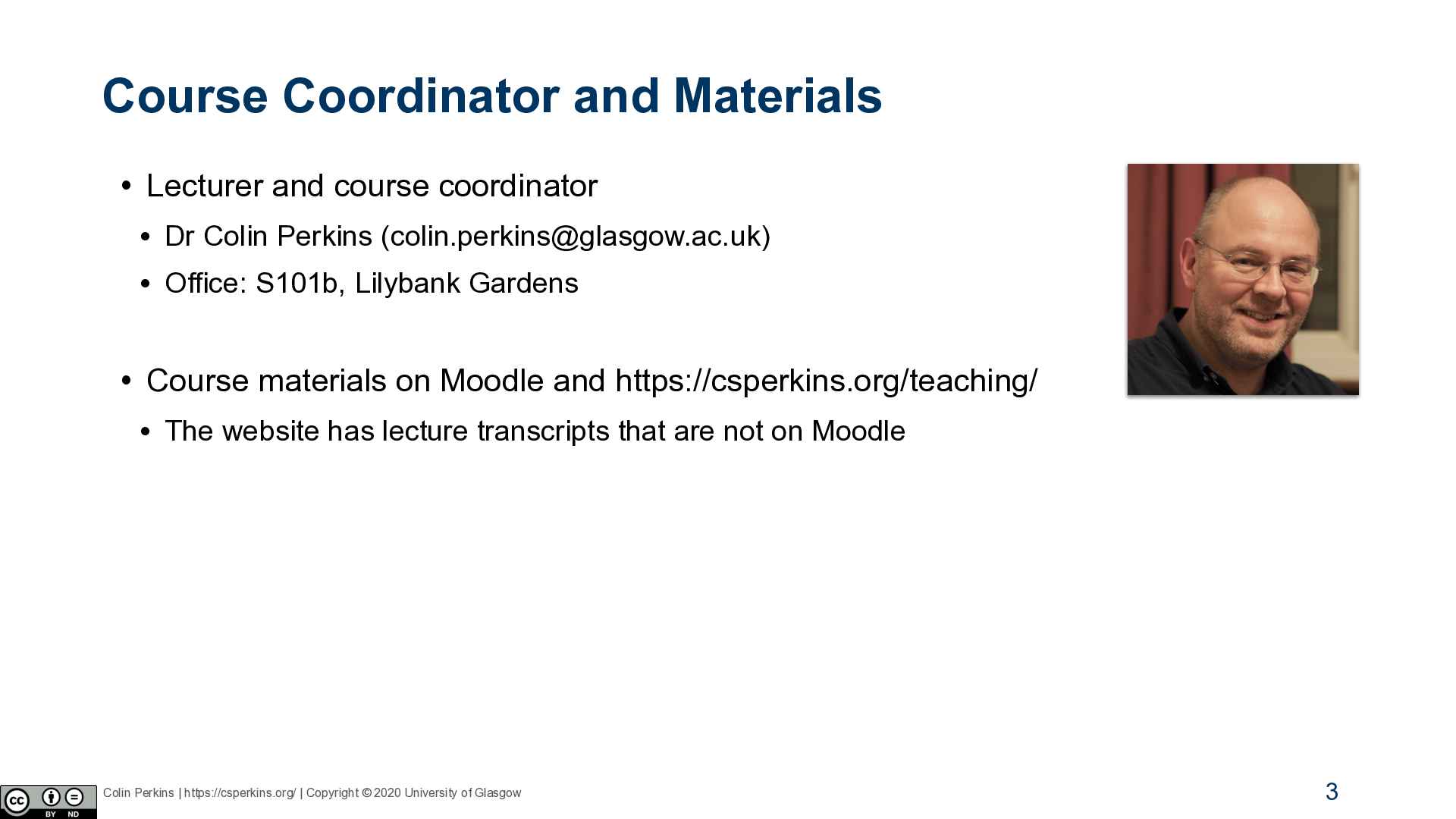
As I mentioned at the start,
00:01:01.266
I'm Colin Perkins.
00:01:03.000
I'm the lecturer and coordinator for this course.
00:01:06.867
If you have questions about the material covered
00:01:09.033
in the course,
00:01:09.967
my email address is on the slide,
00:01:12.200
and I'm happy to answer questions by email.
00:01:15.100
We also have labs and discussion sessions
00:01:17.633
throughout the course when you can ask questions.
00:01:21.400
The course materials, including lecture recordings,
00:01:24.200
copies of the slides,
00:01:25.800
lab handouts, and assessed exercises will be
00:01:28.867
uploaded to Moodle.
00:01:30.934
The material is also on my website
00:01:33.633
at csperkins. org/teaching.
00:01:37.000
The version on my website has
00:01:39.066
lecture transcripts that are difficult to upload to Moodle,
00:01:42.100
as well as the other material.
00:01:46.166
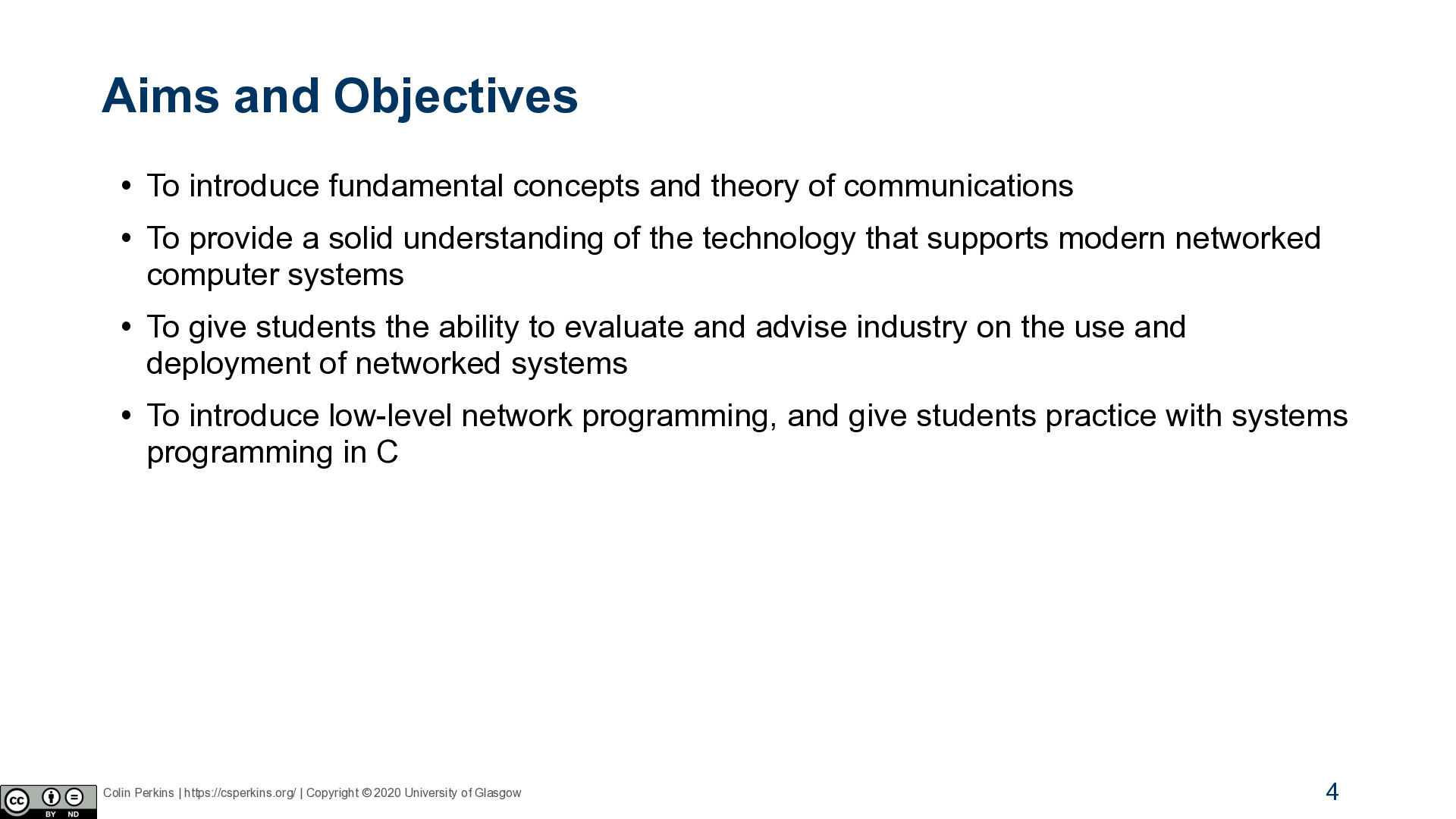
The aims and objectives of the course are four fold.
00:01:50.934
First, the course aims to introduce
00:01:53.400
the fundamental concepts and theory of communications.
00:01:56.934
We'll build on the material from
00:01:59.233
the Networks and Operating Systems Essentials
00:02:01.667
course in level two,
00:02:03.266
covering the concepts in more depth,
00:02:06.367
and going into more details about the operation
00:02:08.633
of the Internet.
00:02:11.133
Second, the course aims to give you a good
00:02:14.000
understanding of the technologies
00:02:15.667
that comprise the modern Internet,
00:02:17.934
and an understanding of how and why
00:02:20.667
the network is changing.
00:02:22.967
We're in the middle of a rapid period
00:02:26.033
of change in the Internet infrastructure.
00:02:28.834
This course will try to make it clear what's
00:02:31.166
changing and what are the drivers for those changes.
00:02:35.000
This should give you the ability to evaluate
00:02:37.300
network systems and understand
00:02:40.333
what technologies and approaches are suitable for
00:02:42.767
particular scenarios.
00:02:44.734
So you can advise on what's appropriate to use.
00:02:48.867
Finally, the course will build on the material in
00:02:51.600
the Systems Programming course to introduce low-
00:02:54.200
level network programming,
00:02:55.834
and to give you some practice with networked
00:02:58.233
systems programming in C.
00:03:03.166
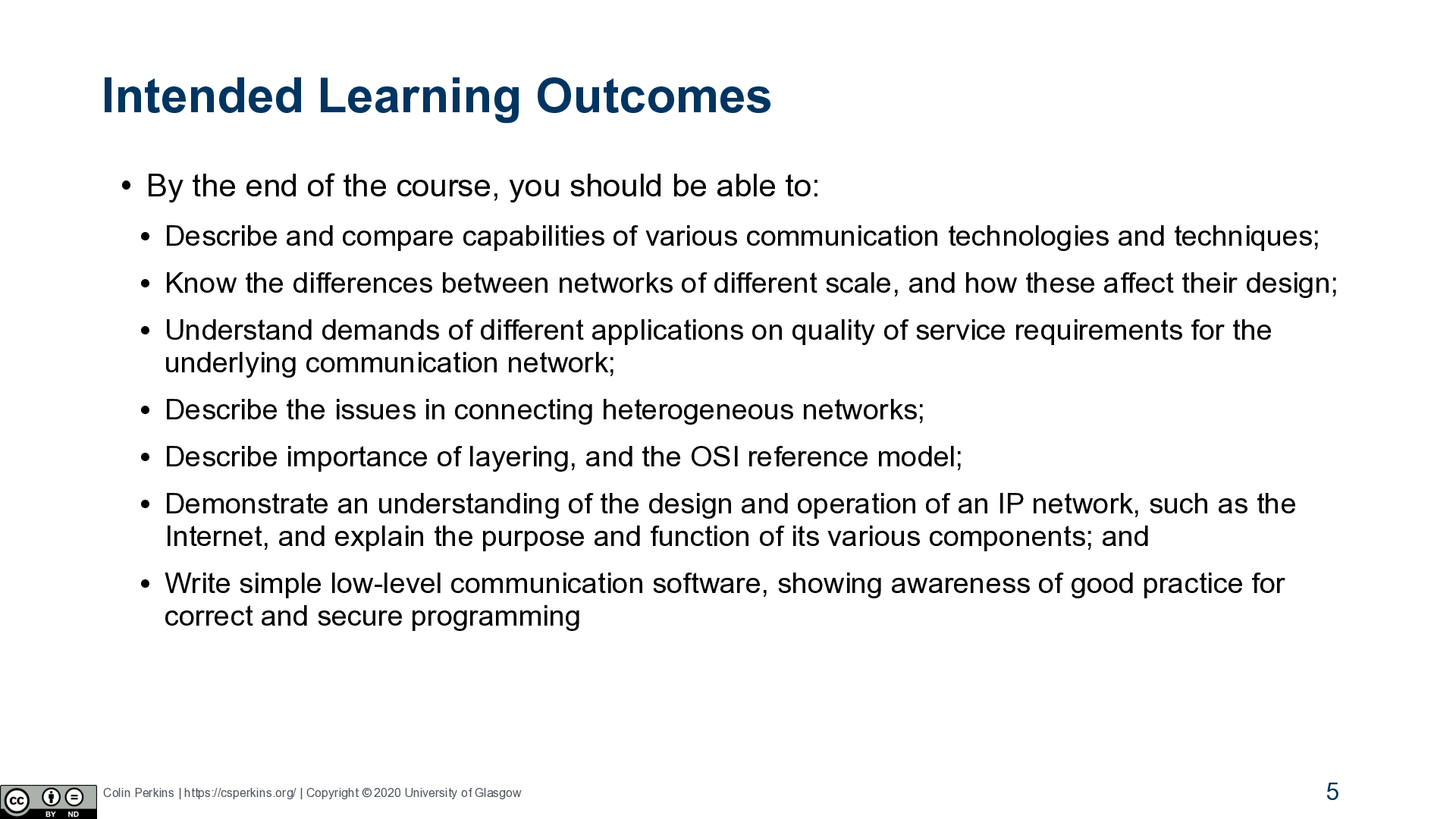
By the end of the course,
00:03:05.200
you should be able to describe and compare the
00:03:07.266
capabilities of different communications technologies,
00:03:10.767
understand the implications of scale on network systems,
00:03:14.867
and the different quality of service needs of
00:03:17.100
different applications.
00:03:19.667
In concrete terms, this means you should
00:03:22.100
understand what are
00:03:23.266
the different protocols in use in the Internet,
00:03:25.867
and when it's appropriate to use one or the other.
00:03:30.000
For example, you should understand the
00:03:32.100
differences between UDP,
00:03:33.867
TCP, and QUIC, and when it's appropriate to use
00:03:37.633
each of these protocols.
00:03:40.300
You should understand the importance of
00:03:42.600
heterogeneity in the design of the Internet,
00:03:45.734
the importance of layered protocol stacks,
00:03:48.500
and the way that different components of the
00:03:50.367
network are combined to form a whole.
00:03:53.867
Finally, you should be able to write simple low-
00:03:56.734
level communication software in C,
00:03:59.433
showing awareness of good practices for correct
00:04:02.133
and secure programming.
00:04:06.667
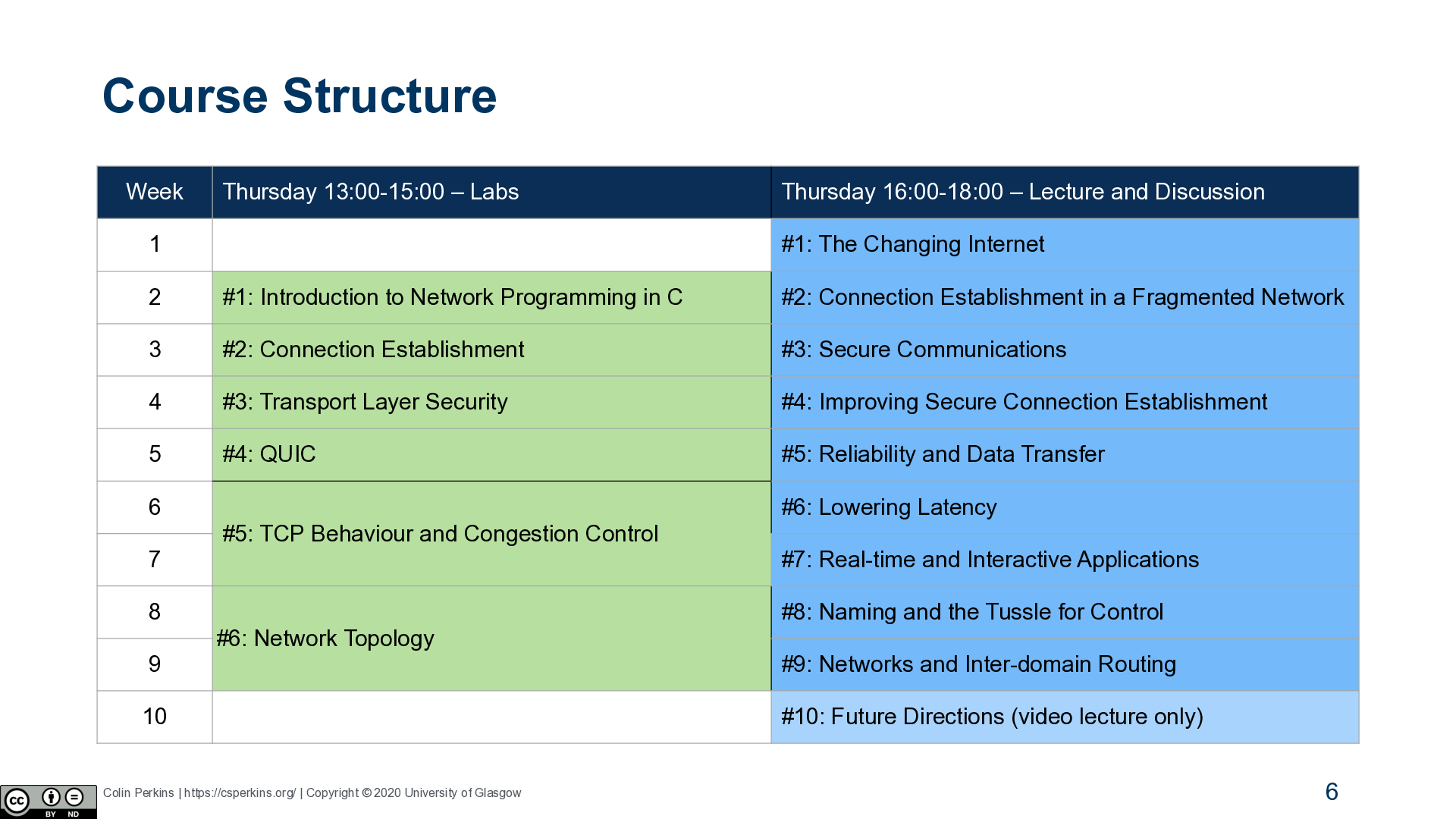
The course is organized as 10 lectures and six
00:04:10.200
laboratory sessions.
00:04:12.367
There's one lecture a week for 10 weeks,
00:04:15.000
with pre-recorded lectures and time for
00:04:17.200
discussion each week.
00:04:19.333
The labs are more variable.
00:04:22.133
The first four lab exercises are expected to take
00:04:25.300
one week each.
00:04:26.834
Then the next two exercises should take two weeks each.
00:04:30.867
The labs run for eight weeks, starting in week
00:04:34.533
two of the semester.
00:04:38.200
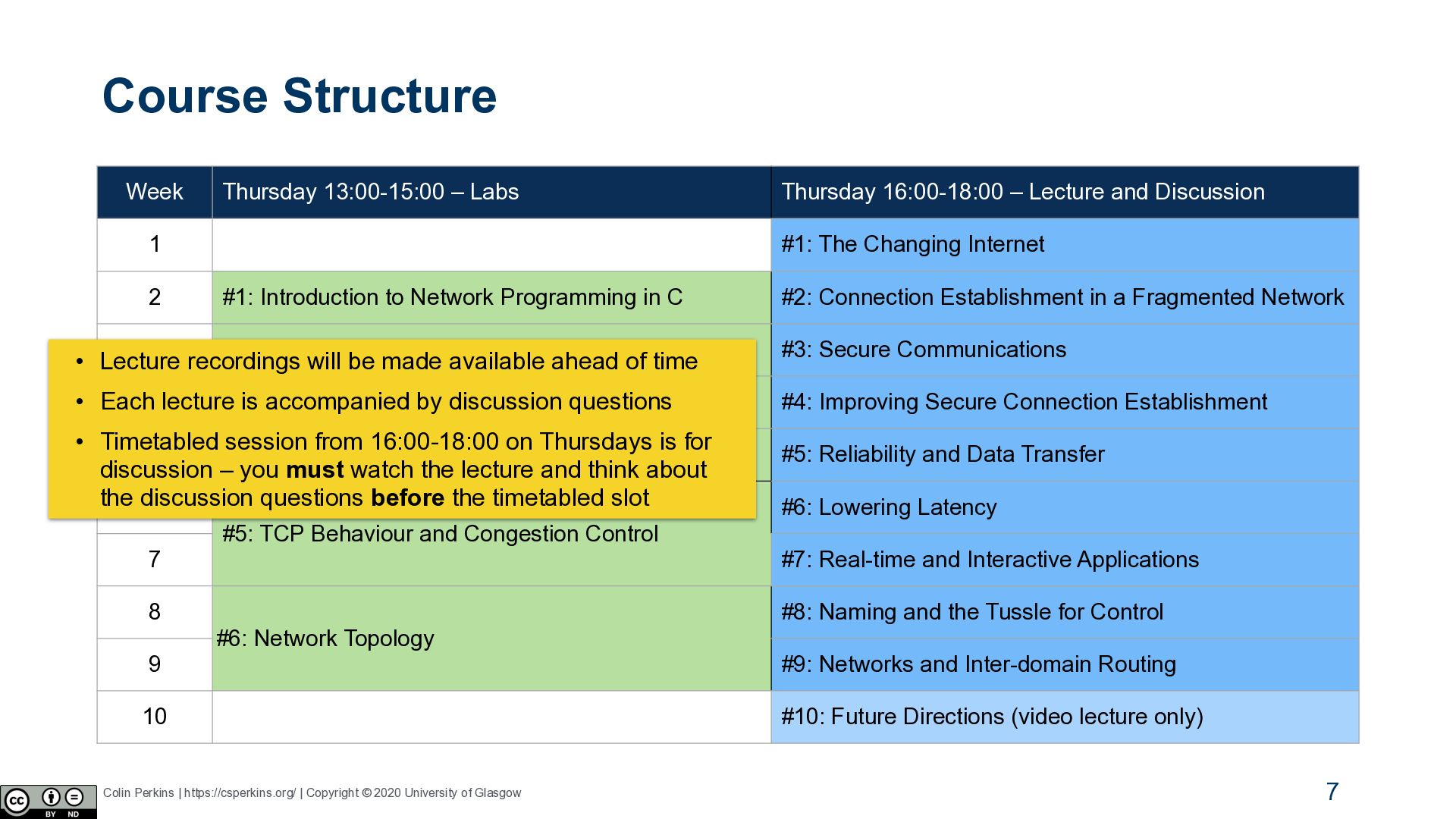
Lecture recordings will be made available ahead of time,
00:04:42.133
and comprise an hour or so of material split into
00:04:45.233
several shorter parts each week.
00:04:48.600
Each lecture will be accompanied by a set of
00:04:52.600
discussion questions and will be available on
00:04:55.166
Moodle and on the course website.
00:04:58.200
These discussion questions are not assessed,
00:05:01.367
and are intended to help you understand the material.
00:05:05.800
We have a live lecture session timetabled from 4-
00:05:08.934
6pm on Thursday afternoons.
00:05:11.867
This is intended for a discussion of the lecture
00:05:14.567
material and questions.
00:05:17.200
You should watch the lecture videos and think about
00:05:20.934
the discussion questions before the timetable sessions.
00:05:26.100
This discussion slot is your main opportunity to
00:05:29.133
ask questions about the material.
00:05:31.533
I strongly encourage you to come prepared to use
00:05:34.934
the slots to talk.
00:05:37.166
The more questions and discussion we have,
00:05:39.667
the more useful it'll be for everybody.
00:05:44.333
There are also weekly labs.
00:05:47.867
The goal of the labs is twofold.
00:05:50.934
First, they're intended to help you practise C programming,
00:05:54.734
building on the material in the systems programming course,
00:05:57.967
and to introduce you to networked programming in C.
00:06:02.500
While languages like Python are popular for web development,
00:06:06.367
C is still by far the most widely used language
00:06:09.967
for writing low-level networking code.
00:06:12.567
So it's important that you're familiar with
00:06:14.567
networked programming in C.
00:06:17.633
The second goal of the labs is to complement the
00:06:20.700
material covered in the lectures,
00:06:22.767
to allow you to explore certain topics around
00:06:25.133
congestion control
00:06:26.600
and the structure of the network in more detail.
00:06:31.233
As with the lectures,
00:06:32.900
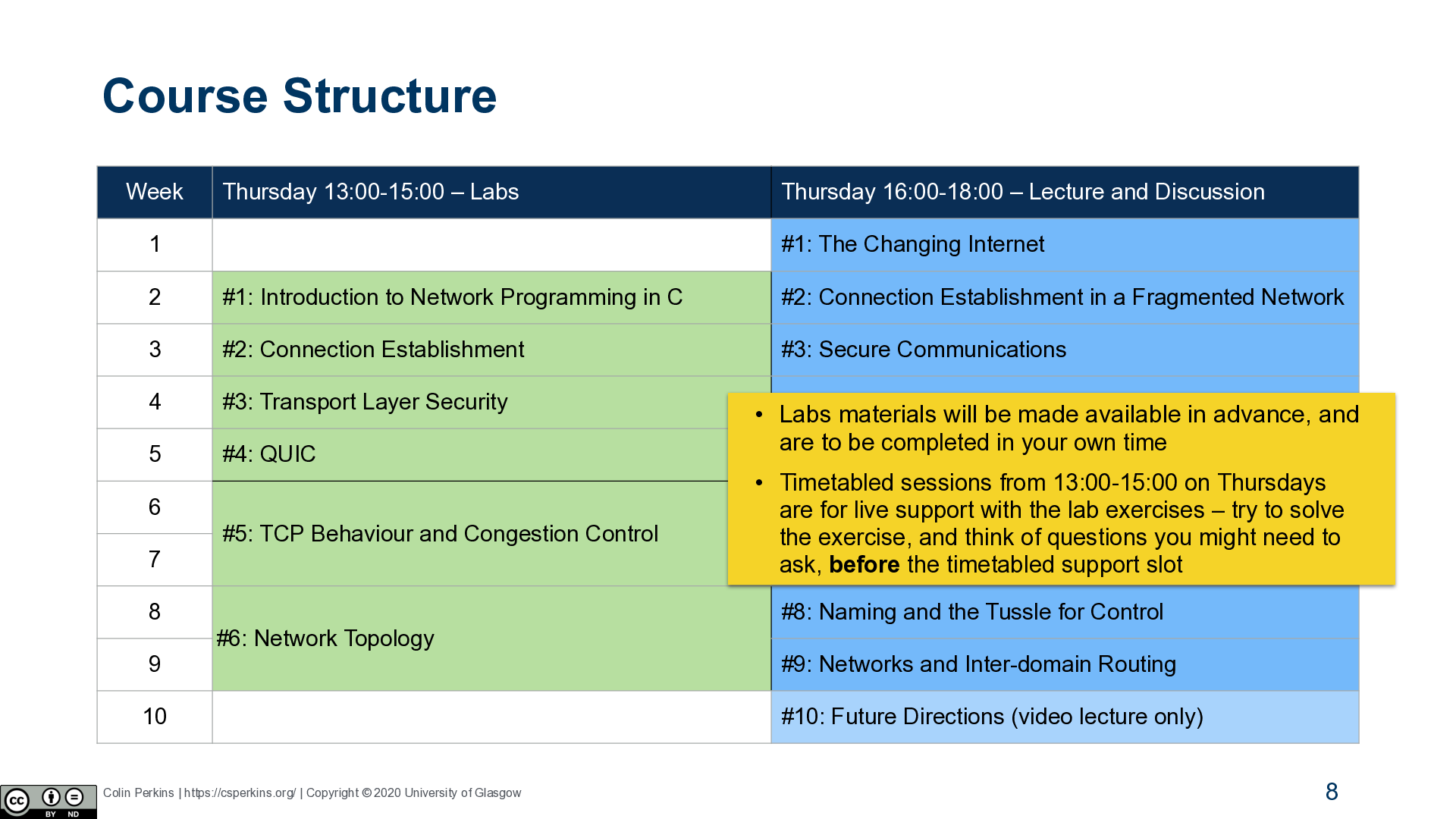
the lab materials will be made available in
00:06:34.800
advance of the timetable sessions.
00:06:38.567
The labs are to be completed in your own time.
00:06:42.767
The timetabled sessions from 1-3pm on Thursdays
00:06:46.834
are for live support with the lab exercises.
00:06:50.633
You should try to solve the exercises and think
00:06:53.133
of questions you might need to ask
00:06:54.900
before the timetable support slots,
00:06:57.734
so the lab demonstrators and I can effectively help you.
00:07:04.133
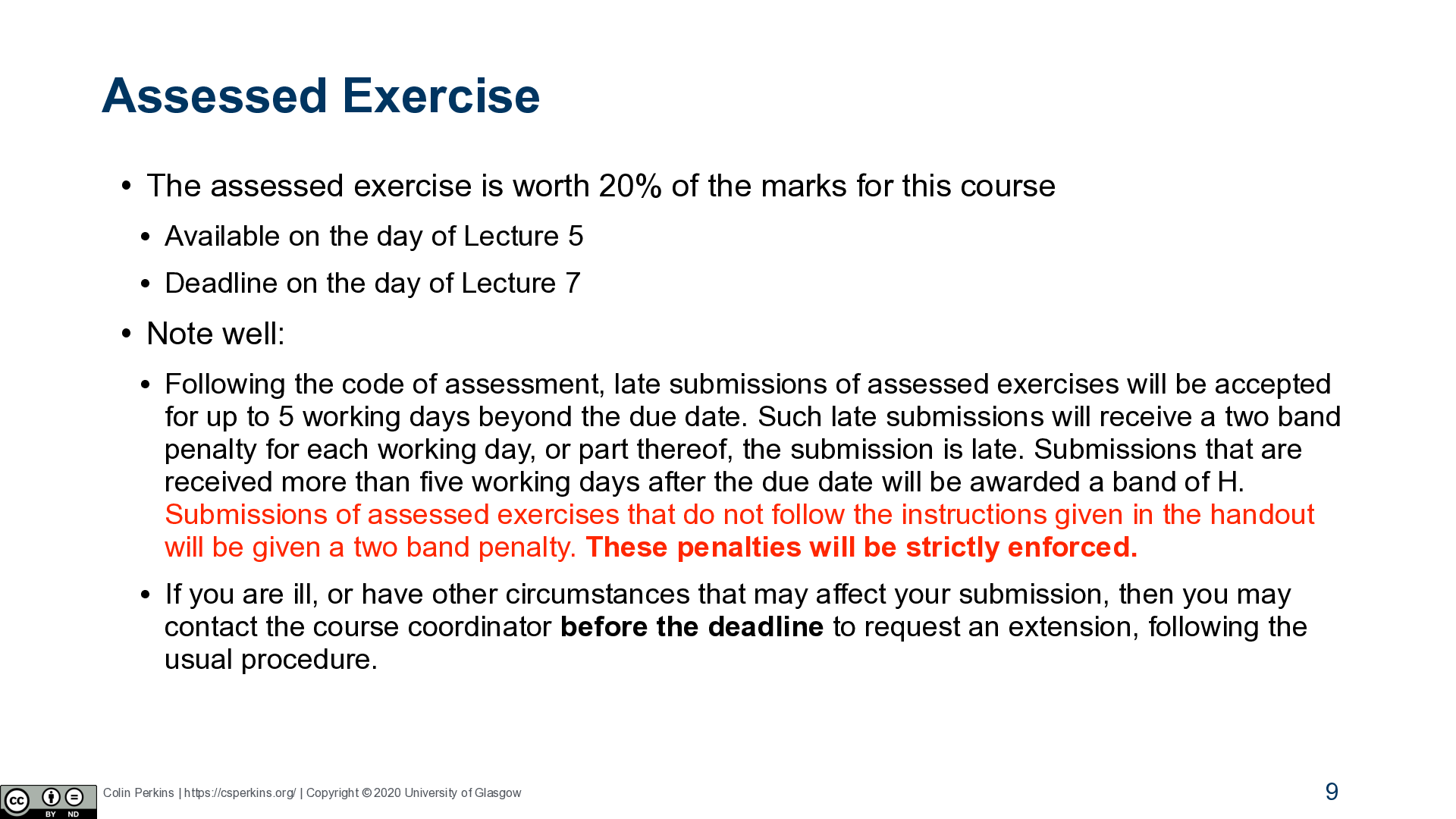
The course follows the usual model of an exam
00:07:07.433
worth 80% of the marks
00:07:09.533
and an assessed exercise worth the remaining 20%.
00:07:14.333
The assessed exercise will be made available in Lecture 5
00:07:18.367
and will be due on the same day that Lecture 7 is held.
00:07:23.200
The usual penalties for late submission will be applied,
00:07:26.567
following the University's Code of Assessment.
00:07:30.467
If you're ill, or if you have other special
00:07:33.333
circumstances that might affect your on-time submission,
00:07:36.633
then you can contact me before the deadline to
00:07:39.500
request an extension.
00:07:43.333
Also, following the school's policy,
00:07:46.133
note that submissions of assessed exercises that
00:07:48.734
do not follow the submission instructions given
00:07:50.834
in the handout
00:07:52.367
will be subject to a two-band penalty.
00:07:55.867
And I want to emphasise this last point, because
00:07:58.467
some people are surprised by it each year.
00:08:01.934
The penalties for late submission and for not
00:08:04.367
following submission instructions
00:08:06.333
will be strictly enforced.

00:08:12.200
As I said earlier, the final exam is worth 80% of
00:08:15.233
the marks for the course.
00:08:18.433
The format of the exam is that there are three
00:08:20.667
questions and you have to answer all questions.
00:08:24.767
There are past exam papers on Moodle, including
00:08:27.333
one with sample answers.
00:08:30.834
The curriculum has changed over the years,
00:08:33.533
and the pandemic caused a shift to online open book exams,
00:08:37.266
and together these mean the style of questions
00:08:39.500
has changed over time.
00:08:42.433
The more recent exam papers, from 2020 onwards,
00:08:46.533
are most representative of the style of questions
00:08:48.834
you can expect.
00:08:52.000
When studying the material and preparing for the exam,
00:08:56.467
remember that the goal of the course is to help
00:08:59.100
you understand how the Internet works.
00:09:03.266
The aim of the exam is to test that understanding,
00:09:06.467
not simply to test your memory of the details.
00:09:09.633
Explain why, don't just recite what.
00:09:14.400
To achieve an A grade in this course,
00:09:17.266
representing excellent performance,
00:09:19.533
you'll need to demonstrate
00:09:20.834
that you can make a reasoned argument,
00:09:22.900
develop logical conclusions, and apply your
00:09:26.200
learning to new situations to solve new problems.
00:09:30.600
The material in the lectures in the labs is examinable,
00:09:34.133
but you're also expected to follow the required readings
00:09:37.533
and to develop a broader understanding of the material.
00:09:43.734
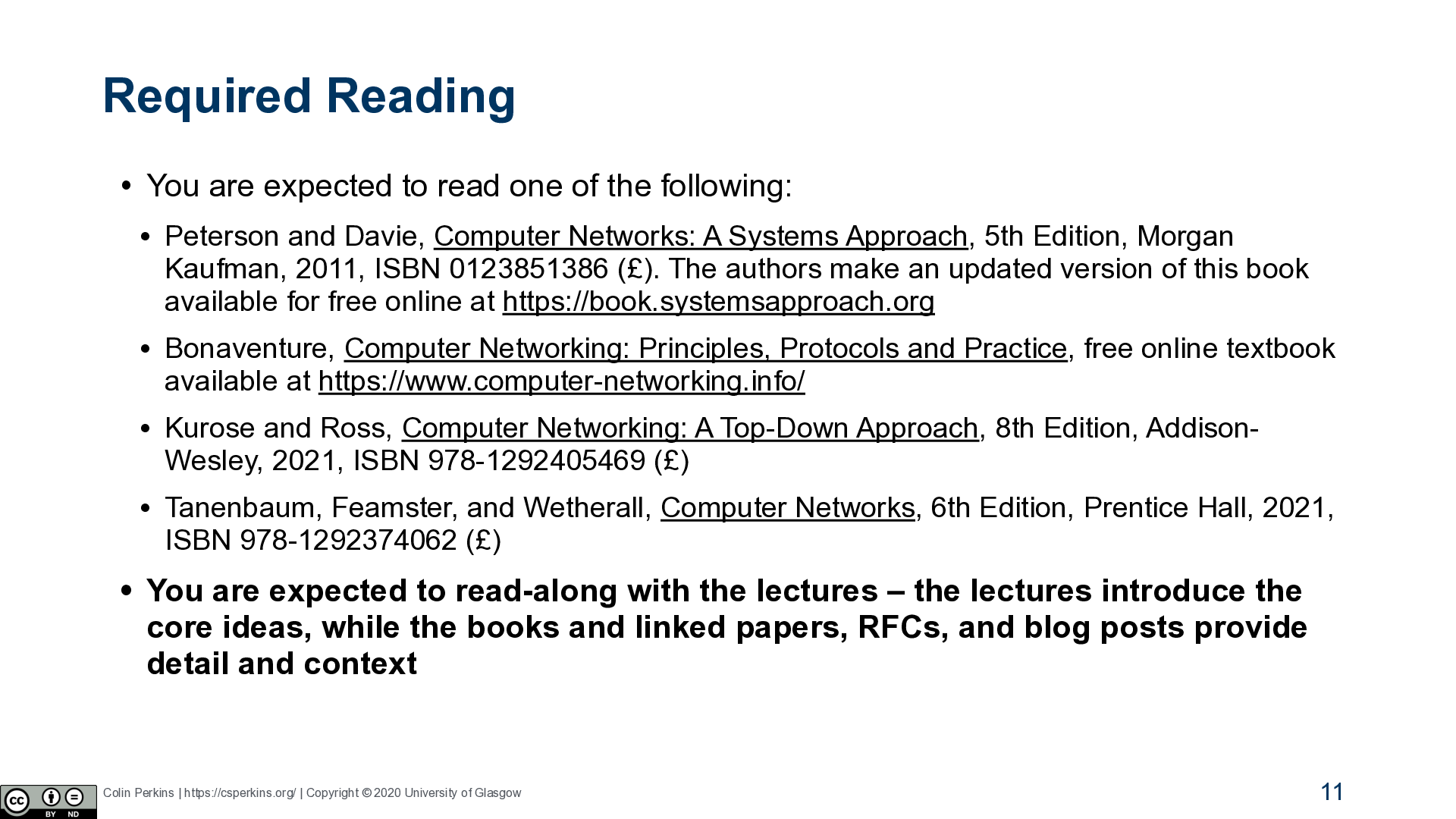
So what are those required readings?
00:09:47.266
Well, the slide lists good books on computer networking.
00:09:53.066
You should read one of them.
00:09:55.800
The books by Peterson and Davie, and by Olivier Bonaventure,
00:10:00.033
are available for free online.
00:10:03.166
The lectures, labs, and discussion can introduce
00:10:06.633
you to important concepts of networking,
00:10:09.800
but it's also important that you read about and
00:10:12.100
around the material covered,
00:10:13.967
so you understand the details.
00:10:17.066
The books explain the material in different ways,
00:10:20.166
and may help illustrate different aspects of the subjects
00:10:23.367
and give different perspectives that make things
00:10:26.200
clear in cases where my explanations do not.
00:10:30.400
In addition to the books, many of the lecture
00:10:33.300
slides also include links to standards documents,
00:10:36.600
research papers, blog posts, or talks that go
00:10:40.767
into more detail about the material.
00:10:44.266
You're not expected to read all of this material,
00:10:47.367
and much of it goes into far more detail than you need,
00:10:50.600
but you should at least look at it to begin to
00:10:53.033
get a feel for the depth of the subject.
00:10:56.700
There's only so much detail that can be covered
00:10:58.700
in a pre-recorded lecture.
00:11:01.266
I've chosen the reading material carefully to
00:11:03.600
complement the lectures.
00:11:06.133
Following along with the reading and
00:11:08.166
participating in the discussion sessions
00:11:10.600
will further your understanding.
00:11:14.000
The exam questions will focus on application of
00:11:16.600
the knowledge you've gained during the course,
00:11:19.000
not on rote memorization.
00:11:22.066
Reading further, thinking about the ideas,
00:11:25.000
and discussing the material covered in the
00:11:26.934
lectures and the labs is essential.
00:11:32.934
So that concludes the review of the course
00:11:35.200
structure and administration.
00:11:37.800
In the remaining parts of this lecture, I'll
00:11:40.166
review the traditional internet architecture,
00:11:42.834
starting with a discussion of protocols and layering,
00:11:45.900
then talk about some of the ways in which the
00:11:47.700
network is changing.
Part 2: Protocols and Layers
Part 2 of the lecture introduces the idea of a network protocol, and
the concept of layering as a way of structuring networked systems. It
reviews the 7-layer OSI model, and discusses how it's a useful way of
thinking about systems, even though it's not representative of any
real-world systems.
00:00:01.333
I’d like to begin the course by reviewing
00:00:03.366
some of the fundamental principles
00:00:05.100
of networked systems.
00:00:06.900
In particular, I'd like to talk briefly
00:00:09.466
about what is a networked system,
00:00:11.366
and how networked systems are structured in
00:00:13.600
the form of a layered protocol stack.
00:00:17.000
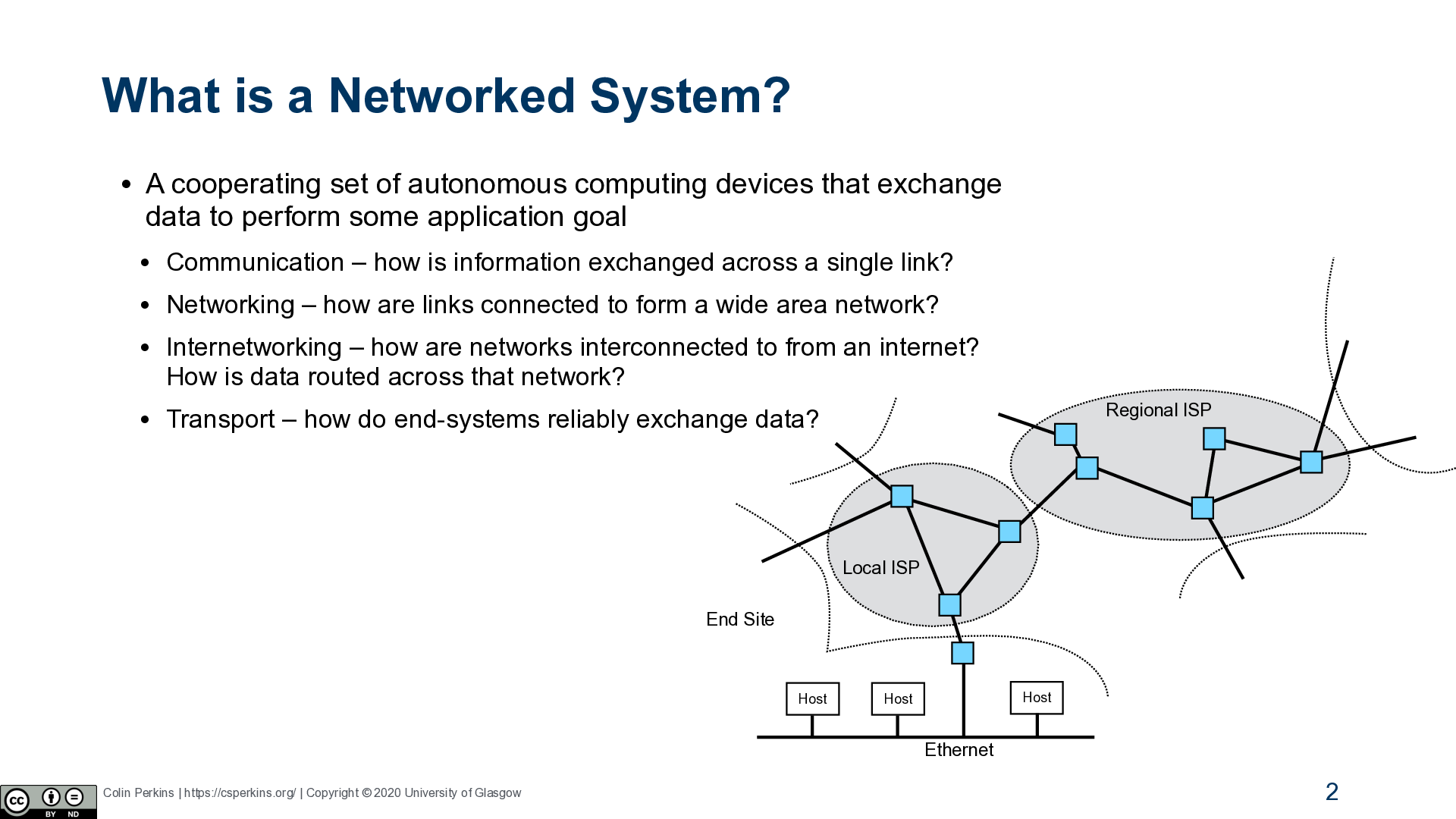
So, what is a networked system?
00:00:20.433
A networked system is a set of cooperating,
00:00:23.233
autonomous, computing devices
00:00:25.433
that exchange data to perform some application goal.
00:00:29.600
I talk about computing devices,
00:00:31.800
because networked systems are not limited to traditional
00:00:34.500
PCs, laptops, or servers.
00:00:37.366
There are far more smart phones and tablets
00:00:39.566
connected to the network
00:00:40.733
than there are laptops and servers, for example
00:00:44.000
But there are also numerous sensors and controllers
00:00:46.466
that form the Internet of Things:
00:00:48.500
cameras, smart light bulbs, heating controllers,
00:00:51.633
weather stations, medical devices,
00:00:54.566
industrial automation, and so on.
00:00:57.633
The network is comprised of an increasingly
00:00:59.966
diverse set of devices, and has to
00:01:02.166
meet their diverse needs.
00:01:05.000
These devices are autonomous.
00:01:07.166
Each device acts independently
00:01:09.233
with no central control,
00:01:11.100
and can choose what data to send,
00:01:13.133
and when to send it.
00:01:15.333
And these devices are all running different applications
00:01:18.233
with different requirements.
00:01:20.066
They require different things from the network
00:01:22.433
and need different network protocols
00:01:24.466
to support their needs.
00:01:28.000
There are four aspects to the network.
00:01:30.900
The first is communication.
00:01:33.233
How can two devices,
00:01:34.800
that are connected to a single link,
00:01:37.100
reliably exchange data.
00:01:39.966
Second, is networking.
00:01:42.133
How can we combine multiple links
00:01:45.033
to form a wide area network,
00:01:46.866
around a building, a campus, or a region.
00:01:51.200
Third is internetworking.
00:01:53.433
How can we connect multiple networks
00:01:56.133
together to form an internet?
00:01:58.166
How can multiple independently operated
00:02:00.866
networks work together
00:02:02.466
to act as-if they were a single global network?
00:02:05.233
How can data be routed across this collection
00:02:07.900
of networks to reach its destination?
00:02:10.666
And, finally, there is the problem of transport.
00:02:14.000
How do the end systems ensure
00:02:16.366
that data is delivered across this network,
00:02:18.333
or networks, with appropriate reliability
00:02:21.366
to meet the needs of the application?
00:02:26.366
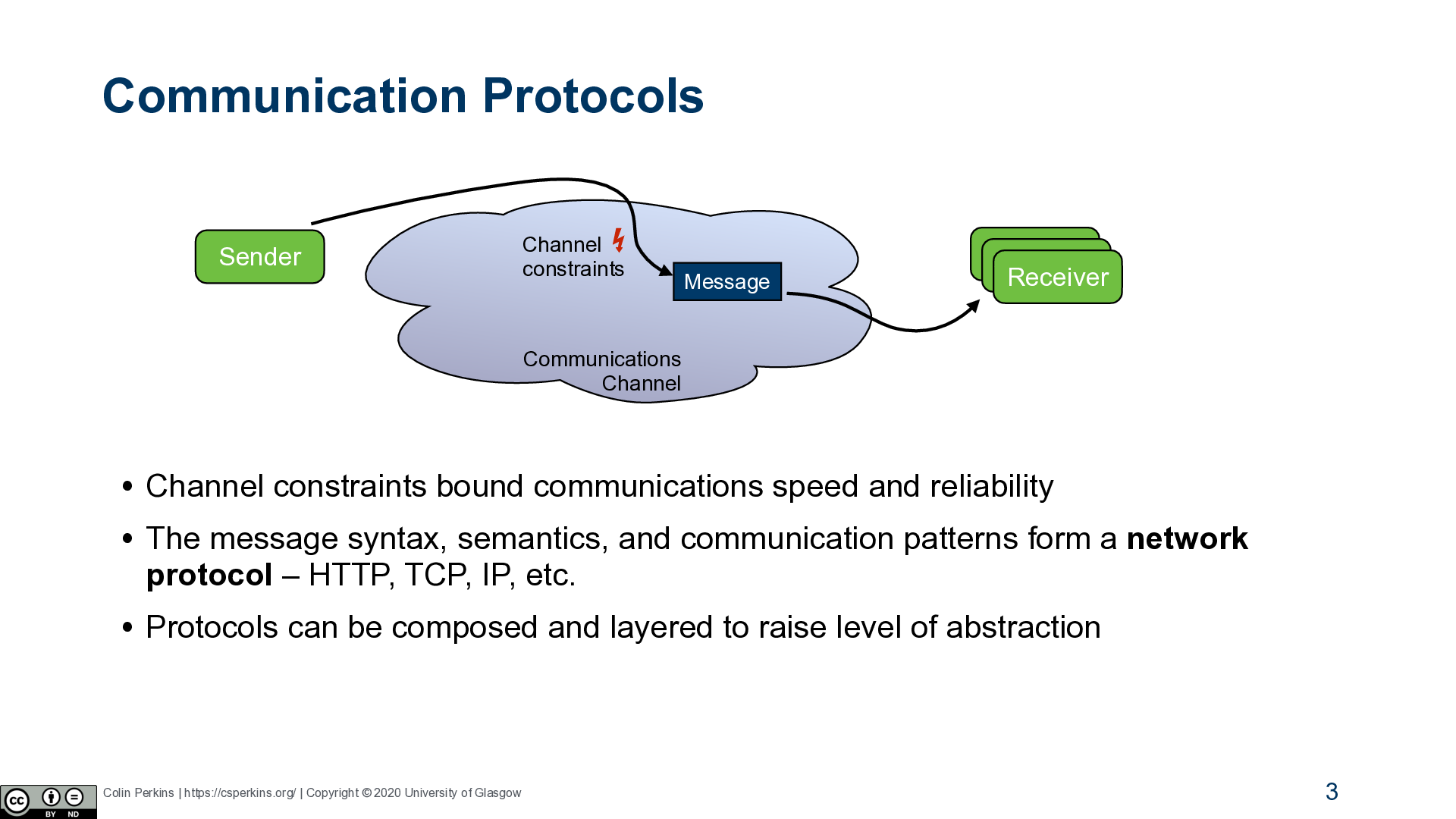
Networked systems are fundamentally
00:02:28.266
about communications protocols.
00:02:31.100
A sender is trying to talk to one of more receivers,
00:02:34.233
via some communications channel.
00:02:36.833
It does this by sending messages,
00:02:39.233
that have to fit within the constraints
00:02:40.833
of the communications channel.
00:02:43.166
These constraints provide limits on the speed
00:02:45.700
and reliability of transmission.
00:02:47.866
The channel is not infinitely fast
00:02:50.100
or perfectly reliable.
00:02:53.566
The messages being sent across the channel
00:02:55.966
have a well defined format
00:02:58.300
Much like programming languages,
00:03:00.333
network protocols have well defined syntax
00:03:02.900
that describes the structure and format
00:03:04.833
of the messages that can be sent.
00:03:07.766
They also have well defined semantics
00:03:09.766
that define the meaning of the messages,
00:03:12.066
the order in which they are sent,
00:03:13.733
and the patterns of communication.
00:03:16.600
Together the syntax and semantics of the messages
00:03:19.833
define a network protocol, such as
00:03:23.566
HTTP, TCP/IP, etc.
00:03:27.000
Each protocol has a particular purpose
00:03:29.466
and solves a particular problem.
00:03:32.100
Protocols can be combined,
00:03:34.100
and layered on one another,
00:03:35.700
to gradually raise the level of abstraction,
00:03:38.400
and provide more sophisticated services
00:03:40.533
to the applications.
00:03:44.900
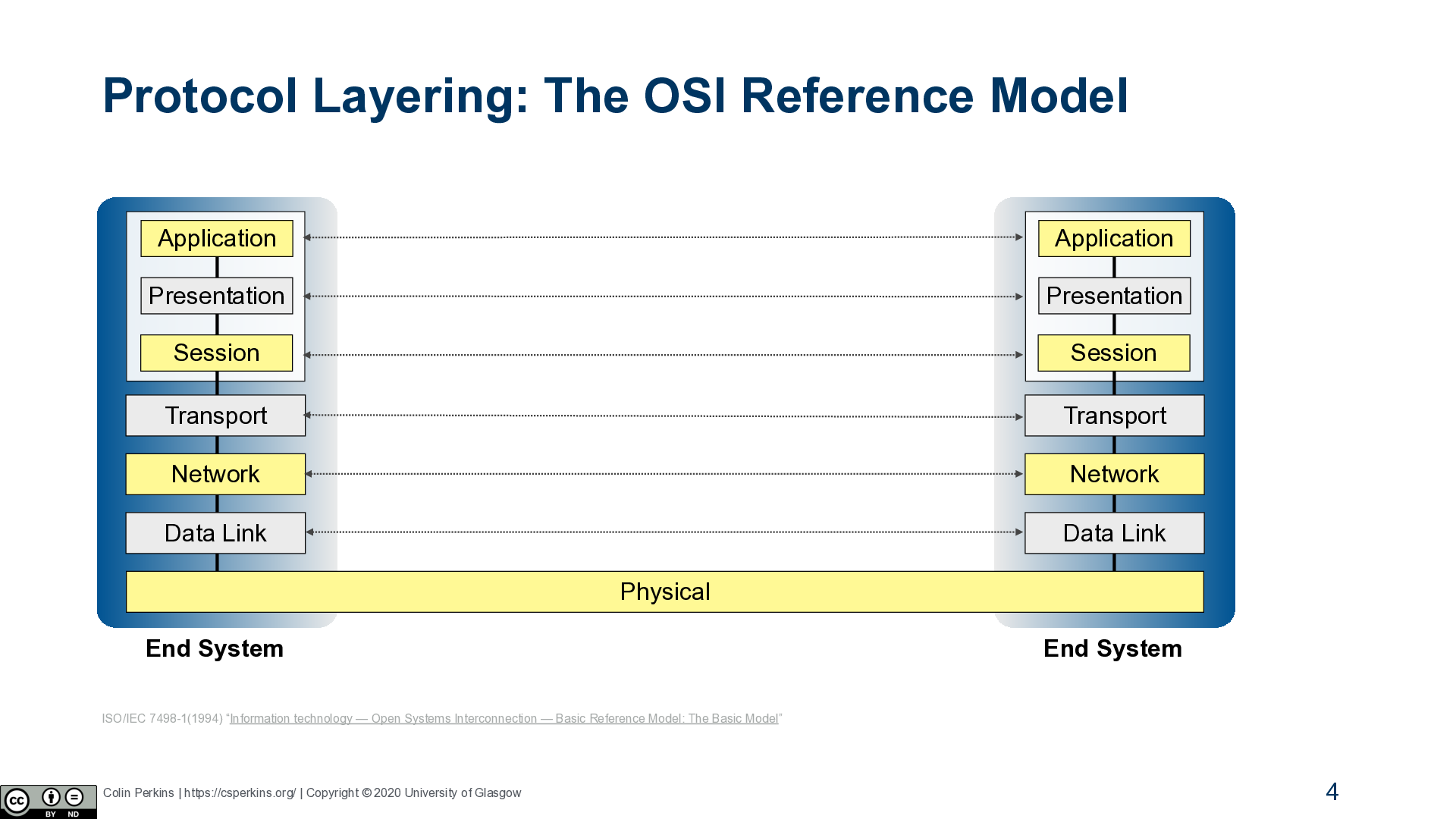
The Open Systems Interconnection Reference Model,
00:03:48.133
the OSI Model,
00:03:49.933
is a common way of thinking about protocol layering.
00:03:54.366
The OSI model structures the network
00:03:56.500
as a set of seven layers.
00:03:59.300
At the bottom of the protocol stack
00:04:01.266
is the physical layer.
00:04:03.100
For two devices, two end systems,
00:04:06.200
that are directly connected, as shown on the slide,
00:04:09.566
the physical layer represents
00:04:11.333
the means of interconnection.
00:04:12.933
The type of cable,
00:04:14.333
if it’s a wired link,
00:04:15.800
or the details of the radio channel.
00:04:18.866
The purpose of the physical layer
00:04:20.566
is to exchange data between the devices.
00:04:24.766
Above this sits the data link layer.
00:04:28.366
The link layer structures that data into messages,
00:04:31.233
identifies the devices,
00:04:33.866
and coordinates when each device can send,
00:04:36.466
so they share access to the channel.
00:04:41.266
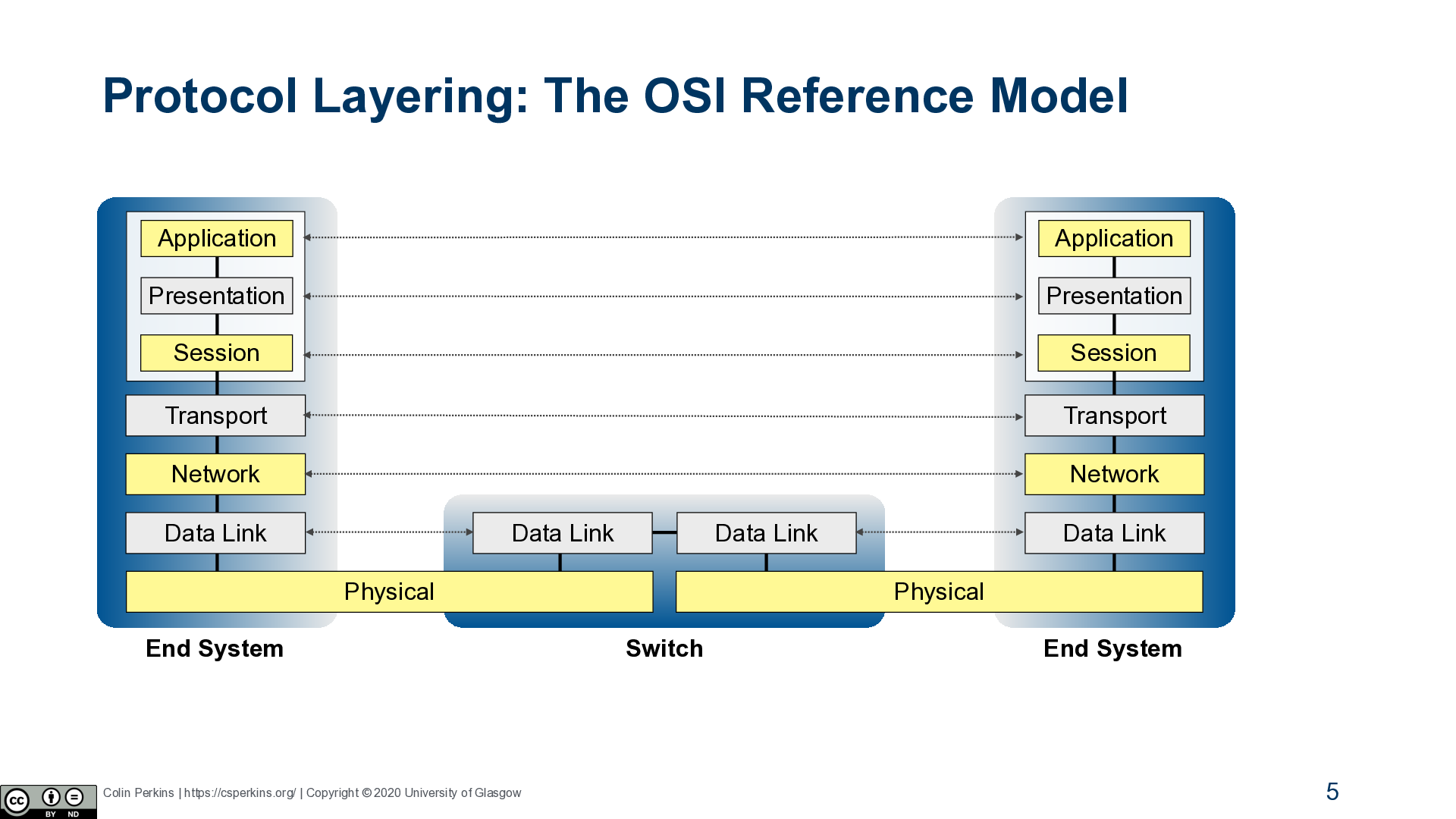
If a single network comprises more than one
00:04:43.166
physical link, devices known as switches
00:04:45.966
can be inserted into the network.
00:04:48.233
Switches operate at the data link layer,
00:04:51.466
adapting the message framing and arbitrating access
00:04:54.466
to the different channels, in order to
00:04:56.633
bridge the different links together.
00:04:59.966
Examples of this include Ethernet switches,
00:05:02.900
that connect multiple Ethernet links together
00:05:05.400
to form a larger Ethernet network,
00:05:08.200
and Wi-Fi base stations that bridge between Ethernet
00:05:11.033
and Wi-Fi networks.
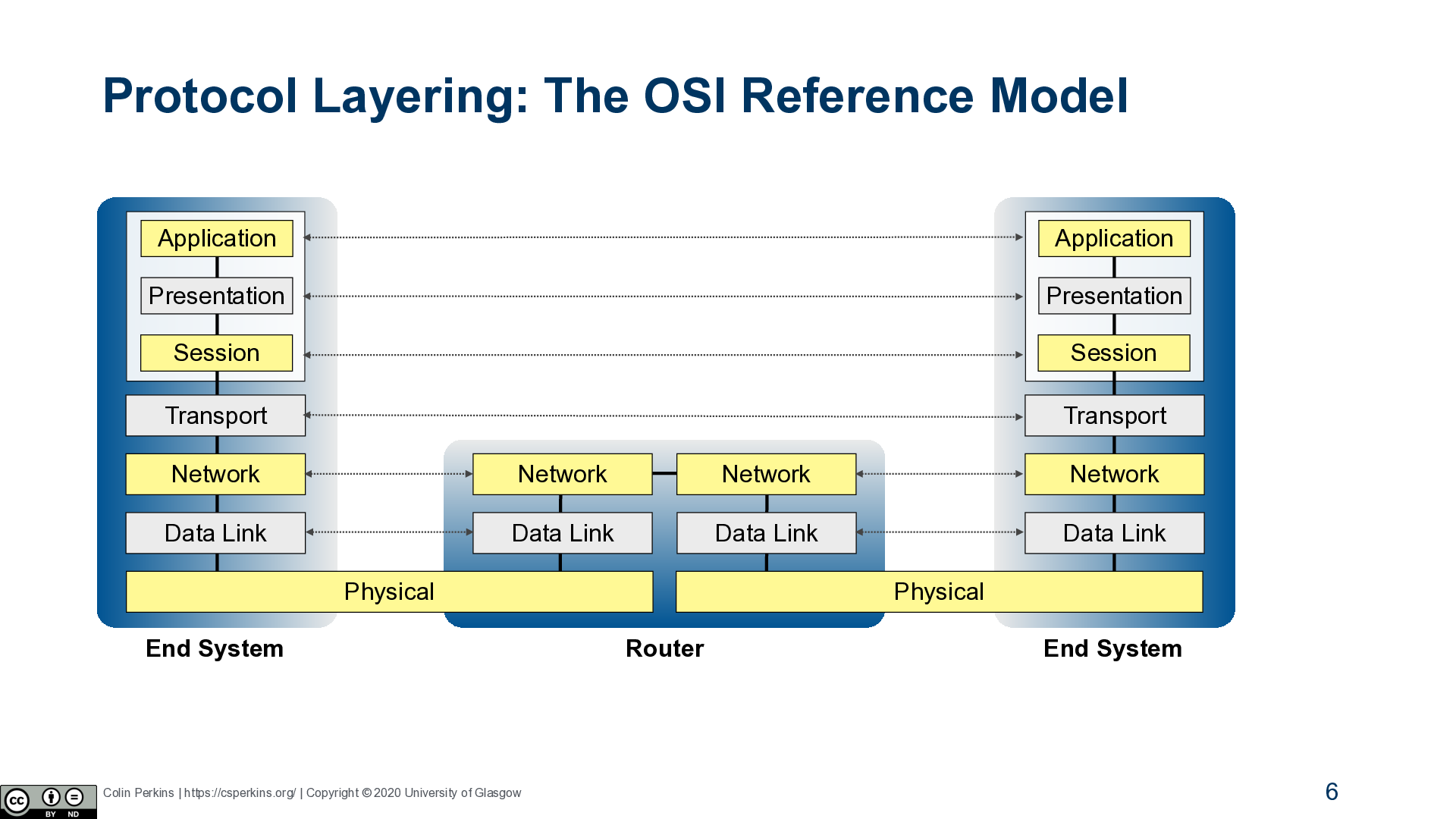
00:05:15.966
The third layer in the OSI model
00:05:18.100
is the network layer.
00:05:20.500
The network layer supports the interconnection
00:05:22.800
of multiple independently operated networks.
00:05:26.466
It abstracts away the details
00:05:27.900
of the different types of ink layer,
00:05:29.833
and combines different networks into one,
00:05:32.933
to give the illusion
00:05:33.966
that there is a single global internetwork.
00:05:37.166
The Internet protocols,
00:05:38.566
IPv4 and IPv6,
00:05:40.833
are examples of network layer protocols,
00:05:43.566
and the devices that connect different networks
00:05:45.633
together are known as routers.
00:05:49.533
Above the network layer,
00:05:51.300
the transport layer ensures that data is delivered
00:05:53.766
with appropriate reliability between end systems.
00:05:57.100
The Transmission Control Protocol,
00:05:59.333
TCP,
00:06:00.333
is a widely used example of a transport protocol.
00:06:04.533
Finally, the Session, Presentation, and Application layers
00:06:09.066
support the coordination of multiple transport connections,
00:06:12.566
describe the data formats used,
00:06:14.733
and support application semantics.
00:06:20.400
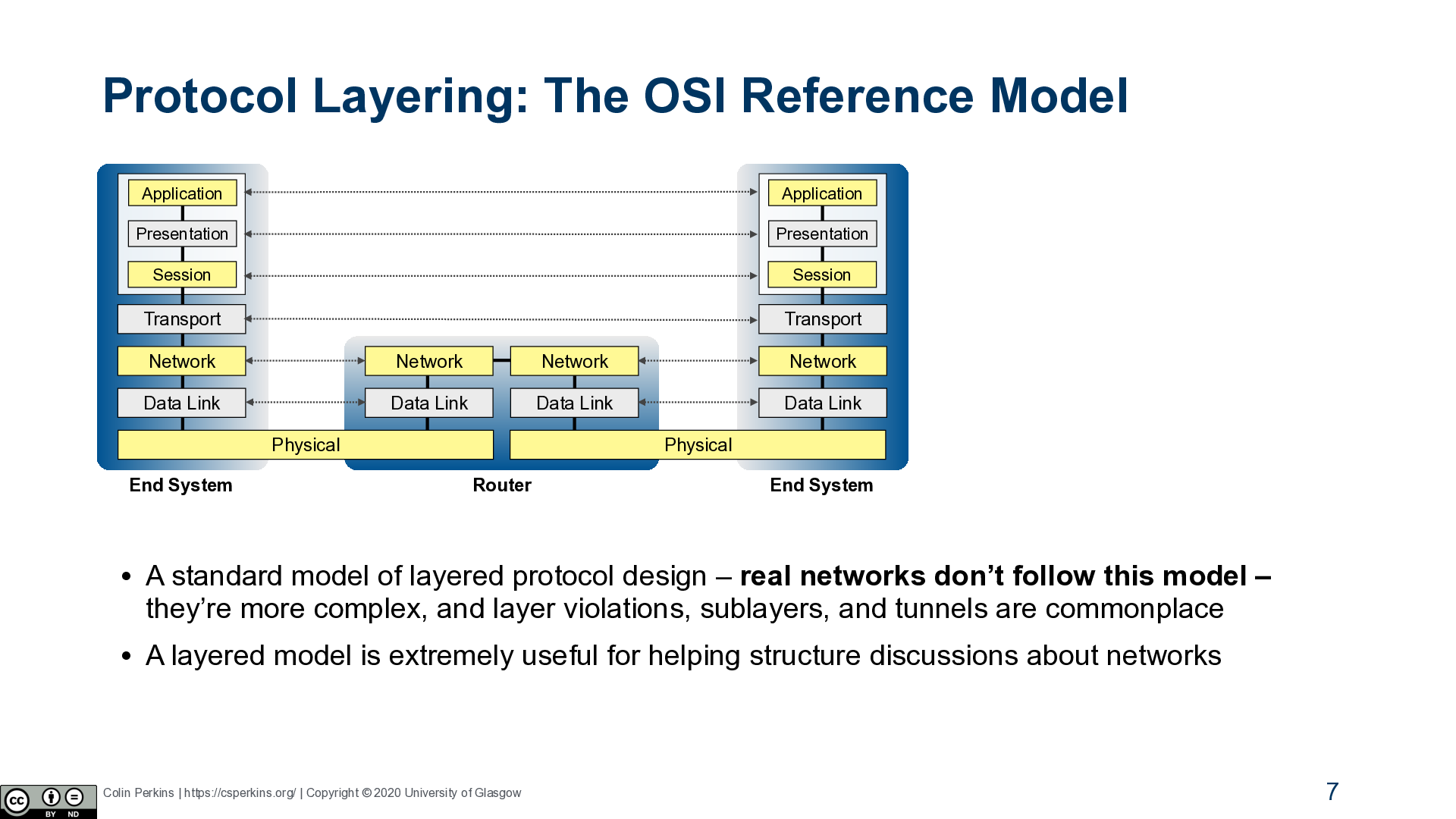
The OSI reference model is a standard
00:06:22.466
model for layered protocol design.
00:06:25.066
It’s important to realise, though,
00:06:27.566
that real networks don’t follow the OSI model.
00:06:31.133
No deployed networked system has seven layers
00:06:34.366
structured in this way.
00:06:36.700
Real systems are more complex.
00:06:39.066
In some cases, especially around the upper layers of
00:06:42.266
the stack, the layers merge together,
00:06:44.700
and the boundaries between them are unclear.
00:06:48.266
In other cases, systems are designed with
00:06:50.766
more layers, or with clearly defined sub-layers,
00:06:54.266
to support features that don't fit neatly
00:06:56.433
into the layer boundaries defined by the OSI model.
00:07:00.433
Tunnelling solutions, that encapsulate data from a
00:07:02.900
lower layer, and transmit it within a higher layer
00:07:05.566
are also common.
00:07:06.766
Virtual Private Networks,
00:07:08.733
VPNs, are a good example of this,
00:07:11.000
and take network layer data,
00:07:13.033
in the form IP packets,
00:07:14.700
and tunnel them inside a transport layer
00:07:16.700
connection to some other part of the network,
00:07:19.166
giving the illusion that a device
00:07:21.166
is physically connected elsewhere.
00:07:22.900
There’s not a strict progression of layers.
00:07:26.700
We talk about the OSI model
00:07:28.600
because it's an extremely useful way to structure
00:07:30.933
discussion about networks,
00:07:32.566
not because it represents the structure
00:07:34.566
of any particular network.
00:07:38.266
To conclude, the network is a collection
00:07:41.433
of autonomous computing devices,
00:07:43.566
cooperating to exchange
00:07:45.400
messages to support application needs.
00:07:47.866
Those messages are structured in the form
00:07:50.666
of a layered protocol stack,
00:07:52.066
gradually building up features
00:07:54.233
from the exchange of data between directly
00:07:56.233
connected devices
00:07:57.466
until we have the global Internet.
00:08:00.200
The seven layer OSI model doesn’t reflect reality,
00:08:03.300
but is a useful way of thinking
00:08:05.500
about the protocol stack.
00:08:07.333
For this reason, I’ll use it to structure the
00:08:10.000
discussion in the other parts of this lecture
00:08:11.933
starting, in the next part,
00:08:14.000
with a discussion of the physical
00:08:15.600
and data link layers.
-
J. Macculey, S. Shenker, and G. Varghese,
Extracting the Essential Simplicity of the Internet,
Communications of the ACM, Volume 66, Number 2,
February 2023.
Part 3: Physical and Data Link Layers
Part 3 of the lecture reviews the physical and data link layers.
It briefly reviews baseband data encoding, carrier modulation,
and spread spectrum communication. It talks about the limitations
of physical links, the Shannon-Hartley theorem, the factor that
limit the performance of a communications channel.
It also briefly reviews the data link layer, talking about framing,
addressing, and media access control.

00:00:00.900
The physical and data link layers
00:00:03.100
occupy the lowest levels of the protocol stack,
00:00:05.600
and support data transmission
00:00:07.366
between directly connected devices.
00:00:10.066
In the following, I’ll briefly discuss the physical
00:00:12.566
characteristics of network links
00:00:14.366
and the modulation process by which data
00:00:16.266
is transmitted across those links.
00:00:18.500
Then, I’ll talk about features of the data link layer,
00:00:21.266
such as framing, addressing, and media access control.
00:00:27.300
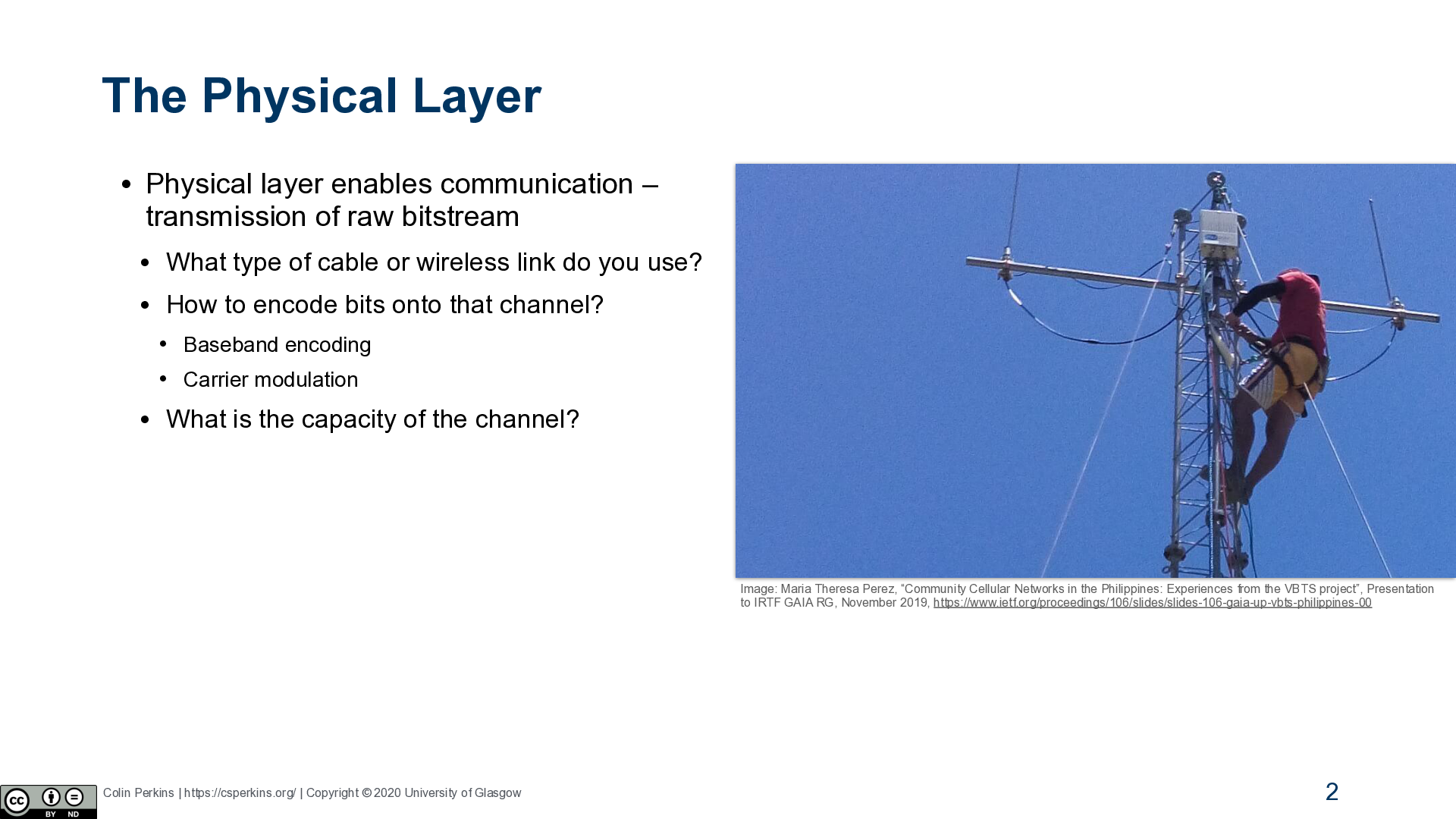
The physical layer describes the properties of
00:00:29.900
the communications channel.
00:00:31.200
It’s the realm of the electrical engineer;
00:00:33.566
of cables, optical fibres,
00:00:35.533
and radio transmission.
00:00:37.666
When considering the physical layer,
00:00:39.666
we discuss the physical properties of the channel,
00:00:42.500
the way bits are encoded onto the channel,
00:00:44.733
and the capacity, and error rate, of the channel.
00:00:48.066
We begin by asking whether the link
00:00:50.066
is wired or wireless?
00:00:52.866
If it is a wired link,
00:00:54.433
we then consider the type of cable
00:00:56.366
or optical fibre used.
00:00:58.000
We ask what voltage is applied to the cable,
00:01:00.700
or what frequency of laser light
00:01:02.566
is sent down the fibre.
00:01:04.366
And we ask how the bits are encoded as
00:01:06.100
variations in that voltage
00:01:07.600
or in the intensity of the laser.
00:01:10.233
If, instead, the channel is wireless,
00:01:12.800
we consider what type of antenna is used,
00:01:15.300
the transmission power, the carrier frequency,
00:01:17.300
and the modulation scheme used to encode
00:01:19.466
data onto the carrier wave.
00:01:22.133
Given these details, we can then estimate
00:01:24.200
the capacity of the channel, and model
00:01:26.533
the physical limitations of the performance
00:01:28.566
of the transmission link.
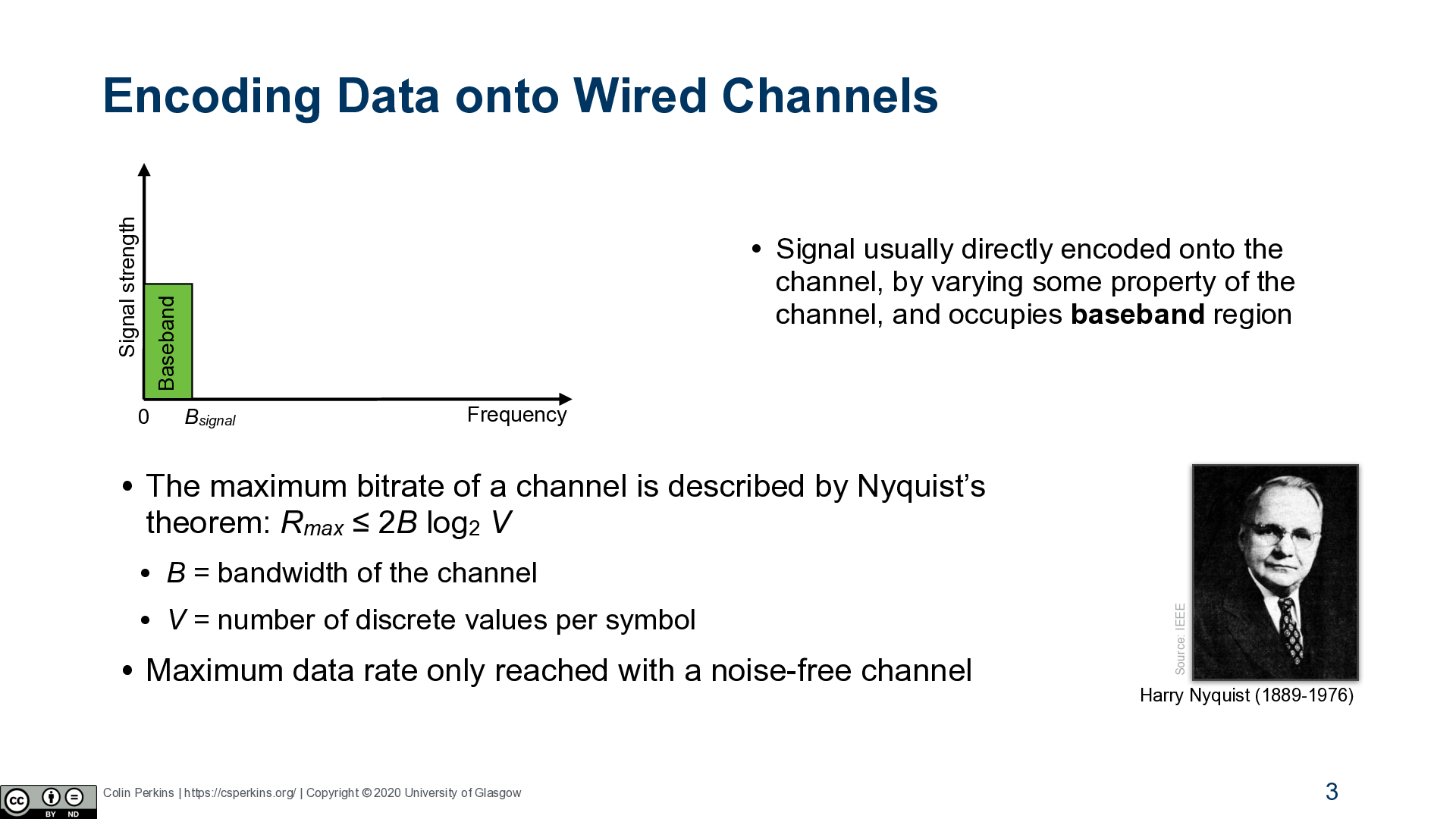
00:01:32.733
When using a wired link,
00:01:34.533
whether an electrical cable or an optical fibre,
00:01:37.266
the signal to be transmitted is usually
00:01:39.466
directly encoded onto the channel.
00:01:41.966
That is, the voltage applied to an electrical cable,
00:01:44.900
or the brightness of a laser shining down an optical fibre,
00:01:48.266
is changed in a way that directly corresponds to the
00:01:50.733
signal to be transmitted.
00:01:53.433
The signal will occupy a certain frequency
00:01:55.600
range, known as its bandwidth.
00:01:58.200
This is measured in units of Hertz, Hz,
00:02:00.733
and directly corresponds to the complexity and
00:02:03.033
information content of the signal.
00:02:06.100
The more information being transmitted in a given
00:02:08.066
time interval, the greater the bandwidth.
00:02:11.200
A signal directly applied to a channel
00:02:13.366
occupies what’s known as the baseband frequency range:
00:02:15.933
the range starting at 0 Hz,
00:02:18.066
and reaching up to the maximum bandwidth of the signal.
00:02:21.833
Every channel also has a maximum bandwidth it can transmit.
00:02:26.100
This depends on the physical characteristics of the channel.
00:02:29.000
For example, the maximum bandwidth that can be sent
00:02:31.400
over a twisted pair electrical cable
00:02:33.466
depends on the length of the cable,
00:02:35.300
the tightness of the twists,
00:02:36.900
and the thickness of the wires.
00:02:39.333
A channel is only able to transmit a particular signal
00:02:42.266
if the bandwidth of the signal
00:02:43.933
is less than the bandwidth of the channel
00:02:46.300
There’s a maximum rate at which data can be transmitted,
00:02:49.000
depending on the physical characteristics of the channel.
00:02:52.766
That maximum rate is determined by Nyquist’s theorem.
00:02:56.533
This states that the maximum data rate
00:02:58.433
a channel can support,
00:02:59.866
Rmax,
00:03:01.033
cannot exceed 2 B Log2 V bits per second,
00:03:07.133
where B is the maximum bandwidth of the channel,
00:03:10.166
and V is the number of different values each symbol can take.
00:03:14.333
For binary data, each symbol can have
00:03:16.700
one of two values, it can be a zero
00:03:18.800
or a one. Accordingly, V is equal to two.
00:03:23.100
The value of “Log2 V” term, in this case,
00:03:25.966
evaluates to one,
00:03:27.400
and the maximum data rate directly
00:03:29.333
corresponds to the channel bandwidth.
00:03:34.000
So, how is data encoded onto the channel?
00:03:38.433
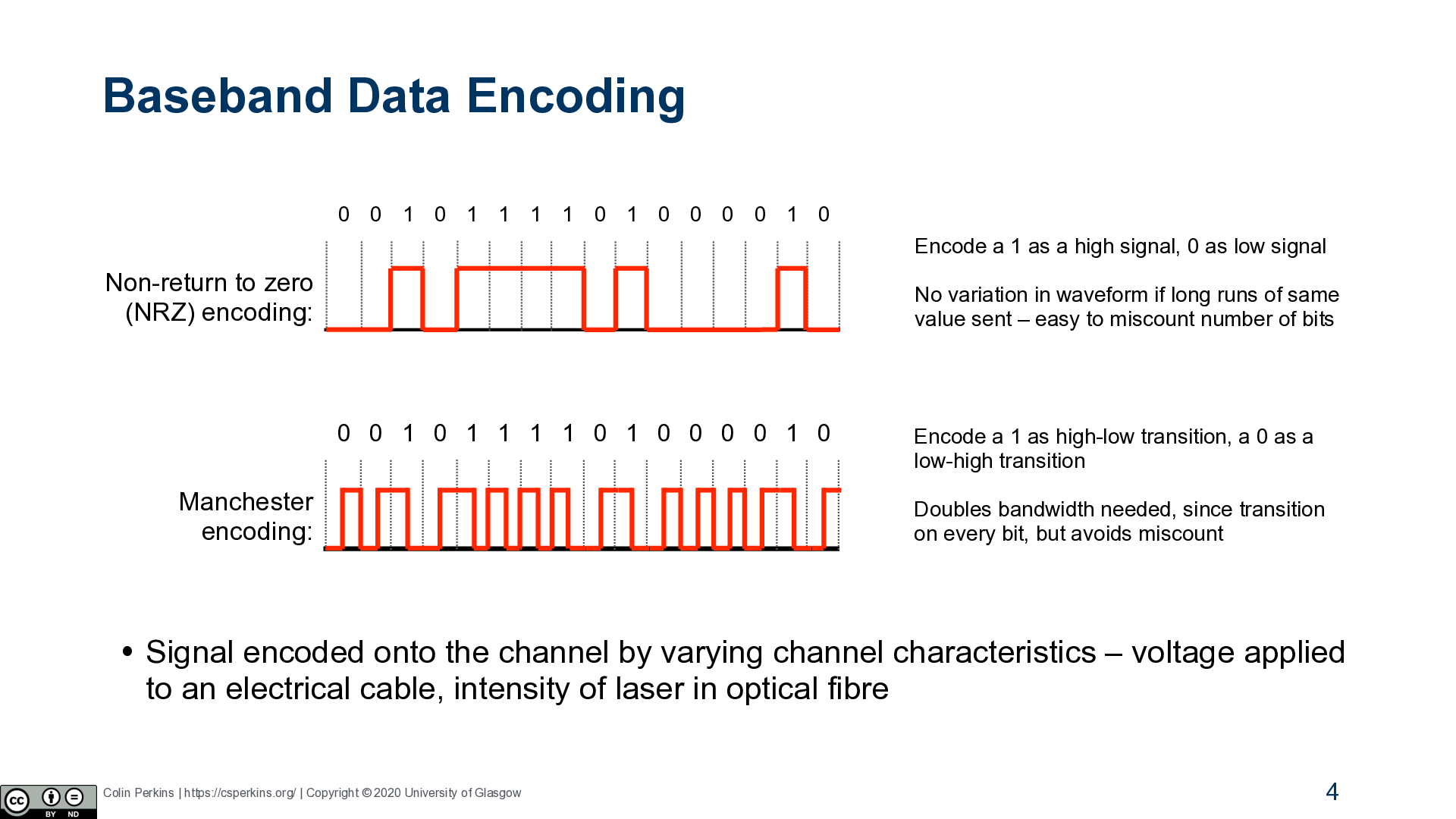
The simplest case is what’s known as
00:03:40.833
non-return to zero, NRZ, encoding,
00:03:43.666
as shown in the top figure on the slide.
00:03:46.833
When sending binary data, NRZ encoding
00:03:50.433
directly encodes the signal onto the channel.
00:03:53.433
If the binary value 1 is to
00:03:54.933
be sent over an electrical cable,
00:03:56.600
for example, a high voltage is applied
00:03:58.900
to the cable, whereas a low voltage
00:04:01.166
is applied to send the binary value zero.
00:04:03.633
The receiver simply measures the voltage,
00:04:05.700
and directly translates it into binary values.
00:04:10.600
Non-return to zero encoding is simple,
00:04:12.833
but has the problem that long runs
00:04:14.833
of ones or zeros result in signals
00:04:17.100
that maintain the same value for long periods of time.
00:04:20.666
The example has a run of four consecutive one bits,
00:04:23.733
followed a little later by a run of four consecutive zeros,
00:04:27.133
and each results in a signal that’s unchanging
00:04:29.400
for a significant period of time.
00:04:32.933
At high data rates, and with long
00:04:35.133
consecutive sequences of the same value,
00:04:37.166
it can be difficult to measure the exact
00:04:39.033
time for which the signal is unchanging
00:04:41.666
This leads to miscounting, where the receiver
00:04:44.066
believes one more, or one less, bit was sent than intended,
00:04:47.600
giving a corrupt signal.
00:04:50.300
To avoid this, more complex encodings are used.
00:04:54.500
One such scheme is Manchester Encoding.
00:04:57.433
This encodes every bit to be sent as a pair of values
00:05:01.633
A binary 1 is sent as a high-to-low transition
00:05:04.600
in the signal strength, whereas a binary 0
00:05:07.466
is sent as a low-to-high transition.
00:05:10.366
This avoids the miscounting problem of NRZ encoding,
00:05:13.600
since the signal always changes
00:05:15.433
irrespective of the data being sent,
00:05:17.700
but at the cost of requiring twice as many transitions,
00:05:20.700
and hence using twice the bandwidth.
00:05:23.800
There are many different methods of baseband data encoding,
00:05:27.666
of which the NRZ and Manchester encodings are the simplest.
00:05:31.800
The different encodings trade-off increased complexity
00:05:34.600
for better performance.
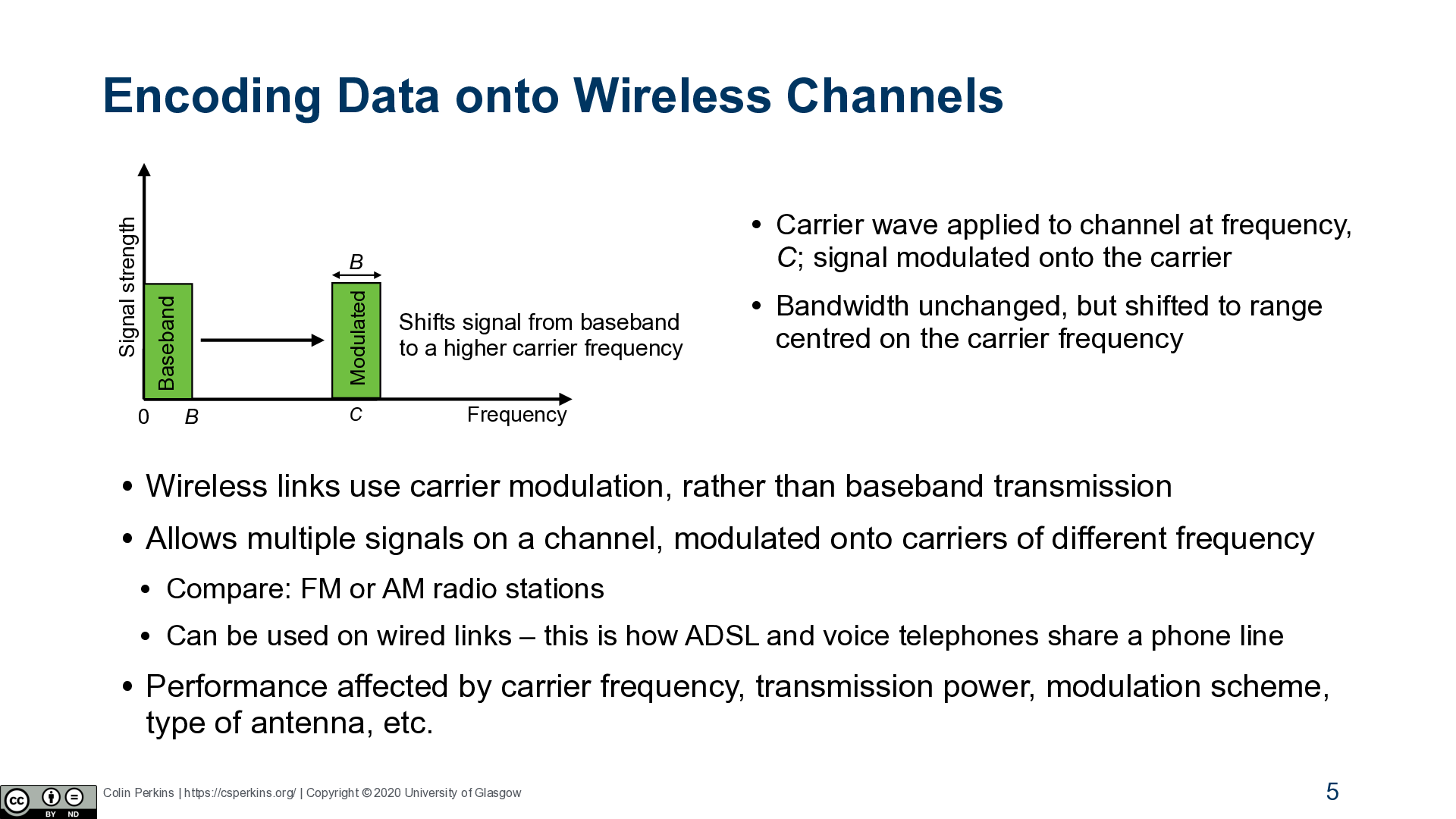
00:05:39.633
When encoding data onto a wireless channel,
00:05:42.300
carrier modulation is used rather than baseband encoding.
00:05:46.433
This allows multiple signals to be
00:05:48.166
carried on a single channel,
00:05:49.766
each modulated onto a carrier wave
00:05:52.066
transmitted at a different frequency.
00:05:55.233
Carrier modulation shifts the frequency range occupied
00:05:58.166
by a signal up, so it’s centred on a carrier frequency
00:06:01.633
Instead of occupying the baseband range, from 0 - B Hz,
00:06:05.500
the signal is shifted to occupy
00:06:07.233
a frequency range centred on the carrier frequncy.
00:06:10.566
This is done by varying some property of the carrier wave
00:06:13.133
to match the signal being sent.
00:06:15.400
The receiver tunes into the carrier frequency,
00:06:18.133
and measures the variation in the carrier wave
00:06:20.366
to extract the signal.
00:06:23.133
In much the same way as wired links,
00:06:25.266
there are limitations in the bandwidth
00:06:26.833
of the signal that can be sent,
00:06:28.400
depending on the carrier frequency,
00:06:30.266
the type of antenna used,
00:06:31.933
the transmission power,
00:06:33.500
the modulation scheme, etc.
00:06:37.000
Broadcast radio stations use carrier modulation to
00:06:39.800
transmit on different frequencies.
00:06:41.833
The principle is the same
00:06:43.533
for digital transmission, except that
00:06:45.600
it’s data being transmitted, rather than music.
00:06:51.466
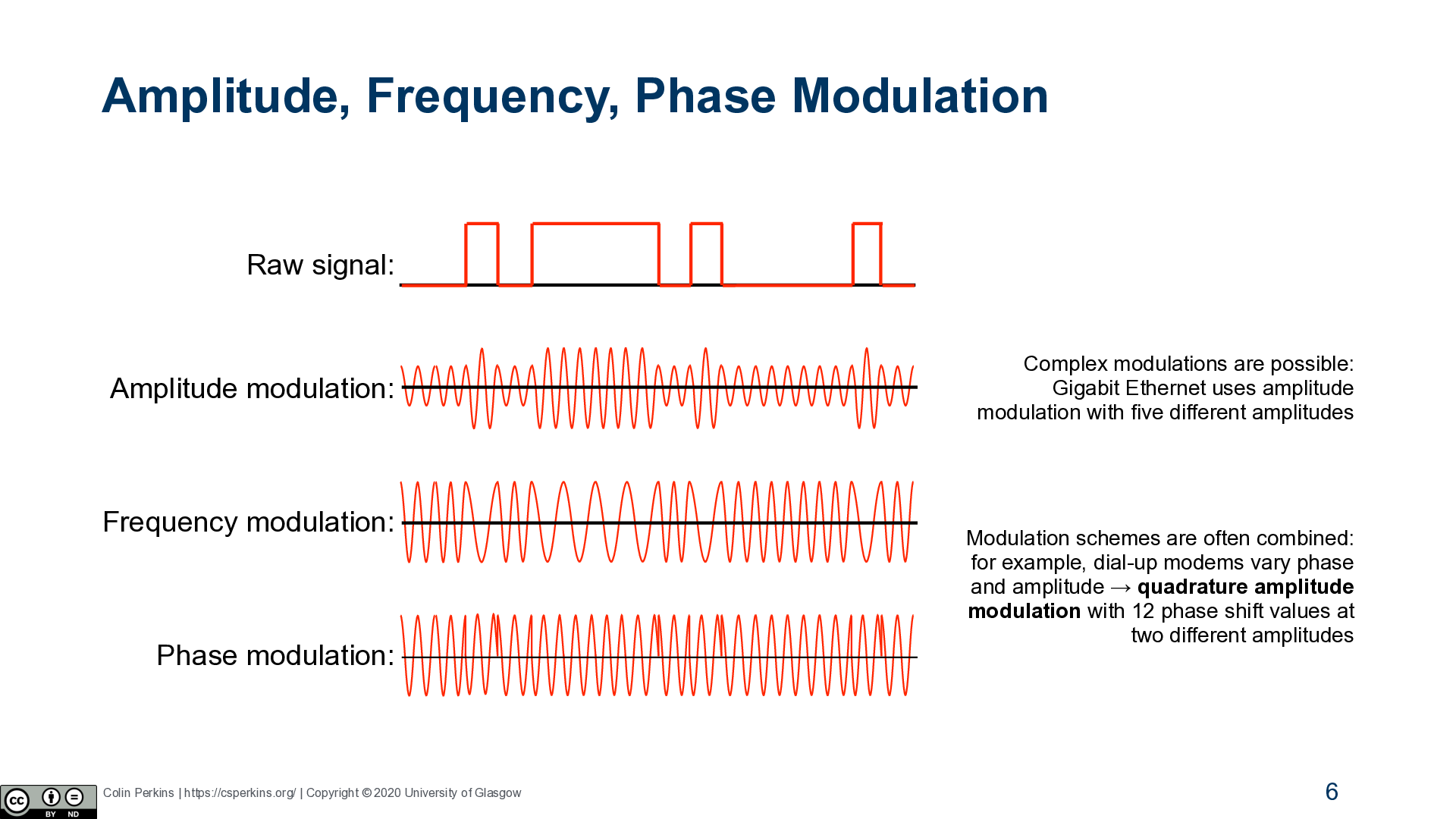
There are three types of carrier modulation that can be used.
00:06:55.866
Amplitude modulation varies the loudness of the carrier
00:06:58.900
wave to directly match the signal being transmitted.
00:07:02.566
AM radio works the same way.
00:07:05.666
Amplitude modulation is simple,
00:07:07.733
but can perform poorly,
00:07:09.266
because radio noise takes the form
00:07:11.100
of changes in the loudness of
00:07:12.966
the signal that corrupt the received data.
00:07:16.766
Frequency modulation varies the frequency of
00:07:19.533
the carrier to match the signal.
00:07:21.900
In the example on the slide,
00:07:23.633
it switches between a high frequency,
00:07:25.533
that corresponds to binary zeros,
00:07:27.333
and a lower frequency that corresponds
00:07:29.233
to a binary ones.
00:07:30.700
FM radio works in a similar way,
00:07:33.166
varying the frequency to match
00:07:34.766
the speech or music being transmitted.
00:07:37.700
This is slightly more complex than amplitude modulation,
00:07:40.766
but more resistant to noise and interference.
00:07:44.400
Finally, phase modulation shifts forwards or backwards
00:07:47.633
in the cycle of the waveform to indicate different symbols.
00:07:51.566
Real systems tend to use a combination
00:07:53.600
of modulation techniques, perhaps varying both the
00:07:56.566
amplitude and phase, to increase the data rate.
00:08:02.333
Radio signals modulated onto a carrier
00:08:04.333
wave are prone to interference.
00:08:06.933
This is because signals sent at particular frequencies
00:08:09.600
tend to be blocked by vehicles, trees,
00:08:11.900
and people moving around, or by the weather
00:08:14.566
and other radio transmissions,
00:08:16.166
while signals sent on a carrier at a different
00:08:18.633
frequency may be unaffected.
00:08:21.000
The strength of this interference can change rapidly.
00:08:25.166
To avoid this problem, many wireless links
00:08:28.000
use a technique known as spread spectrum communication,
00:08:31.166
where the carrier frequency is changed
00:08:33.000
several times per second, following a pseudo-random sequence
00:08:36.200
known to both the sender and the receiver.
00:08:39.766
Spread spectrum communication limits
00:08:41.900
the impact of interference,
00:08:43.533
because the transmission will quickly switch away
00:08:46.433
from a poorly performing channel.
00:08:48.500
It adds a lot of complexity,
00:08:50.466
since both sender and receiver need to
00:08:52.700
continually change the carrier frequency,
00:08:55.066
and synchronise what frequencies they use,
00:08:57.666
but greatly improves performance.
00:09:00.666
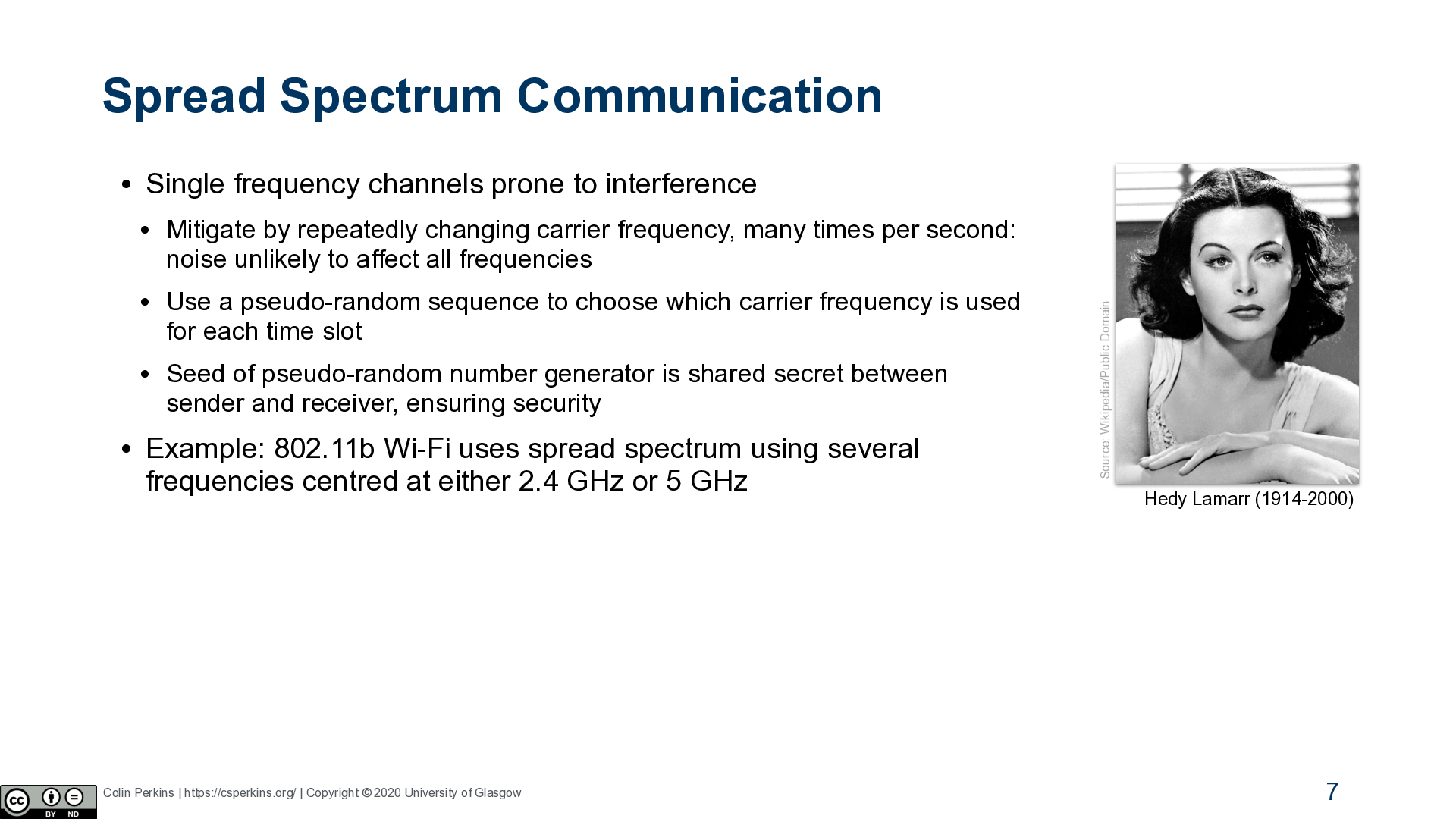
The concept of spread spectrum communication
00:09:03.600
was invented by Hedy Lamarr,
00:09:05.500
a Hollywood actress turned inventor,
00:09:07.333
during World War 2.
00:09:09.166
It’s now widely used as part of the Wi-Fi-standards.
00:09:13.833
The impact of noise on the data rate
00:09:16.400
achievable over a particular channel can be predicted.
00:09:19.800
This is the case whether that noise is due to electrical
00:09:22.166
or radio interference, imperfections in the optical fibre,
00:09:25.366
or other means.
00:09:27.433
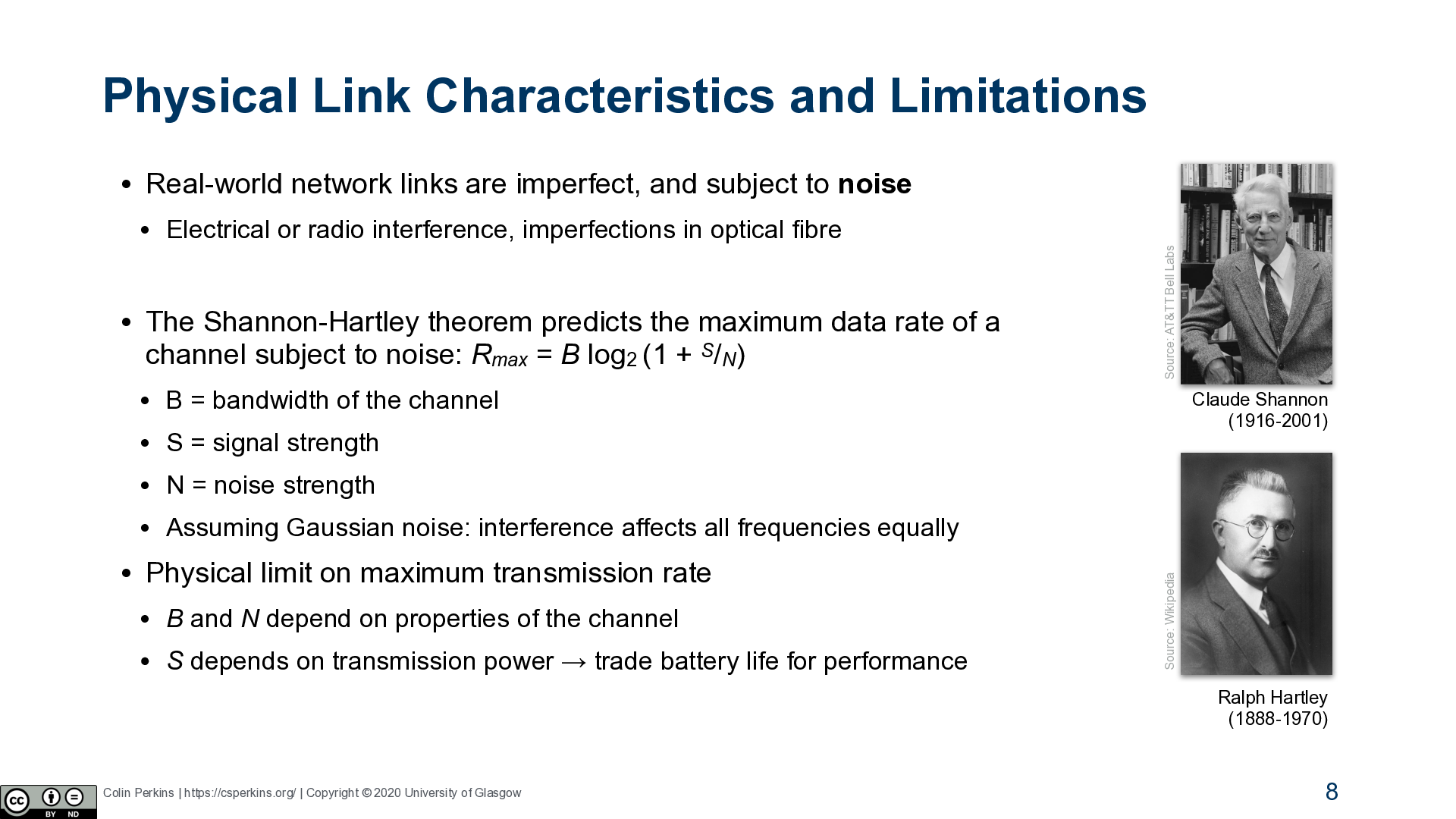
In the simplest case, where it’s assumed that
00:09:30.433
the noise affects all frequencies used by
00:09:32.233
the transmission to the same extent,
00:09:34.300
the maximum data rate of the channel
00:09:36.400
can be determined using the Shannon-Hartley theorem.
00:09:39.433
This states that the maximum data rate,
00:09:41.866
Rmax, is equal to the bandwidth of
00:09:44.133
the channel, B, multiplied by the log
00:09:47.333
of 1 plus the strength of the signal, S,
00:09:49.900
divided by the amount of noise, N.
00:09:53.266
The bandwidth and the amount of noise
00:09:55.300
depend on the channel and the environment.
00:09:58.633
For example, for a wireless link,
00:10:00.733
they depend on the carrier frequency,
00:10:02.733
the type of antenna, the weather,
00:10:04.833
the presence of obstacles between the sender and receiver,
00:10:07.533
and whether there are other
00:10:08.633
simultaneous radio transmissions.
00:10:11.400
The signal strength depends on the amount of power
00:10:14.066
applied at the transmitter.
00:10:16.233
This allows the sender to trade-off
00:10:18.066
battery life for performance,
00:10:20.033
saving power by transmitting more slowly.
00:10:26.500
We have seen that the physical layer enables communication.
00:10:29.566
It allows the sender and receiver to exchange
00:10:32.133
a sequence of bits of data across a channel,
00:10:34.033
but assigns no meaning to those bits.
00:10:37.600
The data link layer starts to provide
00:10:39.733
structure to the bitstream provided by the physical layer.
00:10:43.200
It provides framing,
00:10:44.600
splitting the bitstream into individual messages,
00:10:47.366
and gives the ability to detect,
00:10:49.366
and possibly correct,
00:10:50.600
errors in the transmission of those messages.
00:10:53.966
It provides addressing,
00:10:55.566
giving each device an identifier
00:10:57.466
that can be used to indicate
00:10:58.600
what device sent the message
00:11:00.533
and what device, or devices,
00:11:02.566
should act on the message.
00:11:04.766
And, finally, the data link layer provides
00:11:07.233
media access control.
00:11:09.033
It arbitrates access to the channel,
00:11:11.300
to make sure that more than one device
00:11:13.133
doesn’t try to send at the same time,
00:11:15.033
and to ensure that each gets its fair share to transmit.
00:11:21.533
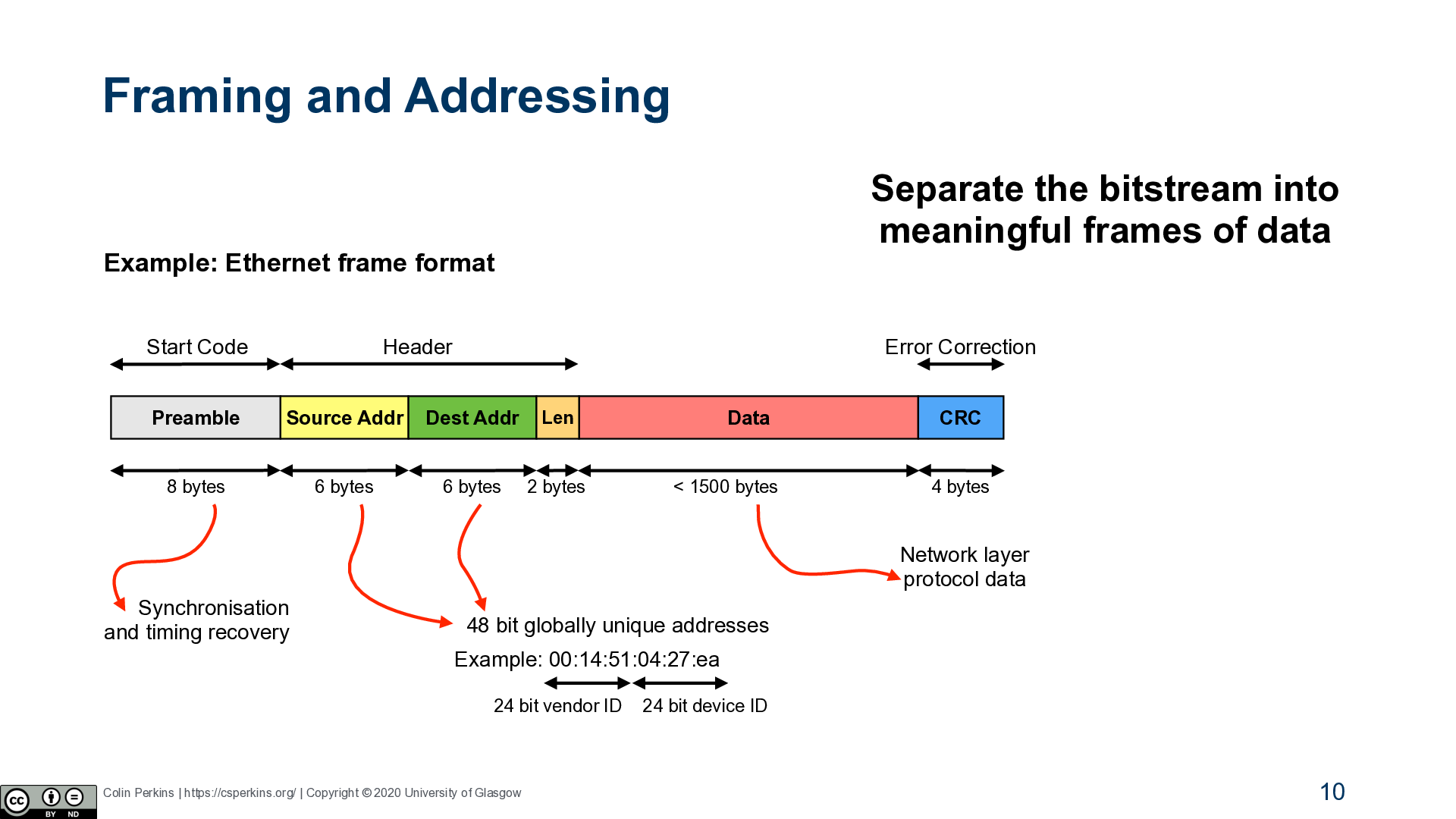
A key role of the data link layer
00:11:23.900
is to separate the bitstream into
00:11:25.233
meaningful frames of data,
00:11:27.500
and to identify the devices that are
00:11:29.066
sending and receiving those frames.
00:11:32.066
For example, if we consider an Ethernet link,
00:11:35.666
the bitstream is split up into frames
00:11:38.166
that contain a number of different elements.
00:11:41.233
First is the start code.
00:11:43.533
This is a preamble, containing a particular pattern
00:11:46.033
that occurs only occurs at the start of a message,
00:11:48.500
and is used to alert the receiver
00:11:50.100
that a new message is starting.
00:11:53.166
This is followed by some header information.
00:11:55.966
The header comprises a source address,
00:11:58.033
specifying the identity of the device sending the frame,
00:12:01.033
and a destination address that identifies the receiver.
00:12:04.666
These are followed by a length field,
00:12:06.366
indicating the amount of data to follow.
00:12:09.766
The data comes next, up to 1500 bytes in length.
00:12:14.633
And, finally, a cyclic redundancy code
00:12:17.166
concludes the packet,
00:12:18.300
allowing the receiver to check
00:12:19.600
if the frame was received correctly
00:12:23.733
The start code provides for synchronisation
00:12:26.233
and timing recovery.
00:12:28.000
It’s a regular pattern that’s only
00:12:29.533
sent at the start of a frame,
00:12:31.033
and allows the receiver to precisely
00:12:32.900
measure the speed at which the frame is being sent.
00:12:38.300
The source and destination addresses
00:12:41.433
identify the devices sending and receiving the message.
00:12:46.200
Each is 48 bits, six bytes, in size,
00:12:49.300
and is globally unique.
00:12:51.633
The addresses are split into two 24-bit parts,
00:12:54.533
one indicating the vendor, and one indicating the device.
00:12:58.933
In this example,
00:13:00.266
the vendor ID of 00:14:51 indicates Apple,
00:13:05.100
and the device ID of 04:27:ea
00:13:08.666
indicates the laptop on which I’m recording this lecture.
00:13:12.933
Modern operating systems are starting to randomly
00:13:15.433
change the Ethernet addresses each time they
00:13:17.500
connect to the network, to limit tracking
00:13:19.766
and improve privacy.
00:13:22.833
Finally, the data part of an Ethernet frame
00:13:25.666
contains data for the next layer
00:13:27.366
up in the protocol stack, the network layer.
00:13:32.933
The last feature of the data link layer
00:13:35.166
that I want to discuss is media access control.
00:13:38.966
If you have a channel that’s shared
00:13:40.400
between multiple devices, such as a
00:13:42.600
common wireless link or a shared cable,
00:13:44.800
then there’s the risk that two devices
00:13:46.966
can try to send at once.
00:13:49.233
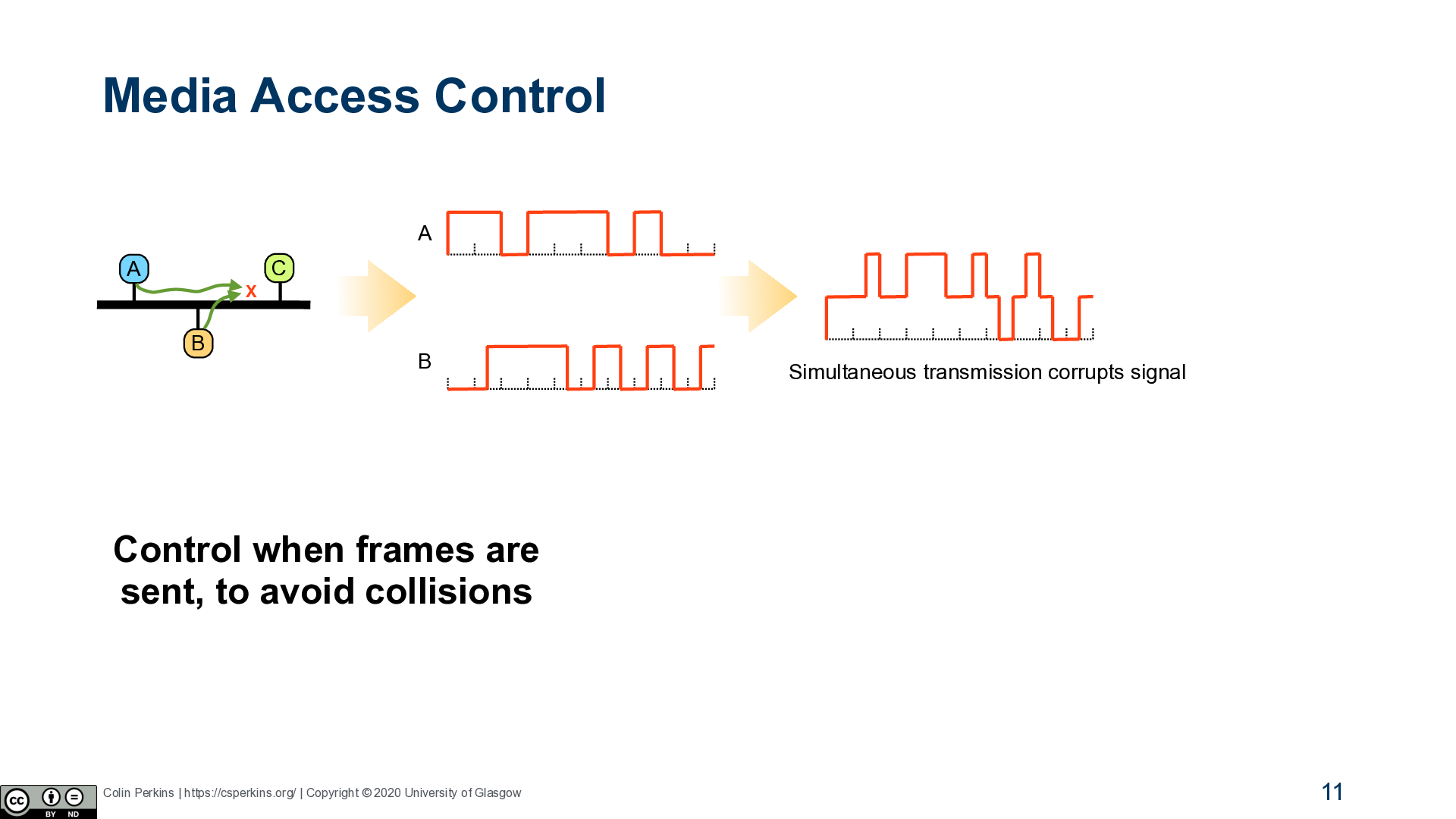
In this slide, for example, devices
00:13:51.566
A and B both try to send a message
00:13:53.566
to device C at the same time.
00:13:56.766
The centre image shows the signals sent
00:13:59.400
by the devices A and B,
00:14:01.300
each of which is sending using NRZ encoding.
00:14:04.966
These are entirely normal signals.
00:14:07.900
The right-hand image shows what’s received at C.
00:14:11.200
This is the superposition of the two signals,
00:14:13.966
the result of adding the two signals together,
00:14:16.433
and is corrupt and meaningless to the receiver.
00:14:20.166
Media access control
00:14:21.600
is the problem of avoiding such collisions.
00:14:26.400
A common way to perform media access
00:14:28.733
control is using a technique known as
00:14:30.433
carrier sense multiple access with collision detection,
00:14:34.066
CSMA/CD.
00:14:36.666
The idea is that when a device wants to send,
00:14:39.466
it first listens to see if another
00:14:41.466
device is sending already.
00:14:43.766
If another transmission is active,
00:14:45.600
then it waits before trying again.
00:14:48.666
If it doesn’t hear anything, it starts to send data.
00:14:52.666
While sending, it listens to see if another
00:14:54.866
device also starts to send.
00:14:57.300
If such a collision occurs,
00:14:58.900
the device stops sending,
00:15:00.600
waits, and tries again.
00:15:03.400
Collisions don’t usually happen,
00:15:05.300
because devices listen before sending,
00:15:07.533
but there’s always some chance that messages
00:15:10.033
might overlap because of the
00:15:11.366
time it takes a message to traverse the network.
00:15:15.766
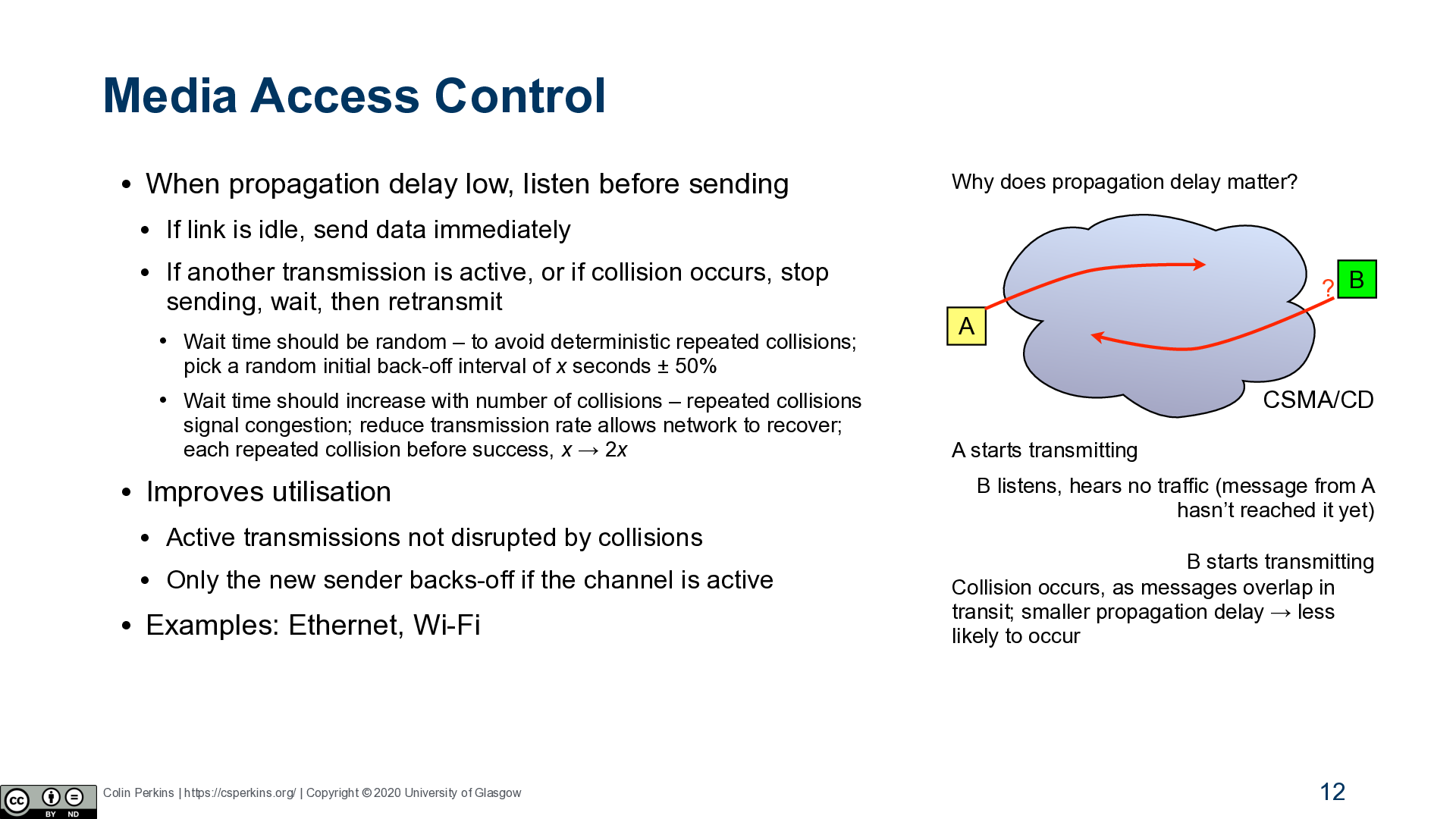
As we see from the diagram on the right,
00:15:18.333
if device A starts to send,
00:15:20.366
and simultaneously B listens,
00:15:22.900
hears nothing because the message from A
00:15:25.066
hasn’t reached it yet, and starts sending,
00:15:27.700
then there’s the risk that both messages
00:15:29.366
collide and are corrupted.
00:15:32.033
Collisions are more likely to occur
00:15:33.833
in long distance networks,
00:15:35.433
with large propagation delays,
00:15:37.266
but can happen in any network with a shared channel.
00:15:42.300
If a collision occurs,
00:15:44.033
how long should a device wait
00:15:45.500
before trying to re-send a message?
00:15:48.333
Well, devices shouldn’t always wait for the
00:15:50.466
same amount of time.
00:15:52.533
Doing so would run the risk that two devices get stuck,
00:15:55.833
each repeatedly trying to send,
00:15:57.766
waiting the same time,
00:15:59.033
and then colliding again in a loop.
00:16:01.966
The amount of time to wait should be randomised,
00:16:04.166
to avoid deterministic collisions.
00:16:07.900
If such randomisation is used,
00:16:10.133
but another collision occurs after waiting,
00:16:12.500
this suggests that the network is busy.
00:16:15.533
It’s unlikely that two devices will
00:16:17.300
randomly wait for the same time,
00:16:19.500
so a subsequent collisions suggest that
00:16:21.333
there are many devices trying to send.
00:16:24.233
A sender should therefore increase the time it waits
00:16:26.600
after each collision,
00:16:27.666
to reduce the overall load on the network.
00:16:31.000
Many data link layer protocols
00:16:32.600
double the wait time after each repeated collision,
00:16:35.066
resetting when a successful transmission occurs.
00:16:39.266
This approach, known as CSMA/CD, is widely
00:16:44.066
used, including in Ethernet and WiFi networks.
00:16:47.333
A consequence of it
00:16:49.033
is that devices share access to the channel,
00:16:51.733
and how quickly they can send a message
00:16:53.866
depends on how busy is the network.
00:16:56.466
This introduces some element of unpredictability
00:16:58.833
into the timing of many messages sent over the network.
00:17:04.966
To conclude,
00:17:06.100
the physical layer provides
00:17:07.933
for encoding a sequence of bits onto a channel,
00:17:10.733
but says nothing about the meaning of those bits.
00:17:14.166
The data link layer starts to add structure,
00:17:16.800
separating the bit stream into frames,
00:17:19.166
checking those frames
00:17:20.466
to ensure they were correctly received,
00:17:22.400
identifying devices,
00:17:24.000
and arbitrating access to the channel.
00:17:26.766
Together, the physical and data link layers
00:17:29.400
enable local area networks,
00:17:31.133
where devices connected to a single link can communicate.
00:17:35.466
This forms the basis of the Internet.
00:17:38.733
In the next part, I’ll talk about the network layer,
00:17:42.000
that allows multiple networks to be combined into one.
Part 4: The Network Layer and the Internet Protocols
Part 4 of the lecture is about the network layer and the Internet
Protocols. It reviews the role of the network layer, and the ideas of
addressing, routing, and forwarding. And, it talks about the network
layer in the Internet, and IPv4 and IPv6.
00:00:01.466
The network layer allows several independently operated
00:00:04.733
networks to be combined to give the
00:00:06.866
appearance of a single network.
00:00:08.933
It provides an internetworking function that allows us to
00:00:11.600
build an internet.
00:00:13.666
In this part, I’ll talk about the Internet Protocols,
00:00:16.366
IPv4 and IPv6,
00:00:18.933
that provide the network layer in the Internet,
00:00:21.366
and briefly review the network layer concepts
00:00:24.000
of addressing, routing, and forwarding.
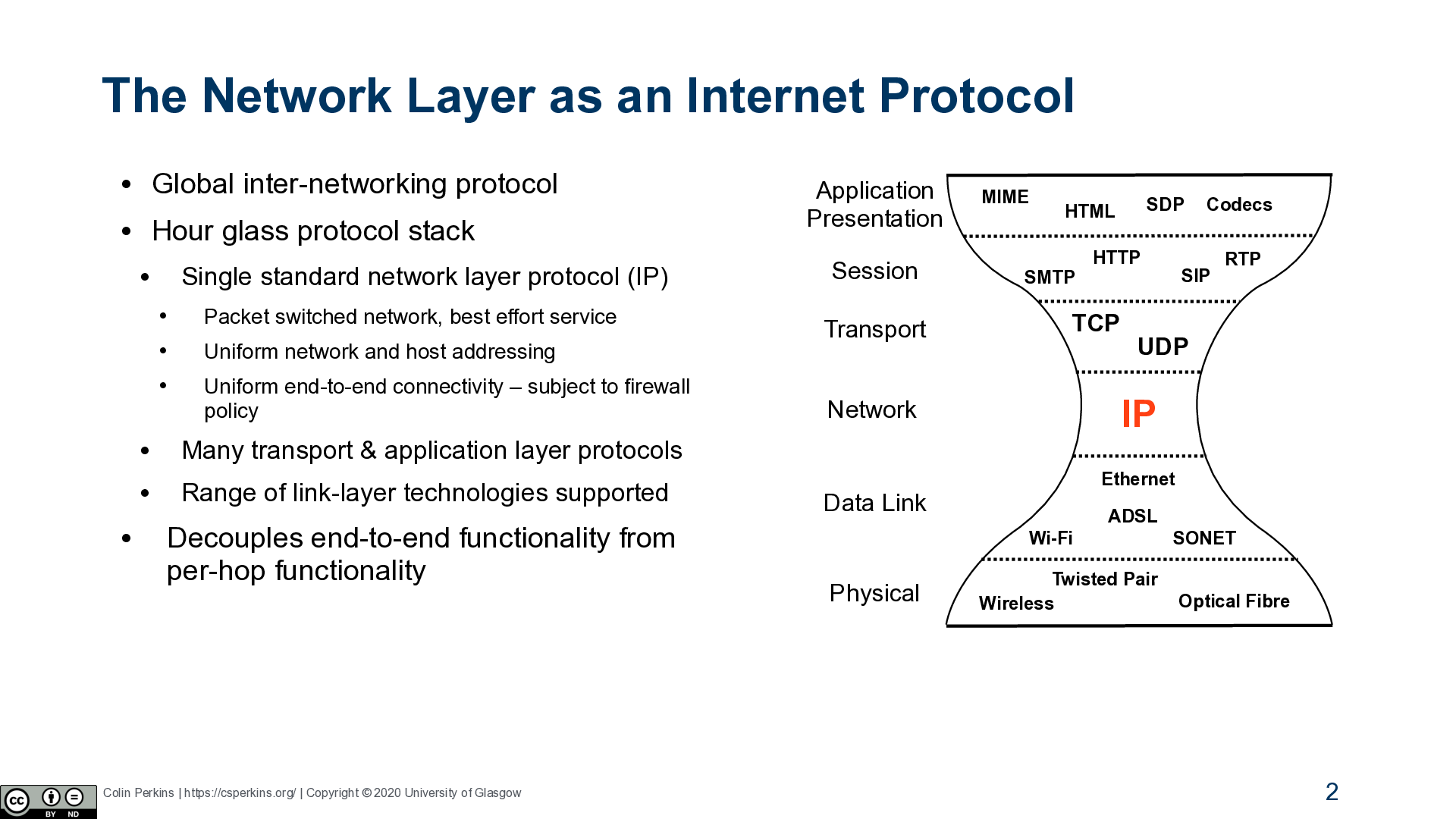
00:00:28.466
The network layer is the internetworking point
00:00:31.033
in the protocol stack.
00:00:32.866
The use of a common network layer
00:00:34.466
protocol allows us to decouple the operation
00:00:37.000
of the networks that comprise the Internet,
00:00:39.133
from the operation of the applications that
00:00:41.166
run on the Internet.
00:00:43.733
It allows each network to make its own choice
00:00:45.800
about what sort of data link
00:00:47.200
and physical layer technologies to use,
00:00:49.733
because that choice is hidden from the
00:00:51.466
applications and transport protocols
00:00:53.033
by the common network layer.
00:00:55.200
It doesn’t matter whether the underlying network
00:00:57.233
is Ethernet, WiFi, optical fibre,
00:00:59.966
or something else,
00:01:01.533
because the differences are hidden
00:01:02.933
from the upper-layer protocols.
00:01:05.533
Similarly, the use of a common network
00:01:07.800
layer makes it easy to deploy different
00:01:10.033
applications and transport protocols.
00:01:12.566
The lower layers must deliver network layer packets,
00:01:15.566
but are unaware of the type of application data
00:01:17.800
contained in those packets.
00:01:20.000
They cannot tell whether the packets being delivered
00:01:22.266
comprise an email message, a web page,
00:01:24.800
a phone call, streaming video, or whatever.
00:01:28.900
This approach is very flexible,
00:01:31.500
and makes it easy to support new physical
00:01:33.300
and data link layer technologies,
00:01:35.500
and new transport protocols and applications,
00:01:38.266
provided they can deliver packets for,
00:01:40.500
and operate over, the common network layer.
00:01:44.266
The disadvantage is that the network
00:01:46.533
layer is not optimised for any one application.
00:01:49.433
It emphasises generality and flexibility
00:01:52.333
to support many different uses,
00:01:54.600
rather than providing optimal performance
00:01:56.366
for any particular use case.
00:01:59.466
In the Internet,
00:02:00.533
the network layer is known as the Internet Protocol, IP.
00:02:04.233
This is the IP part of the
00:02:06.133
well known TCP/IP protocol suite.
00:02:10.100
The Internet Protocol provides a common way
00:02:12.433
to identify devices on the network,
00:02:14.500
using what’s known as an IP address.
00:02:17.400
It provides routing algorithms to direct packets
00:02:19.800
across the network from source to destination.
00:02:22.700
And it forwards those packets in a best effort manner,
00:02:25.333
accepting that the network may be unreliable.
00:02:29.066
At its core, the Internet Protocol
00:02:31.233
provides uniform connectivity.
00:02:33.600
Any host can send data to any other host,
00:02:36.066
subject to firewall policy,
00:02:38.166
but makes no quality guarantees.
00:02:43.366
There are two versions of the Internet Protocol in use.
00:02:46.600
The most commonly used version is IP version 4.
00:02:49.966
This was introduced into what became the Internet in 1983.
00:02:54.733
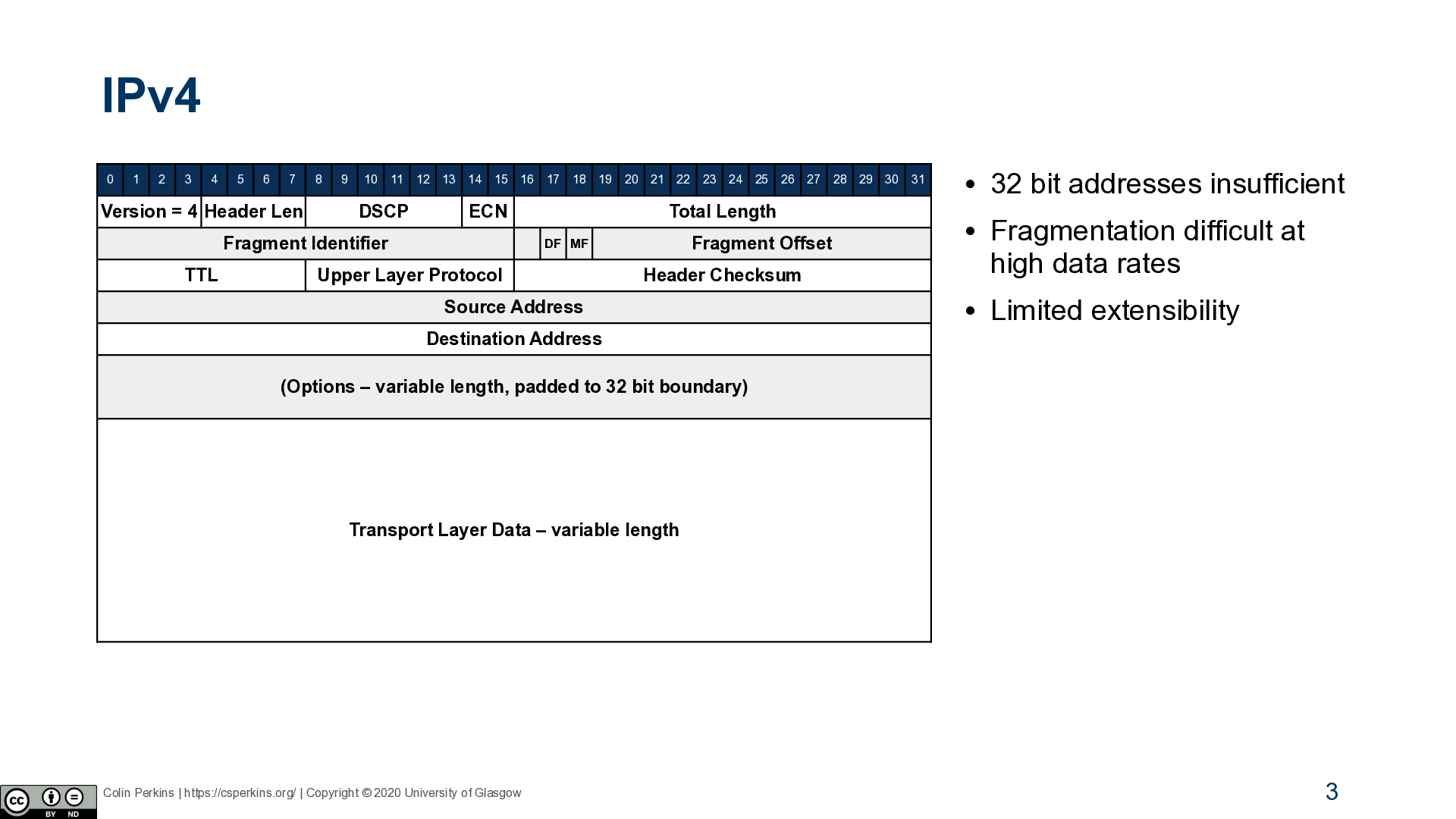
The figure shows the format of an IPv4 packet.
00:02:58.266
This is sent in the payload data section
00:03:00.300
of a data link layer packet,
00:03:01.933
such as an Ethernet or WiFi frame,
00:03:04.400
with the different parts of the IPv4 packet
00:03:06.866
being sent in the order shown,
00:03:08.766
left-to-right, top-to-bottom,
00:03:10.733
starting with the version number,
00:03:12.400
header length, DSCP field, and so on,
00:03:15.700
and concluding with the transport layer data.
00:03:19.533
Key parts of an IPv4 packet are
00:03:21.833
the source and destination addresses,
00:03:24.000
each 32 bits in size,
00:03:26.166
that denote the network interfaces
00:03:28.133
from which the packet was sent,
00:03:29.533
and to which it should be delivered.
00:03:32.200
The use of 32 bits for the address fields
00:03:34.500
allows 2-to-the-power-32 possible addresses,
00:03:37.333
around 4 billion,
00:03:38.900
which is not enough for the current Internet.
00:03:41.800
This is the motivation to switch to IPv6.
00:03:45.633
In addition to addressing,
00:03:47.333
IPv4 provides the fragment identifier,
00:03:50.233
fragment offset,
00:03:51.733
“don’t fragment” (DF),
00:03:53.800
and “more fragments” (MF) fields to allow
00:03:56.233
large IPv4 packets to be split into
00:03:58.966
pieces for delivery over networks
00:04:00.766
that can only deliver small packets.
00:04:03.366
It also includes a Differentiated Services Code Point
00:04:06.833
(DSCP) field to allow packets to request
00:04:10.066
special treatment by the network.
00:04:12.133
For example,
00:04:13.200
a packet that carries video conferencing or gaming data
00:04:16.100
might ask for low latency delivery,
00:04:18.633
while one carrying data that’s part of a background
00:04:20.966
software update might indicate that it’s low priority.
00:04:25.200
The time-to-live (TTL) field prevents packets
00:04:27.533
from circulating forever in the network in case a routing
00:04:30.266
problem causes them to go around in a loop,
00:04:32.566
and the header checksum detects transmission errors.
00:04:36.533
Finally, the upper layer protocol identifier
00:04:38.900
identifies the format of the transport layer data
00:04:41.000
that follows the IPv4 header.
00:04:43.600
This usually indicates that the transport
00:04:45.566
layer data is a TCP segment or a UDP datagram.
00:04:52.433
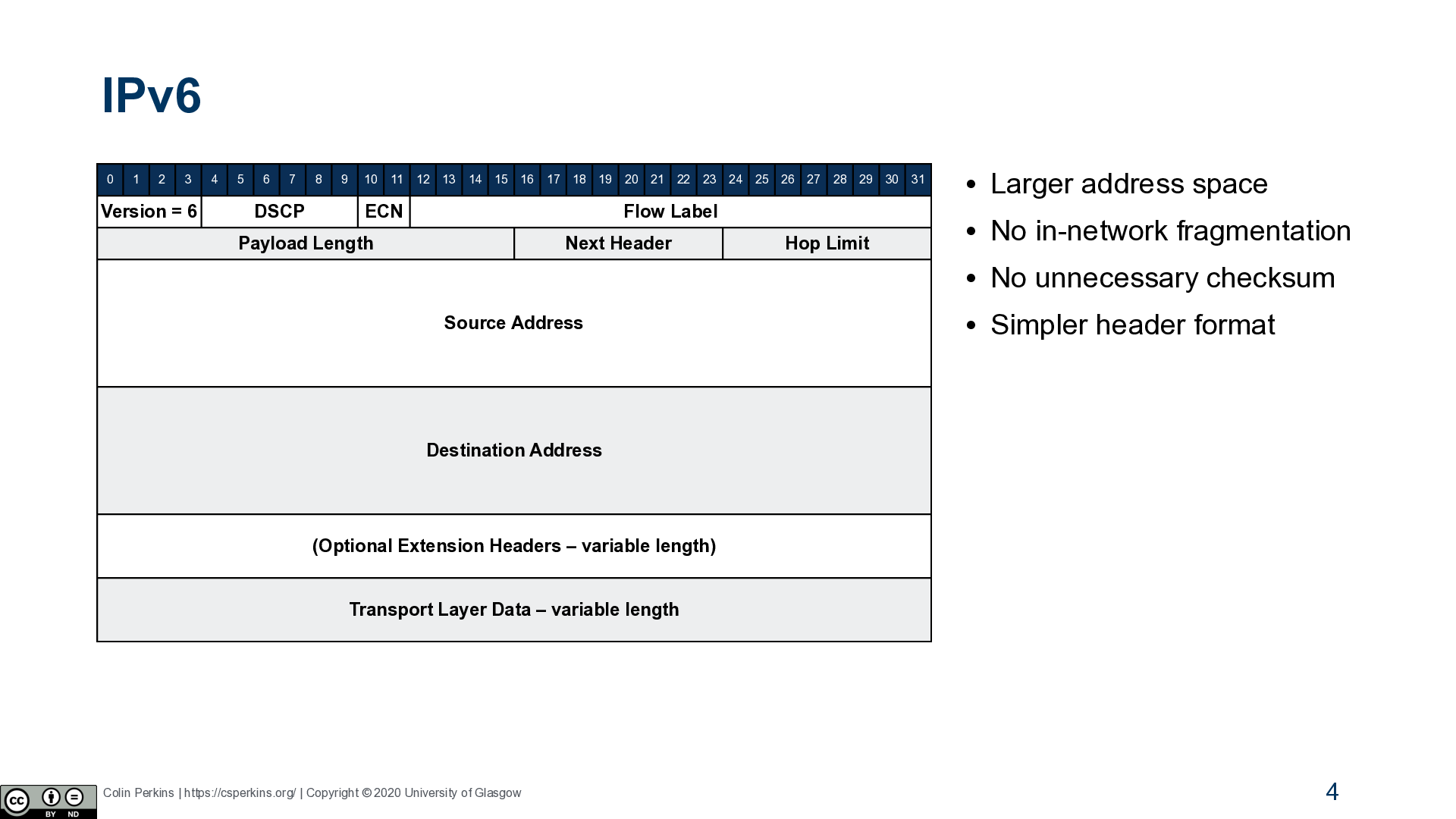
IPv6 was designed to solve the
00:04:54.500
problem that the IPv4 addresses are too small.
00:04:58.033
It replaces the 32 bit addresses used in IPv4
00:05:01.666
with 128 bit addresses.
00:05:04.100
This vastly increases the number of devices
00:05:06.033
that can be added to the network,
00:05:08.433
since each additional bit
00:05:10.000
doubles the number of addresses that are available.
00:05:13.300
In addition, IPv6 simplifies the header.
00:05:16.900
It removes the support for in-network fragmentation,
00:05:19.733
that was present in IPv4,
00:05:21.866
since it was difficult to implement efficiently,
00:05:24.733
and instead requires the hosts to adjust the size
00:05:26.966
of the packets they send to match the network path.
00:05:30.866
It also removes the header checksum,
00:05:32.500
since it’s usually redundant
00:05:33.900
with the checksum provided by the data link layer.
00:05:37.933
As of late 2020,
00:05:39.900
Google reports that about a third of their users access
00:05:42.433
Google over IPv6.
00:05:45.033
Statistics from Akamai,
00:05:46.633
a large content distribution network,
00:05:49.000
report around 60% of connections
00:05:51.266
to their network from India are over IPv6,
00:05:54.333
around 50% from the US, Germany,
00:05:57.333
Belgium, Greece, Taiwan, and Vietnam,
00:06:00.266
and around 35% from the UK.
00:06:03.766
IPv6 took a long time to start seeing deployment,
00:06:06.833
but its use has greatly accelerated over the last few years.
00:06:14.000
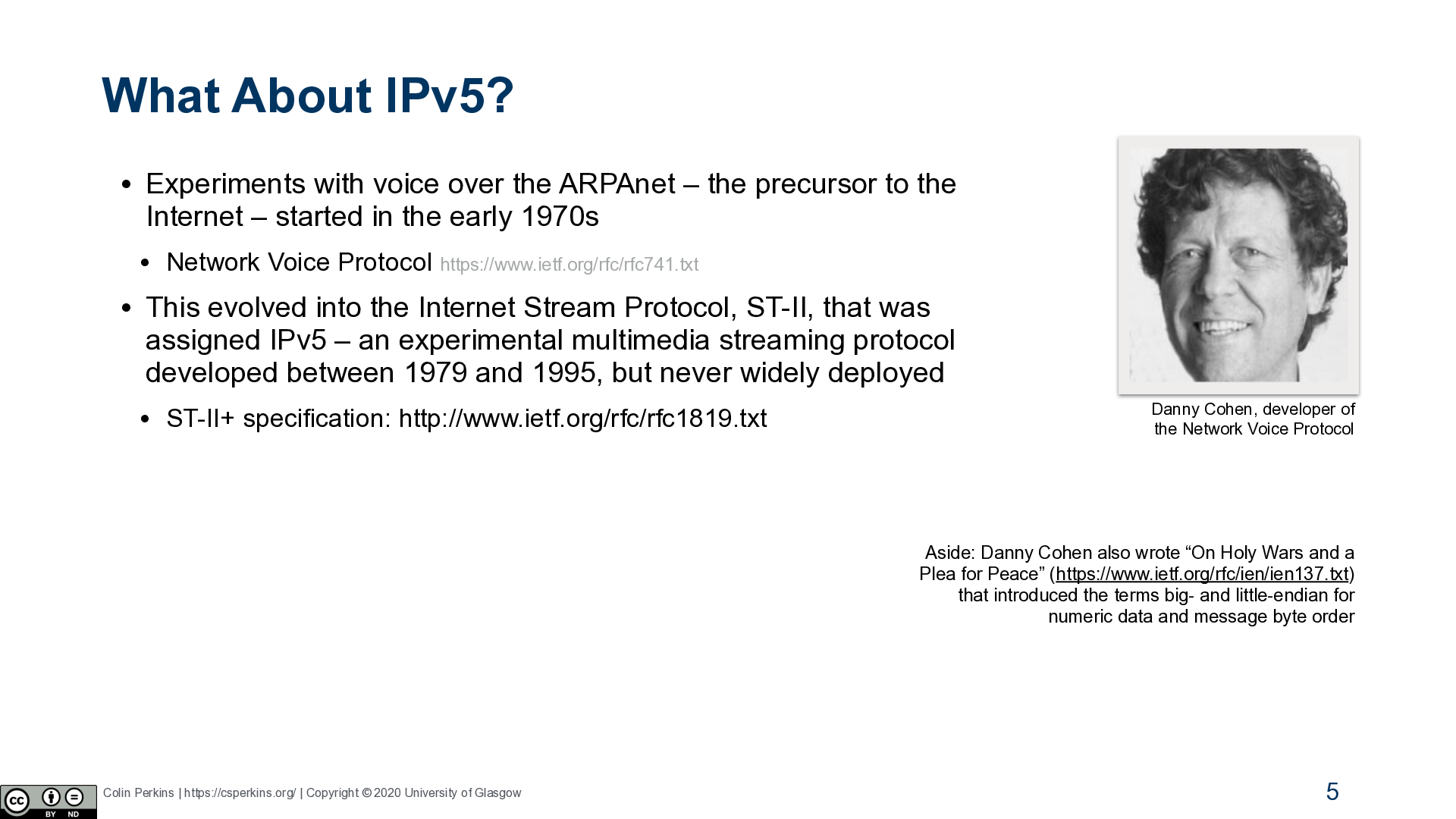
If we have IPv4 and IPv6,
00:06:17.400
you might ask what about IPv5?
00:06:20.900
Well, experiments with packet voice over the ARPAnet,
00:06:24.100
the precursor to the Internet,
00:06:25.966
started in the early 1970s, with the Network Voice Protocol
00:06:30.000
developed by Danny Cohen
00:06:31.433
at the University of Southern California’s
00:06:33.233
Information Sciences Institute.
00:06:36.233
This work eventually led to the Internet Stream Protocol,
00:06:39.100
ST-II, that was an experimental
00:06:41.466
multimedia streaming protocol
00:06:43.166
developed mostly in the 1980s and early 1990s.
00:06:47.333
ST-II ran in parallel to IPv4,
00:06:50.400
and used IP version 5 in its header.
00:06:54.433
ST-II was not widely deployed,
00:06:57.300
but it helped prototype a number of important ideas
00:06:59.933
around multimedia transport over packet networks.
00:07:04.100
Both what worked well, and what didn’t.
00:07:07.300
Steve Casner and Eve Schooler,
00:07:09.533
who both worked with Danny Cohen at ISI,
00:07:12.233
helped lead the development of the next wave of
00:07:14.366
multimedia transport protocols,
00:07:16.400
RTP and SIP,
00:07:18.166
based on experiences with ST-II and earlier protocols.
00:07:22.400
RTP and SIP are extremely widely used
00:07:25.733
in modern video conferencing services,
00:07:28.000
such as Zoom, Webex, and Microsoft Teams,
00:07:31.000
and as the basis for today’s mobile phone networks.
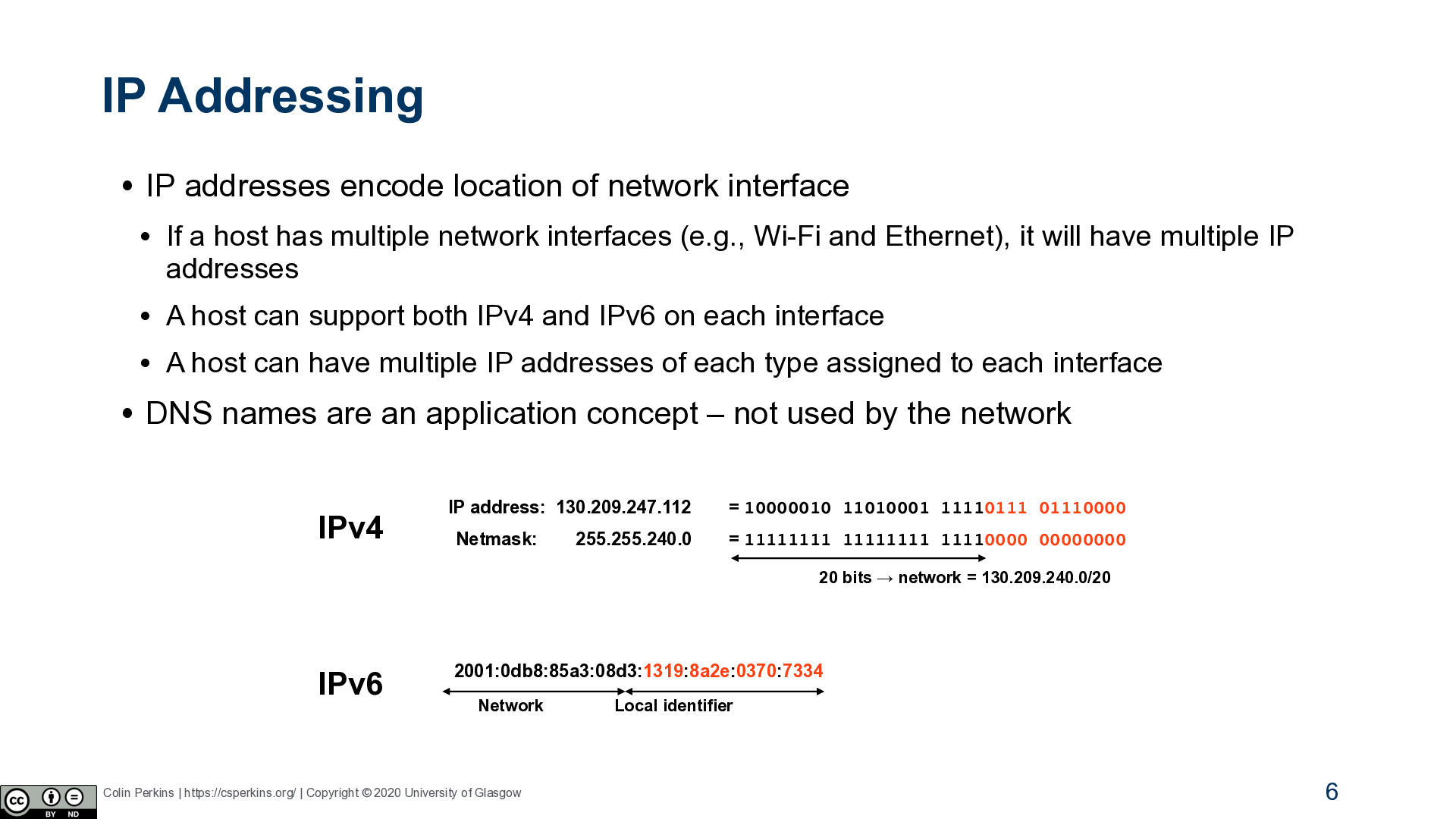
00:07:37.000
IPv4 and IPv6 have differently sized addresses,
00:07:41.533
but otherwise work similarly.
00:07:44.400
In both protocols, an IP address represents
00:07:47.100
]the location of a particular network interface.
00:07:50.666
If a device has more than one network interface,
00:07:54.000
for example if it’s a smart phone with both 5G and WiFi,
00:07:57.566
it will have one IP address for each interface.
00:08:01.066
It may also have both IPv4 and IPv6 addresses
00:08:04.900
assigned to some, or all, of its network interfaces.
00:08:08.600
And, in some cases, can have more than one
00:08:10.966
address of each type assigned to an interface.
00:08:13.866
Importantly, the IP address identifies the location
00:08:17.433
at which a network interface is attached to the network.
00:08:20.066
It does not identify the device,
00:08:22.533
and if a device moves to a different place
00:08:24.766
it will acquire a different IP address.
00:08:27.700
IPv4 and IPv6 addresses
00:08:30.600
both comprise a network part and a host part.
00:08:33.933
The network part, often known as the network prefix,
00:08:37.200
identifies the network to which the device is attached,
00:08:40.300
while the host part of the address
00:08:42.066
identifies a particular attachment point on that network.
00:08:45.700
The fraction of the address tthe address that identifies
00:08:48.366
the network part, and the fraction left for the host varies,
00:08:52.466
with different networks being assigned
00:08:54.033
differing amounts of address space.
00:08:57.133
As an example,
00:08:58.366
the School of Computing Science operates an IPv4 network
00:09:01.700
in Lilybank Gardens and the Boyd Orr Building
00:09:04.166
where the first 20 bits of the IPv4 address
00:09:06.966
comprise the network part,
00:09:08.600
and the last 12 bits are the host part.
00:09:11.233
IPv4 addresses in the range 130.209.240.0
00:09:17.033
to 130.209.255.255,
00:09:21.433
that all share the same initial 20 bit prefix,
00:09:24.800
are all within that network.
00:09:27.133
The School also has an IPv6 network,
00:09:29.733
that works similarly, although the addresses are longer.
00:09:34.366
In the wide area,
00:09:35.833
Internet traffic is routed towards its destination
00:09:38.733
looking only at the network part of the IP address.
00:09:41.733
Only when it reaches the destination network
00:09:44.566
do the routers in the network inspect
00:09:46.400
the host part of the address,
00:09:48.066
to find the device that should receive the packet.
00:09:52.166
Finally, it’s important to remember that the network layer
00:09:55.133
does not use names such as example.com.
00:09:58.166
Traffic delivered over the Internet
00:10:00.300
contains source and destination IP addresses,
00:10:03.066
and is routed based on those IP addresses.
00:10:06.200
The host that sends an IP packet
00:10:08.366
resolves the name of the destination to an IP address,
00:10:12.166
and puts that address into the destination address field
00:10:14.733
of the IP packet.
00:10:16.433
The network delivers that packet using only that IP address.
00:10:21.400
The DNS, that resolves names,
00:10:23.500
is just another application that runs on the Internet,
00:10:26.166
and is not fundamental to its operation.
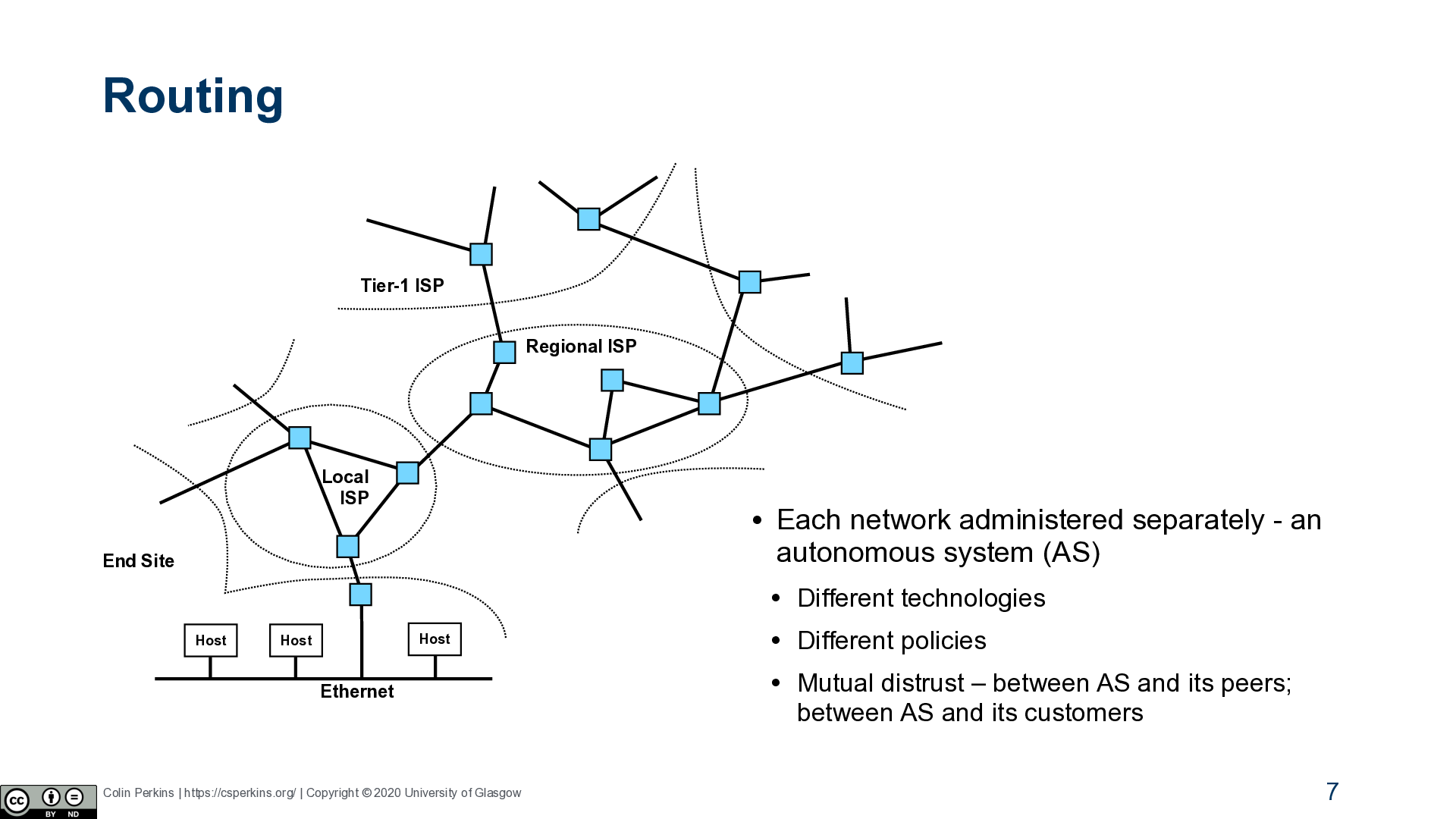
00:10:31.933
The Internet is a network of networks.
00:10:35.533
Each network is administered and operated separately.
00:10:39.133
It acts as what is known as an Autonomous System, an AS.
00:10:43.666
Each AS can choose to use different technologies internally,
00:10:47.400
and can have different rules and policies.
00:10:50.333
The commonality is that all run the Internet Protocol.
00:10:54.300
The University of Glasgow acts as an Autonomous System
00:10:57.000
in the Internet,
00:10:58.500
as do companies such as Google or Facebook,
00:11:01.166
and Internet Service Providers such as BT,
00:11:03.900
Virgin Media, O2, etc.
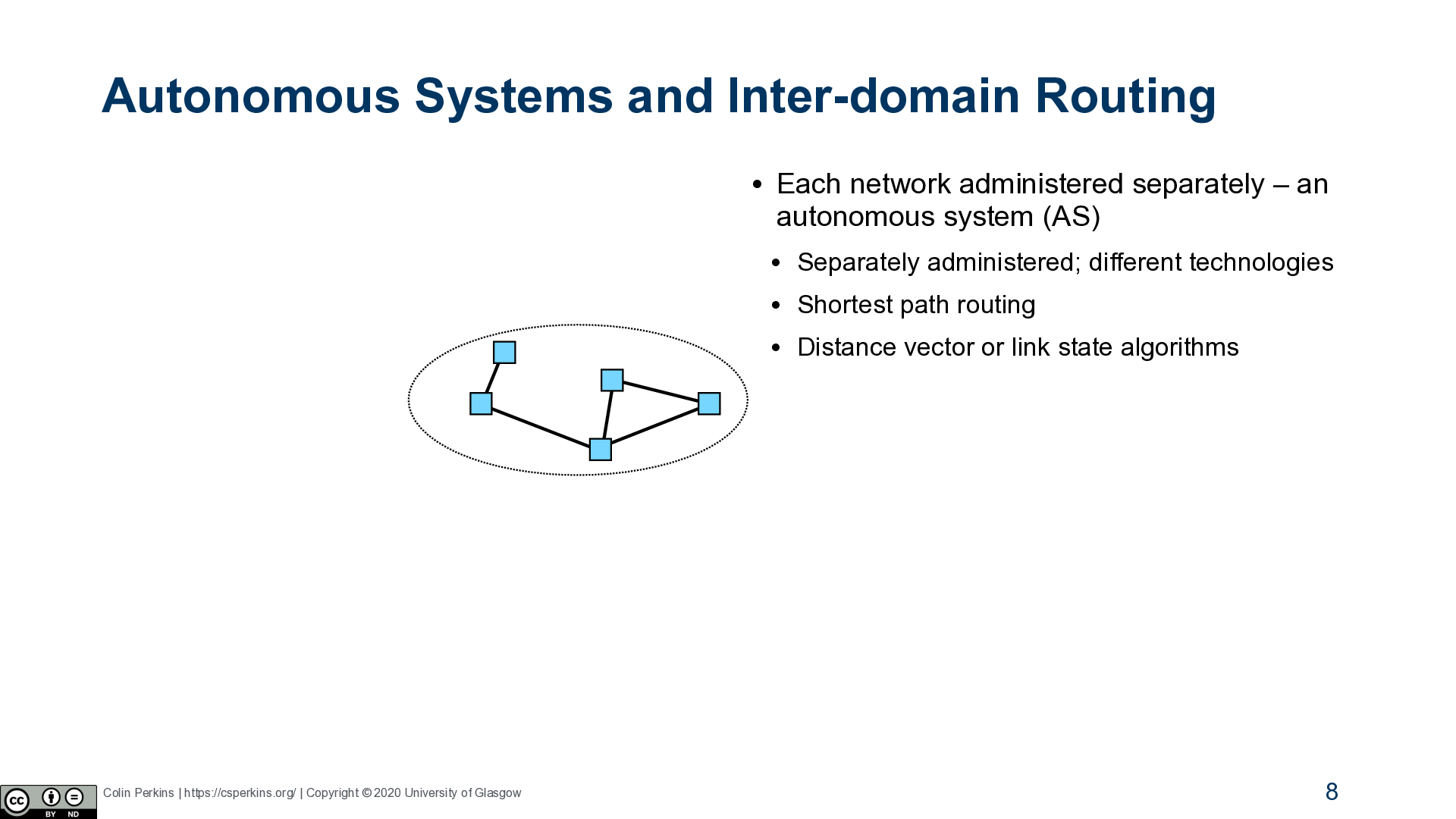
00:11:09.000
Within a network, the network operator
00:11:11.900
will seek to deliver data to its destination
00:11:14.300
as efficiently as possible.
00:11:16.633
The Internet places no requirements on how they do this,
00:11:20.166
or on what data link layer
00:11:21.500
or physical layer technologies they use.
00:11:24.500
Each network operator is free to use whatever technologies,
00:11:27.666
and whatever routing or forwarding algorithms,
00:11:29.966
that it chooses.
00:11:32.033
Typically, the network operator
00:11:34.133
will seek to ensure traffic follows the shortest path
00:11:36.600
from source to destination across their network,
00:11:39.733
using either a distance vector routing algorithm,
00:11:42.566
or, more likely, a link state routing algorithm
00:11:45.700
such as OSPF.
00:11:47.400
There are a wide variety of different approaches used,
00:11:51.133
though, depending on the size of the network,
00:11:53.766
and the needs the network operator and its customers.
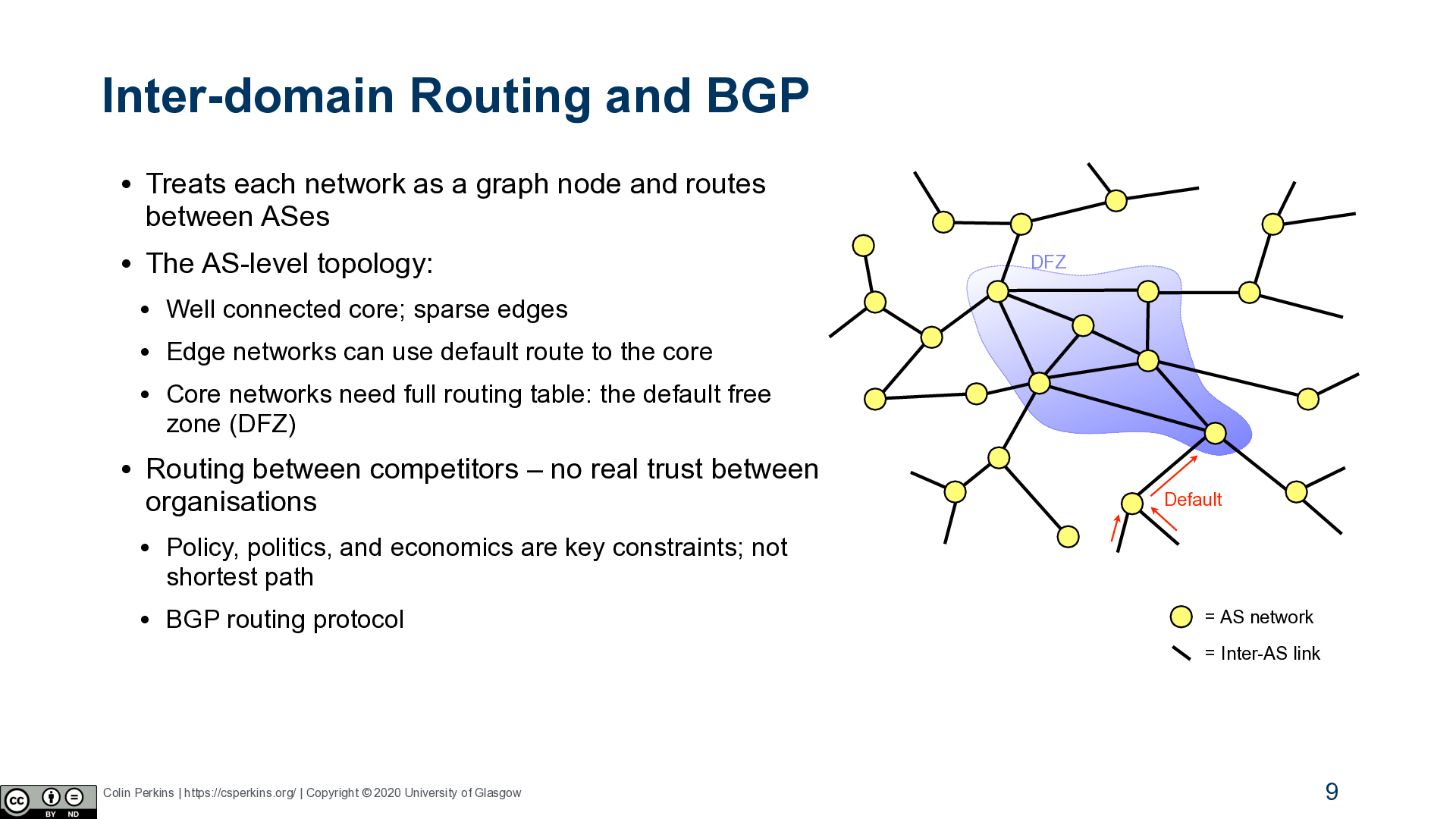
00:11:59.533
Most Internet traffic is not confined to a single AS.
00:12:03.733
Rather, it’s common for traffic to
00:12:06.066
pass through several Autonomous Systems
00:12:07.933
on its path from source to destination.
00:12:11.333
For example, packets sent from the University of
00:12:13.733
Glasgow to Google will start in the University’s network,
00:12:17.666
then traverse a network known as JANET
00:12:19.800
(the Joint Academic NETwork; the University’s ISP),
00:12:22.666
and then finally reach Google.
00:12:25.666
Each of these three networks is an Autonomous System.
00:12:29.200
Each must cooperate to forward the packets,
00:12:31.633
and find an appropriate route
00:12:33.366
for the data across the network.
00:12:35.666
Indeed, all of the ASes that comprise the Internet
00:12:38.833
cooperate to ensure the network
00:12:40.366
can successfully route data to its destination,
00:12:42.966
wherever that destination is.
00:12:46.200
This cooperation is enabled by
00:12:48.400
the Border Gateway Protocol, BGP.
00:12:51.766
BGP is a routing protocol.
00:12:54.100
It allows each AS to advertise the network
00:12:56.900
prefixes that it owns,
00:12:58.466
to tell the rest of the network where to send packets
00:13:01.400
destined for IP addresses contained within those prefixes.
00:13:05.466
In addition, BGP allows ASes
00:13:07.933
to advertise the routes they can use to reach
00:13:10.000
the network prefixes owned by other ASes.
00:13:13.300
This allows, for example,
00:13:15.266
an ISP to advertise how to reach the IP
00:13:17.766
addresses used by its customers.
00:13:20.433
Similarly, BGP allows ASes to filter out
00:13:23.833
advertisements for network prefixes to which they will not
00:13:26.366
forward traffic.
00:13:29.200
The information exchanged in BGP
00:13:31.733
allows ASes to decide how to route
00:13:33.700
packets across the network.
00:13:36.166
Networks located near the edge of the Internet
00:13:38.866
need to maintain relatively little information
00:13:41.166
to participate in BGP.
00:13:43.333
They simply need to know their own network prefixes,
00:13:46.466
and those of their customers.
00:13:48.400
They then advertise those prefixes
00:13:50.466
to the rest of the network.
00:13:52.566
Those edge ASes know how to route traffic to themselves
00:13:56.066
and their customers,
00:13:57.500
and just pass everything else to a default route
00:13:59.700
that directs it out to the wider network.
00:14:02.933
For networks nearer the core of the Internet,
00:14:05.400
this approach is no longer sufficient.
00:14:08.133
These ASes form the so-called default free zone,
00:14:11.200
the DFZ,
00:14:12.433
where they use BGP to put together something
00:14:15.400
close to a complete map of the Internet,
00:14:17.800
so they know how to forward packets to reach any
00:14:20.000
possible destination.
00:14:22.700
When it comes to BGP routing,
00:14:24.666
and finding the correct route for data to
00:14:26.433
cross the wide area Internet,
00:14:28.733
policy, politics, and economics are often
00:14:31.633
more important than finding the shortest route.
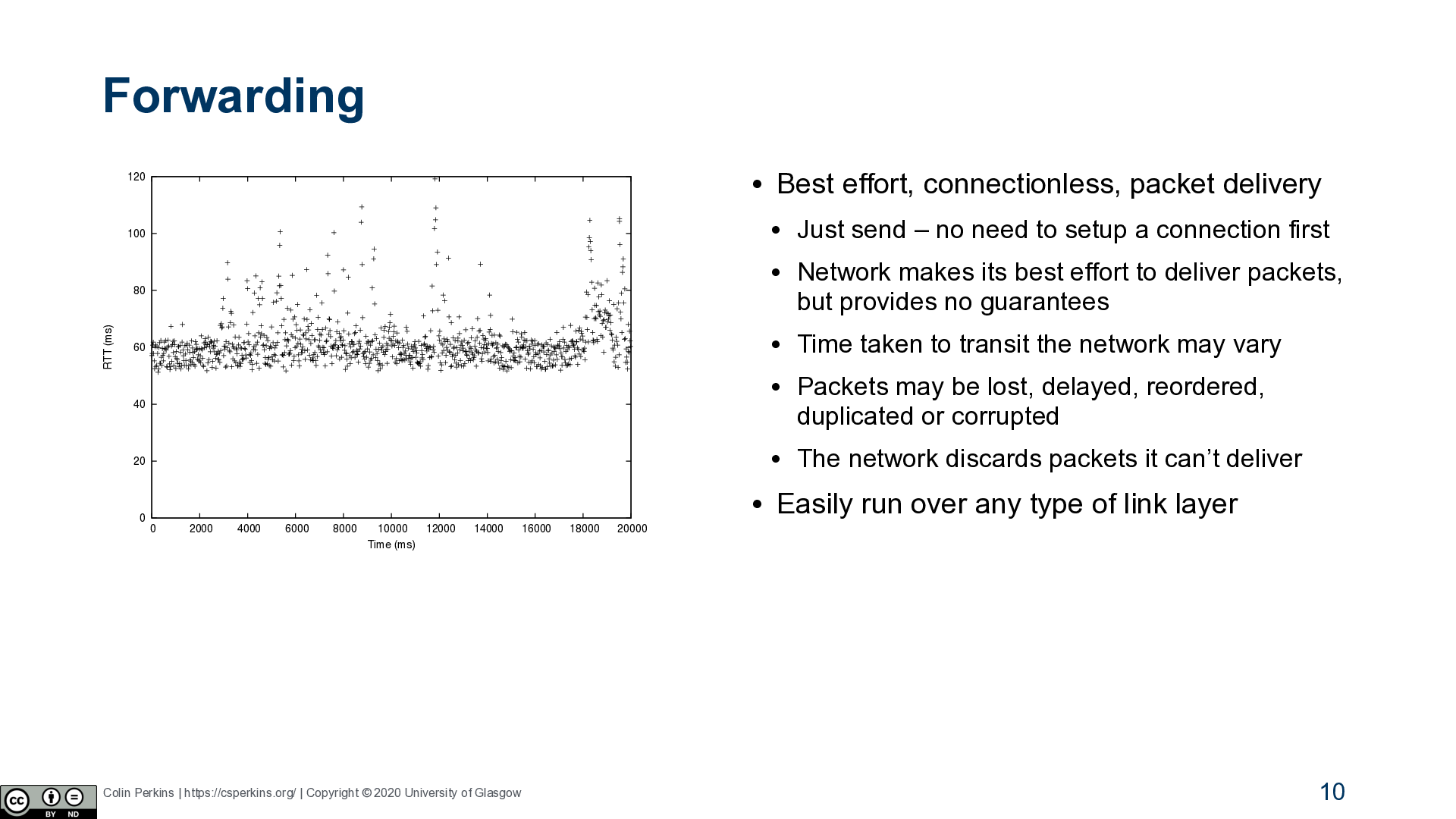
00:14:37.000
A final feature of the network layer is forwarding.
00:14:40.766
Given a route through the network,
00:14:42.833
calculated by BGP for the inter-domain path,
00:14:45.733
and by an intra-domain routing protocol
00:14:47.900
such as OSPF within each network,
00:14:50.600
how are the packets actually forwarded along that path?
00:14:54.700
Forwarding in the Internet follows a best effort approach.
00:14:58.533
A router in the network receives a packet,
00:15:00.966
and makes its best effort to forward it
00:15:02.700
towards its destination.
00:15:05.600
The network is connectionless.
00:15:07.933
A sender doesn’t need to establish a connection
00:15:10.566
or ask permission before sending a packet,
00:15:12.900
and makes no attempt to reserve capacity.
00:15:16.100
As a results, the network makes no guarantees.
00:15:19.533
If there are insufficient resources available to
00:15:22.033
forward a packet, then it may be delayed
00:15:24.400
or will simply be discarded.
00:15:27.466
The figure shows an example,
00:15:29.133
showing the time packets take to traverse the network,
00:15:32.366
with the x-axis showing time since the start
00:15:35.166
of transmission, and the y-axis
00:15:37.533
showing the time taken to receive a response
00:15:39.500
from the destination.
00:15:42.033
As can be seen, the time taken to get a response
00:15:44.566
may vary significantly,
00:15:46.033
depending on the amount of other traffic in the network.
00:15:49.566
Packets may be delayed, reordered, lost,
00:15:52.766
duplicated, or corrupted in transit.
00:15:56.800
In a well engineered network,
00:15:58.800
there is little timing variation,
00:16:00.866
packets are rarely lost or corrupted,
00:16:03.033
and almost never arrive out of order.
00:16:05.733
If the packets traverse a poor quality network,
00:16:08.600
however, behaviour may be less predictable.
00:16:12.666
The Internet can provide extremely high quality,
00:16:16.200
but there’s no requirement that it does so.
00:16:19.000
This gives flexibility.
00:16:20.566
The Internet can encompass all sorts of different networks,
00:16:23.833
not just those in rich countries
00:16:25.733
with well-developed infrastructure.
00:16:28.000
But, it requires applications
00:16:30.300
to be able to cope with unpredictable quality.
00:16:34.500
To summarise,
00:16:36.200
the network layer provides the interworking function
00:16:39.300
that allows networks to cooperate,
00:16:41.366
and come together to build a global Internet.
00:16:44.400
It provides a common addressing scheme
00:16:46.566
to identify endpoints of communication,
00:16:49.066
a routing scheme to allow systems to determine
00:16:51.833
the appropriate path for data to take
00:16:53.500
across the internetwork, and a forwarding scheme
00:16:56.333
to move packets towards their destination.
00:16:59.833
In the Internet,
00:17:00.833
the network layer is the Internet Protocols,
00:17:03.466
IPv4 and IPv6.
00:17:06.433
Data is routed between Autonomous Systems using BGP,
00:17:10.266
and within autonomous systems using distance vector
00:17:13.400
or link-state routing protocols, such as OSPF.
00:17:17.433
Finally, packet forwarding happens on a best effort basis,
00:17:21.466
giving the flexibility operate over any type of link layer
00:17:24.800
at the cost of potentially unpredictable behaviour.
00:17:28.800
The network layer provides connectivity.
00:17:31.666
Above it sits the transport layer,
00:17:33.600
that provides the abstractions that
00:17:35.433
applications use to deliver data.
Part 5: The Transport Layer
Part 5 of the lecture reviews the transport layer in the Internet.
It talks about UDP and TCP, the services they provide to Internet
applications, and their strengths and weaknesses. It reviews TCP
connection establishment and congestion control very briefly.
00:00:00.566
The transport layer isolates the applications
00:00:03.566
from the vagaries of the network.
00:00:05.566
It ensures data is delivered with appropriate reliability,
00:00:08.833
and adapts the speed of transmission to match
00:00:11.033
the network capacity.
00:00:13.066
There are two widely used transport layer protocols
00:00:15.466
in the Internet: UDP and TCP.
00:00:19.300
UDP provides an unreliable packet delivery service,
00:00:22.666
essentially exposing the raw IP
00:00:25.033
network model to the applications.
00:00:27.500
It’s useful for applications that prefer
00:00:29.533
timeliness over reliability,
00:00:31.766
and as a building block for developing
00:00:33.433
new transport protocols.
00:00:35.833
TCP provides a reliable service,
00:00:38.300
retransmitting any lost packets,
00:00:40.466
putting reordered data back into the correct order,
00:00:43.200
and adapting its transmission rate
00:00:45.000
to match the available capacity.
00:00:47.166
It’s useful for applications that need data
00:00:49.633
to be delivered reliably
00:00:51.233
and as fast as possible.
00:00:53.566
In this part, I’ll talk about transport layer concepts,
00:00:56.866
and the UDP and TCP transport protocols
00:00:59.466
used in the Internet.
00:01:01.566
I’ll also briefly introduce the idea of congestion control,
00:01:04.700
adapting the sending rate of the transport
00:01:06.600
to match the available network capacity.
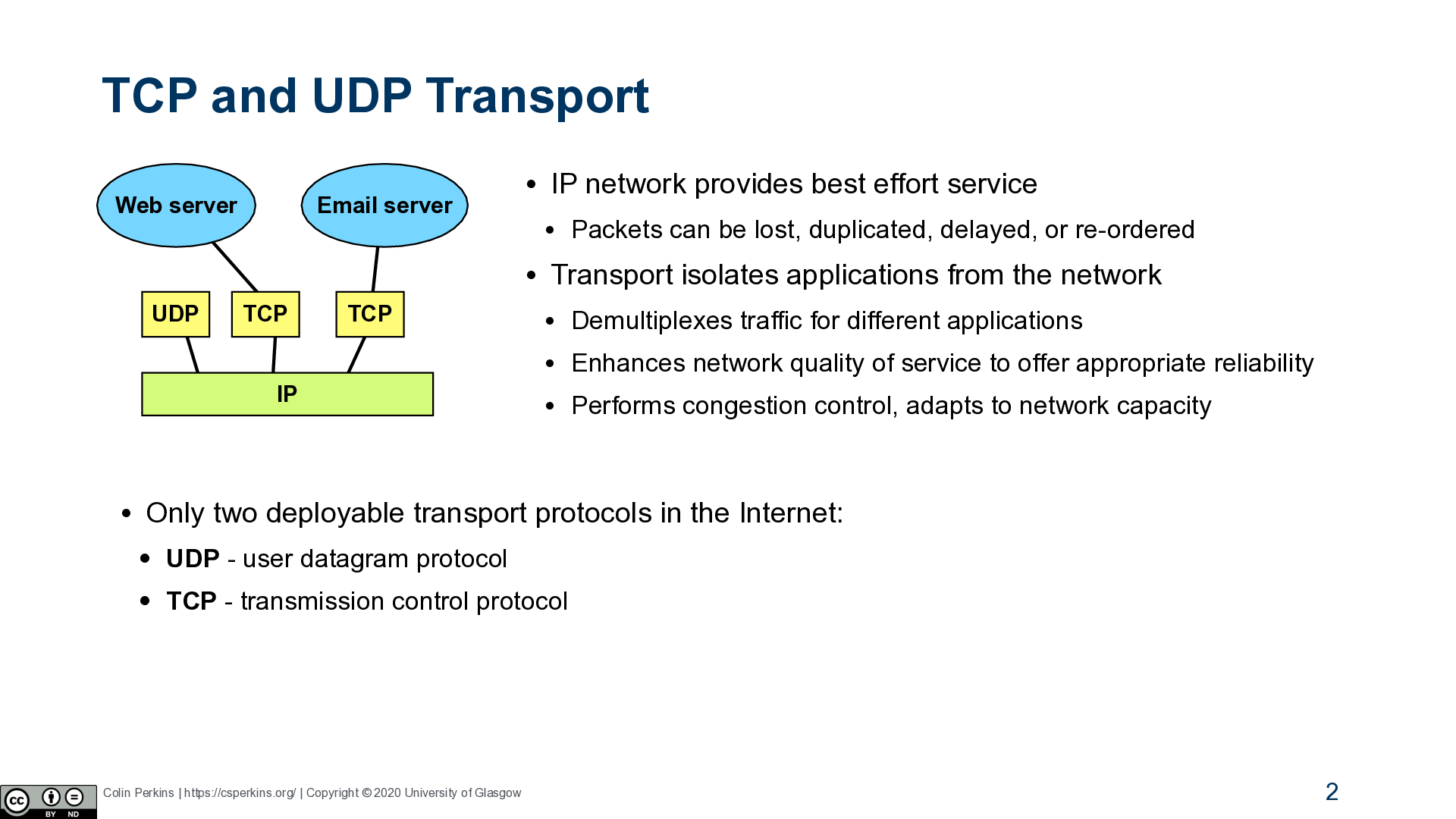
00:01:10.766
As discussed in the previous part,
00:01:13.600
an IP network provides only a
00:01:15.466
best effort packet delivery service.
00:01:18.000
IP packets can be lost,
00:01:19.800
duplicated, delayed, or re-ordered in transit.
00:01:24.033
The role of the transport protocol
00:01:26.100
is to isolate applications,
00:01:27.933
as much as is necessary, from the network.
00:01:31.333
The transport protocol demultiplexes traffic
00:01:33.866
destined for different applications.
00:01:35.933
It enhances the network quality of service
00:01:39.633
to offer appropriate reliability for those applications.
00:01:43.233
And it performs congestion control,
00:01:45.033
to adapt the transmission rate
00:01:46.400
to the available network capacity.
00:01:49.433
There are two transport protocols that have
00:01:51.366
been successfully deployed in the Internet.
00:01:53.700
UDP, the user datagram protocol,
00:01:57.200
provides an unreliable service.
00:02:00.200
TCP, the transmission control protocol,
00:02:03.133
provides a reliable, ordered,
00:02:05.333
and congestion controlled service.
00:02:07.966
Applications that run on the Internet
00:02:10.066
use one of these two transport protocols.
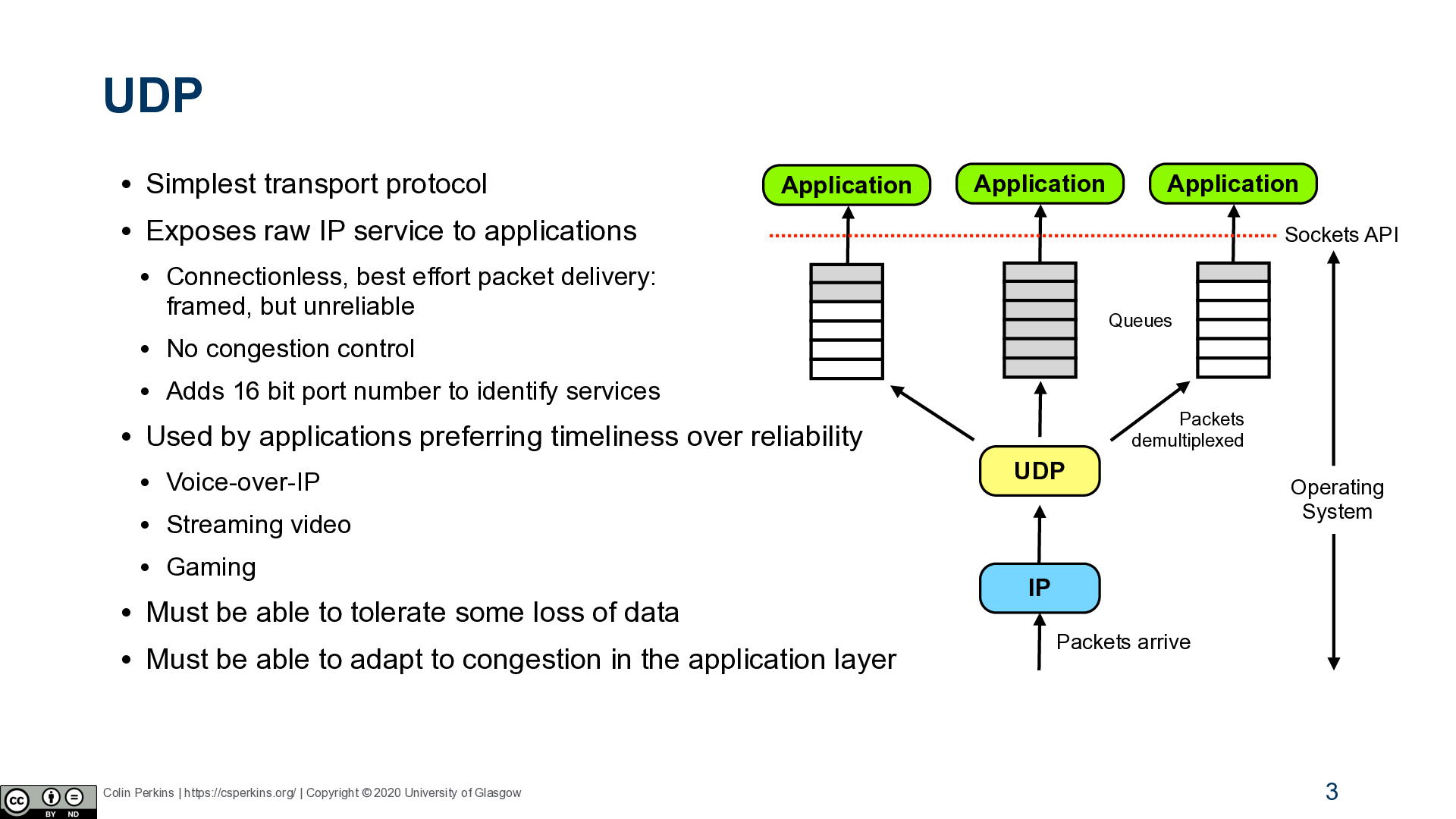
00:02:14.300
UDP is the simplest
00:02:16.366
possible transport protocol that can run on the Internet.
00:02:19.666
It exposes the raw IP service to applications,
00:02:23.733
adding only the concept of a port number,
00:02:26.133
to identify different applications running on a single host.
00:02:30.166
Like IPv4 and IPv6, UDP is connectionless.
00:02:35.300
An application doesn’t need to establish a UDP connection.
00:02:39.200
Rather, it can simply send a packet towards
00:02:41.633
a destination without asking permission
00:02:43.733
or establishing a connection.
00:02:46.933
UDP datagrams are delivered in a best effort manner.
00:02:50.600
Datagrams might not arrive at all,
00:02:52.800
and if they do arrive, they might not arrive in the order
00:02:55.733
they were sent.
00:02:57.266
The UDP transport protocol
00:02:58.866
doesn’t attempt to correct for this,
00:03:01.033
or to ensure reliable delivery.
00:03:03.733
It’s the responsibility of the application using UDP
00:03:07.133
to reconstruct the ordering, or to detect lost packets.
00:03:11.566
Similarly, UDP doesn’t perform any form of
00:03:14.700
congestion control.
00:03:16.366
If an application using UDP
00:03:18.566
tries to send faster than the network can deliver packets,
00:03:22.033
then those packets will simply be discarded.
00:03:25.033
UDP doesn’t help the application adapt
00:03:27.533
its sending rate to match the network capacity.
00:03:31.066
Accordingly, applications using UDP
00:03:34.433
must be able to tolerate some loss of data,
00:03:36.933
to receive data out of order,
00:03:39.400
and to be able to estimate and adapt
00:03:41.700
to the available network capacity.
00:03:44.533
Doing this well is extremely difficult,
00:03:47.033
and UDP is not suitable for many applications.
00:03:51.433
Where UDP is useful
00:03:53.233
is when the application prefers timeliness over reliability.
00:03:57.466
Because it doesn’t attempt to retransmit lost data,
00:04:00.533
and doesn’t buffer data
00:04:02.233
to allow it to be put into the correct order,
00:04:04.433
UDP offers the lowest possible latency for
00:04:07.433
data sent across the network.
00:04:10.300
That’s useful for applications like voice-over-IP,
00:04:13.366
video conferencing, and gaming,
00:04:15.633
that can tolerate some data loss but need low latency.
00:04:20.033
For most applications, though,
00:04:22.066
the unreliable nature of UDP
00:04:23.933
makes it poorly suited to their needs.
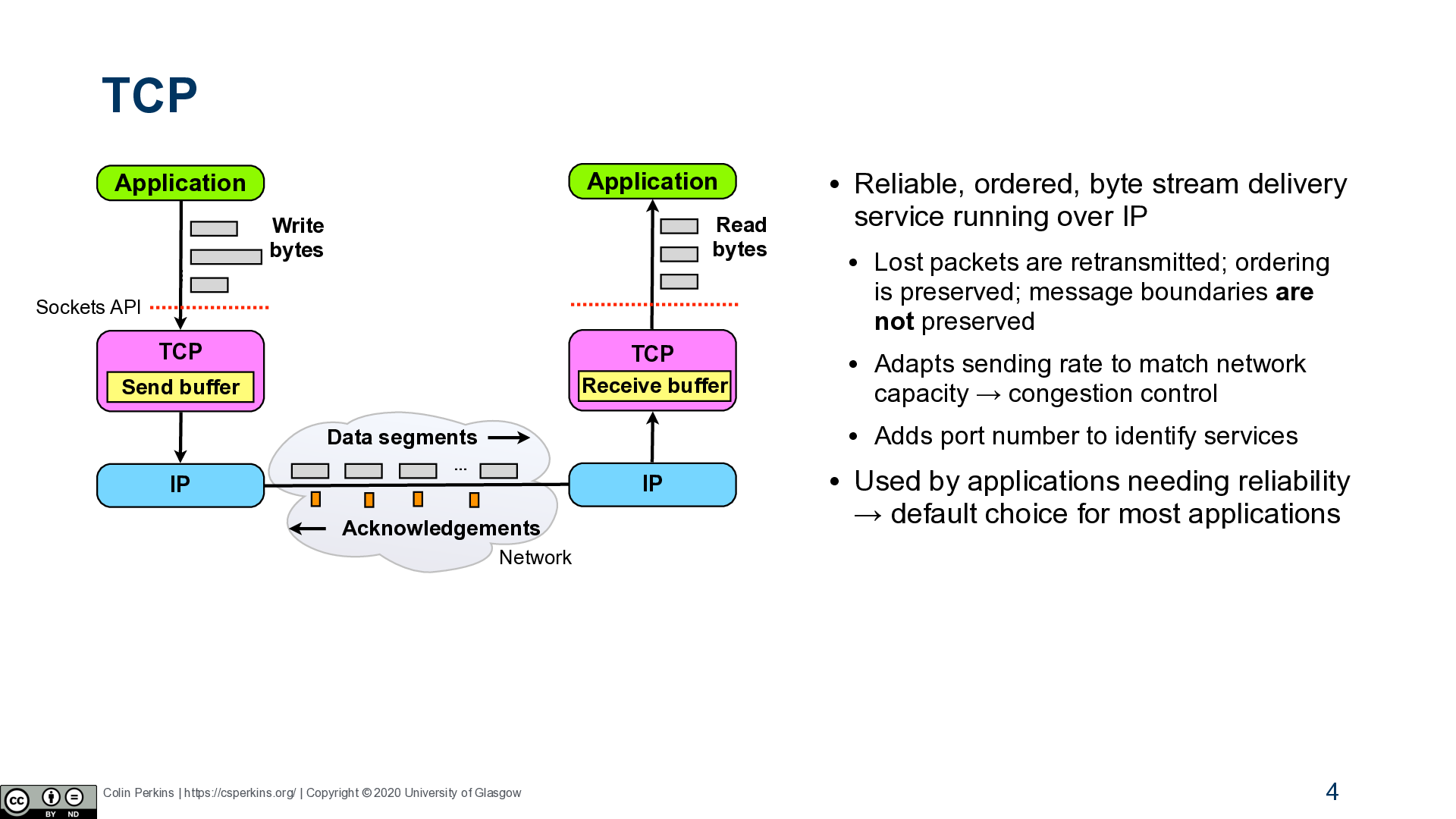
00:04:28.333
By way of contrast,
00:04:29.966
the TCP protocol provides a fully reliable,
00:04:33.266
ordered, byte stream delivery service
00:04:36.100
than runs over an IP network.
00:04:39.400
TCP is a connection oriented transport protocol.
00:04:42.800
Applications that use TCP as their transport
00:04:46.300
must first setup a connection from sender to receiver,
00:04:49.333
before they can send data.
00:04:51.900
Once a connection is established,
00:04:54.000
the TCP protocol ensures that any lost
00:04:56.533
data is retransmitted,
00:04:58.233
and that any reordered data
00:04:59.866
is put back into the correct order,
00:05:01.600
before delivering it to the receiving application.
00:05:05.600
The TCP protocol also adapts the rate at which
00:05:08.866
data is sent across the network
00:05:10.466
to match the available network capacity,
00:05:13.066
a process known as congestion control.
00:05:16.833
A TCP sender writes a sequence
00:05:19.133
of bytes into a TCP connection,
00:05:21.533
and that exact same sequence of bytes
00:05:23.400
is delivered to the receiver.
00:05:25.066
Reliably. In the order sent.
00:05:27.833
And at the maximum speed the network can support.
00:05:31.933
The overwhelming majority of applications
00:05:34.366
running on the Internet use TCP as their transport protocol.
00:05:39.366
TCP has two limitations.
00:05:42.600
The first is that TCP delivers a sequence of bytes,
00:05:46.100
not a sequence of messages.
00:05:48.400
If a sender writes 2000 bytes of data
00:05:51.200
onto a TCP connection,
00:05:53.500
comprising two messages of 1000 bytes each,
00:05:57.033
then TCP guarantees
00:05:58.966
that those 2000 bytes will be received reliably,
00:06:01.933
and in the order sent.
00:06:03.733
It does not guarantee that they will be received as
00:06:06.233
two messages of 1000 bytes each.
00:06:09.500
Indeed, it’s entirely possible that TCP
00:06:11.966
will deliver the data as a block of 1500 bytes
00:06:15.033
followed by a separate block containing
00:06:17.300
the remaining 500 bytes.
00:06:20.000
Applications that care about message boundaries must
00:06:23.233
structure the data they send over a TCP connection
00:06:26.300
to allow those message boundaries to be reconstructed.
00:06:30.066
Since reading and writing data to a file
00:06:32.600
also doesn’t preserve message boundaries,
00:06:35.266
doing this tends not to be difficult.
00:06:39.433
The other limitation of TCP is that,
00:06:42.133
because it delivers data reliably and in order,
00:06:45.100
it must retransmit any lost packets.
00:06:48.333
This delays any data following those lost packets,
00:06:51.700
since it can’t be delivered to the application
00:06:53.866
until the retransmission arrives.
00:06:56.966
This is an unavoidable trade-off,
00:06:58.800
if data is to be delivered reliably,
00:07:00.700
and in the order sent, across an unreliable network,
00:07:04.000
but does mean that TCP trades latency for reliability.
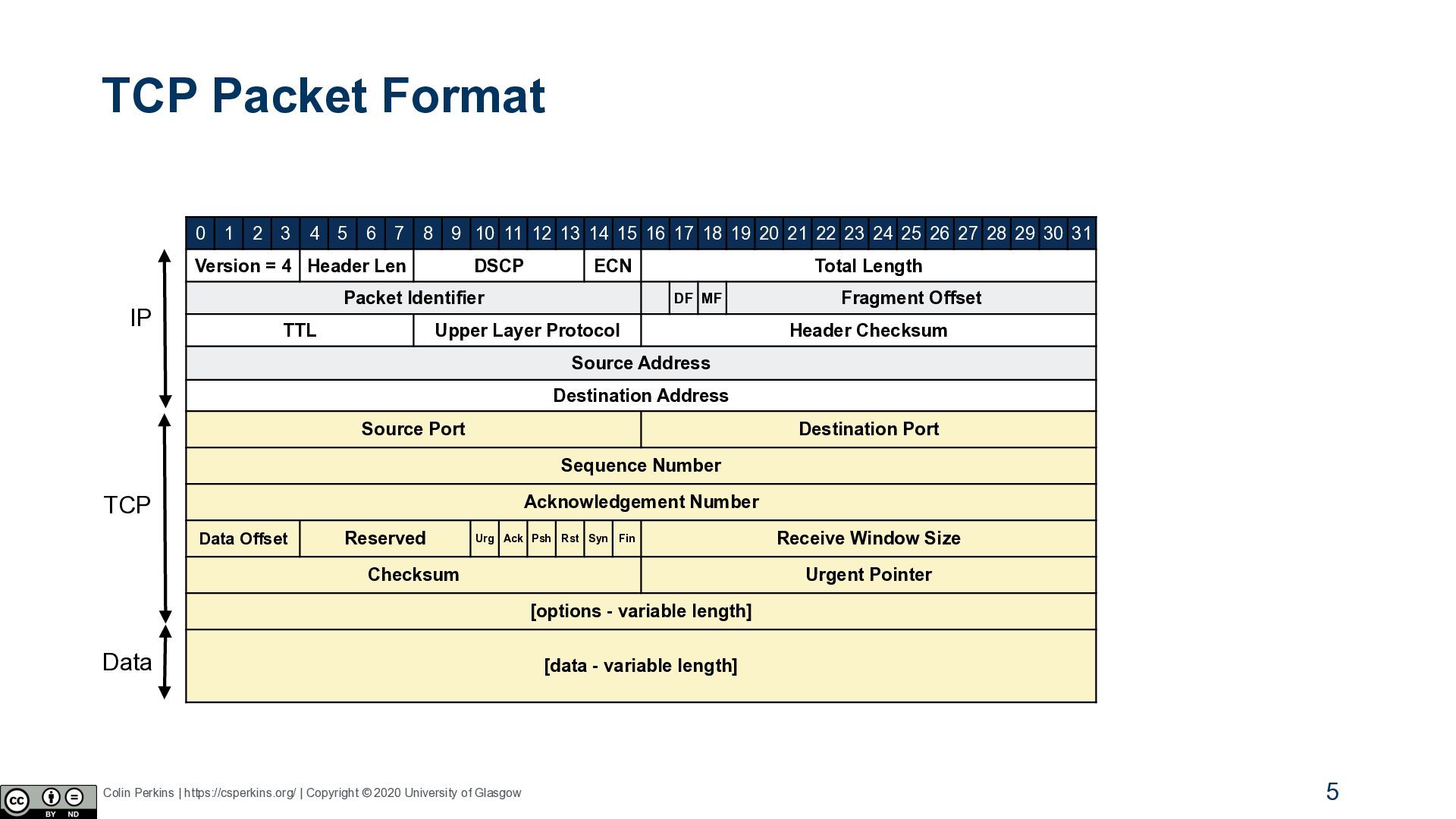
00:07:11.466
TCP delivers data in the form of segments,
00:07:14.600
each delivered within an IP packet.
00:07:17.966
Each TCP segment
00:07:20.033
includes a source and destination port numbers,
00:07:22.733
that identify the applications
00:07:24.966
that send and receive the data.
00:07:27.300
Each TCP segment also includes a sequence number,
00:07:30.433
that counts the number of bytes of data sent
00:07:32.900
and allows the receiver to detect loss
00:07:35.166
and reconstruct the original sending order,
00:07:37.600
and an acknowledgement number
00:07:39.400
that indicates the next segment it wishes to receive.
00:07:43.033
TCP segments also include the receiver window size,
00:07:46.900
that indicates the amount of buffer space
00:07:48.833
the receiver has to store incoming TCP segments,
00:07:52.100
a checksum to detect packet corruption,
00:07:55.366
a set of flags to manage connection setup,
00:07:58.166
and an urgent pointer to support
00:07:59.900
advance delivery of important data.
00:08:02.766
The actual TCP payload data follows this header.
00:08:07.400
As can be seen,
00:08:08.800
TCP packets carry a lot of information
00:08:11.366
in addition to that carried in an IP packet header.
00:08:15.066
TCP is a complex and sophisticated transport protocol,
00:08:18.500
that adds a lot of features to IP
00:08:20.800
in order to ensure that data is delivered effectively.
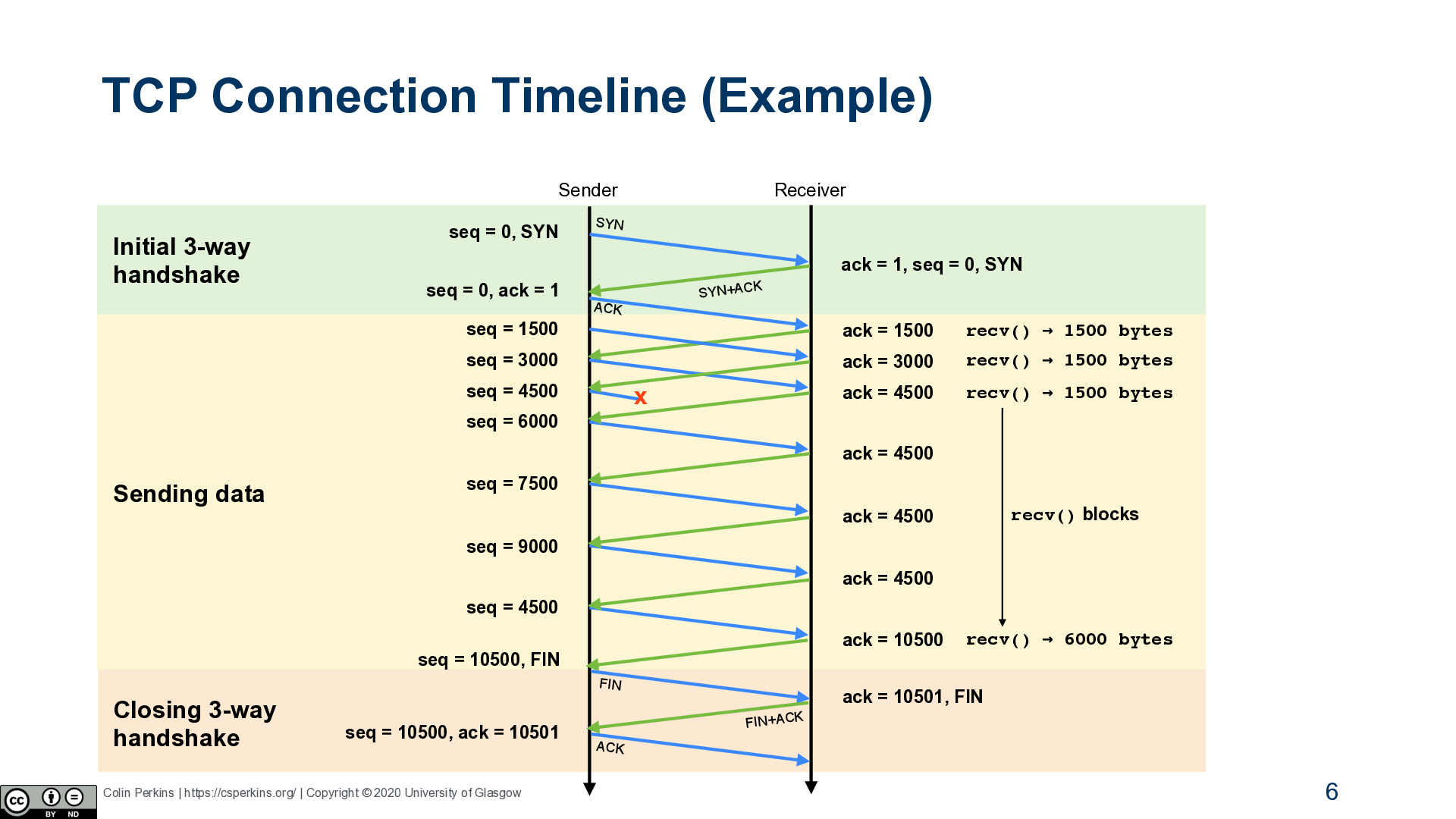
00:08:25.933
A TCP connection proceeds in three stages.
00:08:30.933
At the start of the connection
00:08:32.866
is an initial three-way handshake
00:08:34.766
that establishes the connection.
00:08:36.866
An initial TCP packet is sent
00:08:39.566
from the TCP client to the server,
00:08:41.666
with the SYN (“synchronise”) bit
00:08:44.500
set in the TCP header,
00:08:46.233
to indicate the start of a connection.
00:08:49.266
The server sends a response,
00:08:51.566
with its SYN bit set,
00:08:54.233
to indicate that it’s willing to establish a connection.
00:08:57.433
This response also has the ACK bit set,
00:09:00.300
indicating that the acknowledgement number is valid,
00:09:02.900
because it acknowledges receipt of that initial packet.
00:09:07.000
The client completes the three-way
00:09:09.133
SYN - SYN+ACK - ACK handshake
00:09:11.266
by sending an acknowledgement to the server.
00:09:13.800
This establishes the connection.
00:09:17.200
The client and server can then exchange data.
00:09:20.933
In this example, the client sends data to the server,
00:09:24.366
and the server acknowledges receipt of that data.
00:09:27.633
The initial packet had sequence number 0,
00:09:30.933
and each packet includes 1500 bytes of data.
00:09:35.133
We see the server sending acknowledgement packets,
00:09:37.900
and delivering data to the application in response
00:09:40.300
to recv() calls, as the data packets arrive.
00:09:44.366
We also see that the client
00:09:46.066
can send some number of data packets,
00:09:48.100
known as its congestion window,
00:09:50.100
before it receives an acknowledgement.
00:09:52.966
In this example, the congestion window is 3000 bytes:
00:09:56.533
the client is allowed to send up to 3000 bytes of data
00:09:59.633
without receiving an acknowledgement.
00:10:04.000
The packet with sequence number 4500,
00:10:07.533
sent from client to server, is lost.
00:10:10.800
As a result, when the next packet,
00:10:13.300
with sequence number 6000, arrives
00:10:16.033
the server generates another acknowledgment
00:10:18.433
indicating that it’s still expecting packet 4500.
00:10:23.233
This continues until three duplicate
00:10:25.166
acknowledgements have been received,
00:10:26.800
when the client retransmits the lost packet.
00:10:30.200
Eventually, the missing data arrives at the server.
00:10:33.933
This fills the gap, and the missing data,
00:10:36.533
and the three following packets that were already received,
00:10:39.533
are delivered to the application.
00:10:42.166
The server sees a delay,
00:10:43.866
while the missing data is retransmitted
00:10:46.000
then receives a burst of data.
00:10:48.533
Message boundaries are not preserved.
00:10:52.433
Finally, the connection is closed
00:10:54.333
using a three-way handshake
00:10:55.566
similar to that used to open the connection.
00:10:58.866
We’ll talk more about how TCP establishes connections,
00:11:02.166
and reliably transmits data, in later lectures.
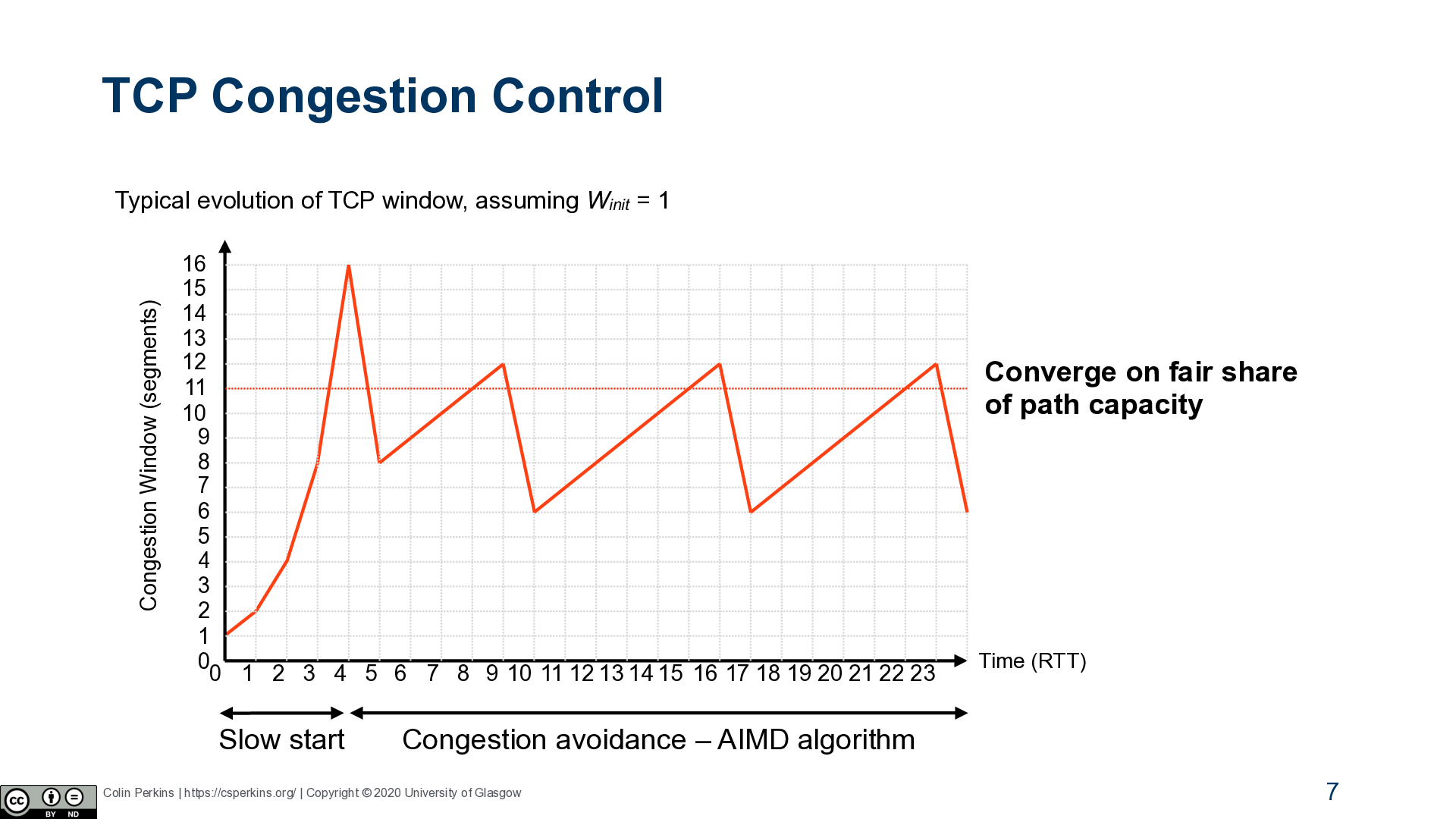
00:11:08.533
The TCP protocol includes a sophisticated algorithm,
00:11:12.000
known as congestion control,
00:11:14.000
that adapts its transmission rate
00:11:15.766
to match the available network capacity.
00:11:18.766
This operates in two phases.
00:11:21.533
The first phase is known as slow-start.
00:11:24.800
At the start of a connection,
00:11:26.666
TCP starts by sending slowly,
00:11:29.066
but increases its sending rate exponentially
00:11:31.633
until it reaches the network capacity.
00:11:33.933
Once it’s sending at a speed
00:11:36.200
that matches the available network capacity,
00:11:38.533
TCP switches to a congestion avoidance phase,
00:11:41.666
adapting its sending rate following a sawtooth pattern
00:11:45.033
that allows it to gradually adapt to changes in capacity.
00:11:49.166
There are a lot of subtle details
00:11:51.300
in TCP congestion control behaviour,
00:11:53.233
that we’ll talk about later in the course.
00:11:56.033
What’s important for now is that TCP can effectively
00:11:59.366
adjust the rate at which data is sent
00:12:01.200
to match changes in the available network capacity.
00:12:04.533
The algorithm it uses to do this looks simple at first glance,
00:12:08.600
but actually contains a lot of complex features,
00:12:11.433
and not obvious behaviours, and is highly effective.
00:12:17.266
To conclude,
00:12:18.933
the transport layer protocols adapt the service
00:12:22.533
provided by the network layer
00:12:23.866
to meet the needs of applications.
00:12:26.266
The Internet provides two transport protocols,
00:12:28.833
TCP and UDP.
00:12:31.033
TCP is a complex and sophisticated protocol,
00:12:34.200
that is highly optimised to deliver reliable data quickly.
00:12:38.066
It’s well suited to the overwhelming majority
00:12:40.800
of Internet applications.
00:12:42.766
UDP is much less sophisticated,
00:12:45.400
and essentially exposes the best effort
00:12:47.433
packet delivery service
00:12:48.666
offered by the underlying IP layer to the application.
00:12:51.700
It’s useful when developing applications that
00:12:54.100
prefer timeliness to reliability,
00:12:56.566
or as a basis for building new transport protocols,
00:12:59.700
but is very difficult to use effectively.
00:13:02.866
The transport layer is the last
00:13:05.100
general purpose layer in the protocol stack.
00:13:07.533
Above it sit the application protocols,
00:13:10.033
that we’ll discuss briefly in the next part.
Part 6: Higher Layer Protocols
Part 6 of the lecture reviews the higher layers of the protocol stack.
It talks about the role of the session layer in managing connections;
it reviews the way the presentation layer supports different data
formats and format negotiation; and it reviews the role of the application
layer in supporting the application logic. Finally, it discusses the
importance of standardisation in ensuring interoperability.
00:00:00.000
The higher layers of the OSI reference model, the
00:00:04.041
session, presentation, and application layers,
00:00:07.000
provide services to help applications manage
00:00:09.333
transport connections, data formats, and the
00:00:11.834
application logic.
00:00:13.708
In this part, I'll talk briefly about some issues
00:00:16.333
to consider around higher layer protocols, and of
00:00:19.291
the importance of protocol standards for interoperability.
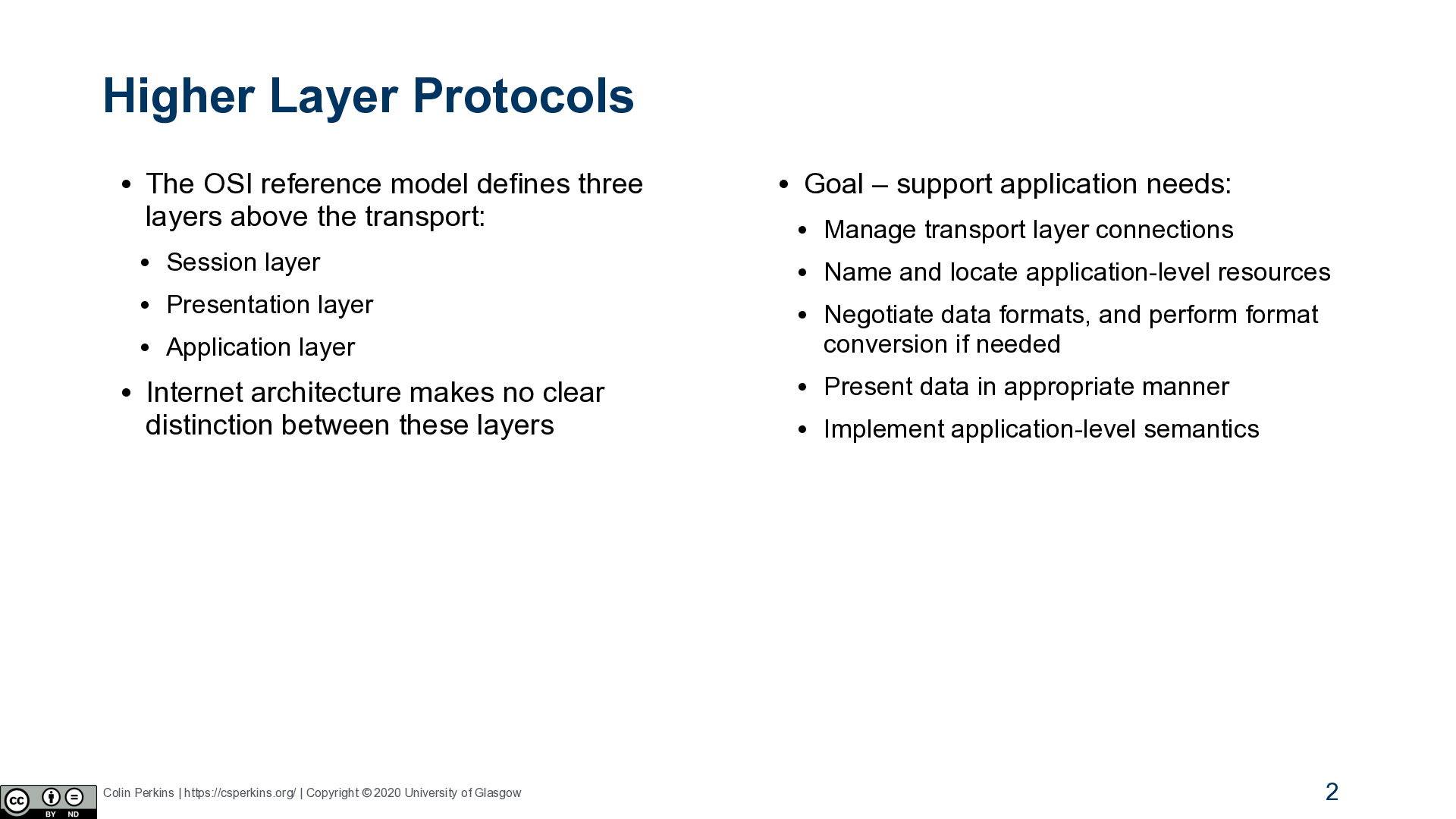
00:00:24.000
The OSI reference model defines three layers
00:00:26.875
above the transport layer. These are the session,
00:00:29.834
presentation, and application layers.
00:00:32.500
The goal of protocols at these layers is to
00:00:35.458
support the needs of applications.
00:00:37.500
They manage transport connections, name and
00:00:40.041
locate resources used by the application,
00:00:42.708
describe and negotiate data formats, and present
00:00:45.959
the data in an appropriate manner.
00:00:48.417
Essentially, they translate the application's
00:00:50.542
needs into protocol mechanisms.
00:00:53.667
The protocols used at these layers tend to be
00:00:56.333
quite tightly bound to particular classes of
00:00:58.583
application, and are less general purpose than
00:01:01.625
protocols at the transport layer and below.
00:01:04.458
As a result, the boundaries between these layers
00:01:07.041
tend to be less clear, and many systems implement
00:01:10.125
these higher layer protocols without a clear
00:01:11.917
distinction between the layers.
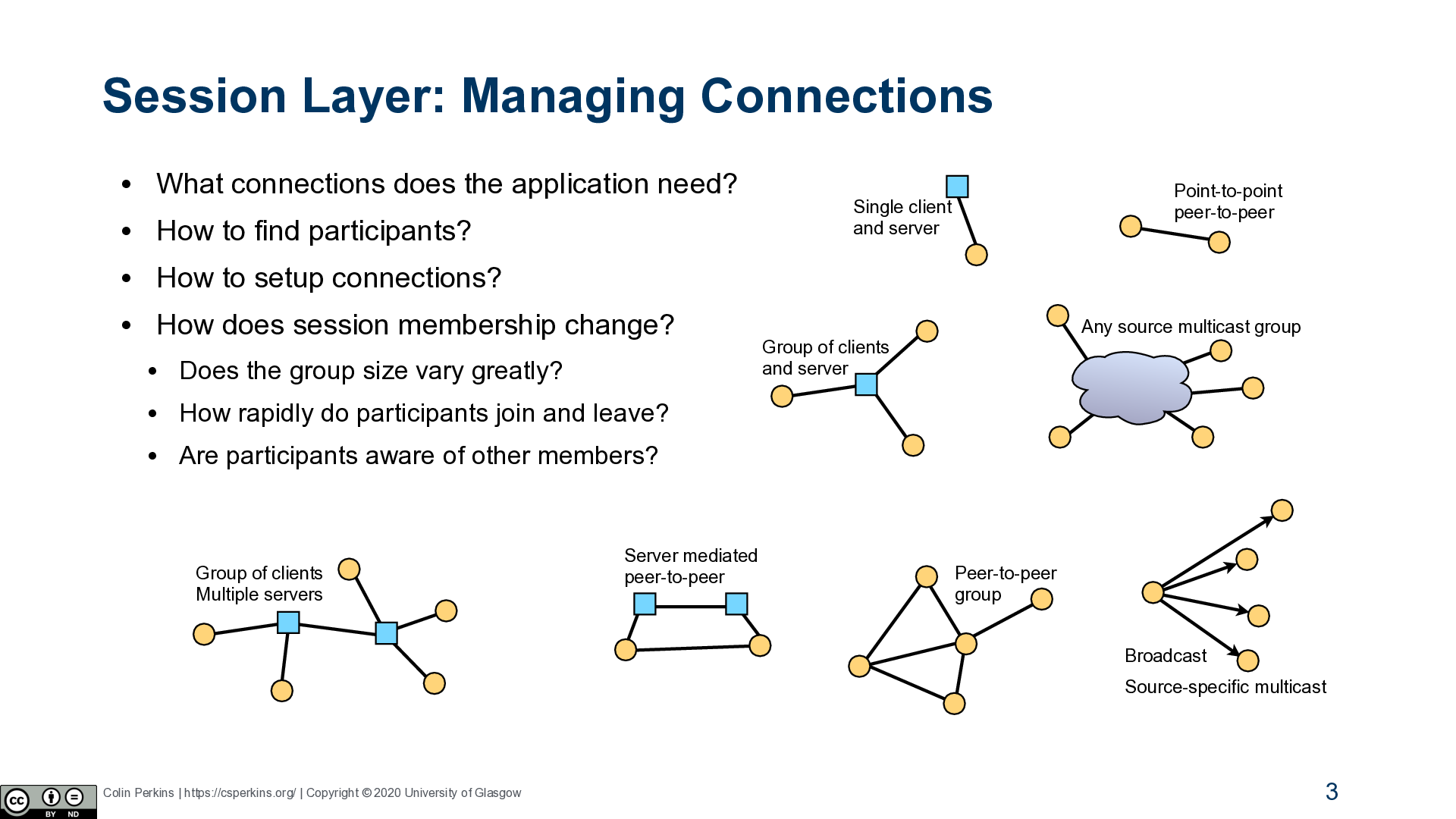
00:01:15.500
The session layer is about managing transport
00:01:18.083
layer connections.
00:01:20.166
Some applications are straightforward, with a
00:01:23.458
single client connecting to a single server, or a
00:01:26.333
small set of servers.
00:01:28.500
HTTP is an example of such a protocol.
00:01:31.792
This class of protocols tends to need relatively
00:01:34.458
little session layer support, often limited to
00:01:37.583
being able to reuse a transport layer connection
00:01:40.417
to send and receive multiple messages.
00:01:43.667
Other systems are more complex, involving
00:01:46.750
multiple clients and servers collaborating to
00:01:49.417
meet the application needs.
00:01:51.625
Examples include video conferencing and chat
00:01:54.041
applications, and multiplayer games that use a
00:01:57.083
cluster of servers to support end-user
00:01:59.208
applications.
00:02:00.959
The session layer in these applications tends to
00:02:03.542
be concerned with finding the participants in a
00:02:06.458
call, or players in the game, and forwarding
00:02:09.417
messages between those participants and between
00:02:12.166
the servers supporting each user.
00:02:15.041
Peer-to-peer applications tend to have still more
00:02:17.708
sophisticated session layer features.
00:02:20.542
These applications have the problem of how to set
00:02:22.834
up peer-to-peer connections in the presence of
00:02:25.166
firewalls and network address translators, and
00:02:27.708
often need to adapt to rapid changes in group
00:02:30.458
membership.
00:02:31.875
BitTorrent is a well-known example of this class
00:02:34.542
of application.
00:02:36.792
Finally, there are applications that use multicast
00:02:40.333
or broadcast transmission, where the network
00:02:42.708
can send messages to a group of receivers.
00:02:45.542
Like peer-to-peer applications, these tend to
00:02:48.083
require the session layer to manage group
00:02:50.083
membership changes.
00:02:52.166
Each session layer protocol is different, and
00:02:54.125
they have relatively little in common with each
00:02:56.458
other, since they tend to be closely tied to a
00:02:58.417
particular class of application.
00:03:02.542
The presentation layer sits above the session
00:03:05.083
layer, and manages the presentation,
00:03:07.375
representation, and conversion of data.
00:03:10.708
Presentation layer features include the media
00:03:13.083
type descriptions that web servers and video
00:03:15.333
conferencing tools use to describe data formats.
00:03:18.458
They specify that a page is in HTML, whether an
00:03:21.708
image is a JPEG or a PNG, or that the video is
00:03:24.834
compressed with H.264 rather than VP8.
00:03:28.583
And they allow applications to describe the data
00:03:31.000
formats they support, and to negotiate an agreed
00:03:33.583
format with the other participants in the session.
00:03:37.041
Other presentation layer features include channel
00:03:40.458
encodings, where data is adapted to fit the
00:03:43.417
limitations of the communications channel.
00:03:46.583
An example is email, where the original design
00:03:48.875
only supported textual data in ASCII formats.
00:03:52.458
When support for email attachments was added,
00:03:54.708
those attachments had to look like text, so they
00:03:57.542
could pass through mail servers that hadn't yet
00:03:59.542
been upgraded.
00:04:01.417
A channel encoding scheme, known as Base64
00:04:03.834
encoding, was developed to do this, allowing
00:04:07.250
arbitrary data to be converted to a text-based
00:04:09.834
format for transmission.
00:04:12.708
Finally, the presentation layer is often where
00:04:15.500
support for internationalization is implemented.
00:04:18.792
There are two sorts of concerns here.
00:04:21.583
One is around labeling the character set used to
00:04:24.041
represent textual data, whether it is in Unicode
00:04:27.208
text in UTF-8 format,
00:04:29.458
or some national character sets such as ASCII,
00:04:31.834
Latin1, or the Big 5 system used in Taiwan and
00:04:35.166
Hong Kong.
00:04:36.667
The other is around labeling the language,
00:04:38.875
possibly the regional variant or dialect that is used.
00:04:43.375
The problems addressed by the presentation layer
00:04:45.625
are wide-ranging and tend to relate to the
00:04:47.708
broader system and to the environment in which
00:04:50.083
the application operates,
00:04:51.500
not just to the network communication.
00:04:56.166
The final layer in the 7-layer OSI reference
00:04:58.875
model is the application layer.
00:05:01.417
It is here that protocol functions that are
00:05:03.667
specific to the application logic are implemented.
00:05:06.959
The application layer protocols deliver email
00:05:09.542
messages, retrieve web pages, stream video,
00:05:12.708
support multiplayer games, and so on.
00:05:15.667
By definition, such messages are entirely
00:05:18.417
application-specific, and there is little that is
00:05:21.250
general to say here.
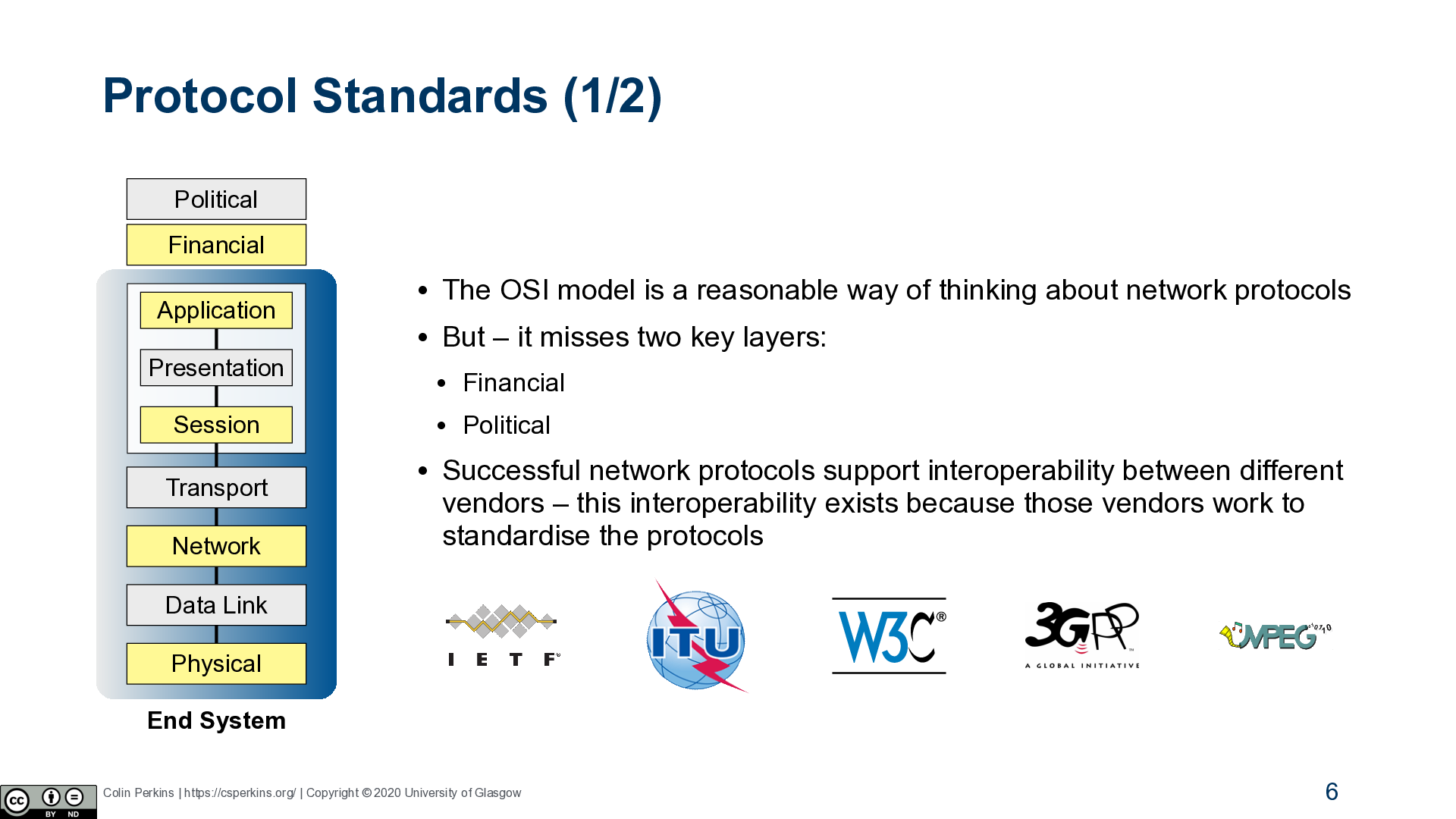
00:05:25.041
The OSI model is a reasonable way of thinking
00:05:27.917
about network protocols.
00:05:29.917
Having a common model helps frame an organized
00:05:32.250
discussion of network protocols.
00:05:35.041
Real networks are more complex, and the layer
00:05:37.625
boundaries are less clear-cut than the model
00:05:39.667
suggests, especially around the higher layers,
00:05:42.417
but the OSI model is close enough to reality to
00:05:45.041
be useful.
00:05:46.792
But it misses two key layers, the financial and
00:05:50.625
the political.
00:05:52.542
Network protocols are only successful to the
00:05:55.375
extent that they enable different devices to communicate.
00:05:59.125
This requires interoperability between different
00:06:01.458
implementations of a protocol,
00:06:03.542
implemented by different groups of people.
00:06:06.667
Getting the incentives right, so that different
00:06:09.291
vendors can work together to ensure their
00:06:11.291
products interoperate,
00:06:12.500
is a problem that rapidly goes beyond the
00:06:14.792
technical and into the realms of organizational
00:06:17.083
politics, market forces, regulation, and economics.
00:06:22.667
It's an area where standard-setting organizations,
00:06:25.458
such as the Internet Engineering Task Force,
00:06:27.708
the International Telecommunications Union, the
00:06:30.667
World Wide Web Consortium, the Third Generation
00:06:33.583
Partnership Project,
00:06:35.500
Moving Picture Experts Group, and others, play an
00:06:38.959
important role.
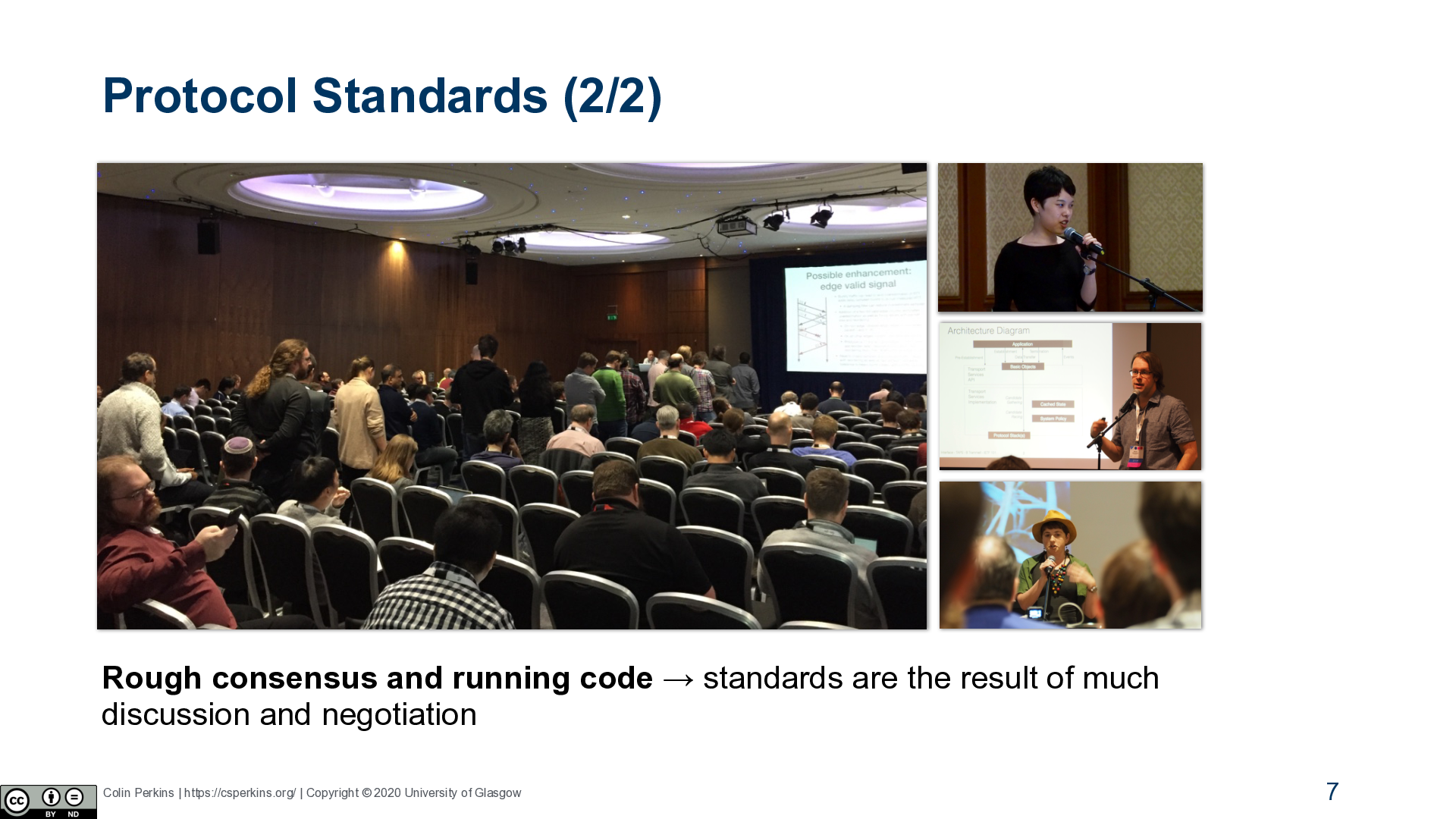
00:06:41.917
Network protocol standards are a very human process.
00:06:45.750
They're the result of much discussion and
00:06:47.750
negotiation, much argument and compromise.
00:06:51.291
The IETF describes the outcome as rough consensus
00:06:54.291
and running code.
00:06:56.208
The Internet works because thousands of engineers
00:06:58.375
spend the effort to make sure it works,
00:07:00.917
to make sure their products work together, and
00:07:03.834
that the protocols are described well enough to
00:07:06.041
support interoperability.
00:07:10.166
This concludes our brief review of the Internet protocols.
00:07:13.583
In the next part, we'll start to think about how
00:07:15.708
the network is changing and evolving,
00:07:17.917
to set the scene for the remainder of the course.
Part 7: The Changing Internet
Part 7, the final part of this lecture, moves on from the review to
talk about some of the changes occurring the Internet, to begin to
set the scene for later lectures. It talks about the assumptions
made in the design of the network, and discusses some changes that
mean those assumption don't necessarily hold in the modern Internet.
In particular, it talks about IPv4 address exhaustion, challenges
in establishing connectivity, increasing device mobility, hypergiants
and centralisation, the need to support real-time applications, and
challenges in securing the network. Finally, it briefly discusses
some of the difficulties faced in upgrading a globally deployed running
network.
00:00:00.000
We're in the middle of a period of rapid change
00:00:02.917
in the Internet infrastructure.
00:00:05.000
In this part, I want to highlight some ways in
00:00:07.291
which the network is changing
00:00:09.000
to set the scene for the remainder of the course.
00:00:11.959
In particular, I want to talk about the
00:00:14.125
exhaustion of the IPv4 address space
00:00:16.333
and the accelerating transition to IPv6,
00:00:19.834
the increasing proportion of wireless mobile
00:00:22.583
Internet endpoints,
00:00:24.000
such as smartphones,
00:00:25.458
and the implications of this shift to a network of
00:00:27.959
mobile devices,
00:00:29.625
the increasing centralization of the network
00:00:32.000
around a small number of hyper-giant content providers,
00:00:35.875
the increasing use of real-time applications
00:00:39.041
and the corresponding need for low-latency transport,
00:00:42.000
and, finally, new approaches to protocol design
00:00:46.000
to support innovation in the face of network ossification.
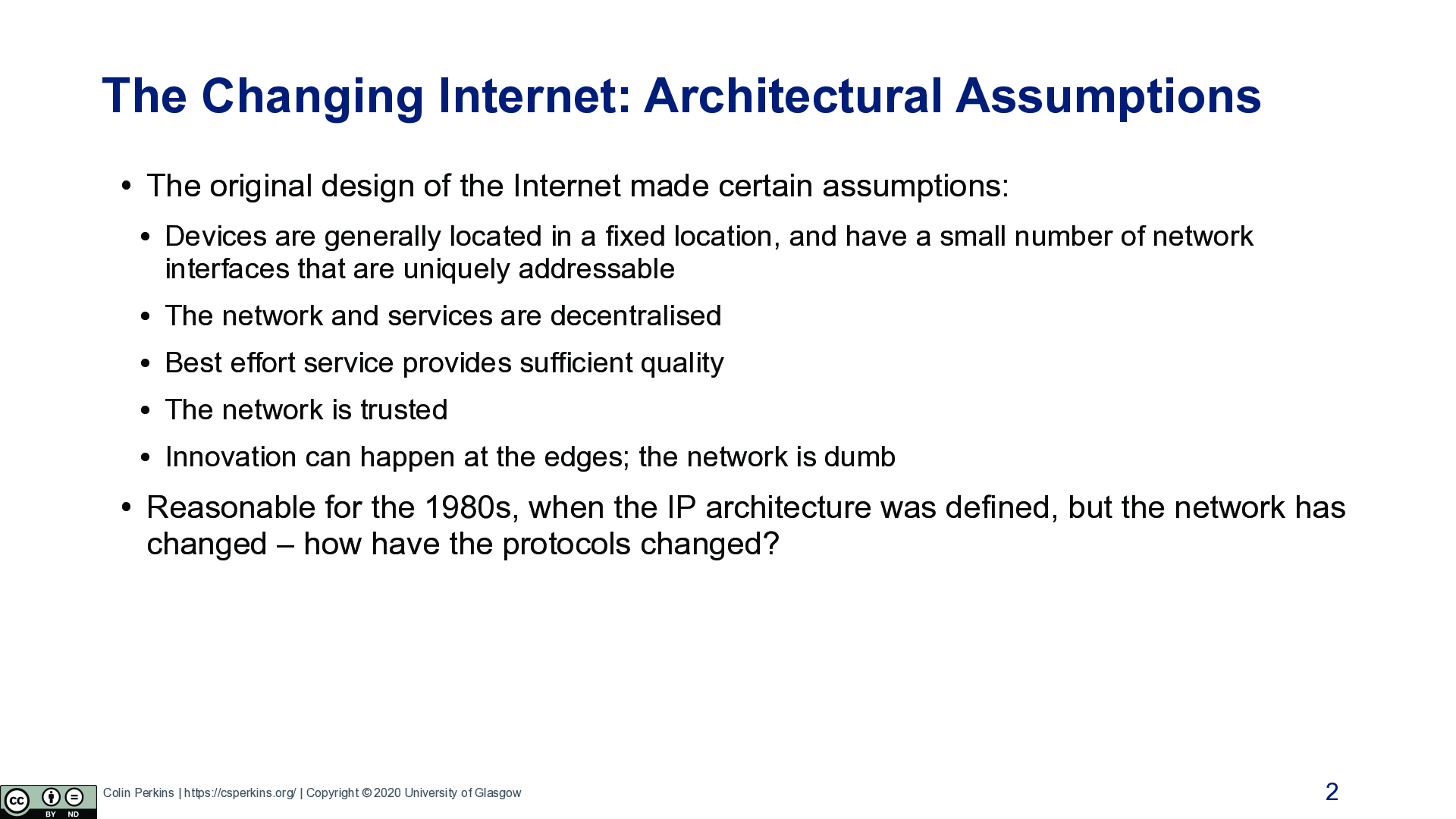
00:00:52.000
The designers of the Internet made certain assumptions.
00:00:56.041
They assumed that devices would generally be located
00:00:59.000
at a fixed location in the network
00:01:01.000
and would have a small number of network interfaces
00:01:04.000
that could be given persistent and globally
00:01:05.917
unique addresses.
00:01:08.166
They assumed the network and the services that run on it
00:01:11.166
would be operated by many different organizations,
00:01:13.917
working as peers,
00:01:16.000
and that there would be no central points of control.
00:01:19.208
They assumed that best-effort packet delivery service
00:01:22.000
would provide sufficient quality
00:01:24.000
and that applications would be adaptive
00:01:26.000
and able to cope with changes in the network capacity
00:01:28.959
and available bandwidth.
00:01:31.125
They assumed that the network was trusted and secure.
00:01:35.583
And they assumed that innovation would happen at
00:01:38.125
the edges and that the network itself
00:01:40.375
would provide only a simple packet delivery service.
00:01:44.458
These assumptions generally made sense
00:01:46.750
for a research network in the mid-1980s,
00:01:49.000
when the original design of the Internet protocols
00:01:51.417
was being finalized.
00:01:53.417
Do they still make sense for a network today?
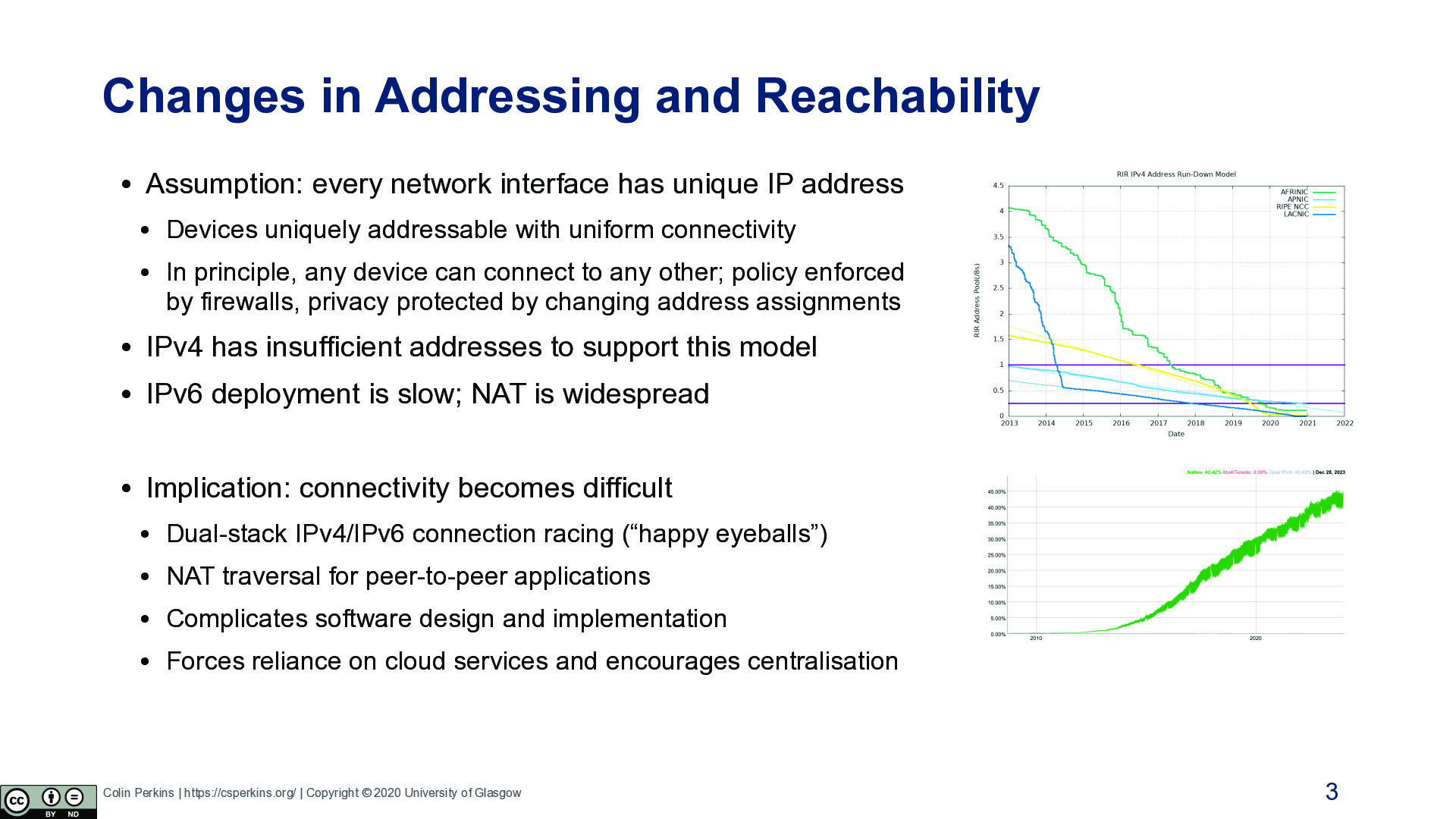
00:01:58.708
The first assumption was that devices were located
00:02:02.041
at fixed places in the network
00:02:03.959
and that each device had a small number of
00:02:05.875
network interfaces
00:02:07.708
that could be given persistent and globally
00:02:09.625
unique IP addresses.
00:02:12.291
This gives the desirable property
00:02:14.250
that every device is addressable by every other device.
00:02:18.375
It assumes a network of peers,
00:02:20.417
with no conceptual difference between clients and servers,
00:02:24.000
where any device connected to the network
00:02:26.250
can take either role, depending on the software it runs,
00:02:29.542
and where, in principle,
00:02:31.500
any device can connect to any other device.
00:02:35.333
Of course, addressable doesn't necessarily imply reachable,
00:02:39.000
and the Internet has long supported firewalls
00:02:41.375
to provide access control by blocking access to
00:02:44.041
certain devices.
00:02:45.834
But the ability for any device to be a server
00:02:48.750
empowers end users.
00:02:51.792
If any device can act as a server,
00:02:54.000
it ought to be possible to run a website or other service
00:02:58.250
anywhere in the network, including on a home machine.
00:03:02.250
There should be no requirement to pay for a
00:03:04.250
dedicated server,
00:03:05.417
located in a managed data center,
00:03:08.000
to host a website or other service.
00:03:12.041
Unfortunately, this assumption failed.
00:03:15.875
It failed because IPv4 had insufficient addresses
00:03:19.000
to support it,
00:03:20.542
and because devices became mobile.
00:03:24.333
The problem with the lack of addresses in IPv4
00:03:28.625
results in many hosts sharing IP addresses with others,
00:03:33.000
using a technique known as Network
00:03:35.250
Address Translation, NAT.
00:03:38.125
In theory, IPv6 will solve this problem
00:03:41.000
by providing enough addresses for each host,
00:03:44.000
but IPv6 has been slow to deploy.
00:03:47.834
The result of this lack of addresses
00:03:50.000
is that connectivity becomes difficult.
00:03:53.125
It's increasingly necessary to try both IPv4 and
00:03:56.333
IPv6 addresses
00:03:58.208
when connecting to a device,
00:04:00.625
perhaps racing connection attempts in parallel to
00:04:03.208
get good performance,
00:04:04.959
a technique known as Happy Eyeballs,
00:04:07.000
because it improves end-user web browsing performance.
00:04:11.667
It's also necessary to think about NAT traversal.
00:04:15.291
A client behind a NAT can easily connect to a
00:04:18.083
server on the public Internet,
00:04:20.000
but, as we'll discuss in Lecture 2,
00:04:23.000
it's difficult to connect to a device located
00:04:25.291
behind a NAT
00:04:26.375
and to build peer-to-peer applications.
00:04:29.625
This combination greatly increases the complexity
00:04:32.625
of establishing a connection.
00:04:35.375
This makes networked applications slower and less reliable,
00:04:39.000
and perhaps more importantly,
00:04:41.000
it forces server applications to run in data centers
00:04:44.000
and discourages peer-to-peer applications.
00:04:47.667
This forces reliance on cloud services
00:04:50.000
and encourages centralization of Internet services
00:04:53.000
onto large cloud providers,
00:04:55.000
such as Amazon Web Services and Google.
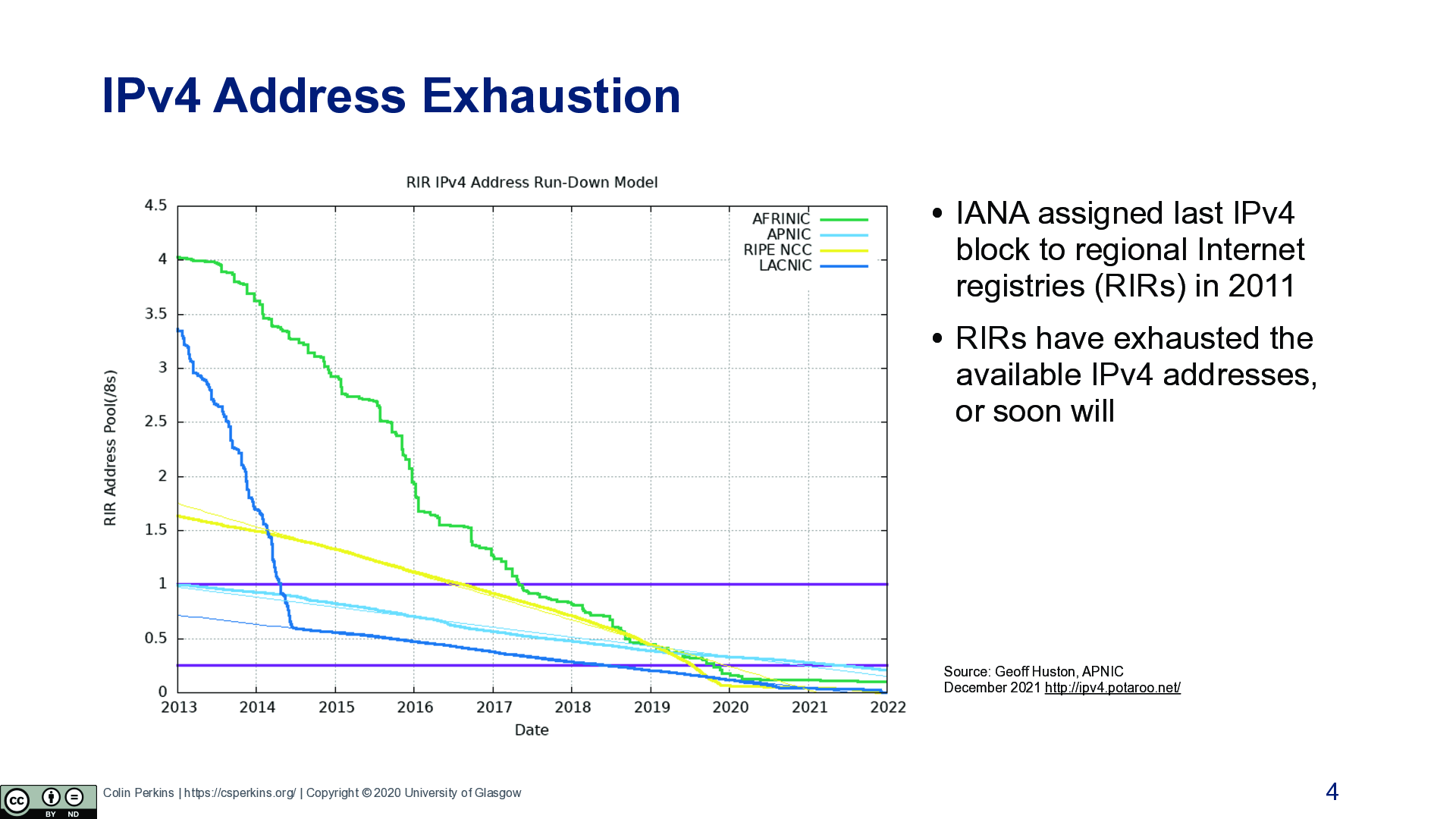
00:05:00.291
How severe is the shortage of IPv4 addresses?
00:05:04.375
Well, IP address assignment follows a hierarchical model.
00:05:09.083
The Internet Assigned Numbers Authority, IANA,
00:05:12.000
assigns blocks of IP addresses to regional
00:05:14.959
Internet registries.
00:05:16.959
Those regional registries then assign addresses to ISPs
00:05:20.708
and other organizations within their region,
00:05:23.000
and those in turn allocate addresses to end users.
00:05:27.000
The IANA assigned the last available blocks of IP addresses
00:05:31.000
to the regional registries in 2011, around 10 years ago.
00:05:36.000
Since then, the regional registries have
00:05:38.583
gradually been running down
00:05:40.000
their pool of available addresses.
00:05:42.125
As of late 2020, the regional registries for
00:05:45.500
Europe, North America, Latin America,
00:05:49.000
and the Asia-Pacific region have entirely run out
00:05:52.417
of available IPv4 addresses.
00:05:55.041
Africa is projected to run out of IPv4 addresses
00:05:59.083
during 2021.
00:06:02.000
There's now a thriving market in the transfer of
00:06:04.291
IPv4 addresses,
00:06:06.000
with networks that were previously assigned IPv4 addresses
00:06:09.000
and have more than they need, selling the
00:06:12.083
addresses on to others.
00:06:14.667
As of late 2020, a single IPv4 address can be
00:06:18.458
sold for around $25.
00:06:21.041
The IPv4 address space owned by the University of
00:06:24.041
Glasgow, for example,
00:06:25.917
is worth around $1.6 million.
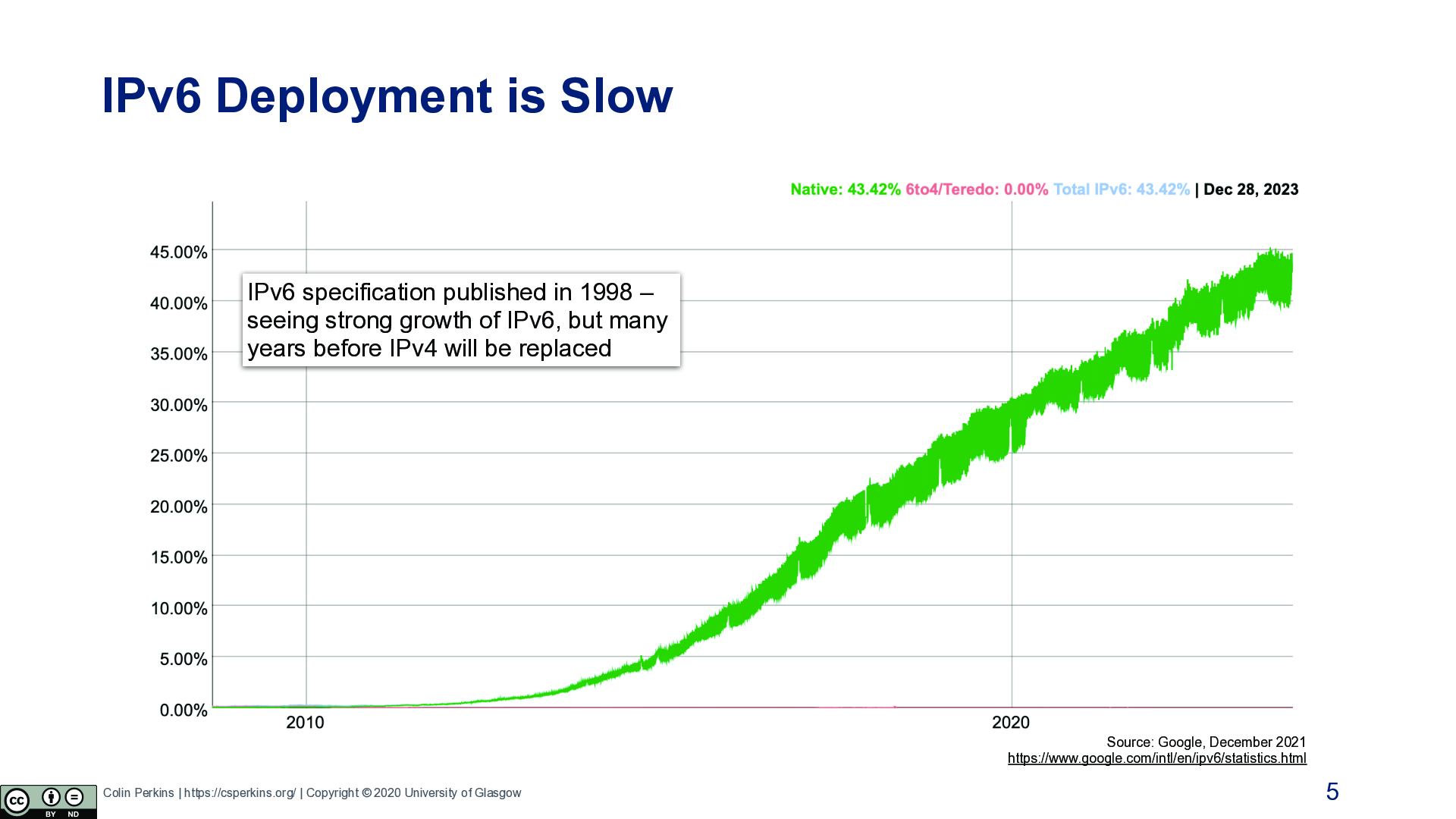
00:06:31.208
Despite the shortage of IPv4 addresses, adoption
00:06:35.041
of IPv6 has been relatively slow,
00:06:37.834
though it's now reaching critical mass.
00:06:40.625
For example, as shown on the slide, Google
00:06:43.667
currently reports
00:06:44.917
that around a third of its users are on IPv6.
00:06:48.917
Availability of IPv6 is highly variable, since
00:06:52.500
network operators tend to switch
00:06:54.000
their customers all at once.
00:06:56.625
Generally, either all the users in a particular
00:06:59.208
network have IPv6, or none of them.
00:07:03.083
In the UK, for example, most mobile networks
00:07:06.792
assign IPv6 addresses
00:07:08.000
to smartphones on their networks by default,
00:07:10.917
but many residential ISPs and businesses still use IPv4.
00:07:15.917
What type of address you get depends on how you
00:07:18.375
connect to the network.
00:07:21.000
Other countries follow similar patterns, with
00:07:23.250
some networks switching wholesale
00:07:25.000
to IPv6, while others remain on IPv4.
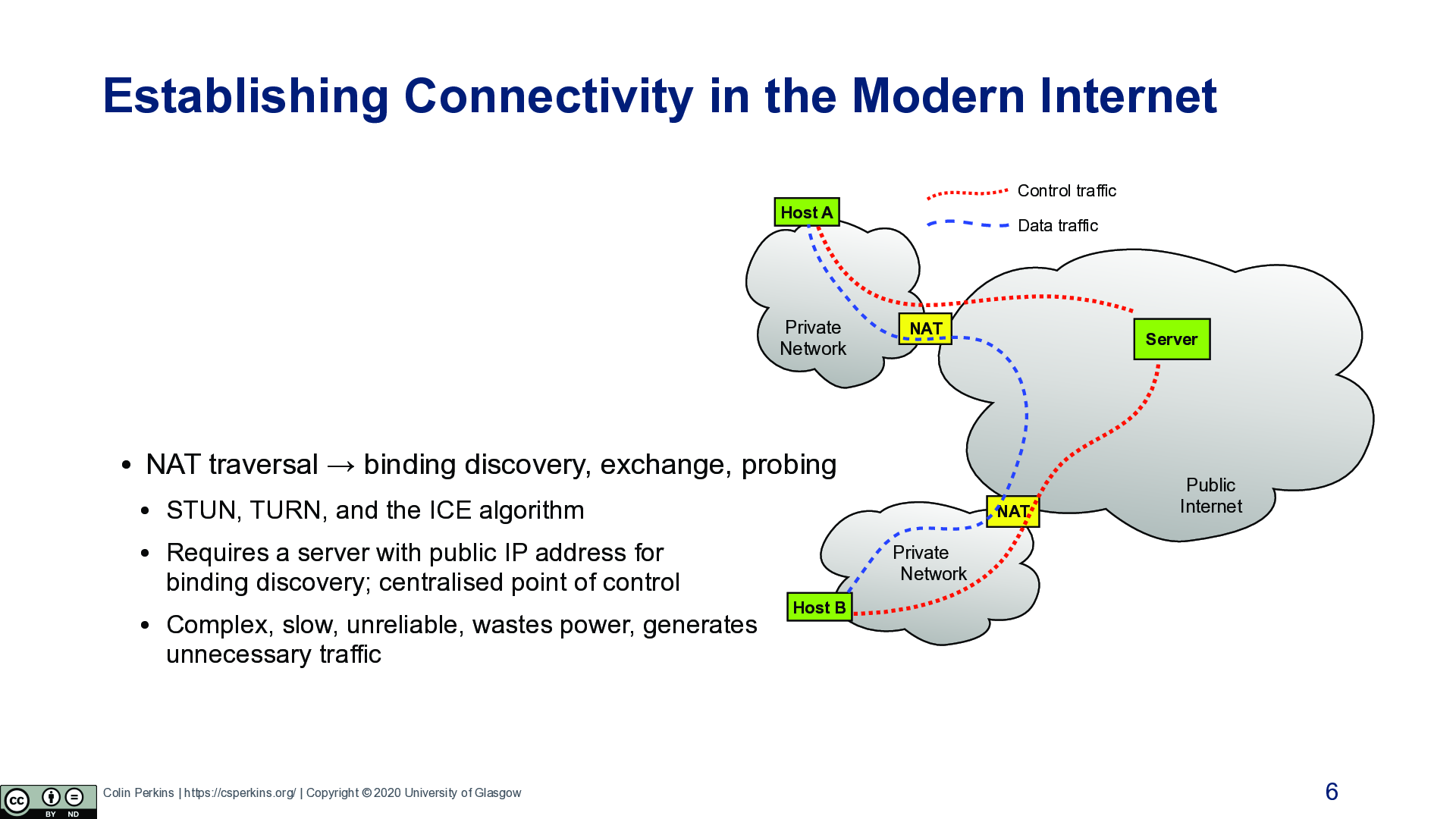
00:07:31.333
This mixed use of IPv4 and IPv6, with many IPv4
00:07:36.500
hosts being located
00:07:37.959
behind network address translators, greatly
00:07:40.417
complicates connection establishment.
00:07:43.750
In the IPv4 Internet, peer-to-peer applications
00:07:47.583
must perform a complex process
00:07:49.208
to discover NAT bindings, exchange candidate
00:07:52.208
addresses with their peer,
00:07:54.000
and probe to establish what addresses are usable
00:07:56.500
for a connection.
00:07:58.792
This uses a set of protocols, known as STUN and
00:08:01.834
TURN, and the assistance
00:08:04.000
of a central server with a globally unique public
00:08:06.542
IPv4 address,
00:08:08.000
to detect the presence of network address translation,
00:08:11.000
to determine what type of address translation is
00:08:13.667
being performed,
00:08:15.000
and to derive a set of candidate addresses that
00:08:17.291
can be used
00:08:18.166
for peer-to-peer communication.
00:08:20.834
The peers use the central server to exchange
00:08:23.083
these candidate addresses
00:08:25.000
with each other, and then follow an algorithm known as
00:08:28.000
Interactive Connectivity Establishment, ICE, to
00:08:31.708
set up direct,
00:08:33.000
low-latency peer-to-peer flows.
00:08:36.208
This works, most of the time, but is complicated,
00:08:39.792
slow, power-hungry,
00:08:41.792
and generates a lot of otherwise unnecessary traffic,
00:08:45.000
all because there aren't enough IPv4 addresses.
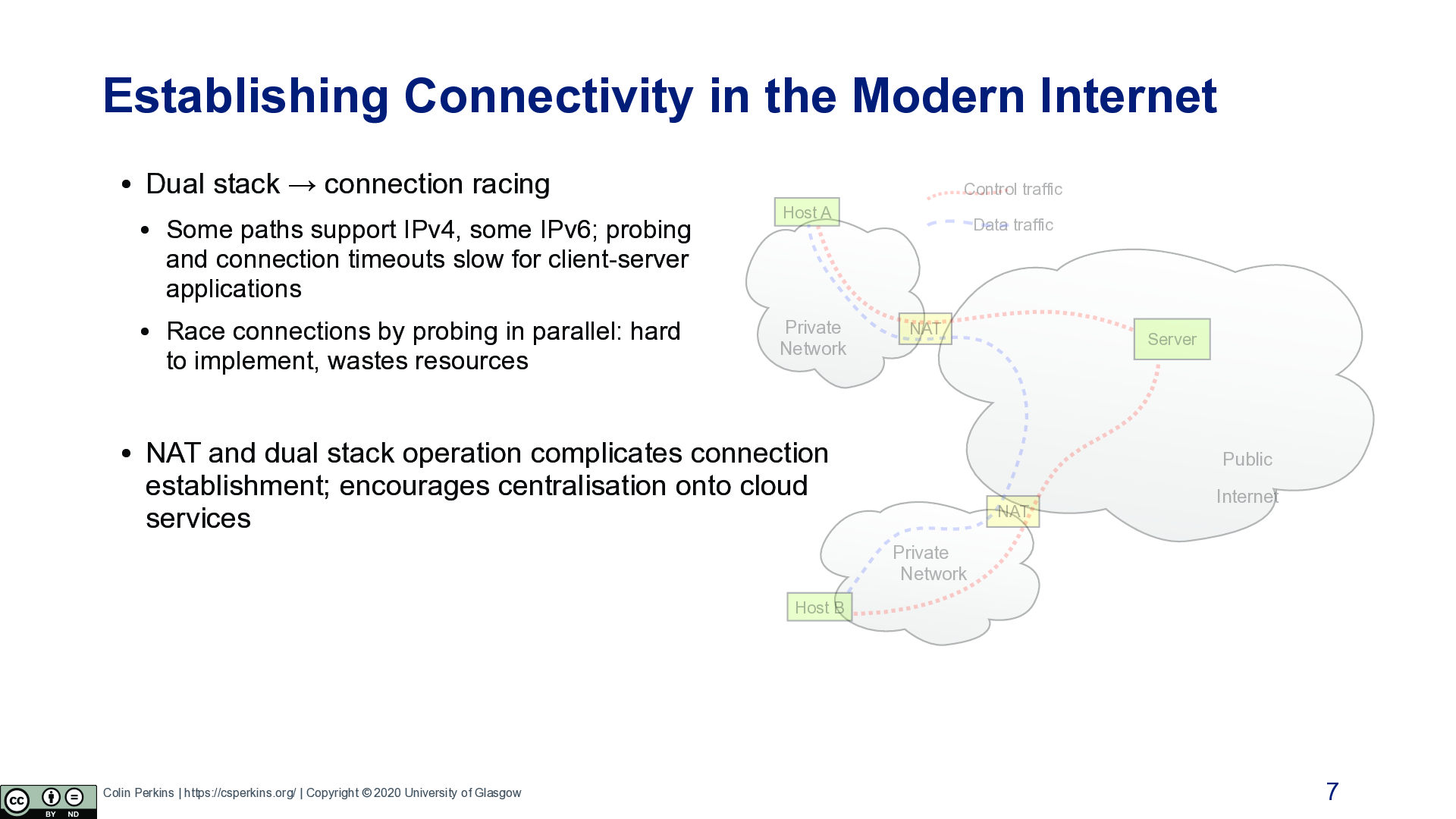
00:08:50.542
The fix, of course, is to move to IPv6.
00:08:54.375
Unfortunately, the move to IPv6 will take a long time,
00:08:58.000
and while it's happening, there will be some
00:09:00.500
devices and some networks
00:09:02.000
that support only IPv4, some that support only IPv6,
00:09:06.208
and some that support both.
00:09:09.166
To reach users on both IPv4 and IPv6,
00:09:13.458
popular services tend to be hosted
00:09:15.583
on servers that have both IPv4 and IPv6 addresses.
00:09:19.750
This is known as dual-stack hosting,
00:09:21.667
and it further encourages
00:09:23.291
centralization onto large hosting providers
00:09:25.834
with the resources
00:09:26.875
to provide both types of address.
00:09:29.917
To get good performance, clients must try to
00:09:32.500
connect using both
00:09:33.792
IPv4 and IPv6 addresses simultaneously,
00:09:36.708
or near- simultaneously.
00:09:39.125
This further complicates connection setup, making
00:09:42.041
it harder to write networked applications.
00:09:48.333
The Internet protocols are designed such that IP
00:09:51.166
addresses encode
00:09:52.333
the location of a network interface within the network.
00:09:55.917
An IP address does not represent a device.
00:09:59.125
It represents a location where a device can
00:10:01.583
attach to the network.
00:10:04.083
If a device is attached to the network via a
00:10:06.333
wireless connection,
00:10:08.000
but moves so that it changes the Wi-Fi or 4G base
00:10:11.125
station to which
00:10:12.000
it connects, then that device will be assigned a
00:10:14.792
new IP address.
00:10:17.166
This has some privacy benefits, but makes it
00:10:20.000
difficult to maintain
00:10:21.542
long-lived connections with that device.
00:10:24.083
For example, TCP connections fail and must be re-
00:10:27.667
established by the application when a device moves,
00:10:31.041
and UDP applications need
00:10:33.000
to coordinate with their peers to change the
00:10:34.792
IP addresses they use
00:10:36.417
for communication.
00:10:38.750
Applications that want to maintain long-lived connections,
00:10:42.000
or that want to accept incoming connections,
00:10:44.792
must deal with the
00:10:46.000
complexity of changing IP addresses,
00:10:48.041
and the need to signal such
00:10:49.583
changes to their peers and re-establish
00:10:51.542
connections as the device moves.
00:10:54.750
Something has to keep track of where each device
00:10:57.125
is in order to route traffic.
00:10:59.792
The assumptions in the design of the Internet
00:11:02.417
mean that complexity
00:11:03.583
is visible to applications, rather than being
00:11:06.000
hidden inside the network.
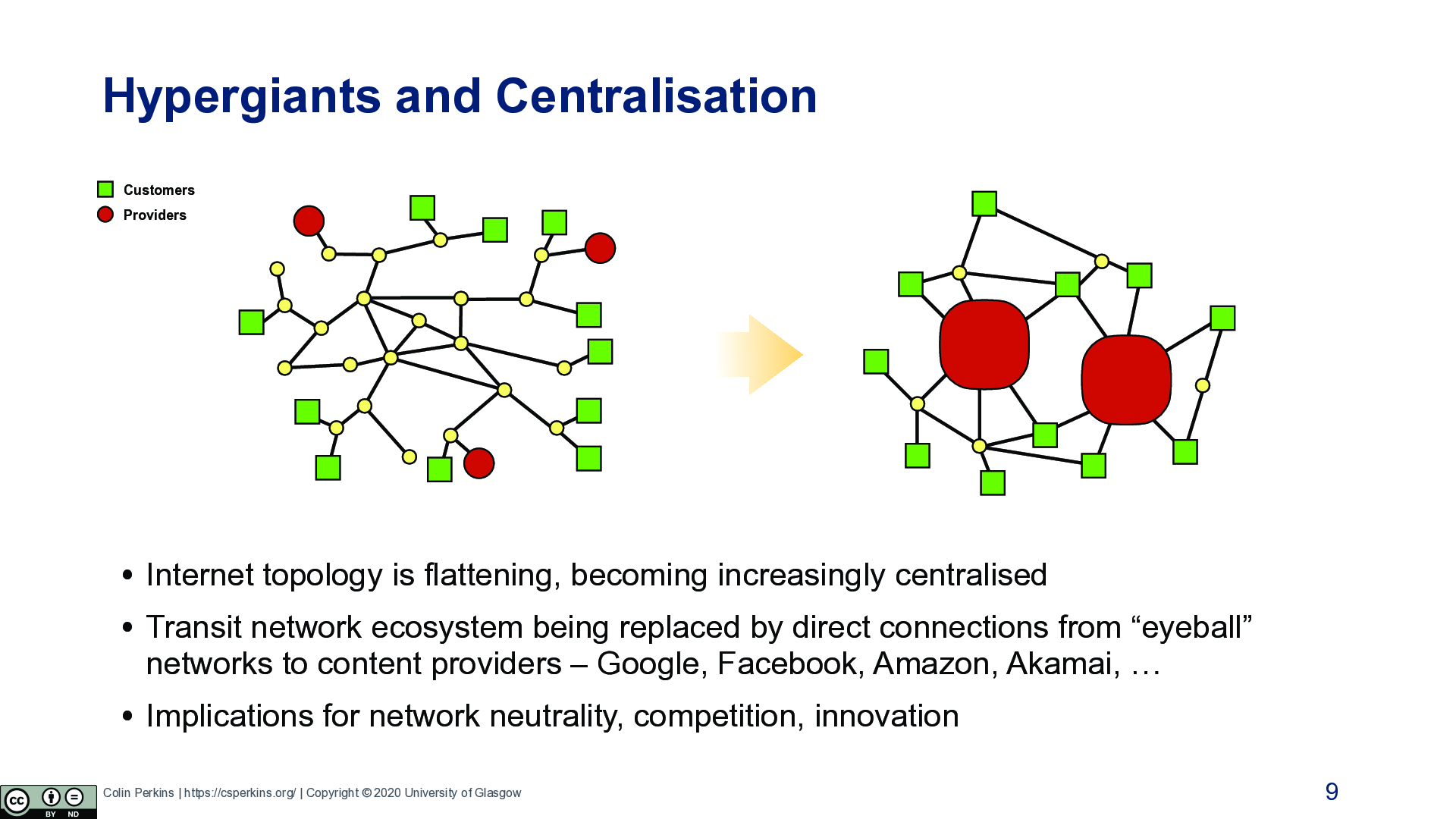
00:11:11.458
As we've seen, several aspects of the Internet's
00:11:14.542
design push towards centralization.
00:11:17.458
The network topology is gradually flattening, and
00:11:20.000
moving away from
00:11:21.250
a complex mesh of peer connections,
00:11:23.625
towards a hub-and-spoke model
00:11:25.250
centered around a small number of large,
00:11:27.375
centralized services,
00:11:29.000
directly connecting to so-called eyeball networks
00:11:31.750
at the edge of the network,
00:11:33.166
where consumers of those services live.
00:11:36.208
This enables the set of hyper-giant content
00:11:38.375
providers, including
00:11:40.000
Google, Facebook, Amazon, Akamai,
00:11:43.041
Apple, Netflix, and so on,
00:11:45.875
to dominate, and makes it difficult for new
00:11:48.250
competitors to gain a foothold.
00:11:50.708
This has implications for network neutrality,
00:11:53.000
competition, and innovation.
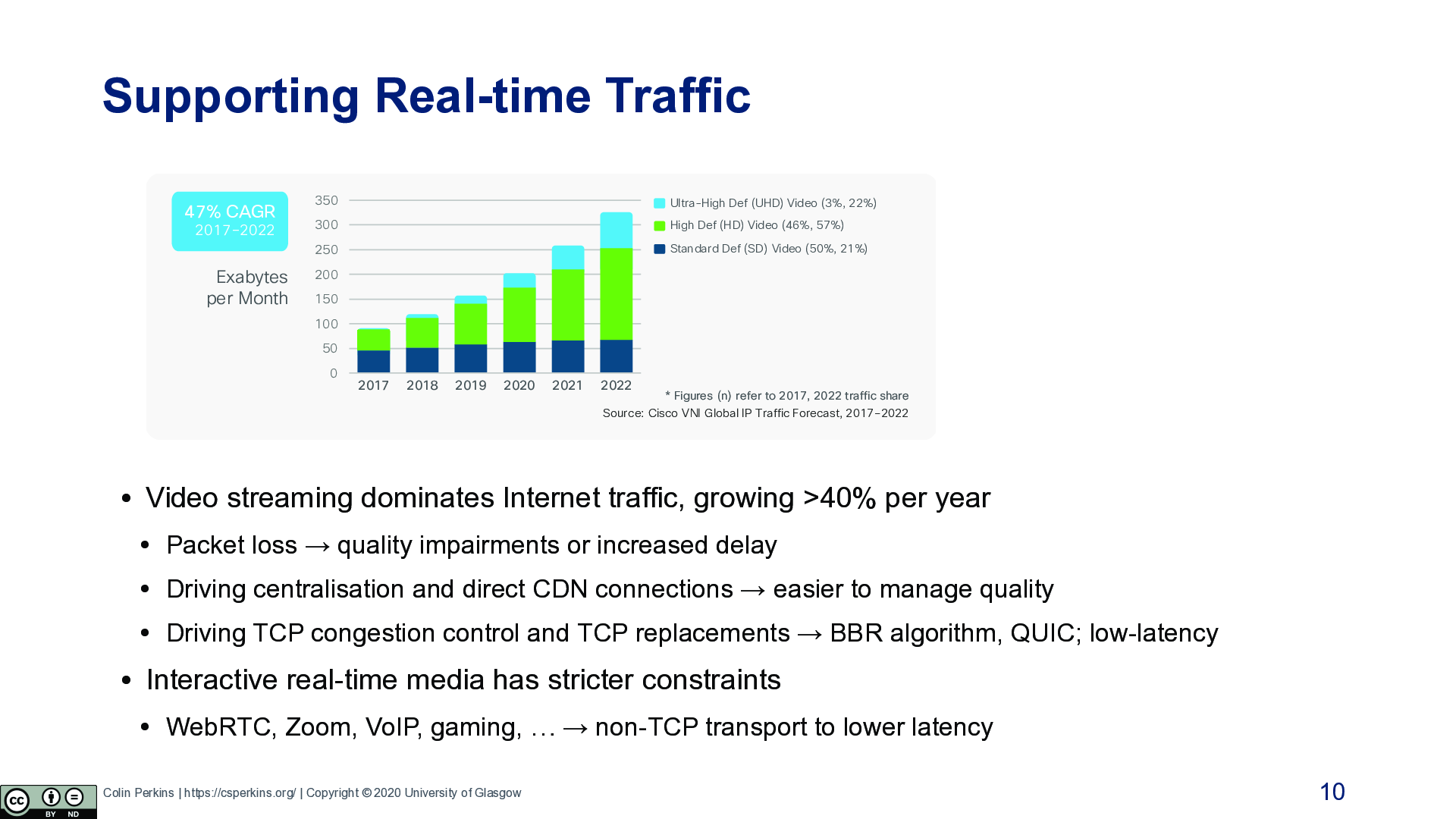
00:11:58.125
We're also seeing steady growth of real-time traffic,
00:12:01.291
with streaming video being, by far,
00:12:03.917
the dominant type of traffic in the network,
00:12:06.708
while still growing at around 40% year-on-year.
00:12:11.041
Streaming video has reasonably strict timing and
00:12:13.542
quality constraints,
00:12:15.000
and these push network operators to improve the
00:12:17.166
quality of their
00:12:18.000
networks, and push streaming video content
00:12:20.375
providers to peer directly
00:12:22.000
with the residential edge networks.
00:12:25.000
This is a further incentive towards centralization,
00:12:27.834
and the flattening of the network,
00:12:29.792
since such direct peerings
00:12:31.375
make it easier to ensure
00:12:32.583
high-quality video is delivered to viewers.
00:12:35.542
Increases in streaming video are also driving
00:12:38.291
changes in TCP congestion
00:12:39.834
control, such as Google's BBR algorithm,
00:12:42.625
and the development of
00:12:43.917
TCP replacements, such as QUIC,
00:12:46.500
both aimed at reducing latency
00:12:48.166
and increasing quality.
00:12:50.083
Lectures 4 and 5 will talk about some of these developments.
00:12:54.458
WebRTC-based video conferencing services, such as
00:12:58.291
Zoom, WebEx,
00:13:00.000
and Microsoft Teams, have even stricter latency requirements.
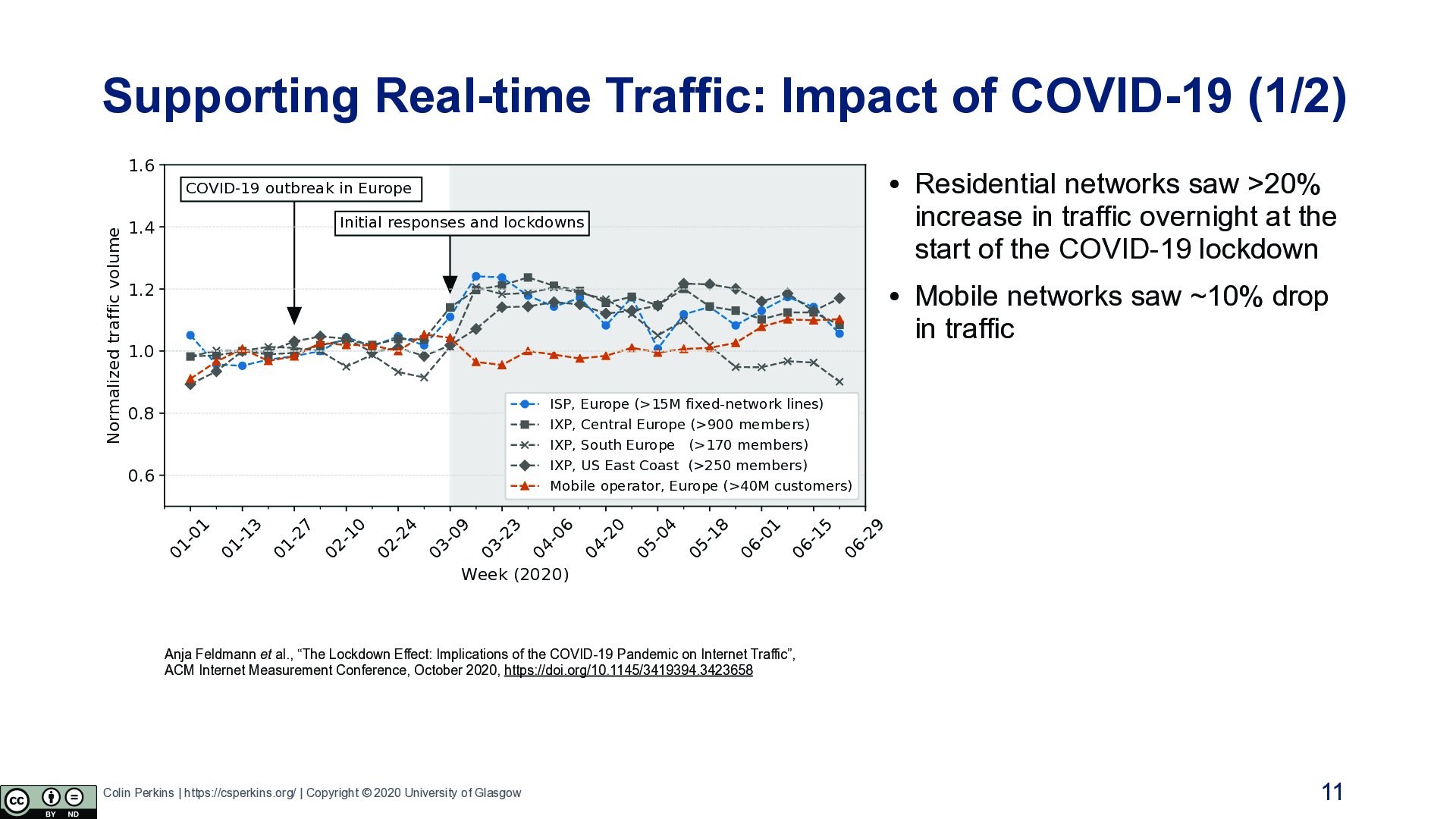
00:13:06.166
The COVID-19 pandemic has accelerated these effects.
00:13:10.667
This graph shows measurements of Internet traffic
00:13:12.917
as the initial
00:13:14.000
lockdowns started in March 2020.
00:13:17.500
It shows that many residential networks saw a 20%
00:13:20.458
to 25% increase
00:13:22.000
in the total amount of Internet traffic they were
00:13:24.208
carrying, as people
00:13:25.917
shifted to working from home.
00:13:28.083
It also shows the corresponding drop in mobile traffic.
00:13:32.208
This shift in traffic wasn't evenly distributed, though.
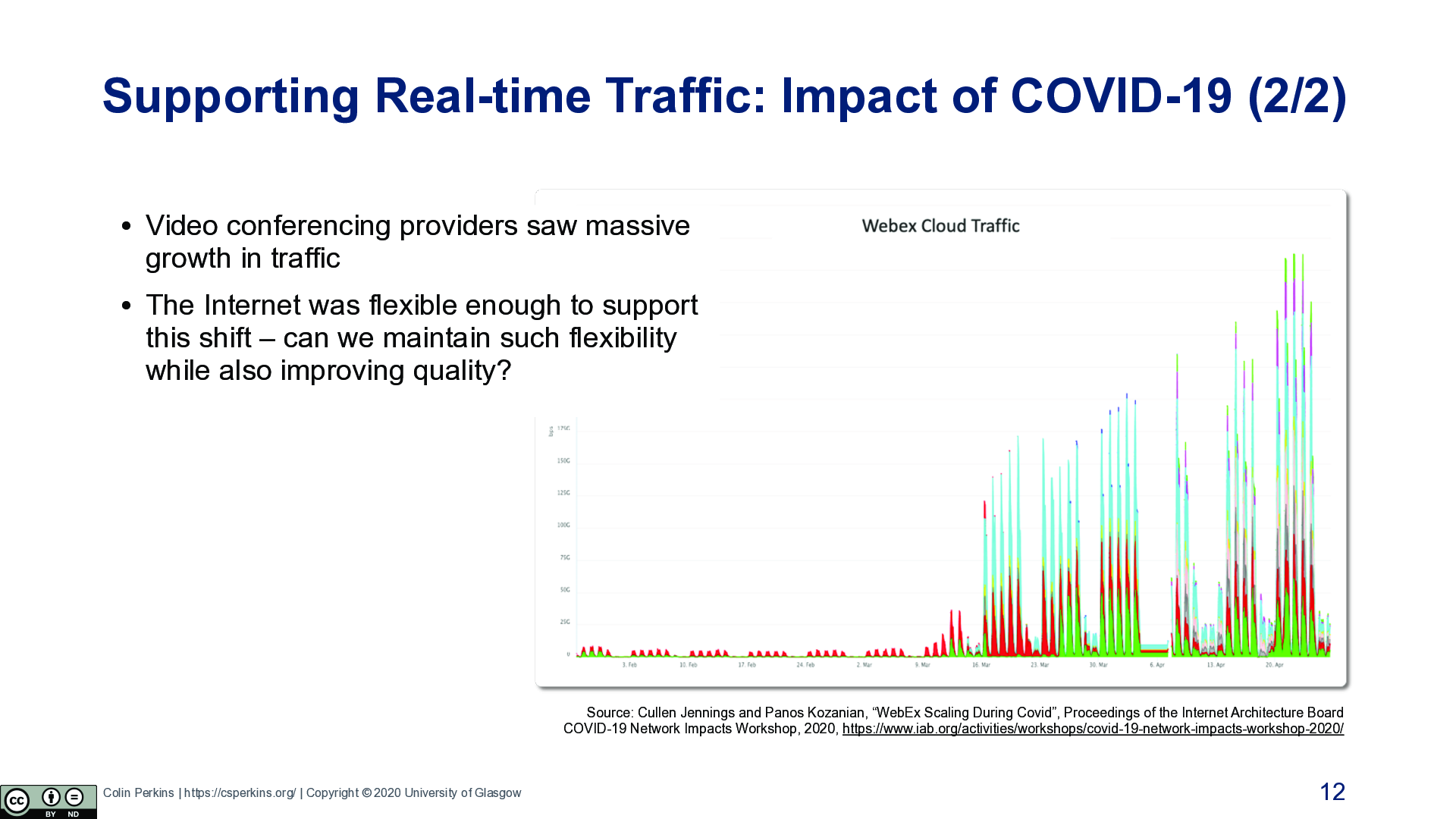
00:13:37.333
The second graph shows the amount of
00:13:39.333
video data being sent over WebEx,
00:13:41.417
one of the popular video conferencing platforms,
00:13:44.000
over a similar time period.
00:13:46.542
Usage grew by about a factor of 20 in less than a
00:13:50.250
week, and has continued growing since.
00:13:54.250
Impressively, the Internet was flexible and
00:13:57.000
robust enough to support
00:13:58.708
this rapid change in how it was used.
00:14:01.375
The question is, can we maintain such flexibility while also
00:14:04.834
improving quality?
00:14:07.125
Lectures 6 and 7 discuss this topic further.
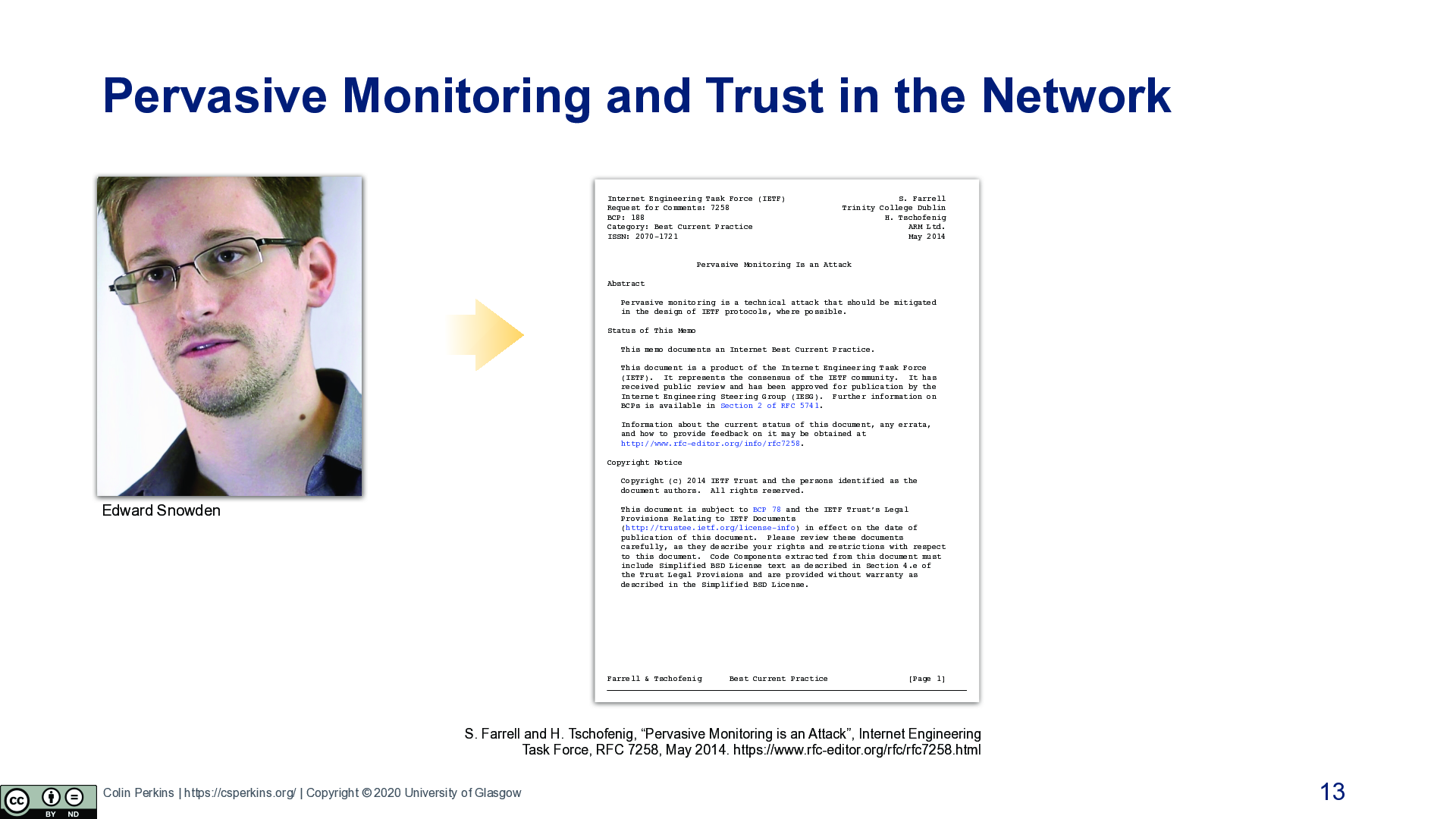
00:14:13.000
The final shift in assumptions has been around security.
00:14:17.625
The Internet protocols were originally designed
00:14:20.333
to support a research network
00:14:21.917
with a relatively small set of users
00:14:24.542
who had reasonably closely aligned goals
00:14:26.959
and provided little in the way of security.
00:14:30.166
Over the years, the protocols have changed to
00:14:32.875
provide increasingly
00:14:34.083
sophisticated security and protection from attacks.
00:14:37.542
The Edward Snowden revelations accelerated that
00:14:40.083
trend by increasing
00:14:41.583
awareness of large-scale government surveillance,
00:14:44.208
but the increase
00:14:45.667
in security started before that, in response to hacking and
00:14:48.417
criminal activity.
00:14:50.750
A significant challenge going forward will be in
00:14:53.291
balancing the
00:14:54.417
needs of law enforcement to access and monitor
00:14:56.875
some traffic in a
00:14:58.625
targeted manner, while preserving privacy and
00:15:01.250
protecting against attackers.
00:15:04.125
We'll talk about these topics more in Lectures 3,
00:15:07.166
4, 8, and 9.
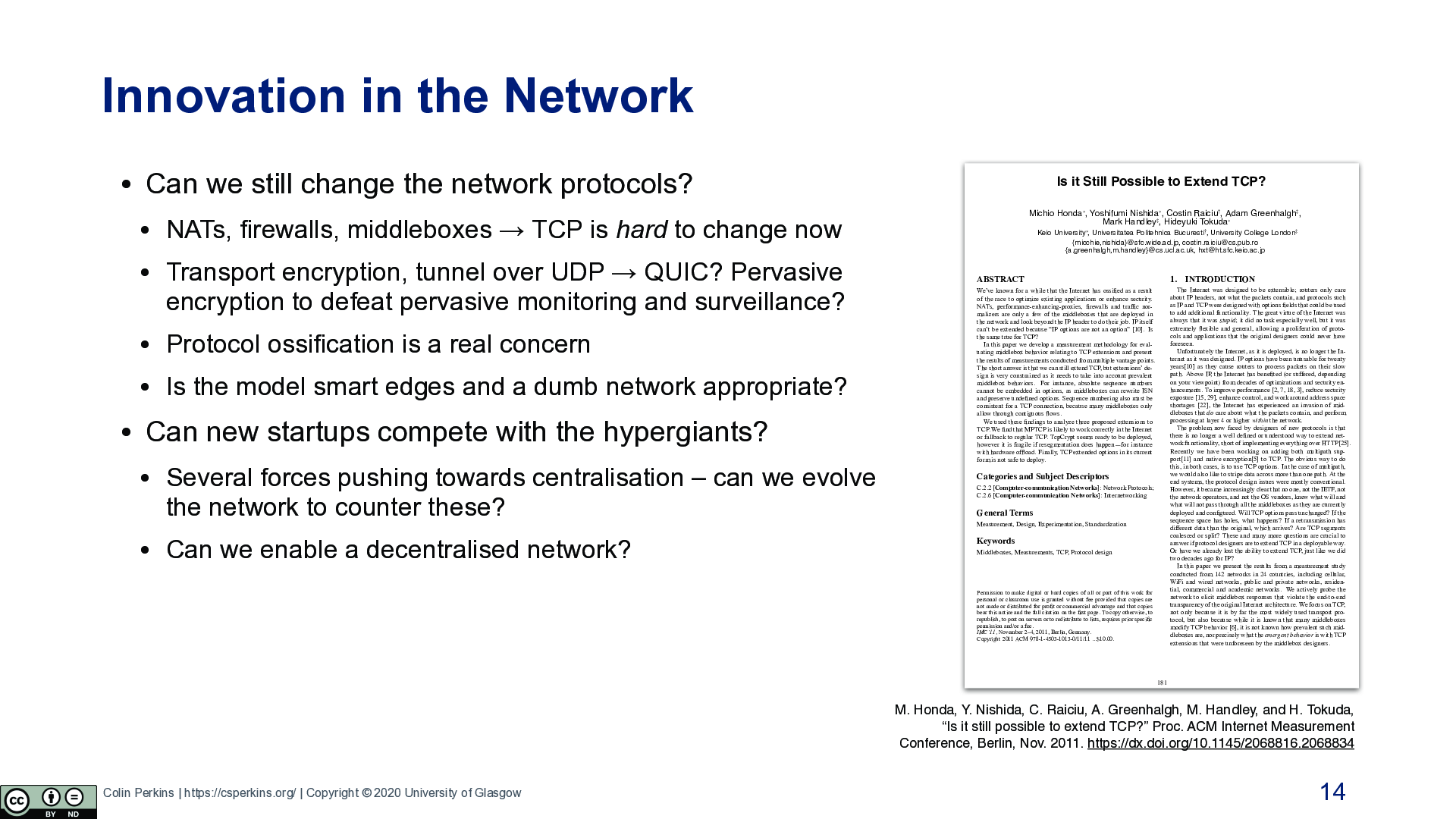
00:15:12.125
The Internet is now a globally deployed network.
00:15:15.750
Like any large system, it becomes increasingly
00:15:18.375
ossified, increasingly
00:15:20.166
difficult to change over time.
00:15:23.125
The slow transition from IPv4 to IPv6 is one
00:15:26.417
example of this ossification.
00:15:29.500
Another example would be the difficulty in
00:15:32.000
updating TCP to better
00:15:34.000
support low-latency services and improve
00:15:36.458
performance.
00:15:38.125
The widespread use of NATs, firewalls, and other
00:15:41.125
middle boxes makes
00:15:42.583
such changes surprisingly difficult.
00:15:45.542
We're now starting to see serious attempts to
00:15:47.959
replace TCP, with
00:15:49.458
protocols such as QUIC that employ pervasive
00:15:51.583
encryption and tunnel
00:15:53.333
over UDP to avoid such interference by the legacy network.
00:15:57.041
But it's not clear that these will succeed.
00:16:00.583
Finally, we must consider the effects of the push towards
00:16:03.917
centralized services and applications, driven by
00:16:06.333
both technical
00:16:07.333
and business considerations,
00:16:09.458
and whether these are beneficial to
00:16:11.875
consumers and users of the network or not.
00:16:15.250
Is this shift towards a small number of hypergiant
00:16:17.291
service providers
00:16:18.834
an inevitable consequence of the design of the
00:16:20.750
network, or of the
00:16:22.542
business and regulatory environment?
00:16:24.917
And to what extent should we attempt to influence
00:16:27.250
it through technological change in the network?
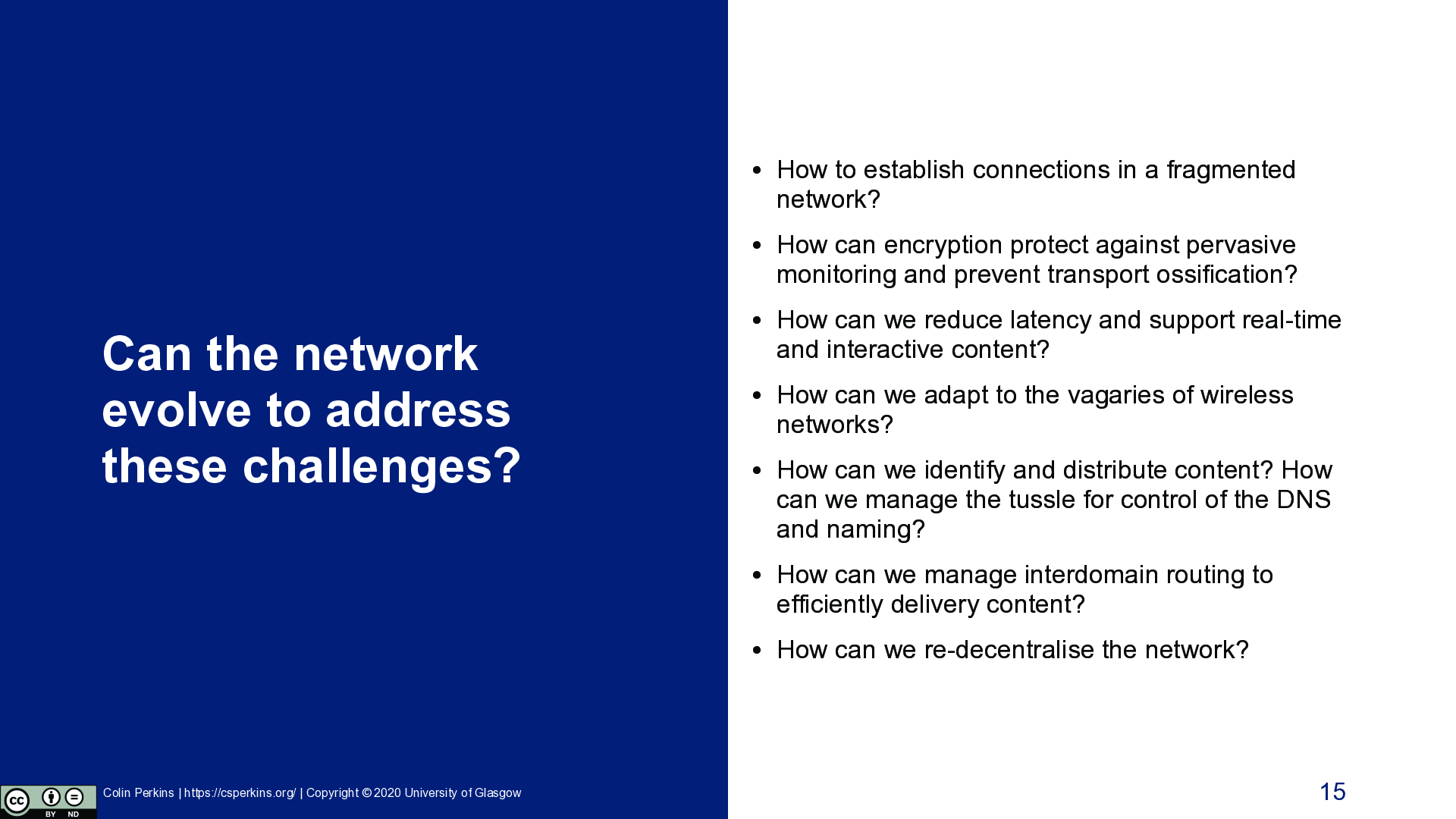
00:16:33.000
The way the network is used is changing, and the
00:16:36.375
technologies that
00:16:37.417
support that use are necessarily shifting too.
00:16:40.667
The network has become more fragmented.
00:16:43.125
There are more serious security threats,
00:16:45.375
more demanding applications,
00:16:47.291
and some significant shifts in the
00:16:50.000
devices and
00:16:51.000
technologies we use to access the network.
00:16:54.166
In the rest of this course, I want to start to
00:16:56.458
discuss how the
00:16:57.625
protocols that form the internet are evolving to
00:16:59.708
meet these needs,
00:17:01.333
and to highlight some of the open issues and
00:17:03.333
challenges still to be addressed.
00:17:06.041
We'll start in the next lecture by discussing the increasing
00:17:09.917
fragmentation of the network and its implications
00:17:12.000
for connection establishment.
-
Anja Feldmann et al.,
The Lockdown Effect:
Implications of the COVID-19 Pandemic on Internet Traffic,
ACM Internet Measurement Conference, October 2020,
-
Cullen Jennings and Panos Kozanian,
WebEx Scaling During Covid, Proceedings of the Internet
Architecture Board COVID-19 Network Impacts Workshop, 2020,
-
S. Farrell and H. Tschofenig,
Pervasive Monitoring is an Attack,
Internet Engineering Task Force, RFC 7258, May 2014.
-
M. Honda, Y. Nishida, C. Raiciu, A. Greenhalgh, M. Handley, and H. Tokuda,
Is it still possible
to extend TCP?, Proc. ACM Internet Measurement Conference, Berlin,
Nov. 2011.
Discussion
The goal of the Networked Systems (H) course is to discuss how the
Internet is changing to support more devices, to improve real-time
and low-latency applications, and to increase security. The recorded
material for lecture 1 reviewed some prior material, which should be
somewhat familiar to you from the Networks and Operating Systems
Essentials course in Level 2, and introduced some of the changes we'll
discuss in the remainder of the course. The live discussion session
will briefly recap this review, then discuss the following points.
IPv4, IPv6, and NAT:
One of the ongoing changes in the network is the transition from IPv4
to IPv6. The lecture presented data from Google showing that about 30%
of their traffic is running over IPv6. Does your home network support
IPv6? What about your mobile provider?
Due to the shortage of IPv4 addresses, many networks use NAT to share
IP addresses. We'll talk more about this in Lecture 2, but for now,
find our whether your home network uses IPv4 with a NAT. There are
instructions for finding your machine’s local IP address online.
If it's using one of the private address ranges (10.0.0.0 - 10.255.255.255,
172.16.0.0 - 172.31.255.255, or 192.168.0.0 - 192.168.255.255) your
home network is using a NAT.
Google “what is my IP” to find your public IPv4 and IPv6 address, and
compare these with the addresses your network uses internally.
Does it matter that we’re running out of IPv4 addresses?
Real-time Applications:
Streaming video is the majority of Internet traffic, and video
conferencing providers saw a massive traffic increase due to the
pandemic. The lecture presented some data to illustrate this, and we'll
talk about the issues more in the rest of the course.
How well have video conferencing apps worked for you?
Do you see frequent quality problems?
Hyper-giants, Centralisation, and Security
Internet topology is flattening and becoming increasingly centralised,
with direct connections from “eyeball” networks to massive content
providers – Google, Facebook, Amazon, Apple, Akamai, etc.
What are the implications for network neutrality, competition,
innovation, privacy, freedom of speech, pervasive monitoring, and
security?