Lecture 2: Connection Establishment in a Fragmented Network
Lecture 2 discusses connection establishment. It begins by reviewing
the operation of TCP and showing how TCP connections are established,
and what factors influence the performance of connection establishment.
It considers the impact TLS and IPv6 on connection establishment, and
discusses the need for connection racing. And it reviews the idea of
peer-to-peer connection, and the difficulties network address translation
causes for peer-to-peer connection establishment. The lecture concludes
with a brief explanation of how NAT binding discovery, and the ICE
algorithm for peer-to-peer connection establishment, work.
Part 1: Connection Establishment in a Fragmented Network
The 1st part of this lecture reviews the operation of TCP.
It outlines the TCP service model, segment format, and
programming model. Then, it discusses how TCP connections
are established and considers the impact of network latency
on TCP connection establishment performance. It concludes
with a review of how this connection establishment latency
affects protocol design.
00:00:00.375
In this lecture, I’ll talk about the
00:00:02.500
problem of connection establishment in a fragmented
00:00:04.875
network, and discuss some issues that affect
00:00:07.417
the performance of TCP connection establishment and
00:00:10.041
data transfer.
00:00:12.417
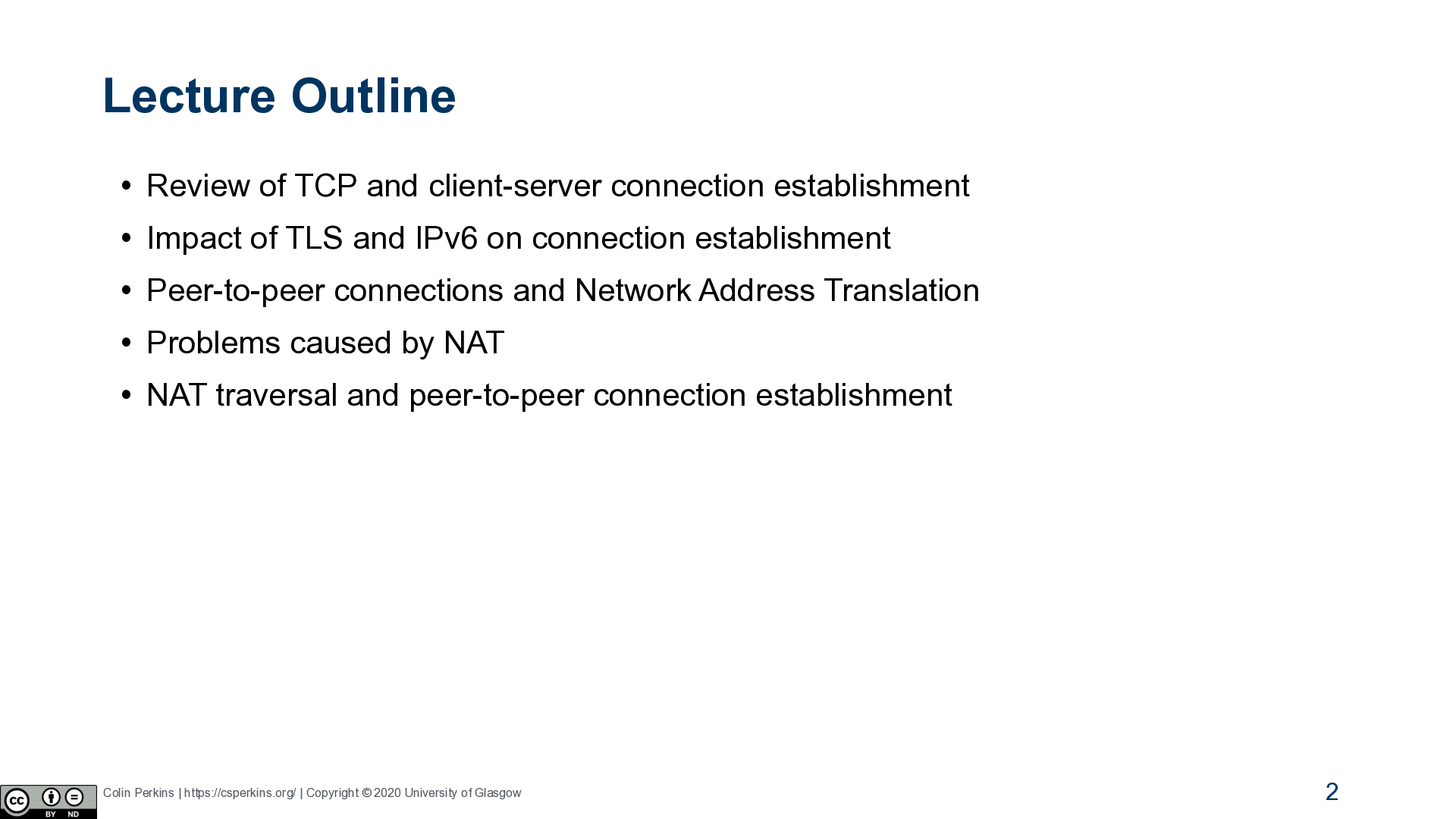
There are five parts to this lecture.
00:00:15.291
In this first part, I’ll review the
00:00:17.333
TCP transport protocol and its programming model,
00:00:20.083
and talk about client-server connection establishment.
00:00:23.417
In the next part, I’ll discuss the
00:00:25.375
implications of Transport Layer Security, TLS,
00:00:28.458
and the use of IPv6 on connection establishment,
00:00:31.583
and show how these changes affect performance.
00:00:35.083
Following that, in part three,
00:00:37.500
I’ll talk about peer-to-peer connections and the impact of
00:00:40.208
network address translation.
00:00:42.250
Then, in the last two parts,
00:00:44.375
I’ll talk about some of the problems
00:00:45.917
caused by NATs, network address translation devices,
00:00:49.000
and outline how NAT traversal works.
00:00:53.125
To begin, I’ll briefly review the Transmission
00:00:55.667
Control Protocol, TCP.
00:00:58.208
I’ll talk about the purpose of TCP,
00:01:00.291
then review the TCP segment format,
00:01:02.625
and the service model TCP offers to applications.
00:01:06.417
Then, I’ll discuss how TCP connections
00:01:08.959
are written using the Berkeley sockets API.
00:01:13.166
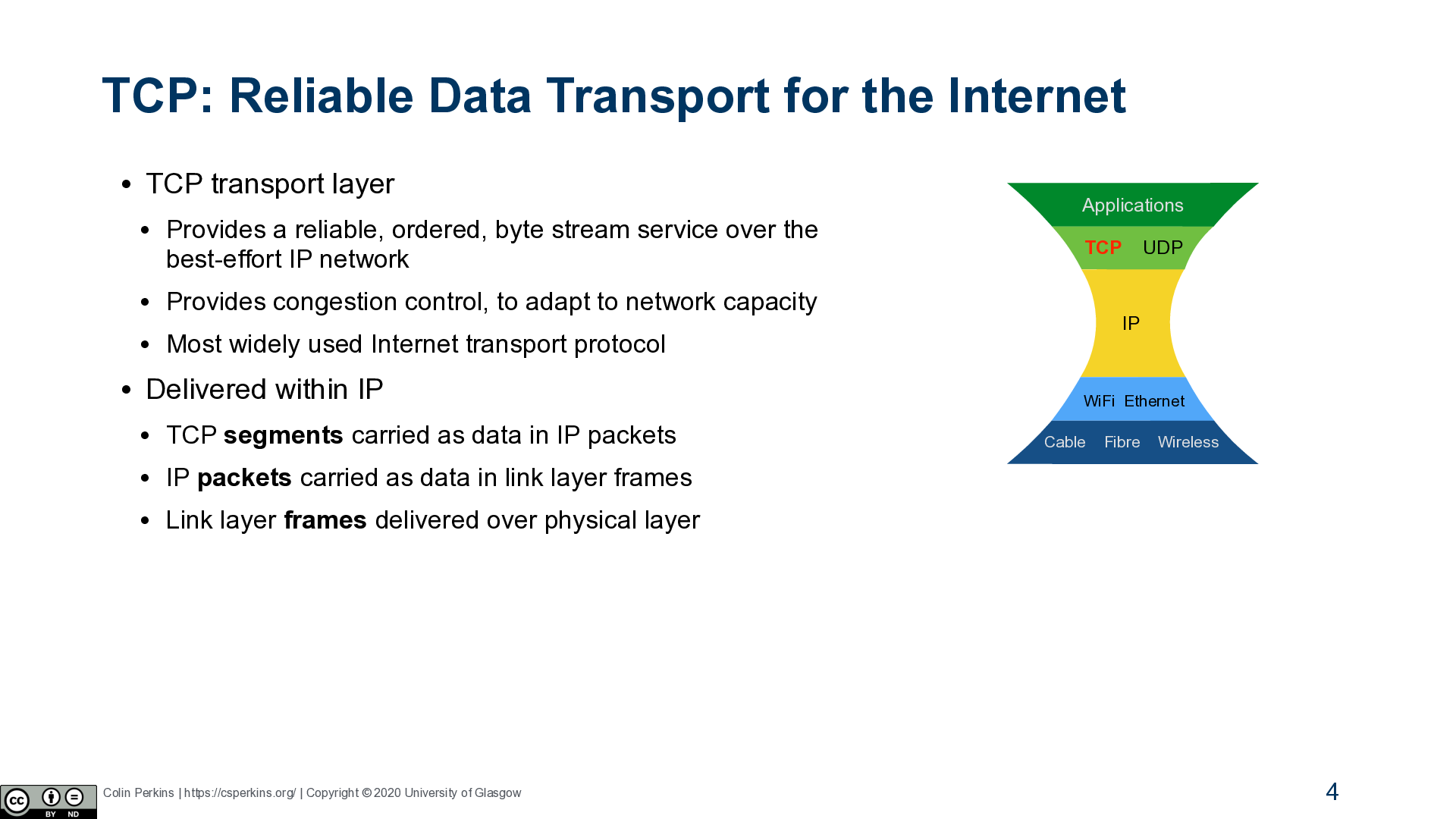
TCP is currently the most widely used
00:01:15.667
transport protocol in the Internet.
00:01:18.125
A TCP connection provides a reliable,
00:01:20.917
ordered, byte stream delivery service
00:01:23.458
that runs on the best-effort IP network.
00:01:26.417
Once a TCP connection is established,
00:01:28.917
an application can write a sequence of bytes
00:01:31.166
into the socket, representing the connection,
00:01:33.583
and TCP will deliver those bytes to the receiver,
00:01:36.417
reliably, and in the correct order.
00:01:39.792
If any of the IP packets containing TCP
00:01:42.333
segments are lost, the TCP stack
00:01:44.917
in the operating system will notice this,
00:01:46.708
and automatically retransmit the missing segments.
00:01:50.083
Similarly, if any of the IP packets
00:01:52.625
are delayed and arrive out of order,
00:01:54.834
the TCP stack will put the data
00:01:56.708
back into the correct order before delivering
00:01:58.625
it to the application.
00:02:00.875
Finally, TCP will adapt the speed
00:02:03.166
at which it sends the data
00:02:04.750
to match the available network capacity.
00:02:07.708
If the network is busy,
00:02:09.583
TCP will slow down the rate at which it sends data,
00:02:12.291
to fairly share the capacity between transmissions.
00:02:16.750
Similarly, if the network becomes idle,
00:02:19.417
TCP connections will speed up to use the spare capacity.
00:02:23.250
This process is known as congestion control,
00:02:25.959
and TCP implements sophisticated
00:02:28.208
congestion control algorithms.
00:02:30.583
We’ll talk more about TCP congestion control in Lecture 6.
00:02:35.583
Applications using TCP are unaware of retransmissions,
00:02:39.250
reordering, and congestion control.
00:02:41.583
They just see a socket,
00:02:43.291
into which they write a stream of bytes.
00:02:45.834
Those bytes are then delivered reliably to the receiver.
00:02:49.250
Internally, those bytes are split into TCP segments.
00:02:52.959
Each segment has a header added to it,
00:02:56.000
to identify the data.
00:02:58.000
The segment is placed inside the data part of an IP packet.
00:03:01.708
That IP packet is, in turn, put inside the
00:03:04.125
data part of a link layer frame,
00:03:06.083
and sent across the network.
00:03:08.458
The IP layer just sees a sequence
00:03:10.834
of TCP segments that it must deliver,
00:03:12.834
and is unaware of their contents.
00:03:15.083
Equally, TCP gives data segments to the
00:03:18.542
IP layer to deliver, and is unaware
00:03:20.583
whether the underlying network is Ethernet,
00:03:22.583
WiFi, optical fibre, or something else.
00:03:27.750
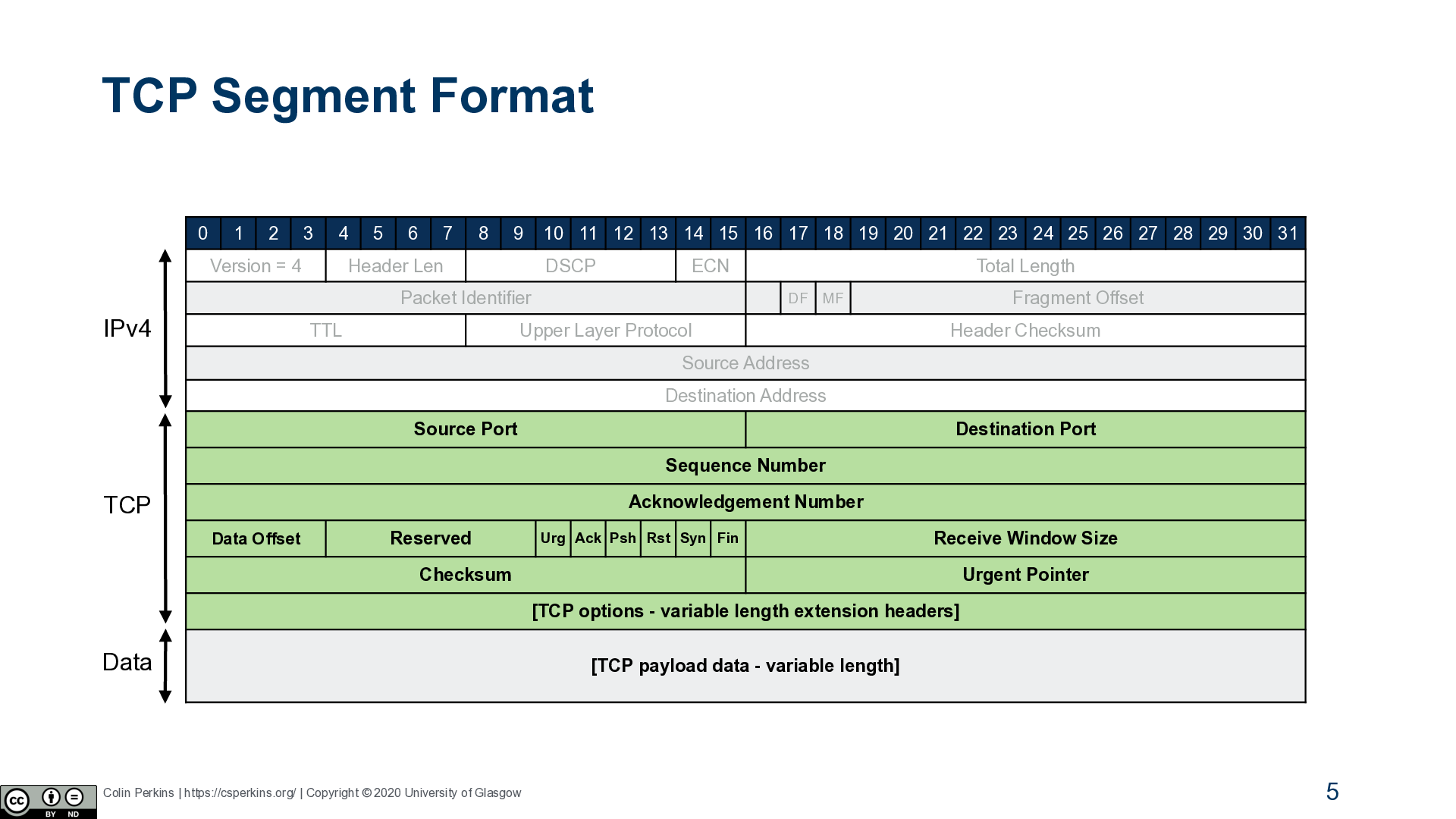
The diagram on the slide shows the
00:03:30.083
format of a TCP segment header,
00:03:32.125
inside an IPv4 packet.
00:03:35.083
Data is sent over the link in the order shown,
00:03:38.083
left-to-right, top-to-bottom, in the
00:03:40.041
payload part of a link layer frame.
00:03:43.125
The IP header is sent first,
00:03:45.333
then the TCP segment header,
00:03:47.041
then the TCP payload data.
00:03:50.125
Looking at the TCP segment header,
00:03:52.333
highlighted in green, we see that it
00:03:55.000
comprises a number of fields.
00:03:58.000
A TCP segment starts with the source
00:04:00.125
and destination port numbers.
00:04:02.083
The source port number identifies the socket that sent the
00:04:05.500
segment, while the destination port number identifies
00:04:08.333
the socket to which it should be delivered.
00:04:11.166
When establishing a TCP connection, a TCP
00:04:14.166
server binds to a well-known port that
00:04:16.375
identifies the type of service it offers.
00:04:19.000
For example, web servers bind to port 80.
00:04:22.708
This gives a known destination port
00:04:24.750
to which clients can connect.
00:04:27.291
Clients specify the destination port to which they connect,
00:04:30.750
but usually leave their source port unspecified.
00:04:34.208
The operating system then chooses
00:04:36.333
an unused source port for that connection.
00:04:39.333
All TCP segments sent from the client to the server,
00:04:42.667
as part of a single connection,
00:04:44.417
have the same source and destination ports,
00:04:46.834
and the responses come back with those ports swapped.
00:04:50.166
Each new connection gets a new source port.
00:04:54.291
Following the port numbers in the TCP segment header,
00:04:57.041
come the sequence number and the acknowledgement number.
00:04:59.959
At the start of a TCP connection,
00:05:02.208
the sequence number is set to a random initial value.
00:05:05.542
As data is sent, the TCP sequence
00:05:08.041
number inserted by the sender increases,
00:05:10.250
counting the number of bytes of data being sent.
00:05:14.083
The acknowledgement number indicates the next byte
00:05:16.500
of data that’s expected by the receiver.
00:05:19.375
For example, if a TCP segment is
00:05:21.917
received with sequence number 4,000,
00:05:24.750
and that segment contains 100 bytes of data,
00:05:27.959
then the acknowledgement number will be 4,100.
00:05:31.250
This indicates that the next TCP segment
00:05:33.583
expected is that with sequence number 4,100.
00:05:39.000
If the acknowledgement number that comes back
00:05:41.208
is different from that expected,
00:05:42.917
it’s a sign that some of the packets have been lost.
00:05:45.750
TCP will then retransmit the
00:05:47.708
segments that were in the lost packets.
00:05:50.250
The data offset field indicates where
00:05:52.583
the payload data starts in the segment.
00:05:54.500
That is, it indicates the size of any TCP options
00:05:57.125
included in the packet.
00:06:00.083
The reserved bits are not used.
00:06:03.250
There are then six single-bit flags.
00:06:06.125
The URG bit indicates whether the urgent pointer is valid.
00:06:10.166
The ACK bit indicates whether the
00:06:11.959
acknowledgement number is valid.
00:06:13.708
The PSH bit indicatesthat this is the last
00:06:16.083
segment in a message, and should be pushed
00:06:18.291
up to the application as soon as possible.
00:06:20.959
The SYN, synchronise, bit is set on
00:06:23.417
the first packet sent on a connection.
00:06:25.917
The FIN bit indicates that the connection
00:06:28.500
should be cleanly closed.
00:06:30.166
And the RST bit indicates that the connection will reset,
00:06:33.417
aborted, without cleanup.
00:06:35.917
The receive window size allows the receiver
00:06:38.417
to indicate how much buffer space it
00:06:40.417
has available to receive new data.
00:06:42.625
This allows the receiver tell the sender to slow down,
00:06:45.458
if it’s sending faster than the receiver
00:06:47.208
can process the data.
00:06:49.000
The checksum is used to detect corrupted
00:06:51.500
packets, that can then be retransmitted.
00:06:55.000
Finally, the Urgent Pointer allows TCP senders
00:06:58.083
to indicate that some data is to be processed
00:07:00.208
urgently by the receiver.
00:07:02.375
Unfortunately, experience has shown that the urgent
00:07:04.875
data mechanism in TCP is not usable in practice,
00:07:08.125
due to a combination of
00:07:09.667
an ambiguous specification and inconsistent implementation.
00:07:13.917
The fixed TCP segment header is
00:07:16.166
followed by TCP option headers, that allow TCP
00:07:19.083
to add new features and extensions,
00:07:21.250
and then the payload data.
00:07:25.417
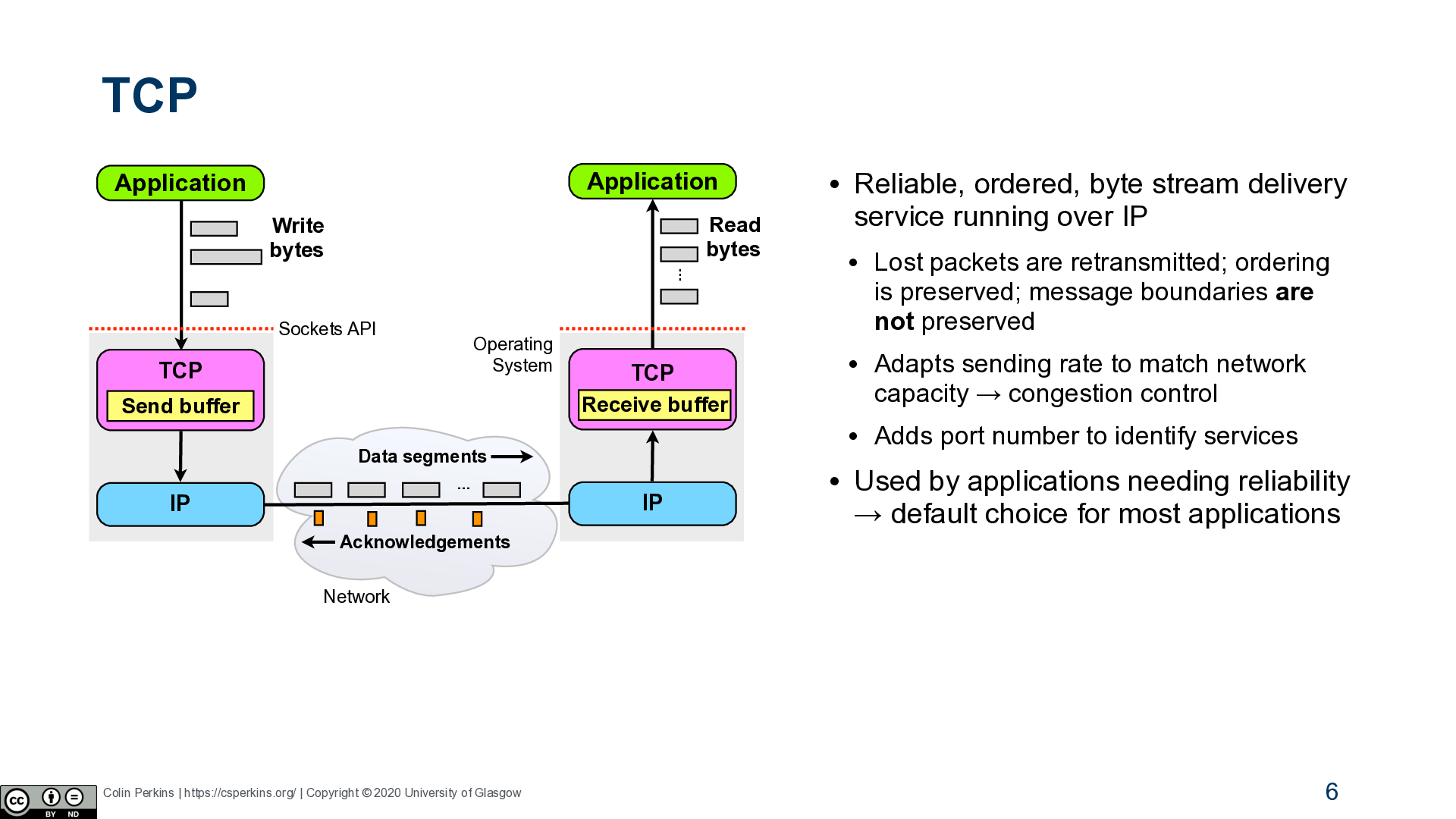
TCP retransmits any data
00:07:27.583
that was sent in packets that are lost,
00:07:29.583
and makes sure that data is delivered to the
00:07:31.834
application in the order in which it was originally sent.
00:07:34.917
It also adapts the speed at which it sends data to
00:07:37.333
match the available network capacity.
00:07:39.834
As a result, TCP provides a reliable, ordered,
00:07:43.375
byte stream delivery service.
00:07:45.917
A limitation of the TCP service model
00:07:48.583
is that message boundaries are not preserved.
00:07:51.250
That is, if an application writes,
00:07:53.542
for example, a block of 2,000 bytes
00:07:55.917
to a TCP connection, then TCP will
00:07:58.208
deliver those 2,000 bytes to the receiver,
00:08:00.625
reliably, and in the order they are sent.
00:08:03.959
However, what TCP does not do,
00:08:06.250
is guarantee that those bytes are delivered to the
00:08:08.375
receiving application as a single block of 2,000 bytes.
00:08:12.208
That might happen.
00:08:14.166
Equally, they could be delivered to the
00:08:16.250
application as two blocks of 1,000 bytes.
00:08:19.208
Or as a block of 1,500 bytes,
00:08:21.250
followed by a block of 500 bytes.
00:08:23.417
Or as 2,000 single bytes. Or as
00:08:25.667
any other combination, provided the data is
00:08:28.417
delivered reliably and in the order sent.
00:08:32.125
This complicates the design of applications that
00:08:34.375
use TCP, since they have to parse
00:08:36.542
the data received from a TCP socket
00:08:38.834
to check if they’ve got the complete message.
00:08:42.000
Despite this inconvenience,
00:08:43.667
TCP is the right choice for most applications.
00:08:46.917
If you need to deliver data reliably,
00:08:48.959
and as fast as possible, then use TCP.
00:08:54.417
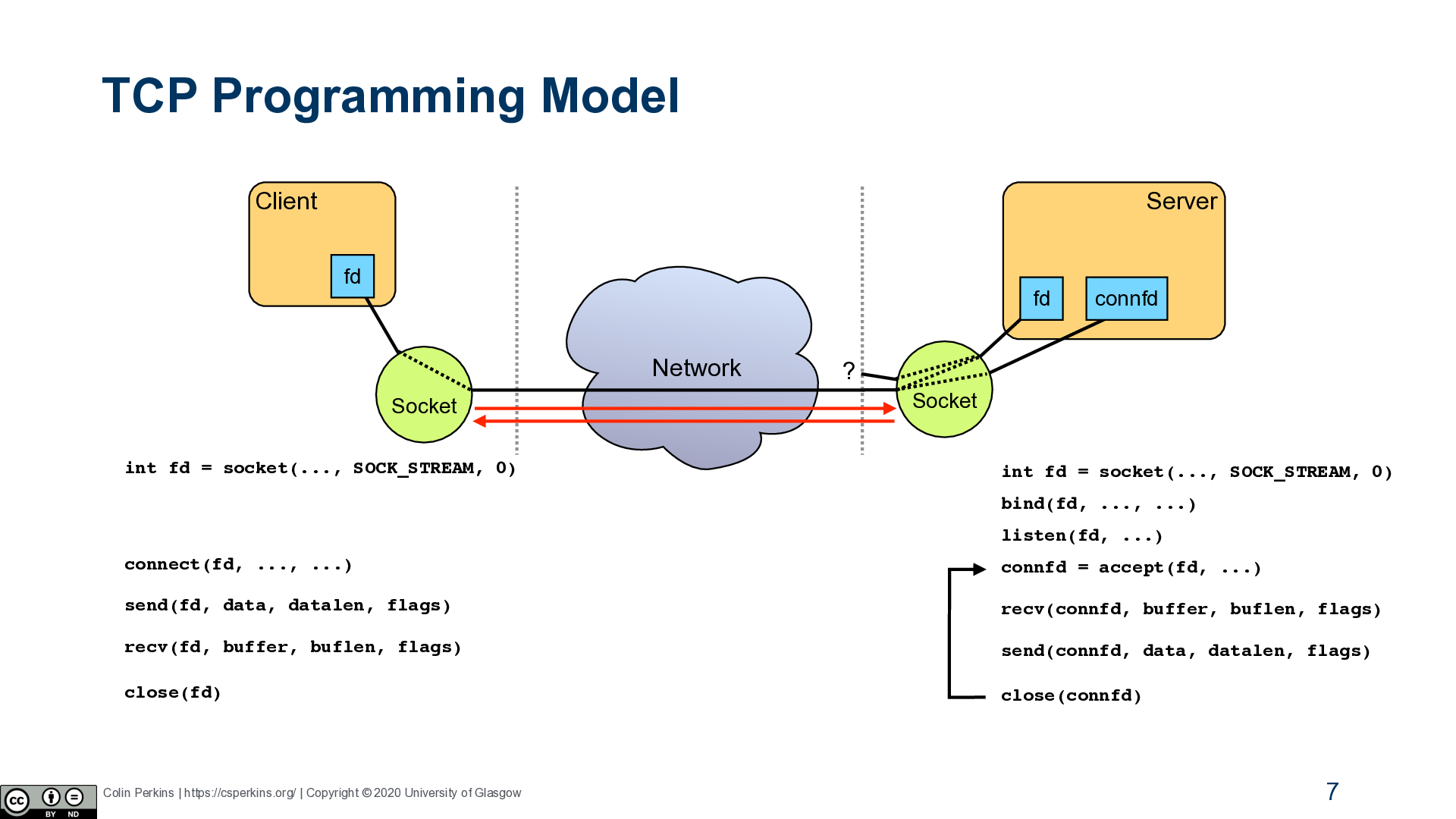
TCP is a client-server protocol.
00:08:56.834
Servers listen for, and respond to, requests from clients.
00:09:01.291
The way you write code to use
00:09:03.458
a TCP connection depends on whether you’re
00:09:05.750
writing a client or a server.
00:09:09.000
On the server side, you begin by creating a socket.
00:09:13.083
The first argument to the socket() call
00:09:15.917
is the constant PF_INET, from the sys/socket.h header,
00:09:19.875
if you want the server to listen for connections on IPv4.
00:09:24.333
Alternatively,if you want the server to listen
00:09:26.792
for IPv6 connections, use PF_INET6.
00:09:31.417
The second argument will be the constant,
00:09:33.583
SOCK_STREAM, to indicate that a TCP server is wanted.
00:09:37.750
The third argument is unused as must be zero.
00:09:43.000
You then call the bind() function,
00:09:44.959
passing the file descriptor representing the newly
00:09:48.083
created socket as the first argument.
00:09:50.417
The other arguments to bind() specify the
00:09:52.667
port number on which the server
00:09:54.375
should listen for incoming connections.
00:09:56.583
The bind() function assigns the requested
00:09:59.417
port number to the socket.
00:10:02.000
You then call the listen() function.
00:10:04.959
This starts the server listening for incoming connections.
00:10:09.125
Then, you call accept(), to indicate that
00:10:11.333
your server is ready to accept a new connection.
00:10:14.708
The accept() function doesn’t return
00:10:16.500
until a client connects to the server.
00:10:18.792
This could potentially be a long wait.
00:10:22.959
Meanwhile, the client application creates its own socket.
00:10:27.417
This is done using the socket() function,
00:10:29.667
in exactly the same way as the server.
00:10:33.000
The client then calls connect(),
00:10:34.834
passing the file descriptor for its newly created socket
00:10:37.959
as the first argument. The subsequent arguments
00:10:40.458
contain the IP address of the server,
00:10:42.750
and the port number on which the server is listening.
00:10:45.708
The connect() call makes TCP establish a
00:10:48.250
connection from the client to the server.
00:10:50.834
When it returns, either the connection has
00:10:53.208
been successfully established, or the server is unreachable.
00:10:57.125
When the connection request reaches the server,
00:10:59.875
the accept() call completes.
00:11:02.000
The return value is a new file descriptor,
00:11:04.375
representing the newly established connection.
00:11:07.417
The original file descriptor,
00:11:08.917
that was listening for incoming connections,
00:11:10.708
remains unchanged.
00:11:14.000
The client and server can now call send() and recv(),
00:11:17.041
to send and receive data over the connection.
00:11:20.458
They can send and receive as much,
00:11:22.250
or as little, data as they want, and TCP places
00:11:25.041
no restrictions on the order in which
00:11:26.917
client and server send.
00:11:28.917
Remember to use the file descriptor representing
00:11:31.583
the accepted connection, not the file descriptor
00:11:33.834
representing the listening socket, when writing the
00:11:36.041
server code.
00:11:38.542
Finally, when they’ve finished, client and server
00:11:41.625
call the close() function, to cleanly shut
00:11:43.417
down the connection.
00:11:45.166
Once the client has closed the connection, it’s done.
00:11:48.458
A server can repeatedly accept new connections
00:11:50.667
from the listening socket.
00:11:56.375
How does connection establishment actually work?
00:11:58.917
And what are the factors that affect how
00:12:00.917
quickly connections can be established?
00:12:03.250
In the following, I’ll talk in detail
00:12:05.834
about how client-server connection establishment works for
00:12:08.708
TCP, and what factors limit performance.
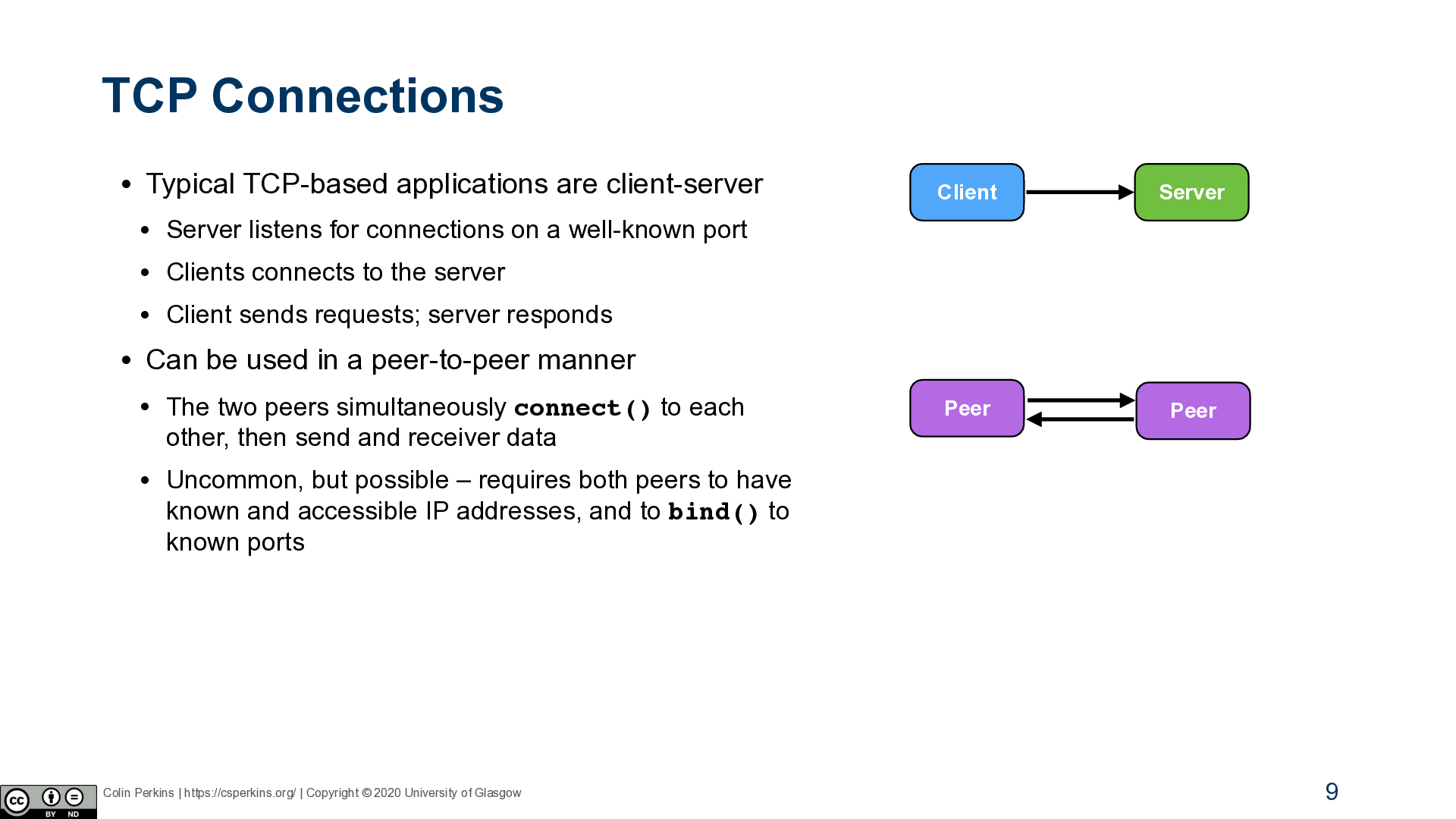
00:12:12.542
TCP-based applications
00:12:14.708
usually work in a client-server manner.
00:12:16.917
The server listens for connections on a well-known port,
00:12:20.083
and the client connects to the server, sends a request,
00:12:23.125
and receives a response.
00:12:25.000
TCP can also, in principle, be used
00:12:27.667
in a peer-to-peer manner.
00:12:30.041
If two devices create TCP sockets,
00:12:32.750
bind to known ports, and simultaneously attempt
00:12:35.625
to connect() to each other, then TCP
00:12:37.625
will able to create a connection,
00:12:39.458
provided there are no firewalls or NAT
00:12:41.417
devices blocking traffic.
00:12:43.250
This is known as simultaneous open.
00:12:45.875
TCP simultaneous open can work,
00:12:48.583
but isn’tespecially useful, since it requires both peers
00:12:51.708
to try to connect at the same time.
00:12:54.041
It’s usually better to work in client-server mode,
00:12:56.917
since the server can wait for clients
00:12:58.708
and the client and server don’t need to synchronise
00:13:01.041
when to connect.
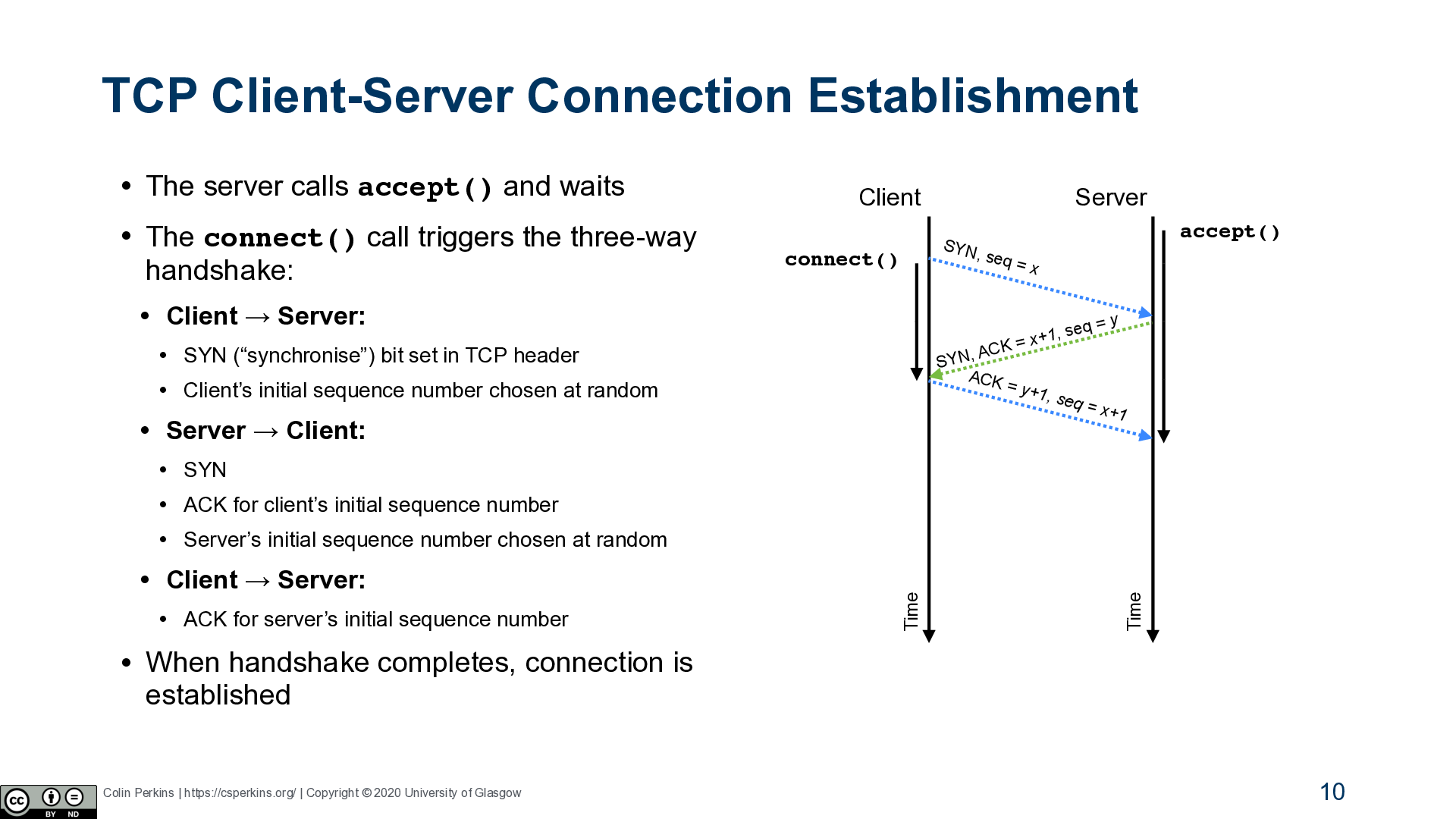
00:13:05.000
How does client-server TCP connection
00:13:07.333
establishment actually work?
00:13:10.125
First, the server creates a TCP socket,
00:13:14.333
binds it to a port, tells it
00:13:16.750
to listen for connections, and calls accept().
00:13:19.917
At that point, the server blocks,
00:13:21.708
waiting for a connection.
00:13:25.000
The client creates a TCP socket and calls connect().
00:13:28.792
This triggers the TCP connection setup handshake,
00:13:31.667
and causes the client to send a
00:13:33.917
TCP segment to the server. This segment
00:13:36.834
will have the SYN (“synchronise”) bit set
00:13:39.375
in its TCP segment header, to indicate
00:13:41.583
that it’s the first packet of the connection.
00:13:44.458
It will also include a randomly chosen sequence number.
00:13:47.500
This is the client’s initial sequence number.
00:13:50.708
The initial segment does not include any data.
00:13:55.208
When this initial segment arrives at the
00:13:57.333
server, the server will send a TCP segment in response.
00:14:01.208
This segment will also have the SYN
00:14:03.417
bit set, because it’s the first segment
00:14:05.583
sent by the server on the connection.
00:14:08.041
It will also include a randomly chosen
00:14:09.667
initial sequence number.
00:14:11.083
This is the server’s initial sequence number.
00:14:14.333
The segment will also have the ACK
00:14:15.959
bit set, because it’s acknowledging the initial
00:14:18.542
segment sent from the client.
00:14:20.917
TCP acknowledgements report the next
00:14:23.041
sequence number expected,
00:14:24.458
and by convention a SYN segment will
00:14:26.750
consume one sequence number.
00:14:28.708
Accordingly, the acknowledgement number
00:14:30.834
in the TCP segment header will
00:14:32.500
be the client’s initial sequence number plus one.
00:14:36.375
Since this segment has both the SYN
00:14:39.000
and ACK bits set, it’s known as a SYN-ACK packet.
00:14:42.542
When the SYN-ACK packet arrives at the
00:14:44.583
client, the client acknowledges its receipt back
00:14:47.208
to the server.
00:14:49.291
The TCP segment it generates to do this will have its
00:14:52.417
ACK bit set to one, to indicate
00:14:54.750
that its acknowledgement number is valid,
00:14:56.583
and the acknowledgement number will be the
00:14:58.667
server’s initial sequence number plus one.
00:15:02.083
The SYN bit is not set on this packet,
00:15:04.375
since it’s not the first packet sent
00:15:06.000
from the client to the server.
00:15:08.667
The sequence number in the TCP segment header
00:15:11.125
will equal the client’s initial sequence number plus one,
00:15:14.417
since the SYN packet consumes one sequence number.
00:15:18.417
This packet also
00:15:19.917
doesn’t include any data, since it’s sent
00:15:21.959
before the connect() call completes.
00:15:25.291
Once this packet has been sent,
00:15:27.000
the client considers the connection established,
00:15:29.166
and the connect() function returns.
00:15:31.708
The client can now send or receive data on the connection.
00:15:36.417
Once this final ACK packet arrives at
00:15:38.333
the server, the three-way handshake is complete.
00:15:41.125
At this point the accept() function completes,
00:15:43.250
returning a file descriptor the server can
00:15:45.542
use to access the new connection.
00:15:48.083
The server now considers the connection to be open.
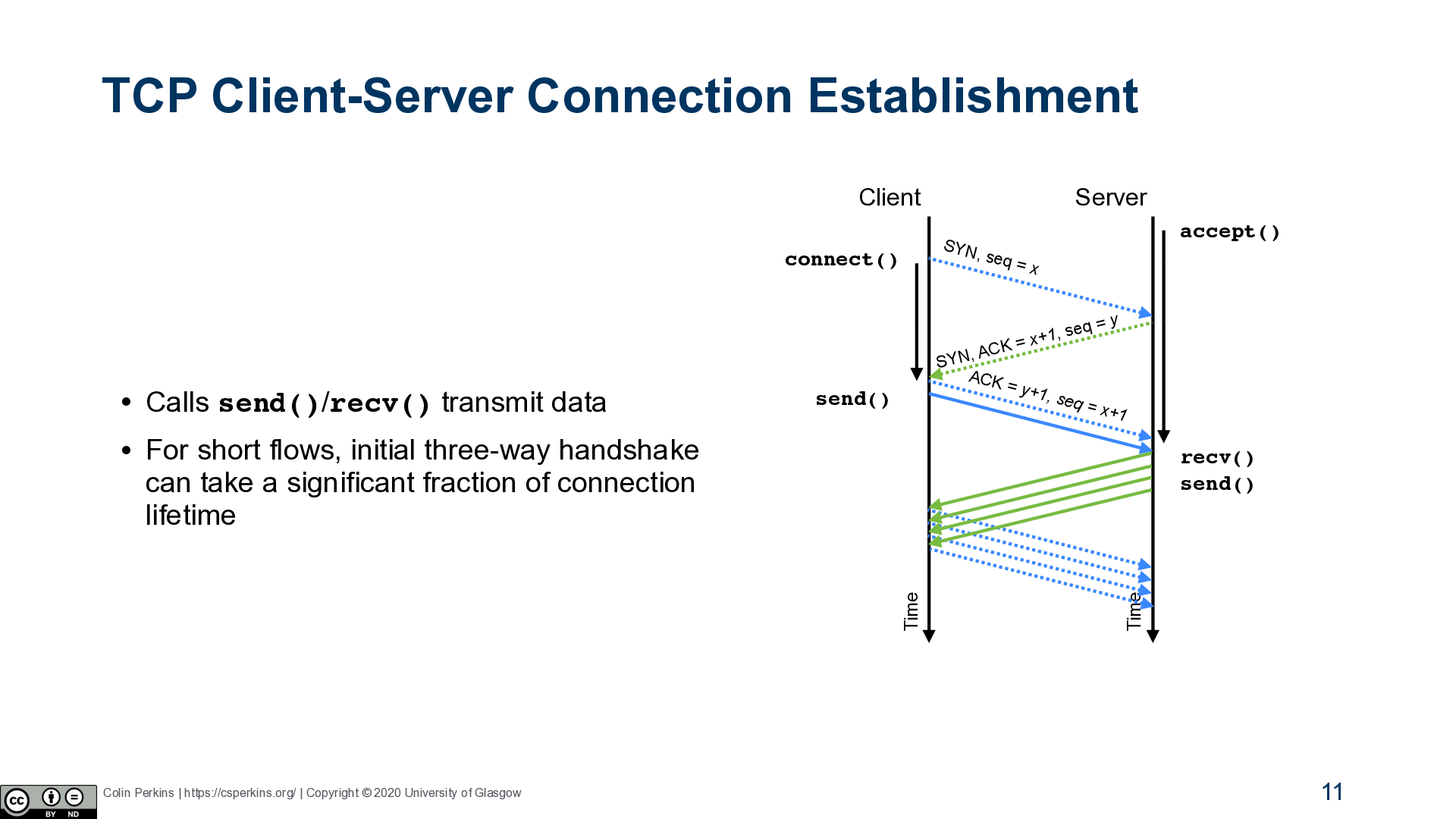
00:15:53.041
Once the three-way handshake has completed,
00:15:55.458
the client and server can send and
00:15:57.375
receive data over the connection.
00:15:59.792
The typical case is that the client
00:16:01.792
sends data to the server immediately after it connects,
00:16:04.417
and the server responds with the requested data.
00:16:07.708
There’s no requirement that the client sends first, though,
00:16:10.792
or that client and server alternate in sending data.
00:16:16.625
The slide shows an example where the
00:16:18.333
client sends a request comprising a single
00:16:20.583
segment’s worth of data to the server.
00:16:23.166
The server then responds by sending a
00:16:25.250
larger response back, including the acknowledgement for
00:16:28.000
the request on the first segment of
00:16:29.583
the response. Finally, we see the client
00:16:32.417
acknowledge receipt of the segments that comprise
00:16:34.583
the response.
00:16:36.208
This is the typical pattern when a
00:16:38.166
browser fetches a web page from a web server.
00:16:41.083
What’s interesting, is that if we look
00:16:43.417
at the time from when the client
00:16:44.792
calls connect(), until the time it receives
00:16:46.834
the last of data segment from the
00:16:49.250
server, a significant part of that time
00:16:51.417
is taken up by the connection setup handshake.
00:16:55.333
It takes a certain amount of time,
00:16:57.000
known as the round trip time,
00:16:58.875
to send a minimal sized request to
00:17:01.083
the server and get a minimal sized response.
00:17:03.834
Larger requests and responses add to
00:17:05.458
this, based on the time to send
00:17:07.667
the additional data down the link,
00:17:09.375
known as the serialisation time for the data.
00:17:12.125
But, if the amount of data
00:17:13.792
being requested from the server is small,
00:17:15.875
it’s often the round trip time that dominates.
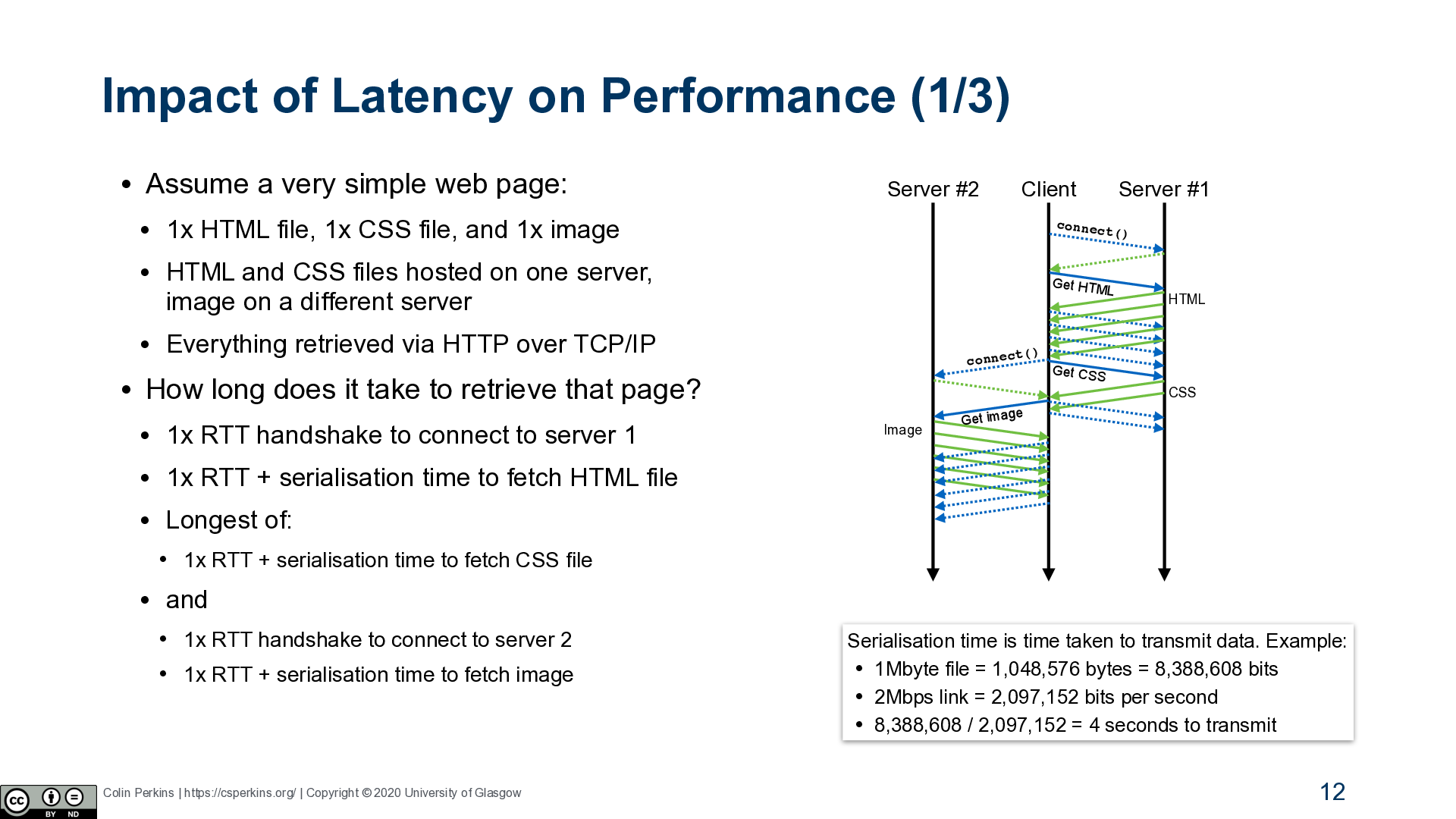
00:17:19.667
For example, let’s assume a browser is
00:17:22.625
requesting a simple web page from a web server
00:17:25.083
using HTTP running over TCP.
00:17:28.291
That web page comprises a single HTML
00:17:30.959
file, a CSS style sheet, and an
00:17:33.917
image. The HTML and CSS files are
00:17:36.917
on one server, while the image is
00:17:39.792
located on a different server.
00:17:42.166
How long does it take to retrieve that page?
00:17:46.000
Well, the client initially connects to the
00:17:48.375
server where the HTML file is located.
00:17:50.750
This takes one round-trip time for the
00:17:52.750
SYN and SYN-ACK packets to be exchanged,
00:17:55.291
and for the connect() call to complete.
00:17:58.458
As soon as the connect() completes,
00:18:00.750
the client sends the request for the
00:18:02.500
HTML. It takes another round-trip for the
00:18:05.875
request to reach the server and the
00:18:07.708
first part of the response to come
00:18:09.750
back, followed by the serialisation time for
00:18:11.583
the rest of the response.
00:18:14.125
When it’s received the HTML, the client
00:18:16.417
knows that it needs to retrieve the
00:18:17.959
CSS file and the image.
00:18:19.959
It reuses the existing connection to the
00:18:22.041
first server to retrieve the CSS file.
00:18:24.834
This takes an additional round trip,
00:18:26.917
plus the serialisation time of the CSS data.
00:18:30.417
In parallel to this, it opens a
00:18:32.333
TCP connection to the second server,
00:18:34.875
sends a request for the image,
00:18:36.500
and downloads the response. This takes two
00:18:39.125
round trips, plus the time to send the image data.
00:18:43.000
Whichever of these takes the longest,
00:18:45.208
plus the amount of time to make
00:18:47.250
the initial connection and fetch the HTML,
00:18:49.959
determines the total time to download the page.
00:18:53.250
The round trip time depends on the
00:18:55.333
distance from the client to the server.
00:18:58.083
The serialisation time depends on the available
00:19:00.625
capacity of the network.
00:19:02.125
For example, if the image is 1 megabyte,
00:19:04.875
8 megabits, in size,
00:19:06.917
and the available bandwidth of the link
00:19:08.792
is 2 megabits per second, then the image will take
00:19:11.208
4 seconds to download, in addition to
00:19:13.375
the round trip time.
00:19:16.000
It can be seen that the total
00:19:18.291
download time depends on both the round
00:19:20.041
trip time, the available bandwidth, and the
00:19:22.208
size of the data being downloaded.
00:19:25.667
What’s a typical round trip time?
00:19:28.750
This depends on the distance between the
00:19:30.542
client and server, and on the amount
00:19:32.583
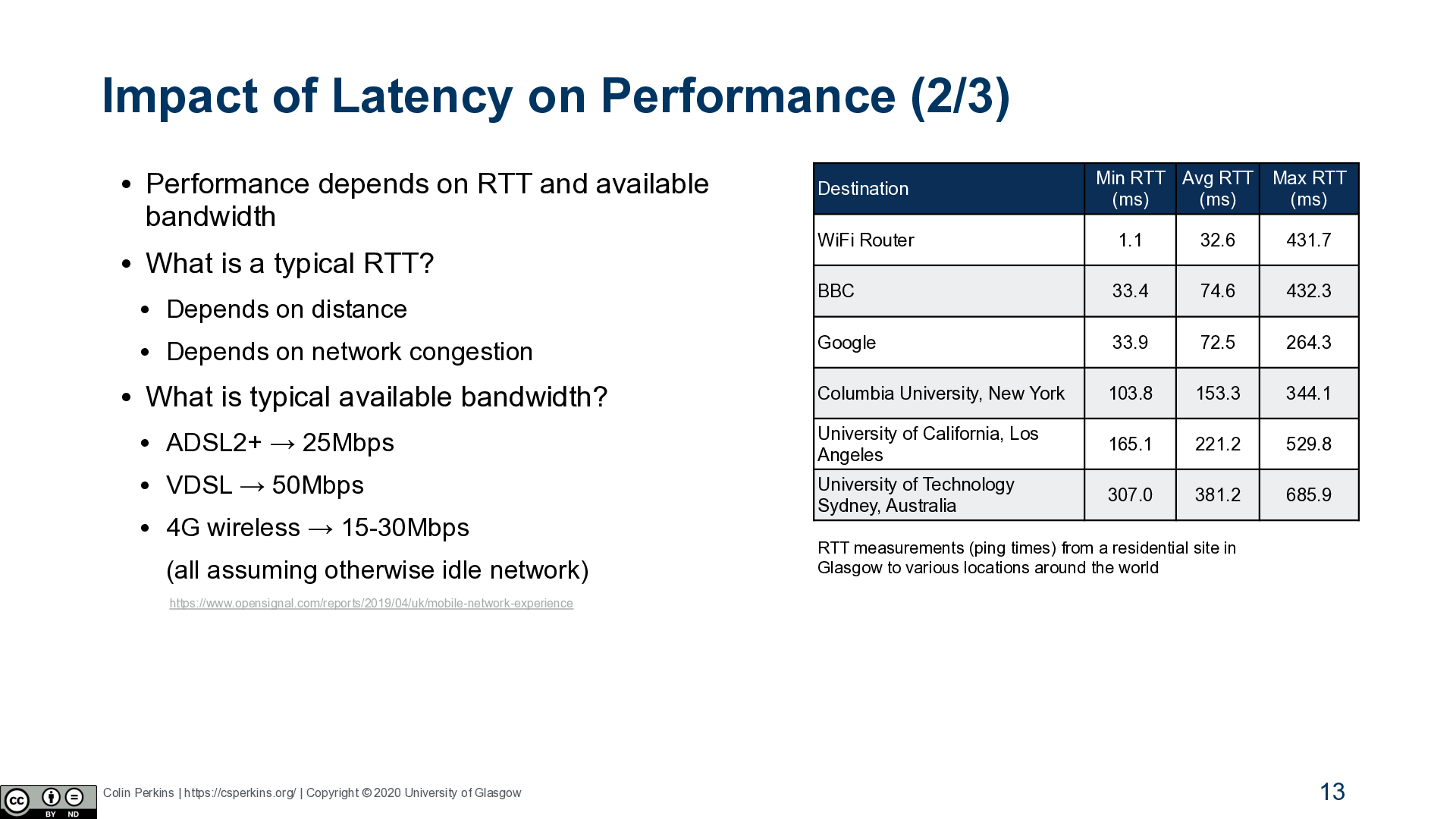
of network congestion. The table on the
00:19:35.750
right gives some typical values, measured from
00:19:38.041
a laptop on my home network to various destinations.
00:19:42.000
There’s a lot of variation.
00:19:43.917
In the best case, it takes around 33ms to
00:19:46.959
get a response from a server in the UK,
00:19:49.375
around 100ms to get a response
00:19:51.542
from a server on the East coast of the US,
00:19:54.208
around 165ms from
00:19:56.458
a server in California, and around 300ms
00:19:59.291
from Australia. Worst case, when there’s other
00:20:02.667
traffic on the network, is considerably higher.
00:20:06.041
This means that a request sent to
00:20:07.917
a server in New York takes at
00:20:09.333
least 1/10th of a second, irrespective of
00:20:11.667
how much data is requested.
00:20:15.000
What about available bandwidth?
00:20:17.458
Well, ADSL typically gets around 25 megabits per second.
00:20:21.917
VDSL, often known as fibre to the
00:20:24.792
kerb, where the connection runs over your
00:20:27.417
home phone line to a cabinet in
00:20:29.125
your street, then over fibre to the
00:20:31.083
exchange and beyond, typically gets around 50
00:20:33.458
megabits per second.
00:20:35.458
And fibre to the premises, where the
00:20:37.792
optical fibre runs direct into your home,
00:20:39.875
can transmit several hundred megabits per second.
00:20:43.250
4G wireless is highly variable, depending on
00:20:45.792
the options enabled by your provider and
00:20:48.041
the reception quality, but somewhere in the
00:20:50.166
15-30 megabits per second range is typical.
00:20:56.000
What does this mean in practice?
00:20:58.208
Let’s take the example of a single
00:21:00.500
web page we used before, comprising HTML,
00:21:03.500
a CSS style sheet, and a single
00:21:05.583
image, and plug in some typical numbers
00:21:07.667
for the file sizes, as shown on
00:21:09.750
the slide. Let’s also assume that the
00:21:12.041
round trip time is the same for
00:21:13.917
both servers, to make the numbers easier.
00:21:16.708
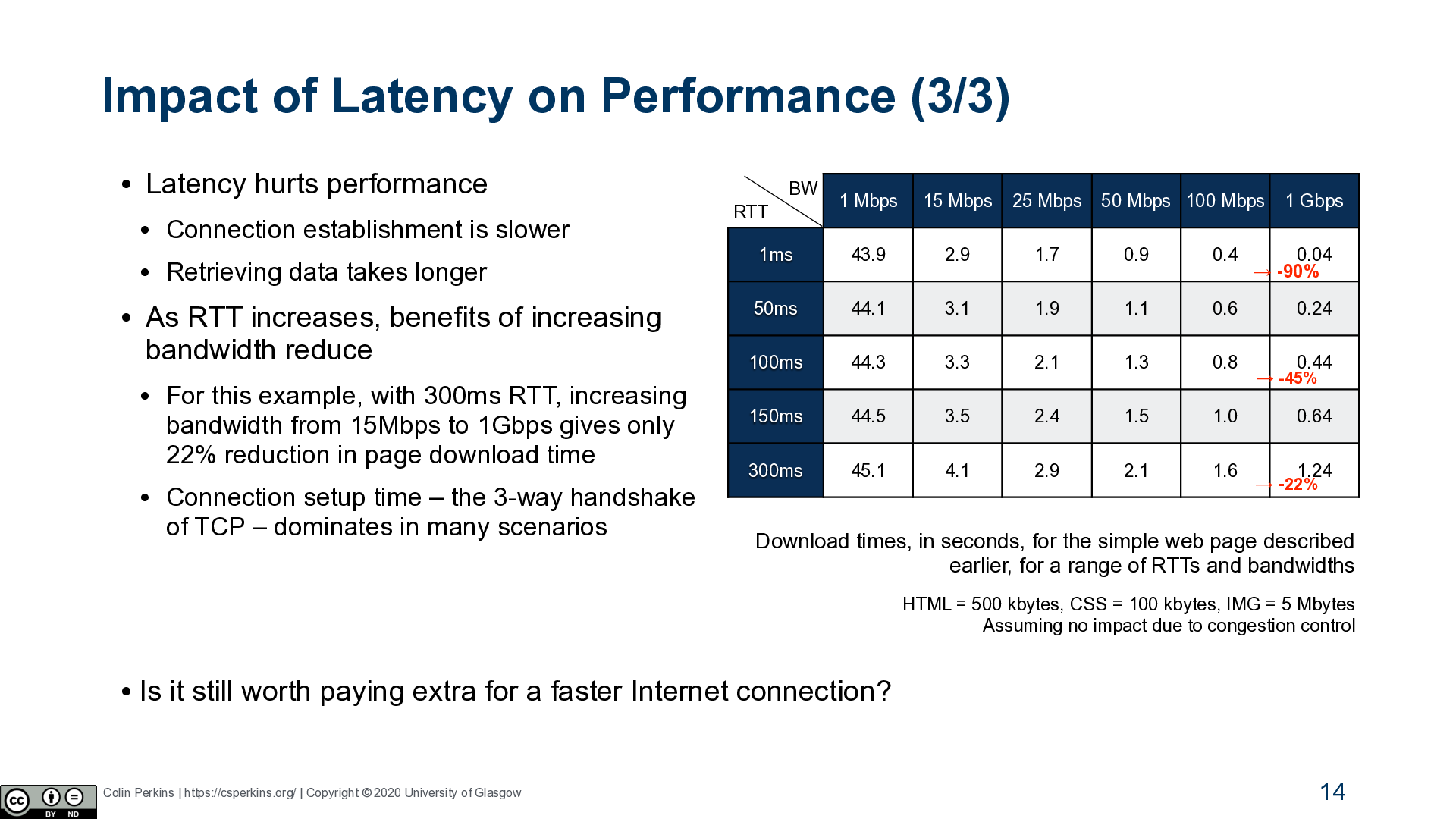
The table then plots the total time
00:21:18.375
it would take to download that simple
00:21:20.917
web page, given different values for bandwidth
00:21:23.333
and the round trip time to the servers.
00:21:25.959
The slowest case is the bottom left
00:21:27.542
of the table, where it would take
00:21:29.041
45.1 seconds to download the page,
00:21:32.041
assuming a 1 megabit per second link
00:21:34.125
to a server with a 300ms round
00:21:36.125
trip time. This models a slow connection
00:21:39.417
to a server in Australia.
00:21:41.917
The fastest is the top right of
00:21:43.625
the table, where it takes 0.04 seconds
00:21:46.125
to download the page from a server
00:21:48.083
located 1ms away on a gigabit link.
00:21:51.625
What’s interesting is how the download time
00:21:53.834
varies as the link speed improves.
00:21:56.375
If we look at the top row,
00:21:58.417
with 1ms round trip time, we see
00:22:00.834
that if we increase the bandwidth by
00:22:02.750
a factor of ten, from 100Mbps to
00:22:05.875
1Gbps, the time taken to download the
00:22:08.458
page goes down by a factor of ten,
00:22:10.583
a 90% reduction.
00:22:13.000
The link is ten times faster,
00:22:14.834
and the page downloads ten time faster.
00:22:18.291
If we look instead at the bottom
00:22:20.458
row, with 300ms round trip time,
00:22:23.166
increasing the link speed from 100Mbps to
00:22:26.166
1Gbps gives only a 22% reduction in
00:22:29.417
download time.
00:22:31.959
Other links are somewhere in the middle.
00:22:35.000
Internet service providers like to advertise their
00:22:37.166
services based on the link speed.
00:22:39.041
They proudly announce that they can now
00:22:41.333
provide gigabit links, and that these are
00:22:43.417
now more than ten times faster than before!
00:22:46.083
And this is true.
00:22:48.208
But, in terms of actual download time,
00:22:50.458
unless you’re downloading very large files,
00:22:52.875
the round trip time is often the
00:22:54.834
limiting factor. The download time, for typical
00:22:58.125
pages, may only improve by a factor
00:23:00.250
of two if the link gets 10x faster.
00:23:03.500
Is it still worth paying extra for
00:23:05.000
that faster Internet connection?
00:23:10.000
What does this mean for protocol design?
00:23:12.500
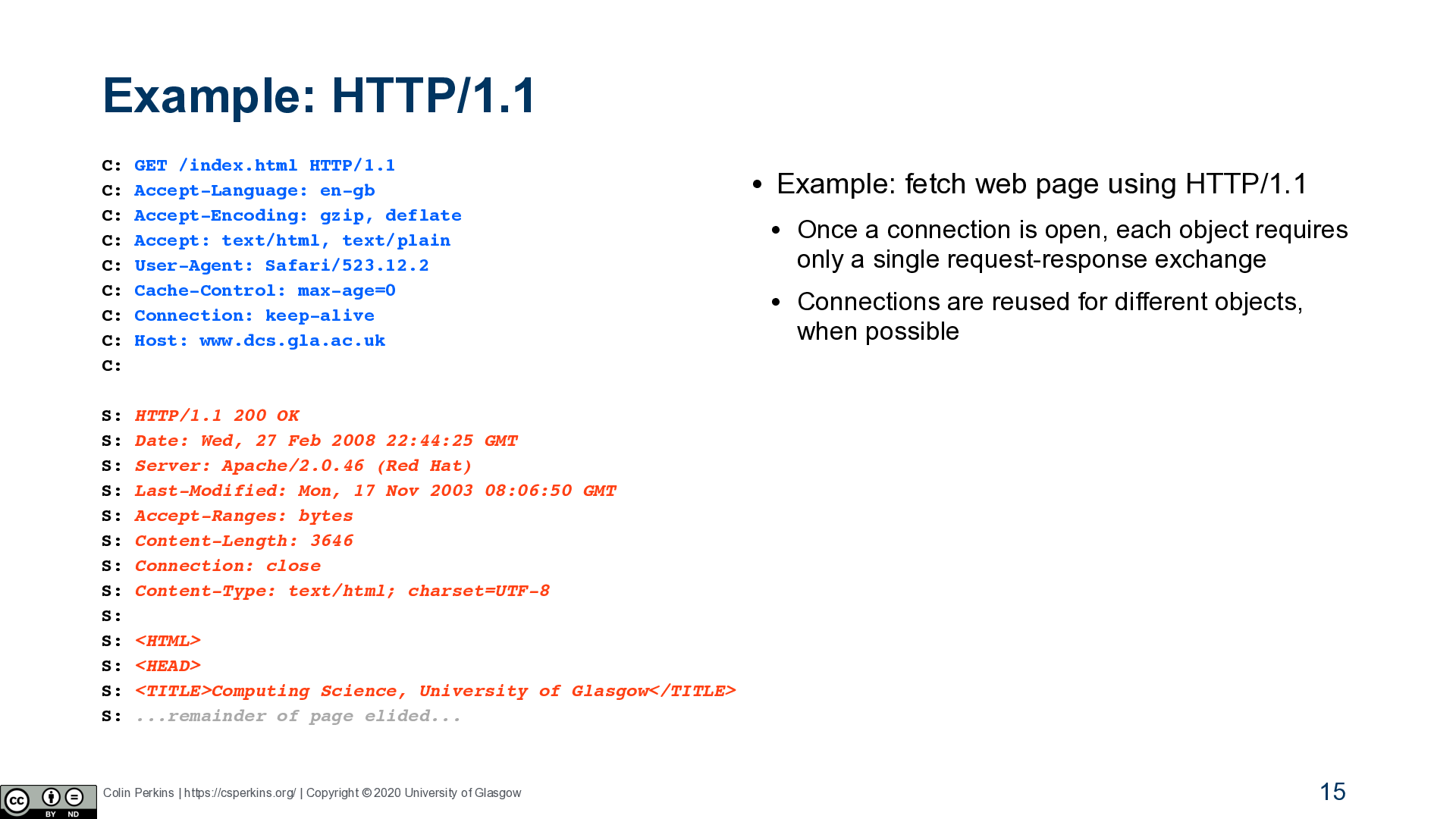
The example shows an HTTP/1.1 exchange.
00:23:15.875
Once the connection has been opened,
00:23:18.375
the client sends the data shown in
00:23:20.041
blue, prefixed with the letter “C:”,
00:23:22.250
to the server. The server then responds
00:23:25.041
with the data shown in red,
00:23:26.875
prefixed with the letter “S:”, comprising some
00:23:29.125
header information and the requested page.
00:23:32.417
Everything is completed in a single round trip.
00:23:34.667
Request. Then response.
00:23:38.542
Compare that with this example,
00:23:40.708
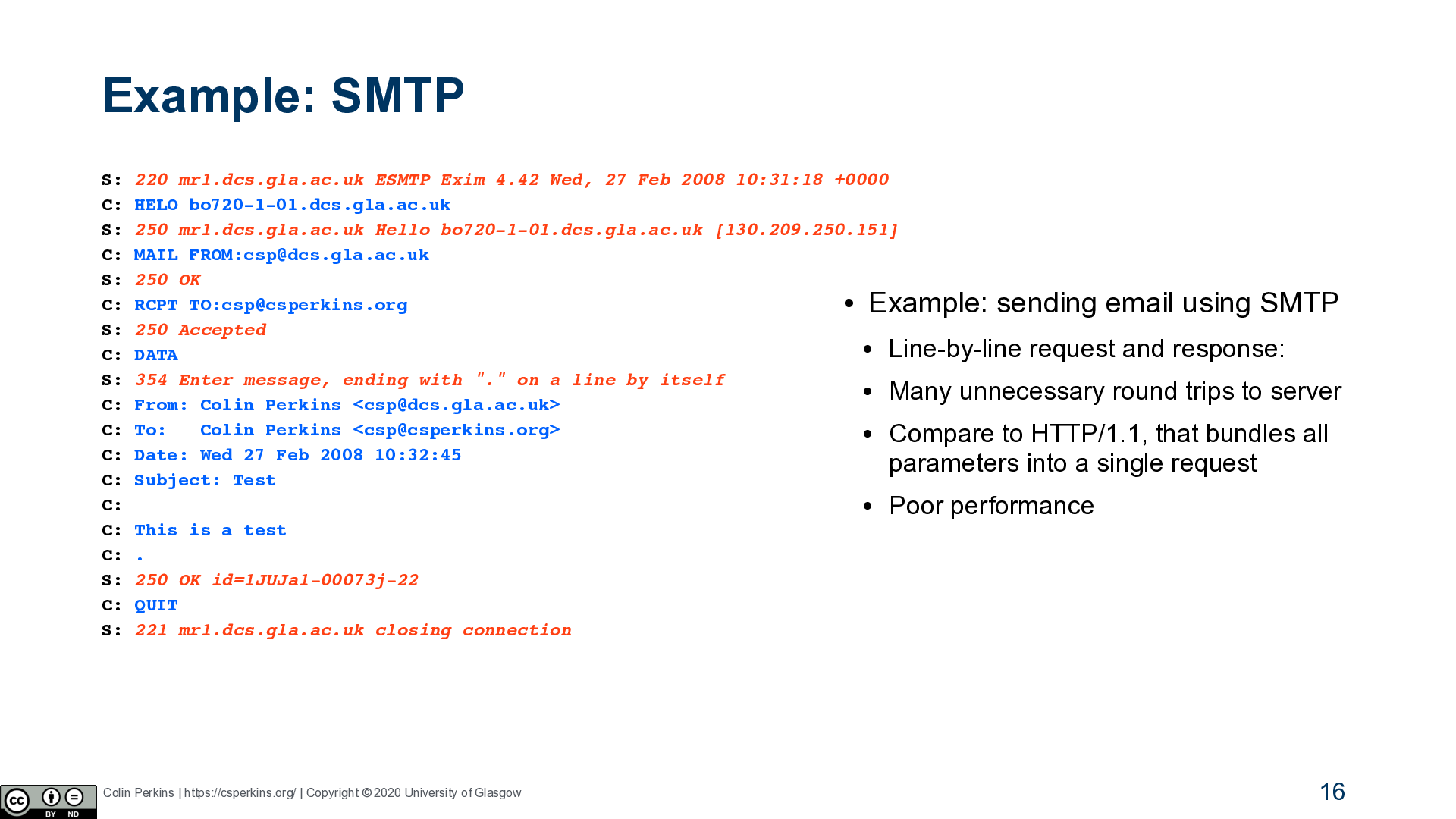
showing the Simple Mail Transfer Protocol,
00:23:42.625
SMTP, used to send email.
00:23:45.542
As with the previous slide, data sent
00:23:48.417
from client to server is shown in
00:23:50.208
blue and prefixed with the letter “C:”,
00:23:52.166
and that sent from the server to
00:23:54.000
the client is in red, prefixed with
00:23:55.458
the letter “S:”.
00:23:57.750
We see that the protocol is very chatty.
00:24:00.500
Once the connection is established,
00:24:02.250
after the SYN, SYN-ACK, and ACK, the server sends
00:24:05.166
an initial greeting. Establishing the connection and
00:24:08.458
sending this initial greeting takes two round trips.
00:24:12.792
The client then sends HELO, and waits
00:24:14.875
for the go ahead from the server.
00:24:16.708
This takes one more round trip.
00:24:19.166
The client then sends the from address,
00:24:21.208
and waits for the server.
00:24:22.875
One more round trip.
00:24:24.834
The client then send the recipients,
00:24:26.917
and waits for the server.
00:24:28.792
One more round trip.
00:24:30.250
The client then says it’d like to
00:24:32.458
send data now, and waits for the server.
00:24:35.250
One more round trip.
00:24:37.000
Then, finally the client gets to send
00:24:39.583
the data, and once it’s confirmed that
00:24:41.875
the data was received, sends QUIT,
00:24:44.041
waits, then closes the connection.
00:24:47.458
The whole exchange takes eight round trips.
00:24:51.000
Is this necessary or efficient?
00:24:53.875
No!
00:24:55.291
If the protocol were designed differently,
00:24:57.291
all the data could be sent at
00:24:58.834
once, as soon as the connection was
00:25:00.500
opened, and the server could respond with
00:25:02.875
an okay or an error. The eight
00:25:06.250
round trips could be reduced to two:
00:25:08.458
one to establish the connection, one to
00:25:10.834
send the message and get confirmation from
00:25:12.667
the server.
00:25:14.542
This is why email is slow to send.
00:25:19.083
TCP establishes connections using a three-way handshake.
00:25:22.834
SYN, SYN-ACK, ACK.
00:25:25.375
The time to establish a connection depends
00:25:27.542
on round trip time and the bandwidth.
00:25:30.000
Links are now fast enough that the
00:25:32.417
round trip time is generally the dominant
00:25:34.583
factor, even for relatively slow links.
00:25:37.000
The best way to improve application performance
00:25:39.375
is usually to reduce the number of
00:25:41.458
messages that need to be sent from
00:25:43.375
client to server. That is, to reduce
00:25:45.750
the number of round trips. Unless you’re
00:25:48.458
sending a lot of data, increasing the bandwidth
00:25:50.792
generally makes very little difference to performance.
-
W. Eddy,
Transmission
Control Protocol (TCP), IETF, August 2022, RFC 9293.
Part 2: Impact of TLS and IPv6 on Connection Establishment
The 2nd part of the lecture discusses the impact of TLS and IPv6 on
TCP connection establishment. It shows how the use of TLS, to secure
connections, increases the connection establishment latency. And it
discusses the "happy eyeballs" technique for connection racing, to
reduce connection establishment delays, in dual stack IPv4 and IPv6
networks.
00:00:00.000
In the previous part, I discussed TCP
00:00:02.917
connection establishment, and highlighted that the round-trip
00:00:05.792
time is often the limiting factor for performance.
00:00:08.834
In the following, I want to discuss
00:00:10.750
the performance implications of adding transport layer
00:00:12.875
security to TCP connections, and how to
00:00:15.625
achieve good performance when the destination is
00:00:17.667
a dual-stack IPv4 and IPv6 host.
00:00:22.583
In the previous part, I showed how
00:00:24.458
the network round trip time can be
00:00:26.125
the limiting factor in performance. This is
00:00:28.834
because every TCP connection needs at least
00:00:31.041
two round trip times: one to establish
00:00:33.792
the connection, and one for the client
00:00:35.834
to send a request and receive a
00:00:37.417
response from the server.
00:00:39.166
I also showed how the protocol running
00:00:41.250
over TCP can make a significant difference
00:00:43.208
to performance, with the examples of HTTP,
00:00:46.583
which sends a request and receives a
00:00:48.375
response in a single round trip,
00:00:50.625
and SMTP, which makes multiple unnecessary round trips.
00:00:55.583
One of the important protocols that runs
00:00:57.667
over TCP is the transport layer security protocol, TLS.
00:01:02.750
TLS provides security for a TCP connection.
00:01:06.000
That is, it allows the client and
00:01:08.417
server to agree encryption and authentication keys
00:01:11.417
to make sure that the data sent
00:01:13.208
over that TCP connection is confidential and
00:01:15.708
protected from modification in transit.
00:01:18.792
TLS is essential to Internet security.
00:01:22.542
When you retrieve a secure web page
00:01:24.291
using HTTPS, it first opens a TCP
00:01:27.500
connection to the server. Then, it runs
00:01:30.166
TLS to enable security for that connection.
00:01:33.166
Then, it asks to retrieve the web page.
00:01:36.333
Depending on the version of TLS used,
00:01:38.750
this adds additional time to the connection.
00:01:41.750
With the latest version of TLS,
00:01:43.834
TLS v1.3, it takes one additional round
00:01:46.875
trip to agree the encryption and authentication keys.
00:01:50.792
That is, after the TCP connection
00:01:53.166
has been established, via the SYN -
00:01:55.333
SYN-ACK - ACK handshake, then the client
00:01:58.166
and server need an additional round trip
00:02:00.250
to enable TLS, before they can request data.
00:02:03.834
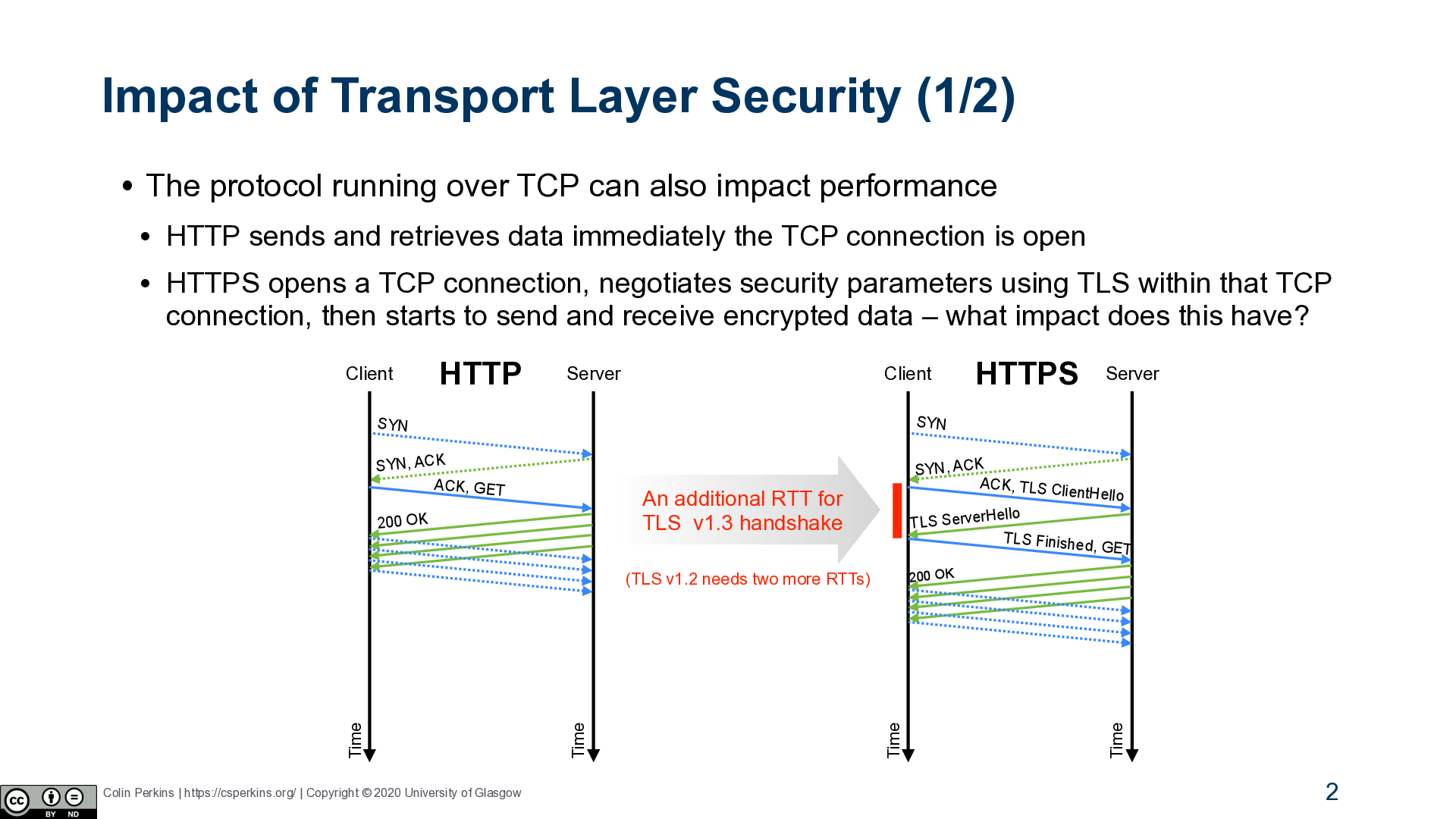
The TLS handshake is in three parts.
00:02:06.917
First, the client sends a TLS ClientHello
00:02:09.917
message to the server to propose security parameters.
00:02:13.041
Then, the server responds with a
00:02:15.000
TLS ServerHello, containing its keys and other
00:02:17.583
security parameters. Finally, assuming there’s a match,
00:02:21.208
the client responds with a TLS Finished
00:02:23.583
message to set the encryption parameters.
00:02:26.500
The client then immediately follows this by
00:02:28.667
sending the application data, such as an
00:02:31.166
HTTP GET request, without waiting for a response.
00:02:35.000
This adds one additional round trip time, in most cases.
00:02:39.083
Older versions of TLS take longer.
00:02:41.542
TLS v1.2, for example, takes at least
00:02:43.917
two round trips to negotiate a secure connection.
00:02:49.000
What impact does the additional round trip
00:02:51.375
due to TLS have on performance?
00:02:54.542
Well, let’s look again at the simple
00:02:56.458
web page download examples from the previous part.
00:03:00.208
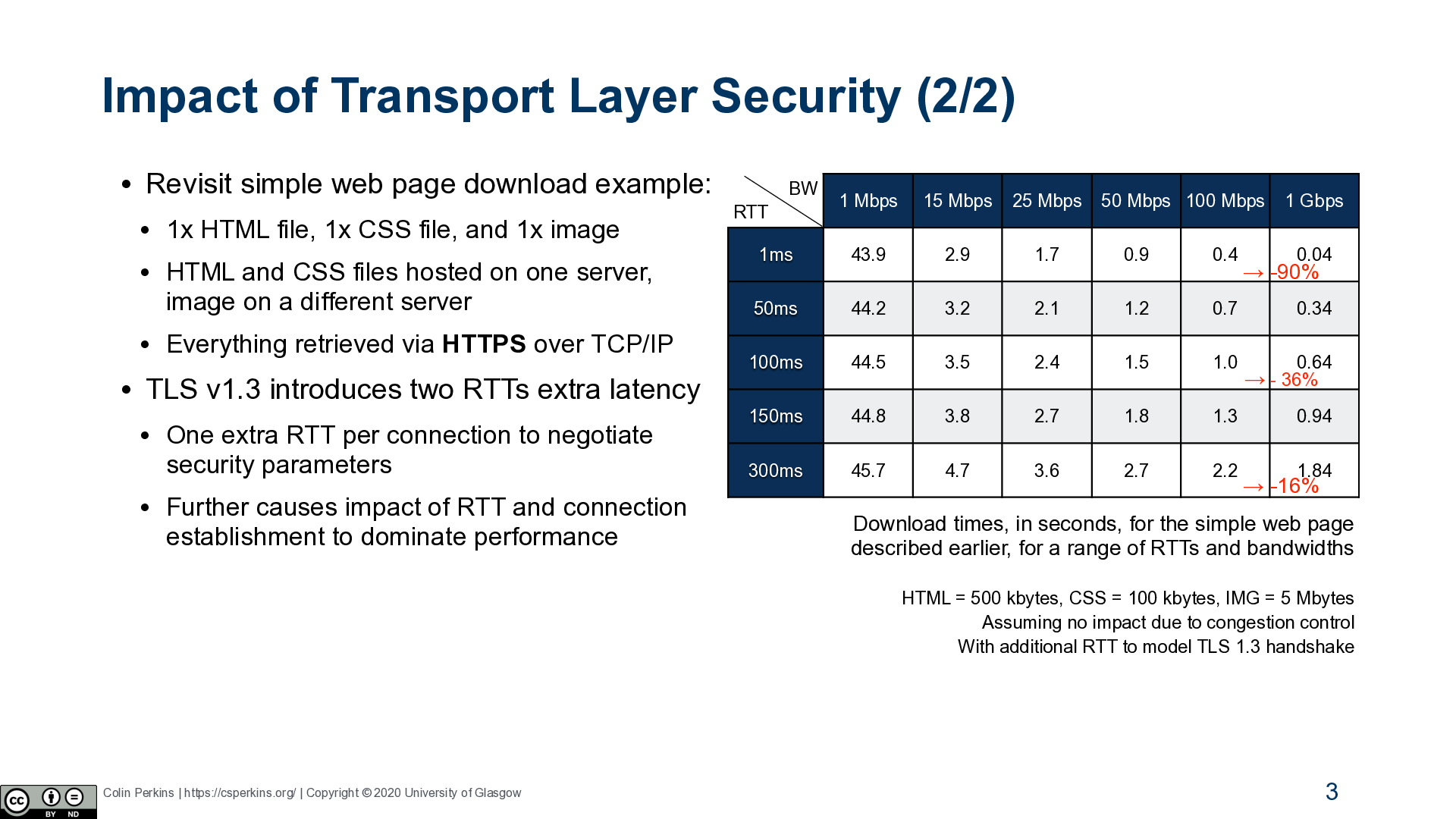
When the round-trip time is negligible,
00:03:02.583
as on the top row with 1ms
00:03:04.667
round trip time, performance is unchanged.
00:03:08.000
As we go down the table,
00:03:09.542
though, performance gets worse. With 100ms round
00:03:13.375
trip time, both the overall performance and
00:03:16.083
the benefit of increasing the link speed
00:03:17.875
go down. The download time for the
00:03:20.500
page on a gigabit link is increased
00:03:22.834
by 45%, from 0.44 to 0.64 seconds,
00:03:26.959
compared to a connection without TLS.
00:03:29.667
And the benefit of going from a
00:03:31.250
100 megabit link to a gigabit link
00:03:32.917
is only 36%, rather than 45% without TLS.
00:03:38.375
With 300ms round trip time the behaviour
00:03:41.875
is even worse. Total download time increases
00:03:44.917
by 48% compared to the non-TLS case,
00:03:47.875
and there’s only a 22% reduction in
00:03:50.250
download time when going from a 100
00:03:51.875
megabit link to a gigabit link.
00:03:55.667
This is not to say that TLS is bad!
00:03:58.250
Far from it – security is essential.
00:04:01.208
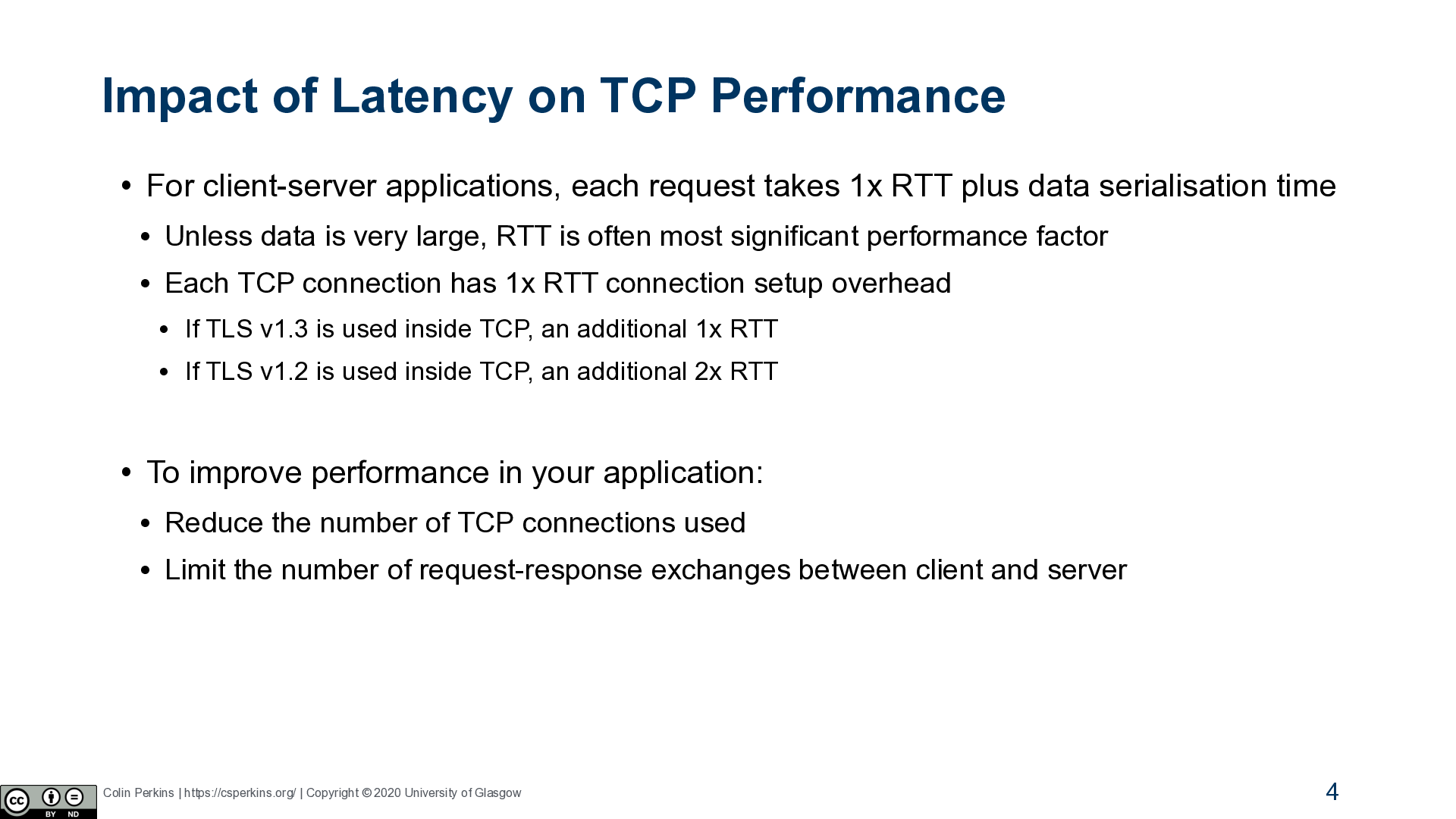
Rather, it further highlights that the number
00:04:03.667
of round trips that a connection must
00:04:05.583
perform, between client and server, is often
00:04:08.291
the limiting factor in performance.
00:04:11.166
Applications that have good performance will try
00:04:13.667
to reduce the number of TCP connections
00:04:15.458
that they establish, since each connection takes
00:04:18.083
time to establish. They also try to
00:04:21.000
limit the number of request-response exchanges,
00:04:23.500
each taking a round trip, they make
00:04:25.583
on each connection.
00:04:27.625
TLS v1.3, standardised in 2018, was a
00:04:31.250
big win here, because it reduces the
00:04:33.625
number of round trips needed to enable
00:04:35.458
security from two, down to one.
00:04:38.000
When used with TCP, this gives the
00:04:40.166
best possible performance: one round trip to
00:04:42.792
establish the TCP connection, and one to
00:04:45.458
negotiate the security, before the data can be sent.
00:04:49.458
We’ll talk more about TLS and how
00:04:51.417
to improve the performance of secure connections
00:04:53.667
in lectures 3 and 4.
00:04:57.000
The other factor affecting TCP connection performance
00:05:00.250
is the ongoing transition to IPv6.
00:05:03.834
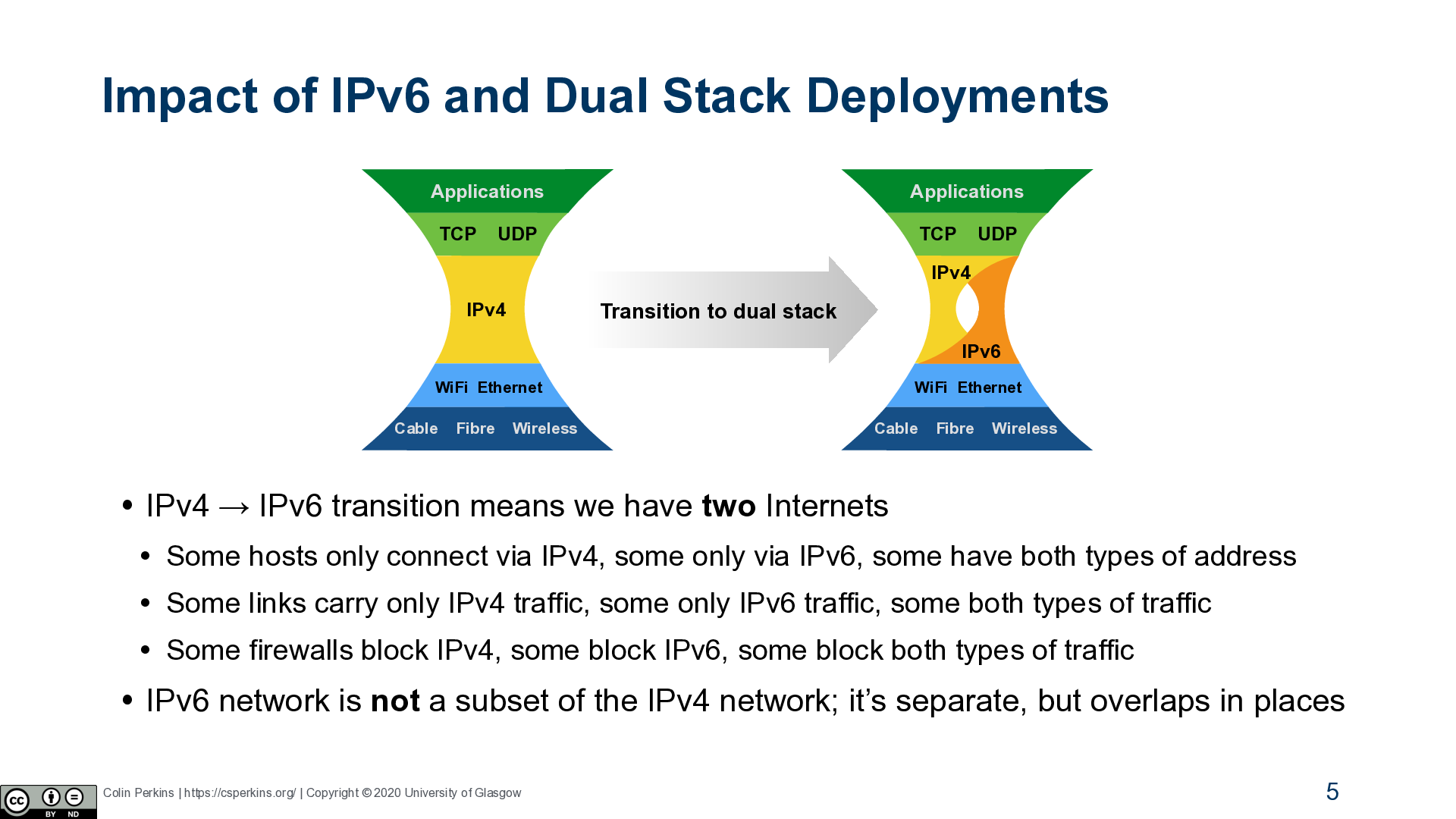
This transition means that we currently have
00:05:06.083
two Internets: the IPv4 Internet and the IPv6 Internet.
00:05:11.417
Some hosts can only connect using IPv4.
00:05:14.542
Some hosts can only connect using IPv6.
00:05:17.667
And some hosts have both types of address.
00:05:21.083
Similarly, some network links can only carry
00:05:23.750
IPv4 traffic, some only IPv6, and some
00:05:27.250
links can carry both types of traffic.
00:05:29.959
And some firewalls, or other middleboxes,
00:05:33.333
block IPv4, some block IPv6, and some
00:05:36.500
block both types of traffic.
00:05:38.875
Importantly, the IPv6 network is not a
00:05:41.917
subset of the IPv4 network. It’s a
00:05:44.959
separate Internet, that overlaps in places.
00:05:49.083
Given that some hosts will be reachable
00:05:51.458
over IPv4 but not IPv6, and vice versa,
00:05:54.792
how do you establish connections during the transition?
00:05:58.792
Well, given a hostname, you perform a
00:06:01.583
DNS lookup to find the IP addresses
00:06:03.708
for that host using the getaddinfo() call.
00:06:07.166
This returns a list of possible IP
00:06:09.417
addresses for the host, including both IPv4
00:06:12.083
and IPv6 addresses.
00:06:14.792
The simple approach is a loop,
00:06:16.917
trying each address in turn,
00:06:18.583
until one successfully connects.
00:06:20.750
This works, but can be very slow.
00:06:24.291
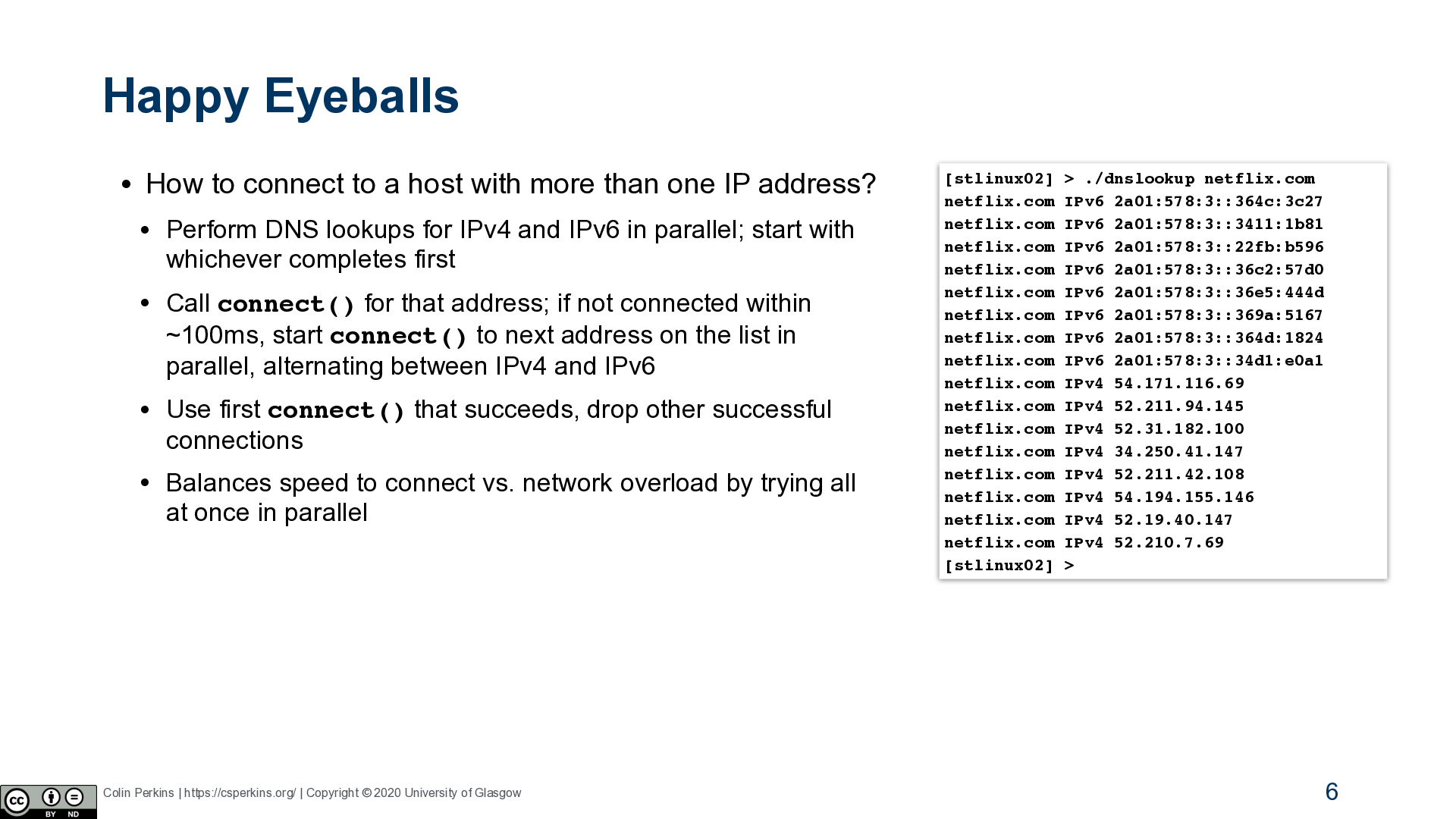
In the example on the slide,
00:06:26.542
Netflix has 16 possible IP addresses,
00:06:29.166
eight IPv6 and eight IPv4, and lists
00:06:32.166
the IPv6 addresses first in its DNS
00:06:35.500
response. If you have only IPv4 connectivity,
00:06:39.542
it may take a long time to
00:06:41.125
try, and fail, to connect to eight
00:06:43.333
different IPv6 addresses before you get to
00:06:45.834
an IPv4 address that works.
00:06:49.000
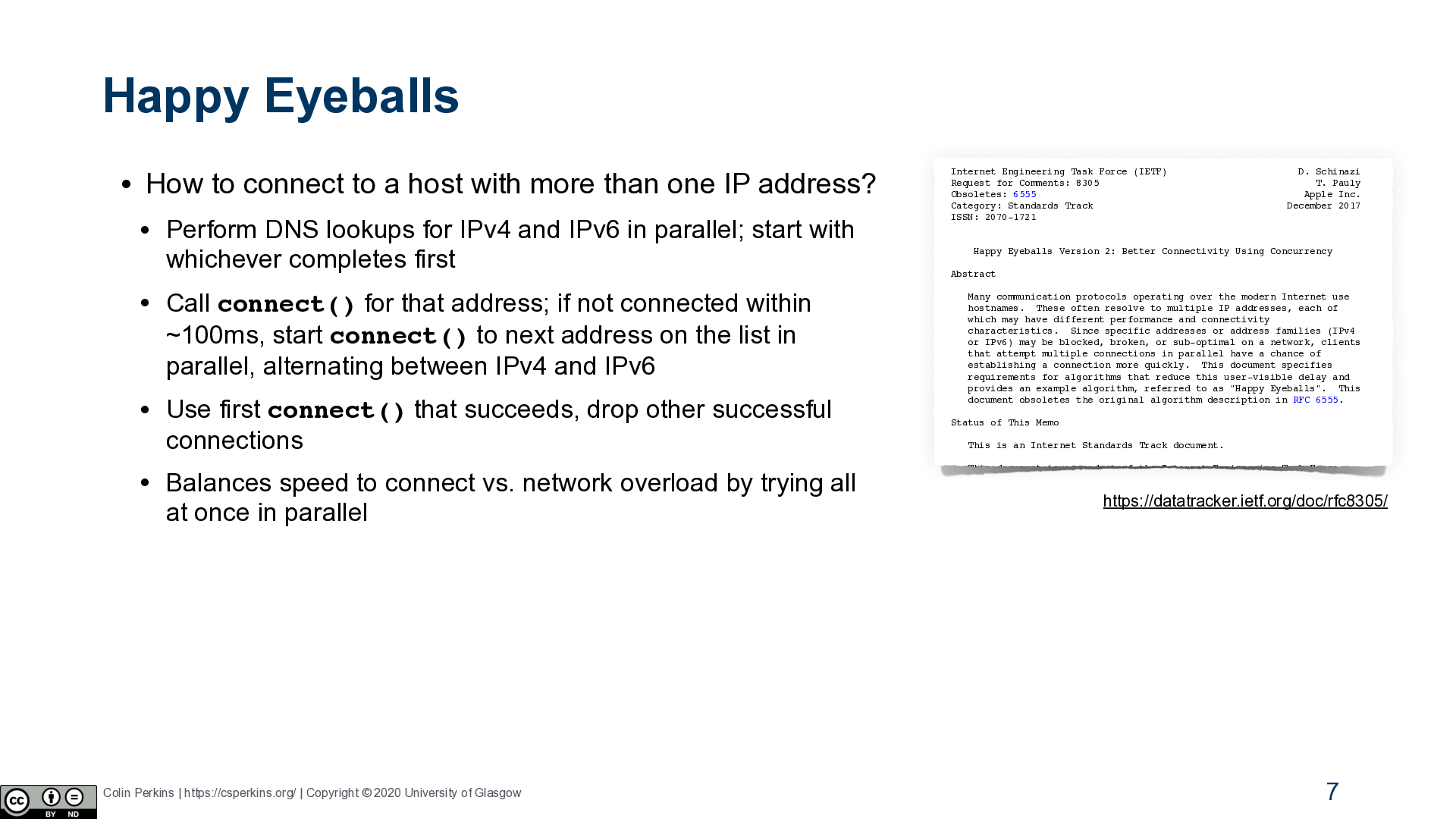
To get good performance, applications use a
00:06:52.166
technique known as “Happy Eyeballs”.
00:06:54.750
This involves making two separate DNS lookups,
00:06:57.583
in parallel, one asking for only IPv4
00:07:00.250
addresses and one for only IPv6 addresses.
00:07:04.250
Starting with whichever of these DNS lookups
00:07:07.041
completes first, the client makes a connection
00:07:09.959
to the first address returned by the server.
00:07:12.500
If that hasn’t succeeded within 100ms,
00:07:15.542
it starts another connection request to the
00:07:17.458
next possible address, alternating between IPv4 and
00:07:21.083
IPv6 addresses.
00:07:23.792
The different connection requests proceed in parallel,
00:07:26.834
until once eventually succeeds. That first successful
00:07:30.917
connection is used, whether over IPv4 or
00:07:33.875
IPv6, and the other connection requests are cancelled.
00:07:38.333
The happy eyeballs technique tries to balance
00:07:40.625
the time taken to connect vs.
00:07:42.959
the network overload of trying many possible
00:07:45.125
connections at once in parallel. It adds
00:07:48.500
complexity to the connection setup, to achieve
00:07:50.583
good performance.
00:07:54.000
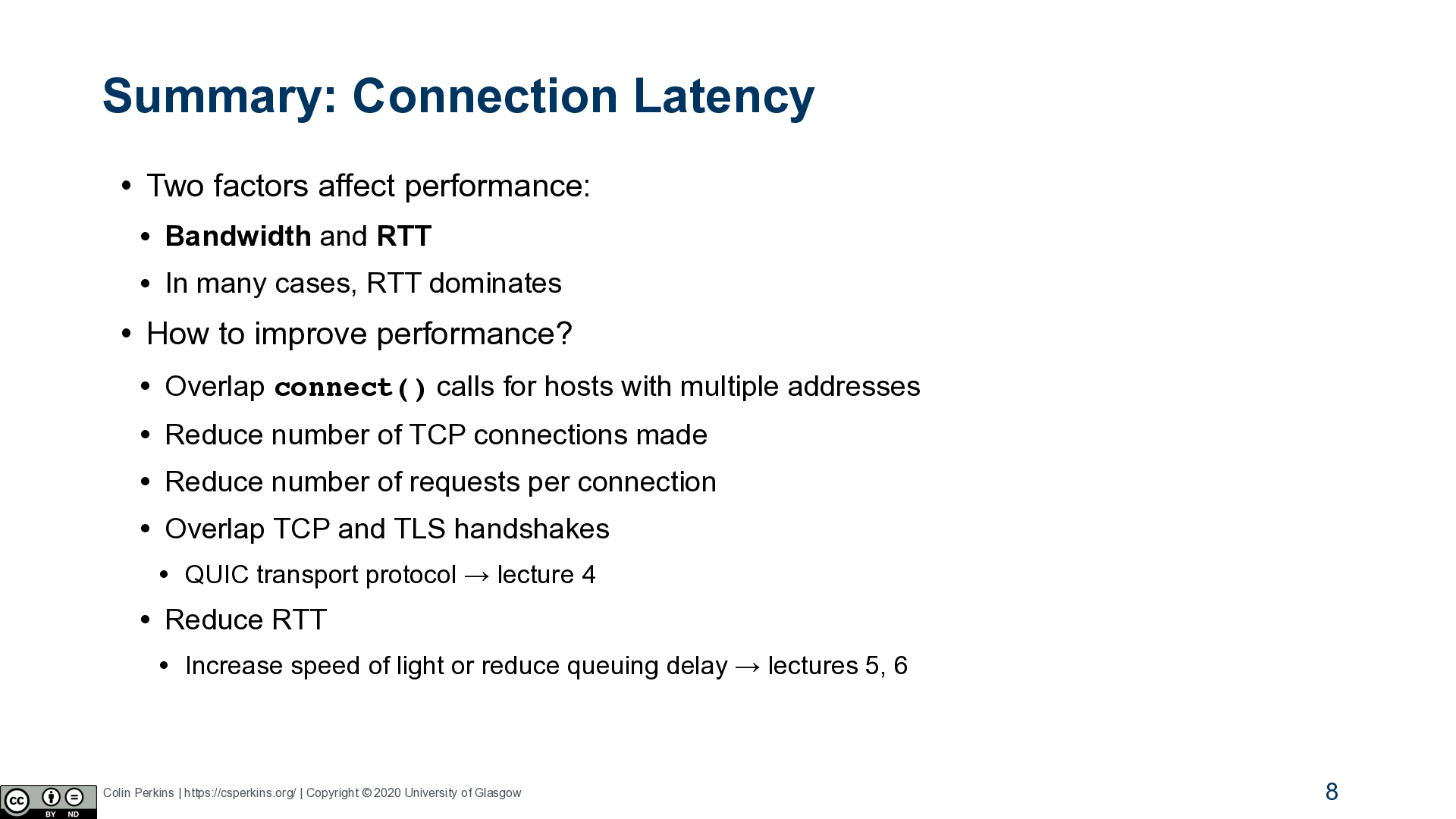
The two factors affecting TCP performance are
00:07:57.125
bandwidth and latency. In many cases,
00:08:00.208
the latency, the round trip time, dominates.
00:08:03.625
The are five ways in which applications
00:08:05.834
using TCP improve their performance.
00:08:09.542
The first is that a client should
00:08:11.458
use something like happy eyeballs, overlapping connection
00:08:13.917
requests if the server, if the server
00:08:16.250
has more than one address. This is
00:08:19.125
more complicated to implement than trying to
00:08:21.000
connect to each different address in turn,
00:08:22.792
but connects a lot faster.
00:08:25.583
The second way to improve TCP performance
00:08:28.125
is to reduce the number of TCP
00:08:29.458
connections made. Each connection takes time to
00:08:32.708
establish. If you can make a single
00:08:35.375
TCP connection and reuse it for multiple
00:08:37.458
requests, that’s faster than making a new
00:08:39.792
connection for each request.
00:08:42.875
Third, if you reduce the number of
00:08:45.083
request-response exchanges made over each connection,
00:08:47.375
you reduce the impact of the round trip latency.
00:08:50.959
All these are possible for any application,
00:08:53.208
by using TCP connections effectively.
00:08:56.166
There are also two more radical changes that can be made.
00:09:00.166
The first is to overlap the TCP
00:09:02.542
and TLS connection setup handshakes, by sending
00:09:05.458
the security parameters along with the initial
00:09:07.583
connection request, so that both the connection
00:09:10.041
setup and security parameters can be negotiated
00:09:12.708
in a single round trip. This isn’t
00:09:15.750
possible with TCP, but the QUIC transport
00:09:18.250
protocol, that we’ll discuss in lecture 4,
00:09:20.333
does allow this.
00:09:22.375
Finally, one can always improve performance by
00:09:24.667
reducing the round trip latency.
00:09:26.959
This latency depends on two things:
00:09:29.625
the speed at which the signal propagates down the link,
00:09:32.166
and the amount of other traffic.
00:09:34.750
Since signals travel down electrical cables and
00:09:37.417
optical fibres at the speed of light,
00:09:39.625
there’s little that can be done to
00:09:41.500
increase the propagation speed, although low earth
00:09:43.917
orbit satellites can help, we’ll discuss in
00:09:46.375
lecture 6.
00:09:48.625
Reducing the amount of other traffic queued
00:09:50.792
up at intermediate links is a possibility
00:09:52.500
though, and this can be affected by
00:09:54.750
the choice of TCP congestion control algorithm.
00:09:57.875
We’ll talk about this in lectures 5 and 6.
00:10:02.000
To summarise, one of the limiting factors
00:10:04.917
with TCP performance is the round trip latency.
00:10:08.750
The use of TLS is essential to
00:10:11.250
improve security, but comes at the expense
00:10:13.500
of an additional round trip that slows
00:10:15.542
down connection establishment. This is solved by
00:10:18.792
the upcoming QUIC transport protocol, that we’ll
00:10:21.125
discuss in lecture 4.
00:10:23.583
Similarly, the ongoing migration to IPv6 means
00:10:26.959
that servers often have both IPv4 and
00:10:29.417
IPv6 addresses, and it’s not clear which
00:10:31.917
of these are reachable. Clients must try
00:10:34.625
to establish multiple connections in parallel,
00:10:36.834
using the happy eyeballs technique, to get
00:10:39.041
good performance.
Part 3: Peer-to-peer Connections
The 3rd part starts to discuss peer-to-peer connections. It talks about
how the use of Network Address Translation (NAT) affects addressing and
connection establishment, and why it complicates creating peer-to-peer
applications.
00:00:00.000
In this part, I’ll start to talk
00:00:02.417
about peer-to-peer connections, network address translation,
00:00:05.458
and how these affect Internet addressing and
00:00:07.625
connection establishment.
00:00:10.542
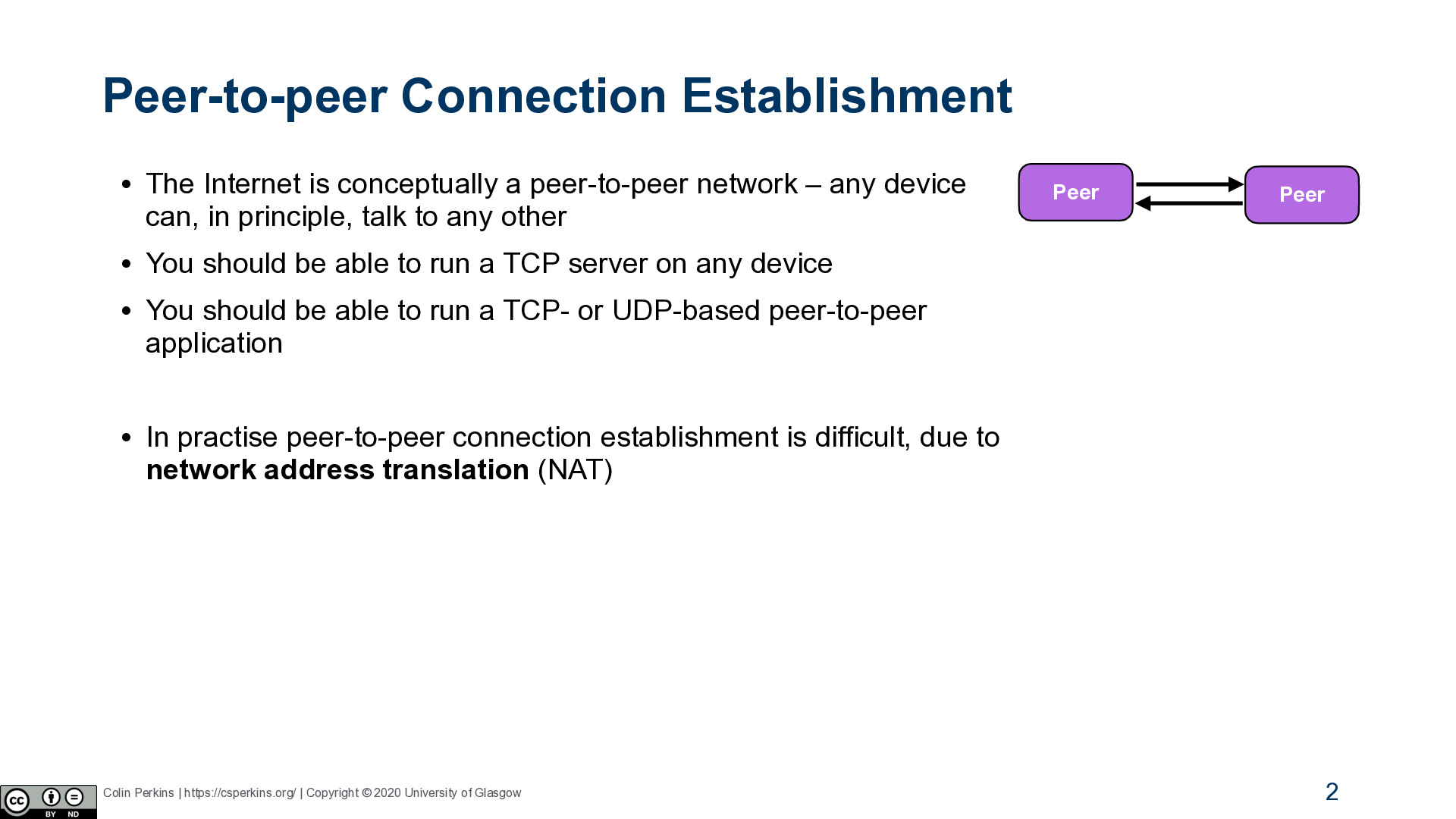
The Internet was designed as a peer-to-peer
00:00:12.917
network, and makes no distinction between clients
00:00:15.667
and servers at the IP layer.
00:00:17.959
In principle, it should be possible to
00:00:20.291
run a TCP server, or a UDP-
00:00:22.667
or TCP-based peer-to-peer application
00:00:25.417
on any host on the network,
00:00:27.458
as long as the clients have some way of finding the
00:00:30.083
server’s IP address, and knowing what port
00:00:32.542
number it’s using, and as long as
00:00:34.667
any firewall pinholes are opened, then it
00:00:36.708
shouldn’t matter whether a server is located
00:00:38.583
in someone’s home or in a data centre.
00:00:41.917
A server in a data centre is
00:00:43.583
likely to have better performance, of course,
00:00:45.875
because it’s probably got a faster connection
00:00:48.250
to the rest of the network.
00:00:49.917
It’s also likely to be more robust,
00:00:52.125
because the data centre will have redundant
00:00:54.041
power and network links, air conditioning,
00:00:56.625
and professional system administrators. But, at the
00:00:59.792
protocol level, there shouldn’t be a difference.
00:01:03.000
In practise, this is not the case.
00:01:05.875
It’s difficult to run a server on
00:01:08.250
a host connected to most residential broadband
00:01:10.375
connections, and it’s difficult to make peer-to-peer
00:01:12.708
connections work.
00:01:14.625
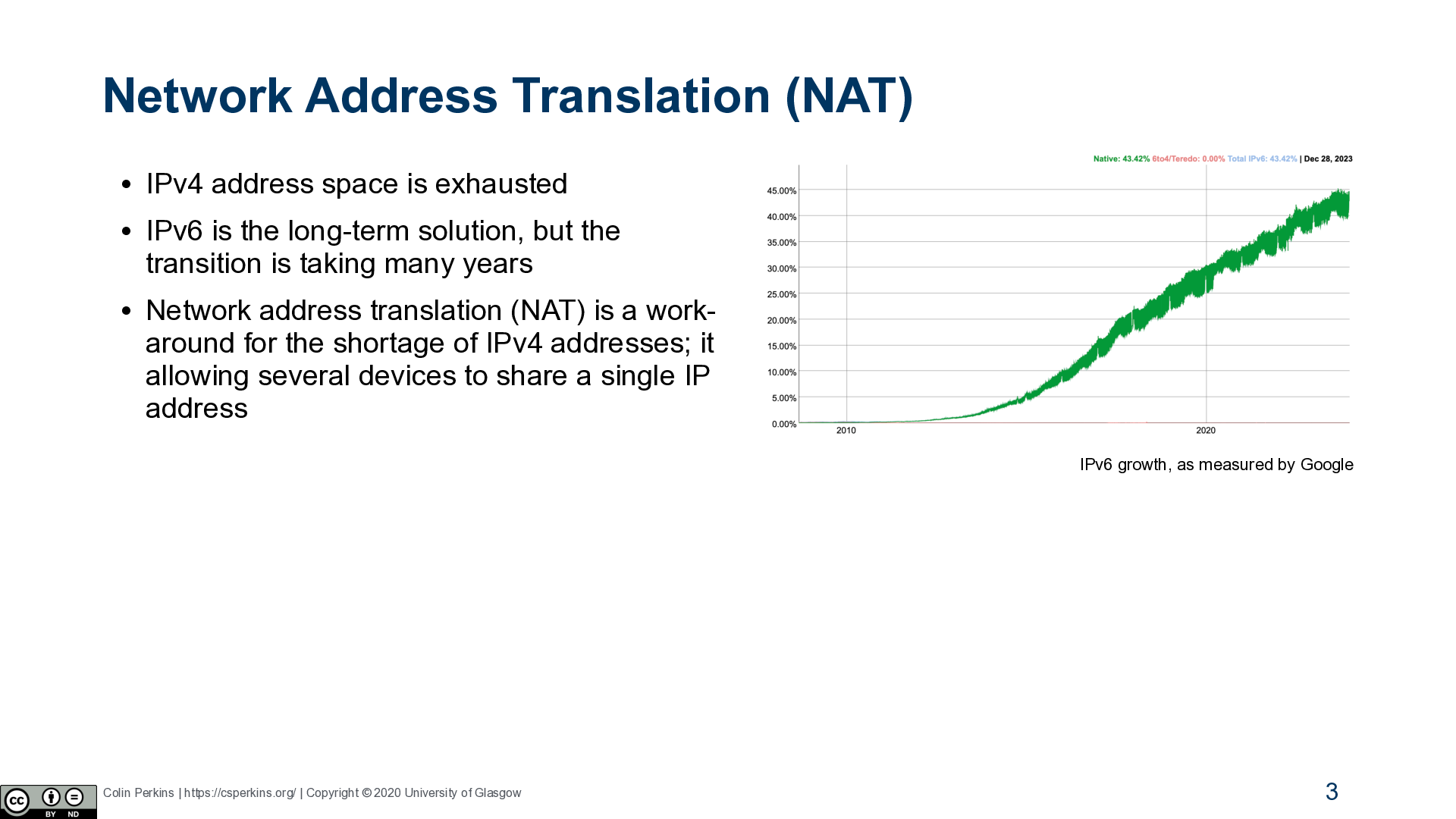
The reason for this is the widespread
00:01:16.917
use of network address translation – NAT.
00:01:21.500
What is network address translation?
00:01:24.375
NAT is the process by which several
00:01:26.500
devices can share a single public IP
00:01:28.583
address. It allows several hosts to form
00:01:31.875
a private internal network, with IP addresses
00:01:34.750
assigned from a special-use range. One device
00:01:38.125
– the network address translator, the NAT
00:01:40.708
– is connected to both the private
00:01:42.500
network and to the Internet, and can
00:01:45.166
forward packets between the two networks.
00:01:47.708
As it does so, it rewrites,
00:01:49.959
translates, the IP addresses, and the TCP
00:01:52.750
and UDP port numbers, so all the
00:01:55.291
packets appear to come from the NAT’s IP address.
00:01:58.750
Essentially, it hides an entire private network
00:02:01.667
behind a single IP address.
00:02:04.000
This is useful because there aren’t enough
00:02:06.333
IPv4 addresses for every device that wants
00:02:08.333
to connect to the network, and because
00:02:10.542
it’s taking a long time to deploy IPv6.
00:02:14.125
NAT is a work around, to let
00:02:16.458
you keep using IPv4 devices, with some
00:02:18.750
limitations, even though there aren’t enough IPv4 addresses.
00:02:25.000
How does NAT work?
00:02:27.375
Well, let’s first step back, and think about how a
00:02:30.542
single host connects to the network.
00:02:33.000
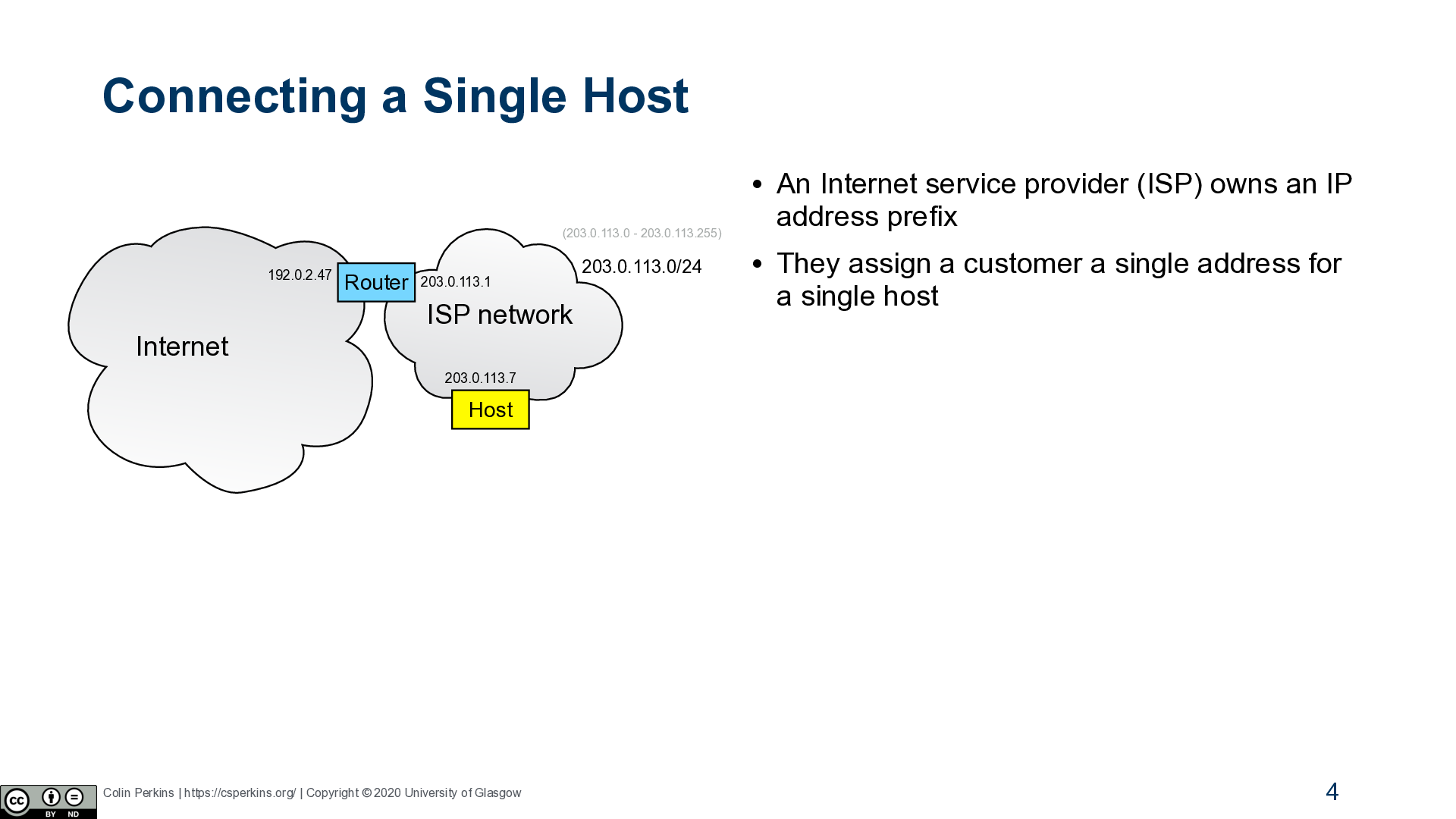
In the figure, a customer owns a
00:02:35.458
single host. That host connects to a
00:02:38.125
network run by an Internet service provider.
00:02:41.000
That ISP, in turn, connects to the
00:02:43.792
broader Internet.
00:02:45.333
The ISP owns a range of IP
00:02:47.333
addresses that it can assign to its customers.
00:02:50.083
In this example, it owns the IPv4
00:02:53.500
prefix 203.0.113.0/24.
00:02:57.959
That is, the set of
00:03:00.041
IPv4 addresses where the first 24 bits,
00:03:02.125
known as the network part of the
00:03:04.500
address, match those of 203.0.113.0 are assigned to the ISP.
00:03:11.000
These are the IPv4 addresses in the range
00:03:13.208
203.0.113.0 to 203.0.113.255.
00:03:21.417
The address with the host part equal
00:03:23.333
to zero represents the network, and cannot
00:03:25.625
be assigned to a device. The ISP
00:03:28.417
assigns the first usable IP address in
00:03:30.083
the range, 203.0.113.1, to the internal network
00:03:33.542
interface of the router that connects it
00:03:37.125
to the rest of the network,
00:03:39.291
and assigns the rest of the addresses to customer machines.
00:03:42.917
One particular customer is assigned IP address
00:03:45.458
203.0.113.7 for their device.
00:03:49.625
The external, Internet-facing, side of the router
00:03:52.917
that connects the ISP to the rest of the network
00:03:56.000
has an IP address assigned by the network to which the
00:03:58.583
ISP connects. In this example, it gets
00:04:01.625
IP address 192.0.2.47.
00:04:07.375
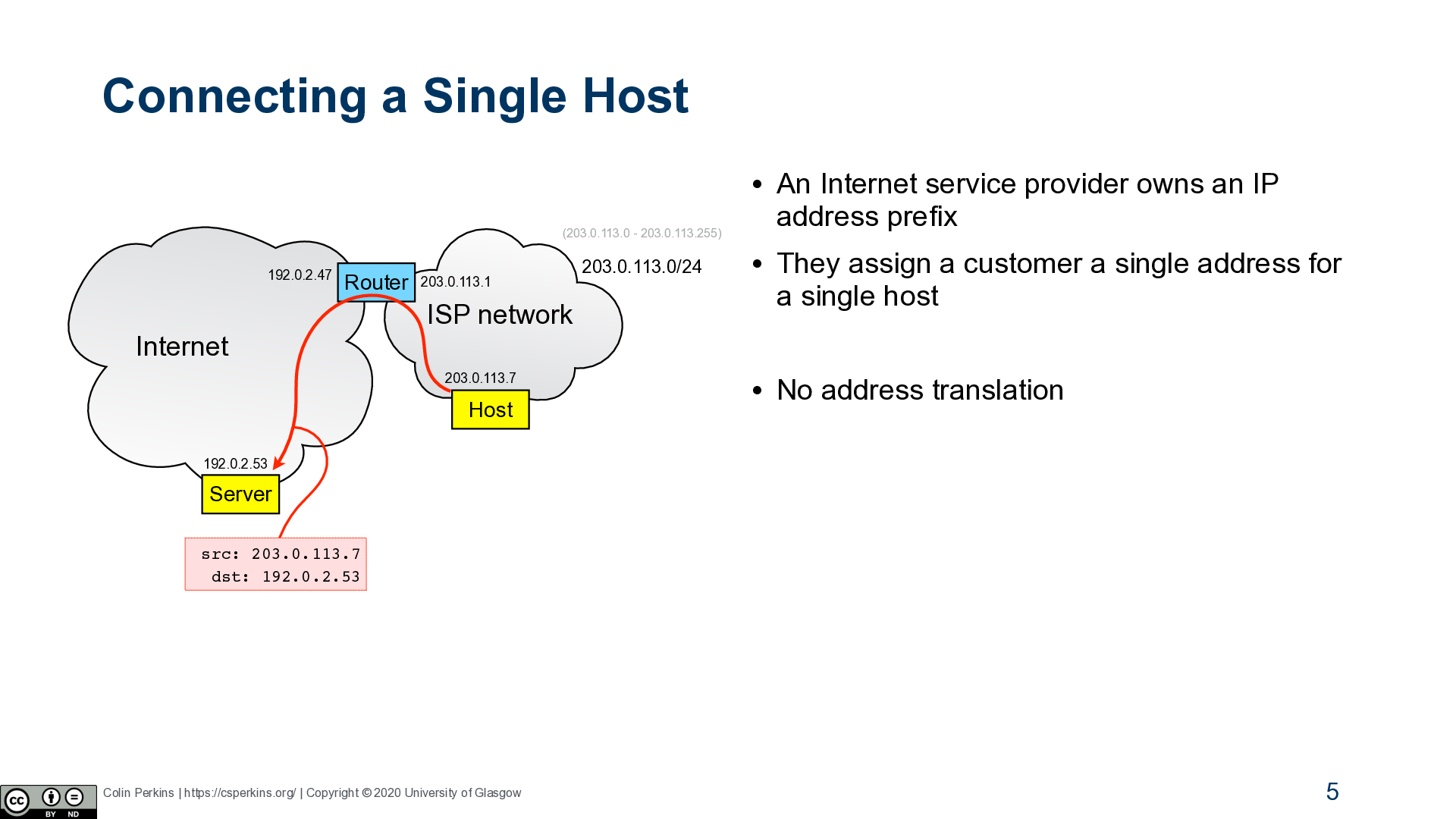
The customer’s host connects to a server
00:04:09.708
on the Internet. The server happens to
00:04:12.417
have IP address 192.0.2.53.
00:04:16.166
The customer’s host sends packets that have
00:04:19.083
their destination IP address equal to that
00:04:21.375
of the server, 192.0.2.53, and source IP
00:04:26.250
address equal to that of the customer’s
00:04:28.959
host, 203.0.113.7.
00:04:32.708
Those packets travel through the network without
00:04:35.208
change, and when they arrive that the
00:04:37.500
server, they still have destination IP address
00:04:40.625
192.0.2.53 and source IP address 203.0.113.7.
00:04:48.875
When it sends a reply, the server
00:04:51.667
will set the destination IP address to
00:04:53.333
that of the customer’s device, 203.0.113.7,
00:04:57.959
and use its own address, 192.0.2.53,
00:05:02.166
as the source IP address.
00:05:04.208
No address translation takes place.
00:05:08.166
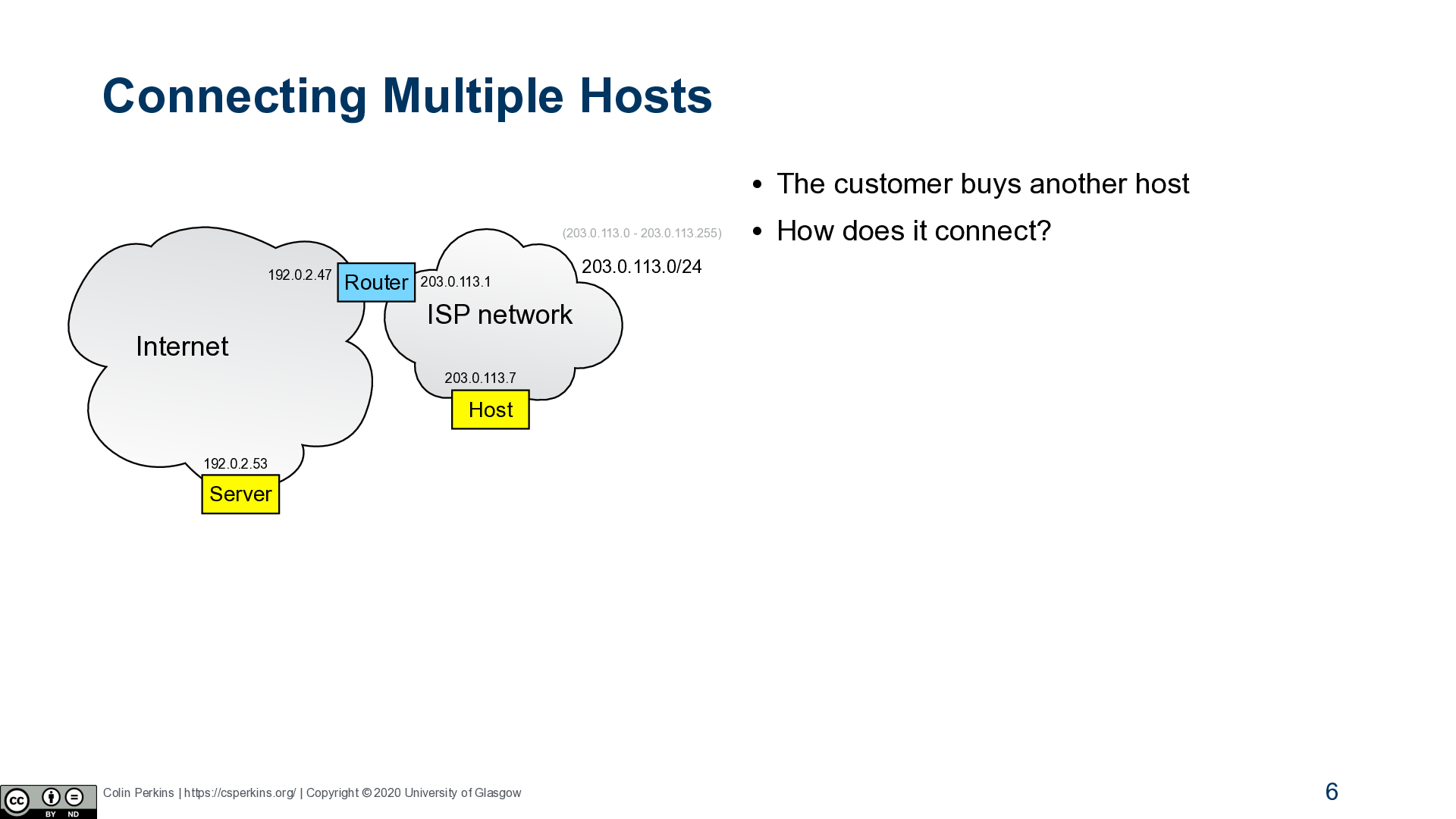
At some point later, the customer buys
00:05:10.750
another host. How does it connect to
00:05:13.000
the network?
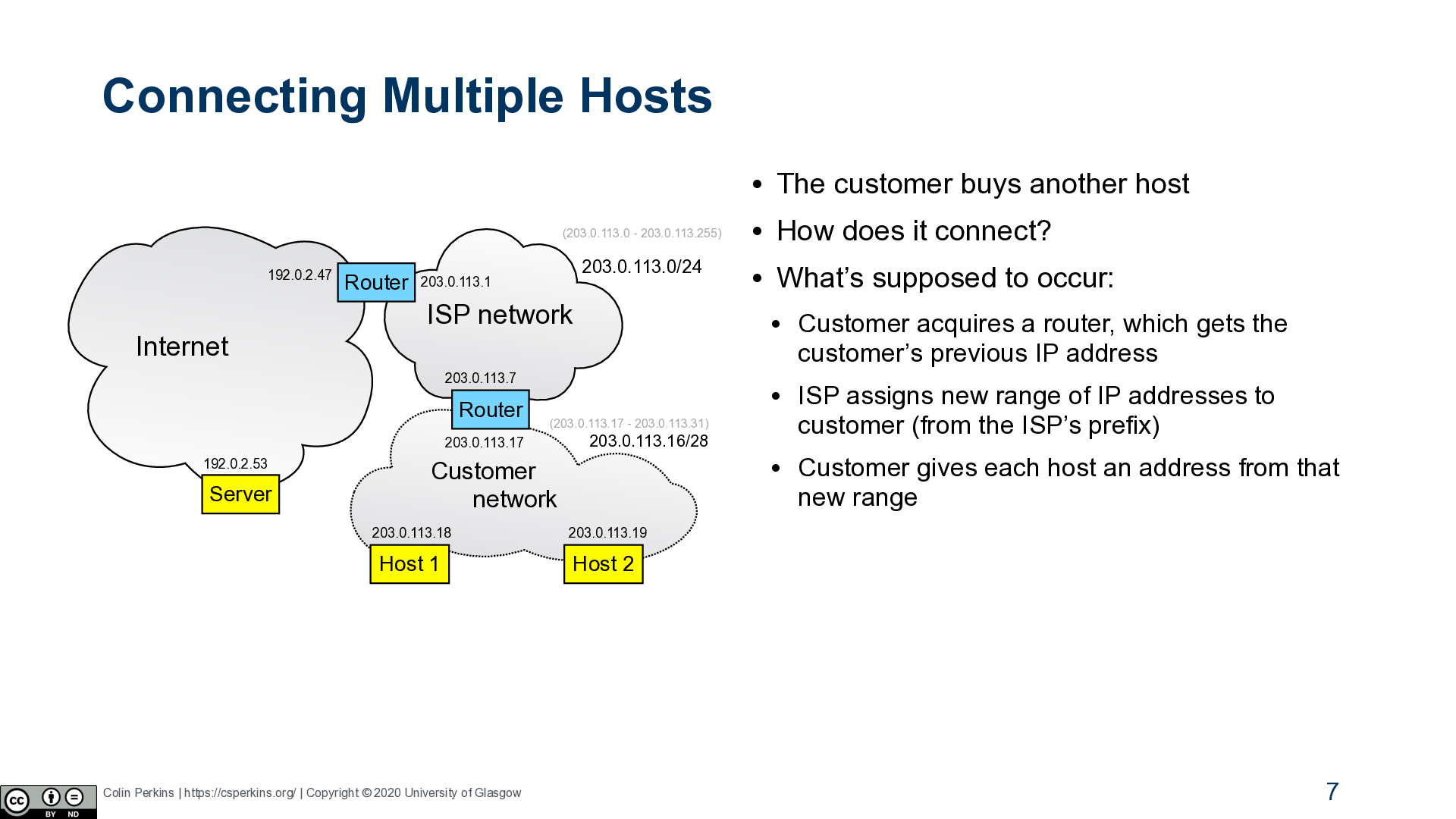
00:05:15.667
What’s supposed to happen is as follows.
00:05:18.834
First, the customer buys an IP router,
00:05:21.583
or is given one by the ISP.
00:05:24.458
The router is used to create an
00:05:26.291
internal network for the customer, that connects
00:05:28.750
to the ISP’s network.
00:05:30.834
This could be an Ethernet, a WiFi
00:05:32.959
network, or whatever.
00:05:35.000
The external interface of that router,
00:05:37.708
that connects the customer to the ISP,
00:05:40.166
inherits the IP address that was previously
00:05:42.458
assigned to the customer’s single device,
00:05:45.166
in this case 203.0.113.7.
00:05:50.208
The ISP also assigns a new IP
00:05:52.792
address range to the customer.
00:05:55.000
This will be a subset of the IP address range the ISP owns.
00:05:59.250
In this example,
00:06:00.250
the customer is assigned the IP address
00:06:02.375
range 203.0.113.16/28.
00:06:06.959
That is, IP addresses where
00:06:09.083
the first 28 bits match those of
00:06:11.333
203.0.113.16, namely the range 203.0.113.16 to 203.0.113.31.
00:06:22.333
The customer assigns the first usable address
00:06:24.875
in that range, 203.0.113.17, to the internal
00:06:30.583
network interface of the router, and assigns
00:06:33.250
other addresses to their two hosts.
00:06:35.667
In this example, the two hosts are
00:06:38.083
given addresses 203.0.113.18 and 203.0.113.19.
00:06:44.500
The end result is that the ISP
00:06:46.542
delegates some of the IP addresses they
00:06:48.959
own to their customer, and the customer
00:06:50.834
uses them in their network.
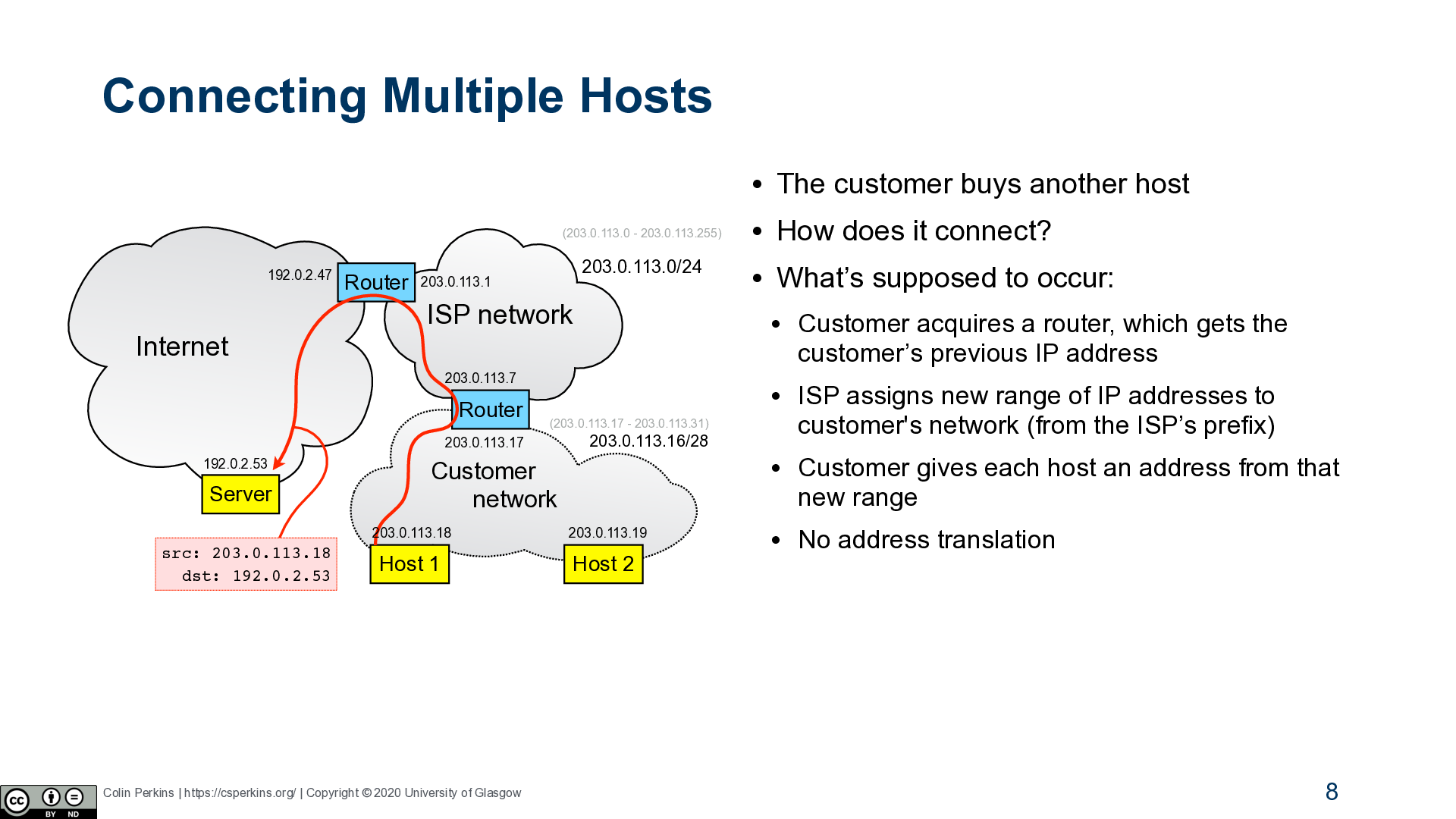
00:06:54.125
One of the customer’s hosts connects to
00:06:56.125
a server on the Internet.
00:06:58.500
As expected, to do so, that host
00:07:01.583
sends an IP packet with the source
00:07:03.834
IP address set to its IP address,
00:07:06.500
in this case 203.0.113.18, and the destination
00:07:10.959
address set to the IP address of
00:07:12.583
the server, 192.0.2.53.
00:07:16.834
That packet travels through the customer’s network
00:07:19.500
to its router, and is forwarded on
00:07:21.667
to the ISP’s network. It traverses the
00:07:24.542
ISP’s network to the router connecting the
00:07:26.959
ISP to the Internet, and is forwarded
00:07:29.291
on from there to the Internet.
00:07:31.834
Eventually, the packet arrives at the server.
00:07:34.458
When it arrives, it still has destination
00:07:36.917
address equal to that of the server,
00:07:39.041
192.0.2.53, and source address equal to that
00:07:43.792
of the host that sent it,
00:07:45.458
203.0.113.18.
00:07:48.875
When it sends a reply, the server
00:07:51.375
will set the destination IP address to
00:07:53.417
that of the customer’s device, 203.0.113.18 and
00:07:57.542
use its own address, 192.0.2.53, as the
00:08:01.583
source IP address.
00:08:03.583
No address translation takes place.
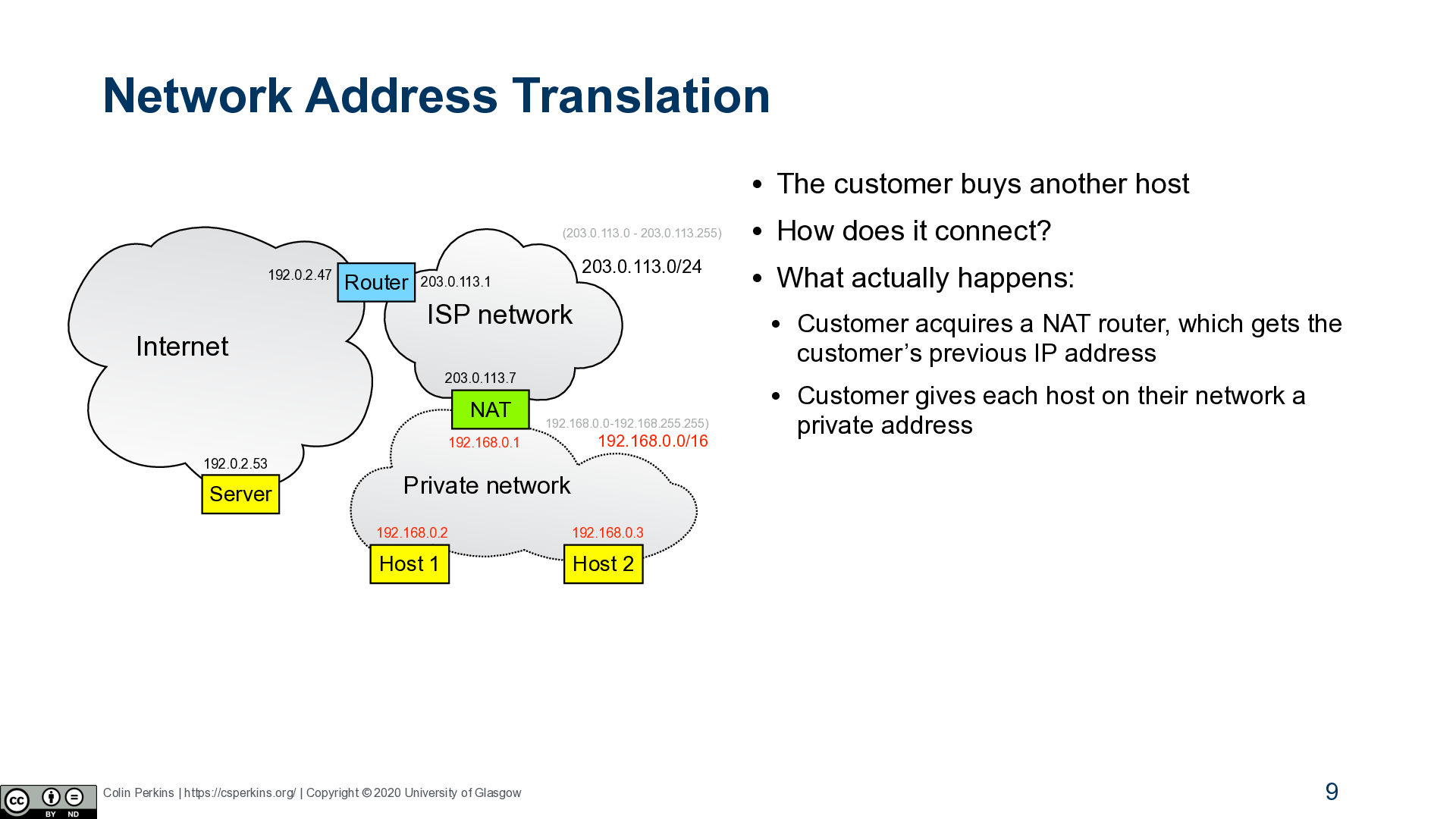
00:08:07.000
That’s what’s supposed to happen,
00:08:09.542
but what actually happens?
00:08:11.834
Well, most likely the ISP either doesn’t
00:08:14.875
have enough IPv4 addresses to delegate some
00:08:17.834
of them to their customer, or they
00:08:19.750
want to charge a lot extra to do so.
00:08:22.333
Accordingly, the customer buys a network address
00:08:25.083
translator, and connects it to the ISP’s
00:08:27.792
network in place of their single original host.
00:08:31.083
The external interface of the NAT gets
00:08:33.625
the IP address assigned to the customer’s
00:08:35.583
original host, 203.0.113.7.
00:08:40.333
The customer sets up their internal network
00:08:42.792
as before, but instead of using IP
00:08:45.417
addresses assigned by their ISP, they use
00:08:47.750
one of the private IP address ranges.
00:08:50.625
In this example, they use
00:08:52.875
addresses in the range 192.168.0.0 to 192.168.255.255.
00:09:01.417
The internal interface of the NAT is
00:09:03.000
given IP address 192.168.0.1, and the two
00:09:07.000
hosts get addresses 192.16.0.2 and 192.168.0.3.
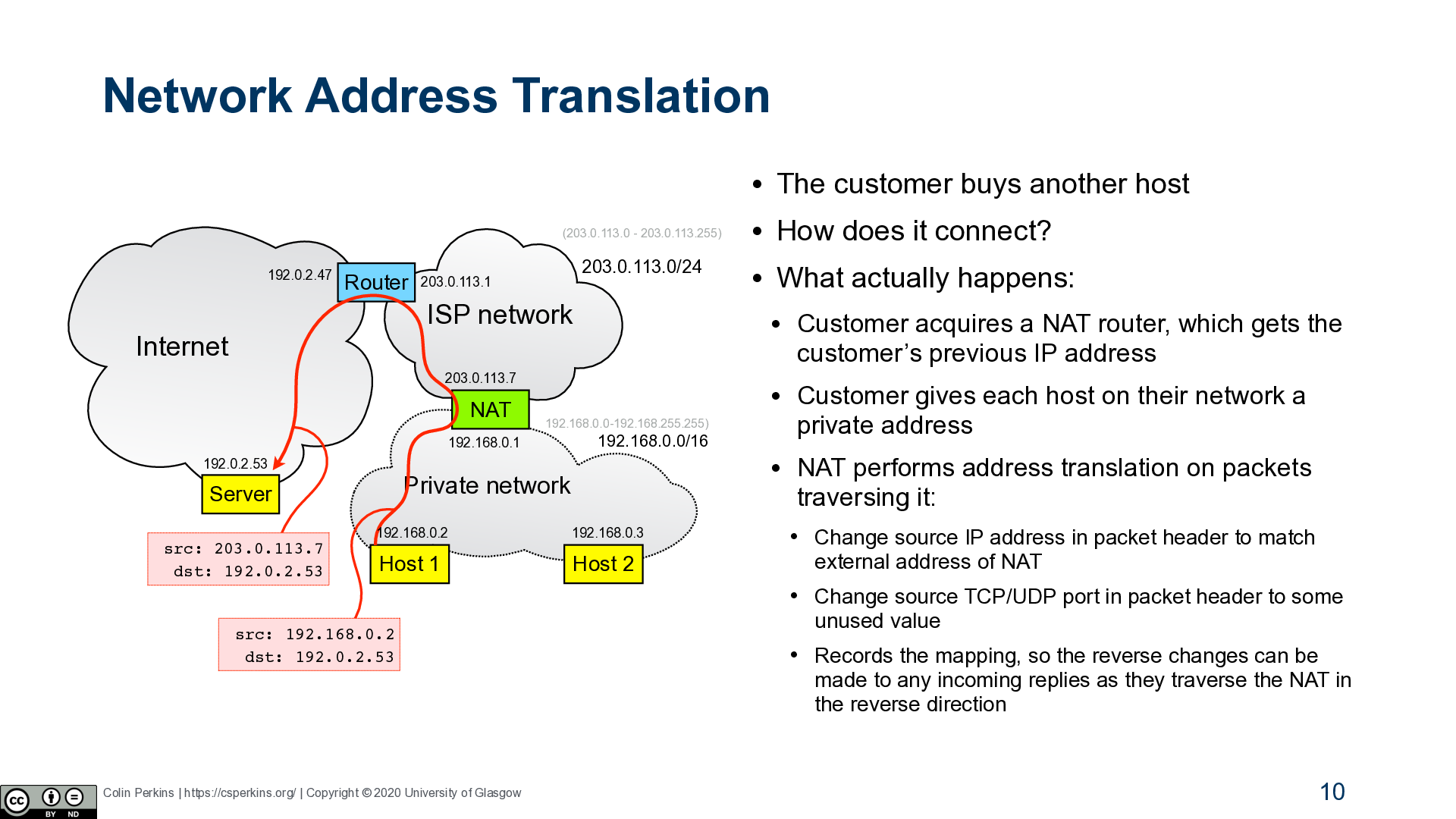
00:09:15.000
One of the customer’s hosts again connects
00:09:17.959
to a server on the Internet.
00:09:20.625
As expected, that host sends an IP
00:09:22.750
packet with the source IP address set
00:09:24.750
to its IP address, in this case
00:09:27.291
192.168.0.2, and the destination address set to
00:09:32.041
the IP address of the server, 192.0.2.53.
00:09:38.166
That packet travels through the customer’s network
00:09:40.667
to its NAT router. The NAT rewrites
00:09:43.917
the source address of the packet to
00:09:45.708
match the external address of the NAT,
00:09:48.208
in this case 203.0.113.7, and also rewrites
00:09:53.041
the TCP or UDP port number to
00:09:54.959
some new port number that’s unused on
00:09:57.041
the NAT, and forwards the packet on
00:09:59.333
to the ISP’s network.
00:10:01.750
Internally, the NAT keeps a record of
00:10:04.083
the changes it made, associated with the port.
00:10:07.875
The packet traverses the ISP’s network to
00:10:10.208
the router connecting the ISP to the
00:10:12.125
Internet, and is forwarded on from there
00:10:14.583
to the Internet. Eventually, the packet arrives
00:10:18.083
at the server. When it arrives,
00:10:21.166
it still has destination address equal to
00:10:23.500
that of the server, 192.0.2.53, but source
00:10:28.417
address will equal to that of the NAT, 203.0.113.7.
00:10:34.250
To the server, the packet appears to
00:10:36.708
have come from the NAT. When it
00:10:38.583
sends a reply, the server will set
00:10:40.750
the destination IP address to that of
00:10:42.458
the NAT, 203.0.113.7, and use its own
00:10:47.083
address, 192.0.2.53, as the source address.
00:10:52.000
The reply will traverse the network until
00:10:54.417
it reaches the NAT. The NAT looks
00:10:57.083
at the TCP or UDP port number
00:10:59.166
to which the packet is destined,
00:11:01.208
and uses this to retrieve its internal
00:11:03.375
record of the rewrites that were performed.
00:11:06.250
It then uses this to do the
00:11:08.166
inverse rewrite, changing the destination IP address
00:11:10.750
and port in the packet to those
00:11:12.959
of the host on the private network,
00:11:15.041
then forwards the packet onto the private
00:11:16.834
network for delivery.
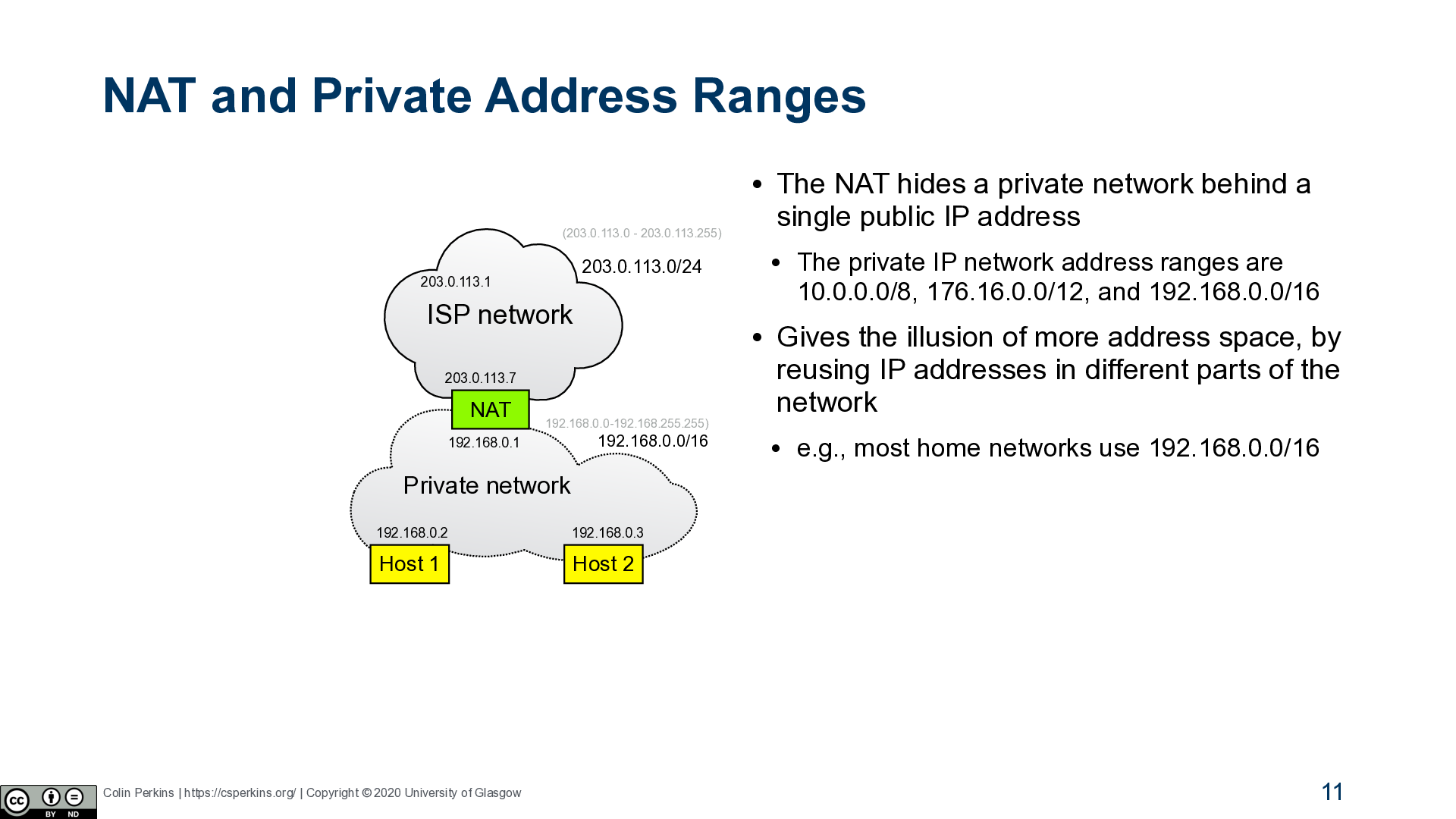
00:11:20.000
Essentially, the NAT hides a private network
00:11:22.792
behind a single public IP address.
00:11:26.291
The private network can use one of
00:11:28.041
three private IPv4 address ranges:
00:11:30.834
10.0.0.0/8,
00:11:34.083
176.16.0.0/12, and
00:11:38.500
192.168.0.0/16.
00:11:43.083
Machines in a private network can directly
00:11:45.542
talk to each other using these private
00:11:47.417
IP addresses, provided that communications stays within
00:11:50.542
the private network.
00:11:52.000
When they communicate with the rest of
00:11:54.417
the network, the IP addresses are rewritten
00:11:56.834
so that, to the rest of the
00:11:58.667
network, the private network looks like a
00:12:00.917
single device, with one IP address matching
00:12:03.500
that of the external address of the NAT.
00:12:06.667
This gives the illusion that there
00:12:08.875
are more IPv4 addresses available, by allowing
00:12:11.875
the same private address ranges being re-used
00:12:14.000
in different parts of the network.
00:12:16.125
Your home network, for example, almost certainly
00:12:19.667
uses addresses in the range 192.168.0.0/16,
00:12:23.583
and is connected to the rest
00:12:25.125
of the network via a NAT router
00:12:27.333
provided by your ISP.
00:12:30.208
This concludes our review of how NAT
00:12:32.917
routers allow multiple devices to share a
00:12:34.750
single IP address. In the next part,
00:12:37.667
I’ll explain some of the problems NATs cause.
-
Y. Rekhter, B. Moskowitz, D. Karrenberg, G. J. de Groot, and E. Lear,
Address
Allocation for Private Internets, IETF, February 1996, RFC 1918.
-
P. Srisuresh and K., Egevang,
Traditional IP
Network Address Translator (Traditional NAT), IETF, January 2001,
RFC 3022.
Part 4: Problems due to Network Address Translation
The 4th part of the lecture continues the discussion of the problems
cause by NAT devices, and why they are used despite these problems.
It talks about the use of NAT as a work-around for the lack of IPv4
address space, as a possible translation mechanism between IPv4 and
IPv6, and to avoid renumbering. And it talks about the implications
of NAT for TCP connections and UDP flows.
00:00:00.125
In the previous part we discussed what
00:00:02.708
is network address translation, and walked through
00:00:05.333
some examples showing how NAT routers allow
00:00:07.834
several hosts on a private network to
00:00:09.875
share a single IP address.
00:00:11.708
In the following, I want to talk
00:00:13.708
about some of the problems caused by
00:00:15.250
NATs, and to discuss some of the
00:00:17.542
reasons why NATs are used despite these problems.
00:00:22.000
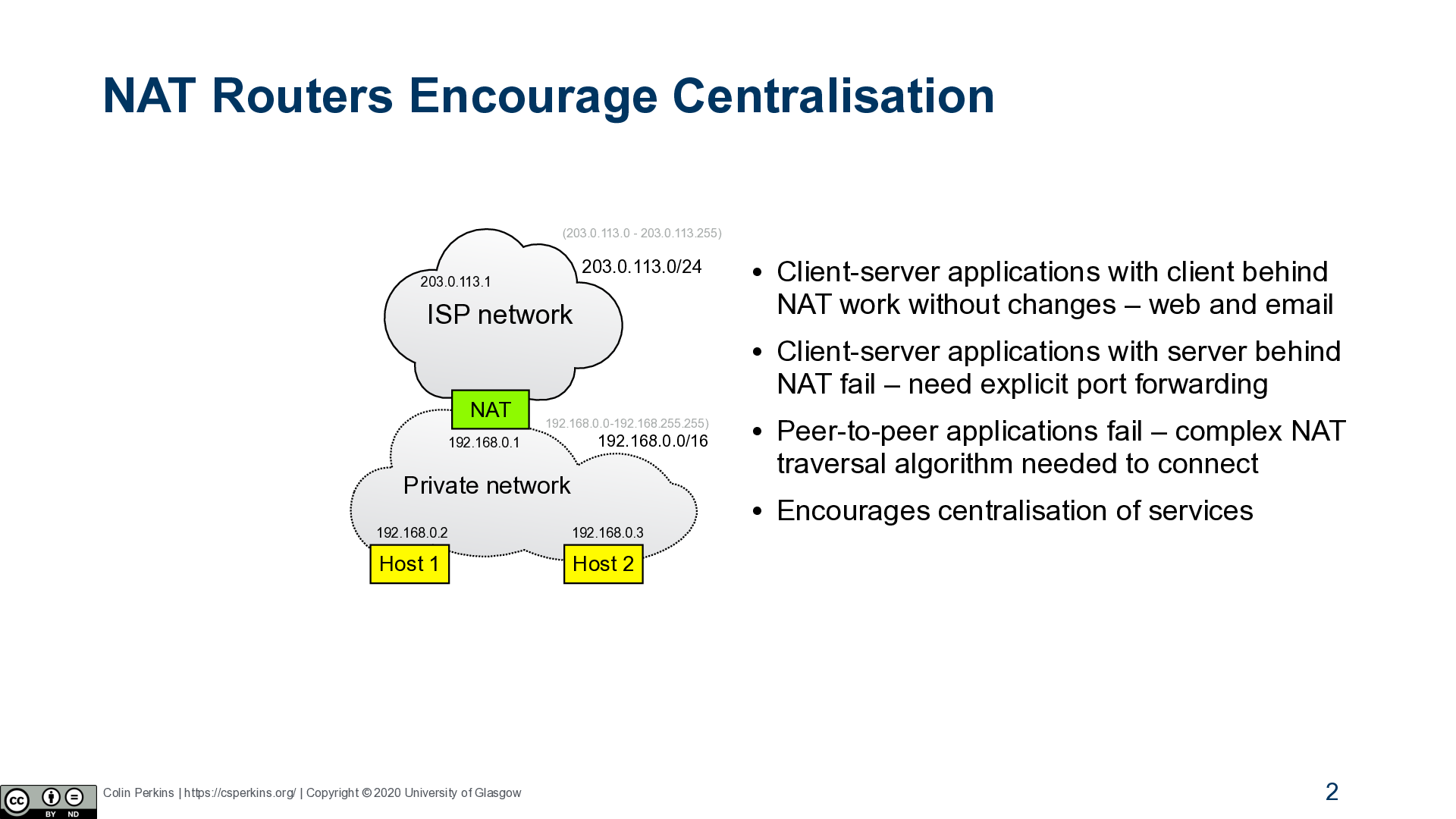
The first issue with NAT routers is
00:00:24.083
that they break certain classes of application,
00:00:26.083
and encourage centralisation.
00:00:28.500
NATs are designed to support client-server
00:00:30.750
applications, where the client is behind the NAT
00:00:33.583
and the server is a host on
00:00:35.417
the public Internet. Packets sent by a
00:00:38.041
host with a private IP address can
00:00:40.083
pass out through the NAT, and will
00:00:42.250
have their IP address and port translated
00:00:44.500
to use the public IP address of
00:00:45.834
the NAT before they’re forwarded to the
00:00:47.750
public Internet. The NAT will also retain
00:00:50.834
state, so that the reverse translation will
00:00:53.375
be applied to replies to those packets,
00:00:56.083
allowing them to pass back through the NAT.
00:00:59.083
This behaviour allows clients to connect to
00:01:01.333
servers, setting up NAT translation state in the process,
00:01:04.834
and to receive responses.
00:01:07.792
The reverse doesn’t work, though.
00:01:10.125
NAT routers rely on outgoing packets to
00:01:12.375
establish the mappings they need to translate
00:01:14.625
incoming packets. That is, when an incoming
00:01:18.166
TCP or UDP packet arrives at some
00:01:20.542
particular port on a NAT, the NAT
00:01:22.792
looks at its record of what it
00:01:24.125
previously sent from that port, and how
00:01:26.667
it was translated, to know what’s the
00:01:28.667
reverse translation to make. If there’s been
00:01:31.875
no outgoing packet on that port,
00:01:33.792
the NAT won’t know how to translate
00:01:35.667
the incoming packet. It won’t know which
00:01:37.875
of the private IP addresses to use
00:01:40.125
as the destination address for the translated packet.
00:01:43.125
This complicates running a server behind a
00:01:45.375
NAT, since the NAT won’t know how
00:01:47.542
to translate incoming requests for the server.
00:01:50.875
It’s possible to manually configure the NAT
00:01:53.125
to forward packets appropriately, of course,
00:01:55.708
and protools like UPnP can help with
00:01:57.708
this, but these approaches are complicated or
00:02:00.625
unreliable. It’s generally easier and more reliable
00:02:04.792
to pay a cloud computing provider to
00:02:07.291
host the server, which encourages centralisation onto
00:02:10.208
large hosting services.
00:02:13.000
NATs also make it hard to write
00:02:14.667
peer-to-peer applications. In part, this is because
00:02:17.959
NATs make incoming connections difficult. But it’s
00:02:22.041
also because hosts located behind a NAT
00:02:24.375
only know their private address, so can’t
00:02:26.834
give their peer a public address to
00:02:28.792
which it can connect. There are solutions
00:02:31.458
to this, that I’ll talk about in
00:02:33.667
the next part of this lecture,
00:02:35.291
but they’re complicated, slow, and wasteful.
00:02:38.792
Unless you really need the privacy and
00:02:40.750
latency benefits of a direct peer-to-peer connection,
00:02:43.875
it’s often easier to relay traffic via
00:02:46.166
a server hosted in a data centre
00:02:48.041
somewhere, with a public IP address,
00:02:50.917
again encouraging centralisation of services.
00:02:56.000
If NAT routers are so problematic,
00:02:58.417
why do people use them?
00:03:00.917
There are three reasons.
00:03:03.708
The first is to work around the
00:03:05.458
lack of IPv4 address space.
00:03:08.041
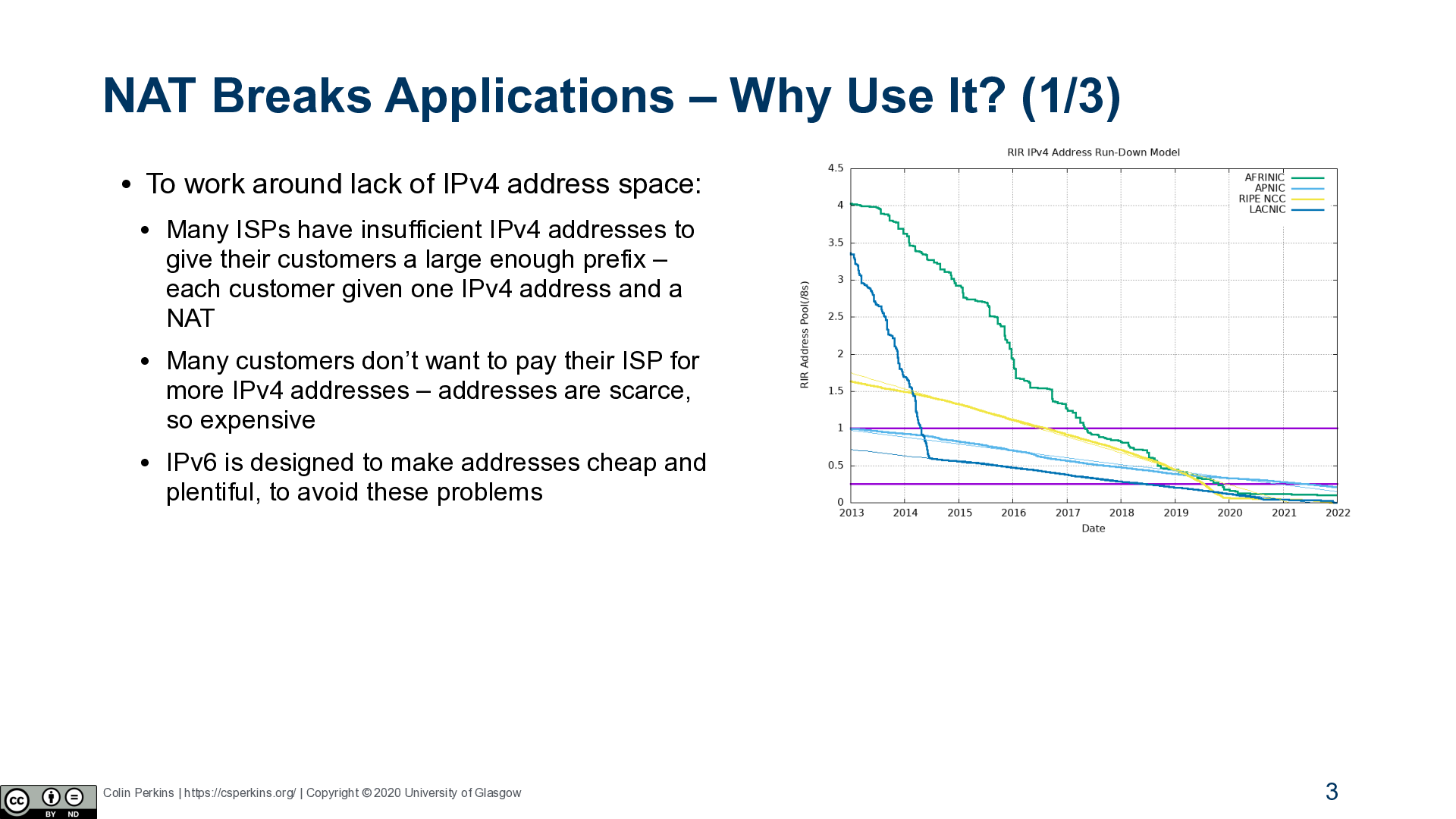
As shown in the figure on the
00:03:09.750
right, the Regional Internet Registries have run
00:03:12.125
out of IPv4 addresses. There are no
00:03:15.291
more IPv4 addresses available for ISPs and
00:03:18.083
companies that want to connect to the
00:03:19.667
Internet, and they can’t provide enough IPv4
00:03:22.250
addresses to fulfil demand.
00:03:24.625
The result is that IPv4 addresses are
00:03:27.083
scarce and expensive. ISPs either don’t have
00:03:30.333
enough addresses to meet their customers needs,
00:03:33.000
or the cost of those addresses is
00:03:34.625
prohibitive, and customers use a private network
00:03:37.333
with a NAT instead of using public
00:03:39.041
IPv4 addresses.
00:03:41.542
The transition to IPv6 will solve this
00:03:43.208
problem, since IPv6 makes addresses cheap and
00:03:46.500
plentiful. The smallest possible address allocation for
00:03:49.875
an IPv6 network is a factor of
00:03:52.417
four billion times larger than the entire
00:03:55.083
IPv4 Internet! Unfortunately, the transition to IPv6
00:03:59.208
has been slow.
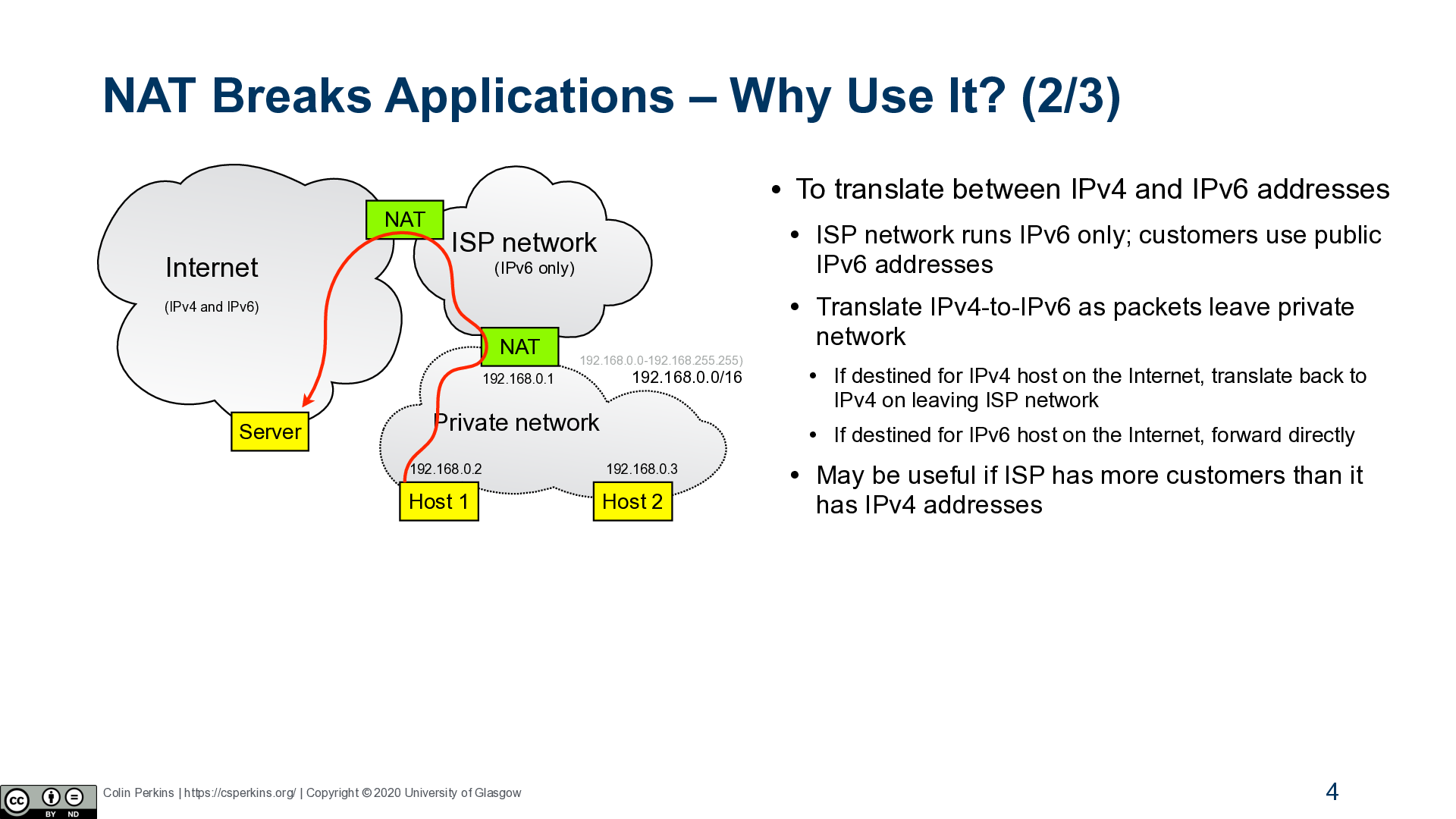
00:04:02.000
This suggests the second reason why NAT
00:04:04.834
is used: to translate between IPv4 and
00:04:07.625
IPv6 addresses.
00:04:09.917
In this model, an ISP, or other
00:04:12.125
network operator, runs IPv6 internally in their
00:04:15.291
network, and does not support IPv4.
00:04:19.083
This gives the ISP a clean,
00:04:21.375
modern, and future-proof network.
00:04:24.000
The ISP also runs two sets of NATs.
00:04:28.041
For customers that want to use IPv4
00:04:30.625
internally, the customer uses a private IPv4
00:04:33.500
network, and the NAT translates the IPv4
00:04:36.875
packets into IPv6 packets when they leave
00:04:39.917
the customer’s network. The principle is the
00:04:42.959
same as the NAT routers we discussed
00:04:44.792
in the last part of this lecture,
00:04:46.917
except that rather than rewriting packets with
00:04:49.083
private IP addresses to have public IPv4
00:04:51.792
addresses, the NAT rewrites the entire IPv4
00:04:54.667
header and replaces it with an IPv6 header.
00:04:59.125
When packets get to the edge of
00:05:00.834
the ISPs network, where it connects to
00:05:02.708
the public Internet, they’re either forwarded as
00:05:05.542
native IPv6 if the destination is accessible
00:05:08.291
via IPv6, or translated to IPv4 by
00:05:12.333
another NAT.
00:05:14.625
The expectation in this approach to running
00:05:16.792
a network is that, over time,
00:05:19.250
the number of customers and destination networks
00:05:22.041
that need IPv4 will go down,
00:05:23.959
and more traffic will run IPv6 end-to-end.
00:05:27.417
NAT is used as a, hopefully temporary, workaround.
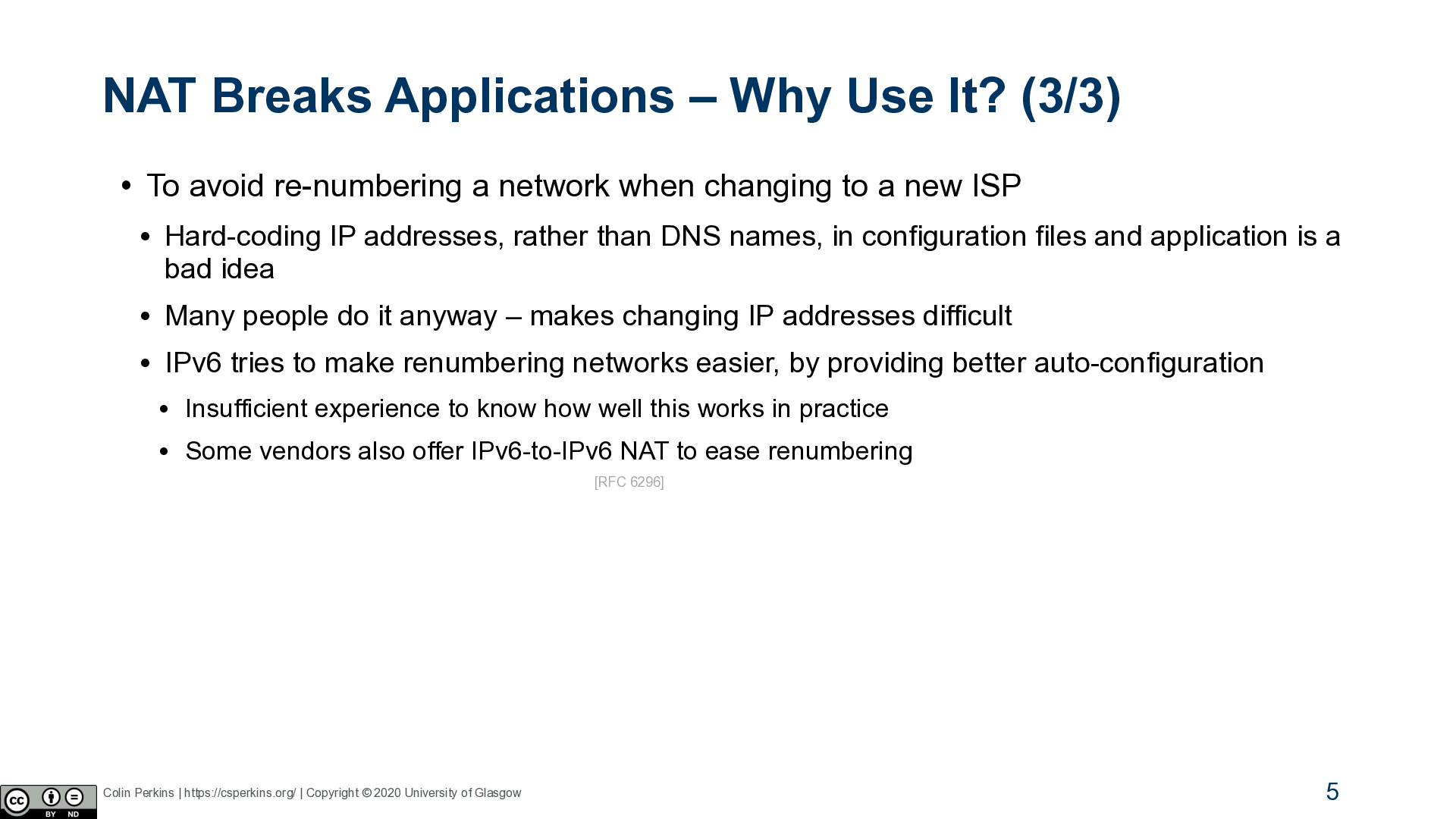
00:05:33.000
The third reason to use NAT is
00:05:35.208
to avoid renumbering.
00:05:37.166
Networks that have a public IP address
00:05:39.583
range tend, over time, to end up
00:05:41.917
hard coding IP addresses from that range
00:05:44.166
into configuration files, applications, and settings.
00:05:47.917
This is a mistake.
00:05:49.708
Applications should always
00:05:51.375
use DNS names, to allow the IP
00:05:53.458
addresses to change, but people do it anyway.
00:05:57.250
The result is that it’s difficult to
00:05:59.083
change the IP addresses used by machines
00:06:01.208
on a network. The longer a host
00:06:04.041
has used a particular IP address,
00:06:06.041
the more likely it is that something,
00:06:07.959
somewhere, on the network has that address
00:06:10.458
hard-coded, and will fail if the host’s address changes.
00:06:15.041
If a network has an IP address
00:06:16.583
range delegated to it from its ISP,
00:06:19.166
what’s known as a provider allocated IP
00:06:21.083
address range, and wants to change ISP,
00:06:24.250
then it will need to change the
00:06:25.625
IP address range it uses to one
00:06:27.708
delegated from its new provider. Many organisations
00:06:31.750
have found this sufficiently difficult that it’s
00:06:34.166
easier to keep the old IP addresses
00:06:36.250
internally, and use a NAT to translate
00:06:40.125
addresses to the range assigned by the new ISP.
00:06:44.417
A similar problem can occur if one
00:06:46.250
company buys another, and has to integrate
00:06:48.417
the IT systems of the new company
00:06:50.542
into its existing network.
00:06:53.083
IPv6 has better auto-configuration support than IPv4,
00:06:57.333
and tries to make renumbering easier,
00:06:59.542
but it’s not clear how well this
00:07:02.625
works. As a result, some network equipment
00:07:04.708
vendors have started selling NATs that translate
00:07:07.000
between two different IPv6 prefixes, to ease renumbering.
00:07:12.834
In both cases, a better approach is
00:07:15.834
that an organisation gets what’s known as
00:07:17.792
provider independent IP addresses, directly from one
00:07:20.125
of the Regional Internet Registries, so it
00:07:22.834
owns the IP addresses it uses.
00:07:25.708
In this case, the organisation pays its
00:07:27.917
ISP to route traffic to the addresses
00:07:31.250
it owns, and can move to a
00:07:33.417
new ISP without renumbering.
00:07:37.792
Given these reasons why NAT routers will
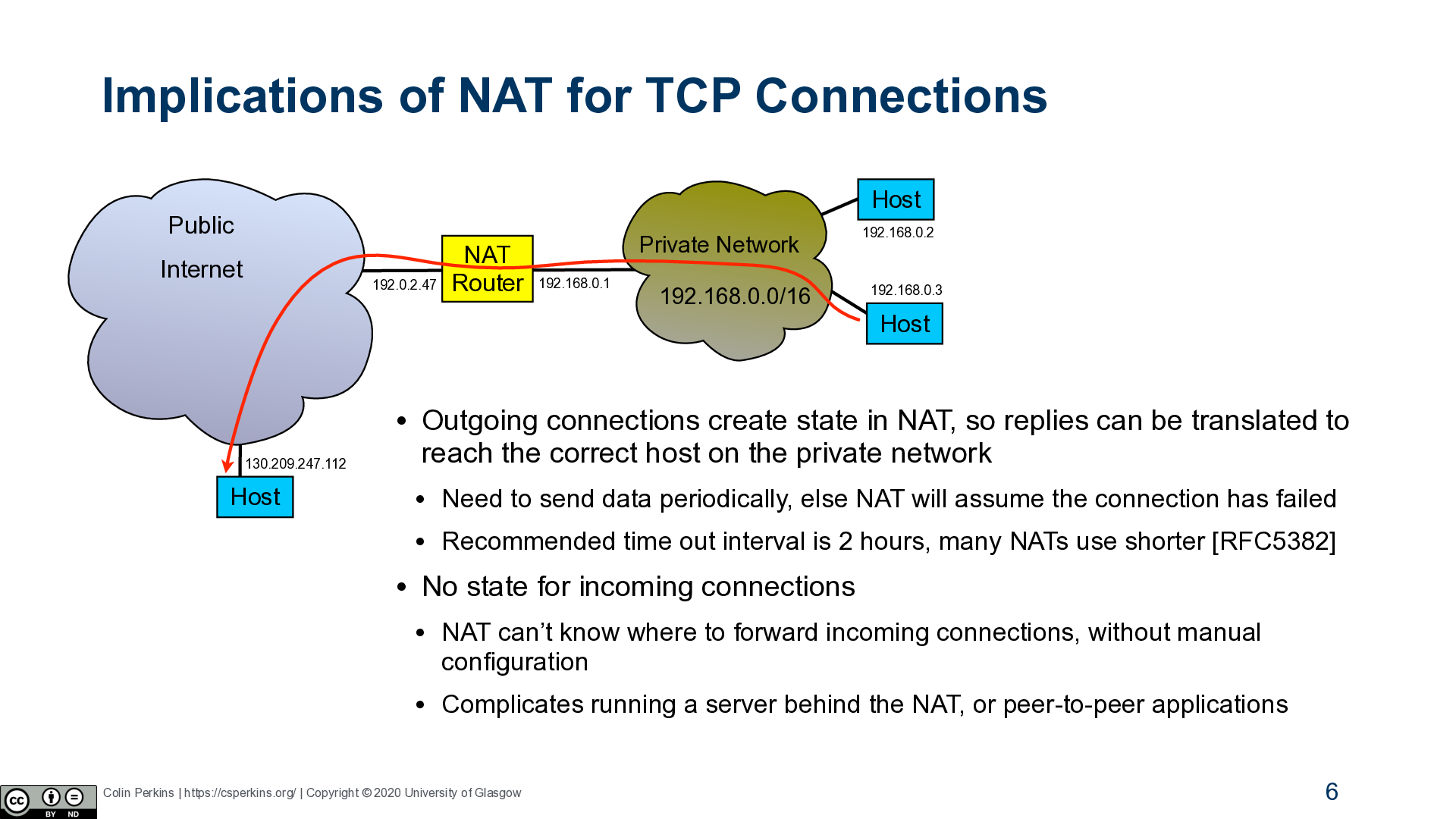
00:07:39.834
be used, despite their problems, what are
00:07:42.500
the implications for NAT routers on TCP connections?
00:07:46.458
Well, as I’ve explained, outgoing connections create
00:07:50.000
state in the NAT, so replies can
00:07:52.542
be translated to reach the correct host
00:07:54.375
on the private network. The question is,
00:07:57.375
then, how does the NAT know what translation state to setup?
00:08:01.917
The way this works is that the
00:08:03.542
NAT router looks at TCP segments it’s
00:08:05.792
translating and forwarding, and watches for packets
00:08:08.875
representing a TCP connection establishment handshake.
00:08:12.875
If the NAT sees an outgoing SYN
00:08:14.917
packet, followed by an incoming SYN-ACK,
00:08:17.792
then an outgoing ACK, with matching sequence
00:08:20.708
and acknowledgment numbers, then it can infer
00:08:24.375
that this is the start of a
00:08:25.792
TCP connection, and setup the appropriate translation.
00:08:30.333
TCP connections have a similar exchange at
00:08:32.583
the end of the connection, with FIN,
00:08:34.625
FIN-ACK, and ACK packets. The NAT router
00:08:38.333
can watch for these exchanges, and infer
00:08:40.792
that the corresponding TCP connections have finished,
00:08:43.417
and that the translation state can be removed.
00:08:46.834
Unfortunately, applications and hosts sometimes crash,
00:08:50.291
and connections disappear without sending the FIN,
00:08:52.750
FIN-ACK, and ACK packets. For this reason,
00:08:56.542
NAT routers also implement a timeout.
00:08:59.500
If a connection waits too long between
00:09:01.333
sending packets, the NAT will assume it’s
00:09:03.750
failed, and remove the translation state.
00:09:07.083
The recommendation from the IETF is that
00:09:09.417
NATs use a two hour timeout,
00:09:11.542
but measurements have shown that many NATs
00:09:13.667
ignore this and use a shorter timer.
00:09:16.083
The result is that long-lived TCP connections,
00:09:18.959
that would otherwise go idle, need to
00:09:21.291
send something, even if just an empty
00:09:23.583
TCP segment, every few minutes, to prevent
00:09:26.708
NATs on the path from timing out
00:09:28.417
and dropping the connection.
00:09:30.583
If you’ve ever used ssh to login
00:09:32.625
to a remote system, gone to do
00:09:34.583
something else, then come back after a
00:09:36.750
couple of hours and wondered why the
00:09:38.583
ssh connection has failed, this may well
00:09:41.166
be due to NAT timeout.
00:09:43.959
The other issue, as I mentioned at
00:09:45.834
the start of this part, is that
00:09:47.417
the NAT won’t have state for incoming
00:09:49.041
connections, unless manually configured to do so.
00:09:52.834
This makes it difficult to run a
00:09:54.417
server or peer-to-peer application behind the NAT.
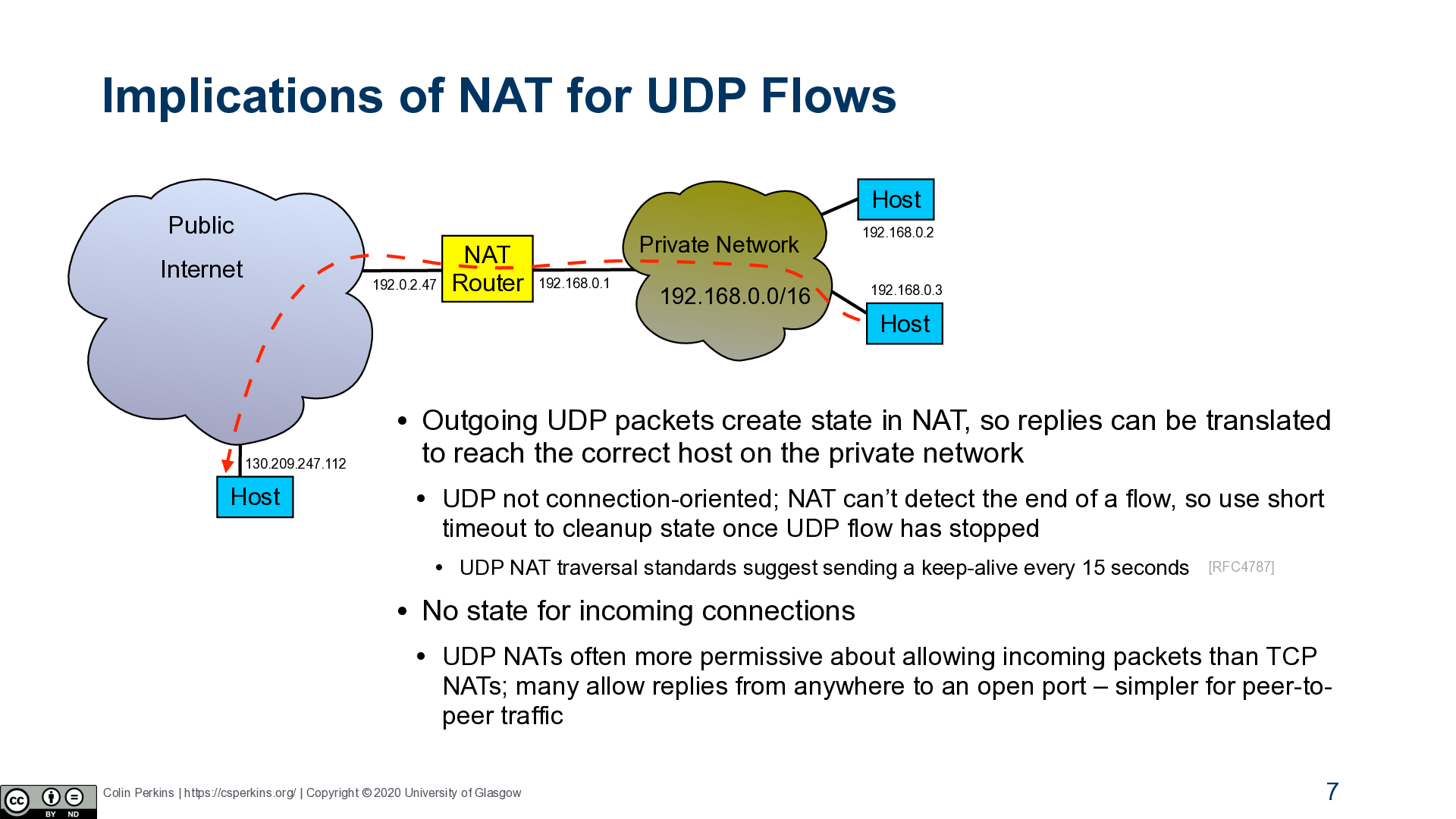
00:10:00.000
The implications of NAT for UDP flows
00:10:03.500
are similar to those for TCP,
00:10:05.792
except that the lack of connections with
00:10:07.834
UDP complicates things.
00:10:10.291
For TCP, a NAT can watch for
00:10:12.458
the connection establishment and teardown segments,
00:10:14.917
and know when the TCP connections start
00:10:17.875
and finish. TCP connections can fail without
00:10:21.625
sending the FIN, FIN-ACK, ACK exchange,
00:10:24.166
but this is rare, and NAT routers
00:10:26.667
generally rely on watching the TCP connection
00:10:28.917
setup and teardown messages to manage translation state.
00:10:32.917
UDP, on the other hand, has no
00:10:35.500
connection establishment,
00:10:37.000
since it has no concept of connections.
00:10:39.125
This is not a great problem when
00:10:40.834
it comes to establishing state in a
00:10:42.291
NAT. If the NAT sees any outgoing
00:10:45.542
UDP packet with a particular address and
00:10:48.250
port, it sets up the state in
00:10:49.917
the NAT to allow replies.
00:10:52.291
The problem comes with knowing when to
00:10:53.834
remove that translation state in the NAT.
00:10:56.542
Since UDP has no “end of connection”
00:10:58.750
message, the only way to do this
00:11:00.708
is with a timeout.
00:11:03.291
The most widely used UDP application,
00:11:06.125
historically, has been DNS. DNS clients tend
00:11:09.750
to contact a lot of different servers,
00:11:12.166
but exchange only a small amount of
00:11:13.959
data with each. As a result,
00:11:16.917
many NATs have very short timeouts -
00:11:19.166
on the order of tens of seconds
00:11:21.000
- for UDP translation state, to prevent
00:11:23.917
them accumulating state for too many UDP flows.
00:11:27.166
An unfortunate consequence of this, is that
00:11:30.166
applications that use UDP, such as video
00:11:33.041
conferencing and gaming, must send packets frequently,
00:11:36.333
in both directions, to make sure the
00:11:38.917
NAT bindings stay open. The IETF recommends
00:11:42.417
that such applications send and receive something
00:11:45.083
at least once every 15 seconds.
00:11:47.667
This can generate unnecessary traffic.
00:11:51.166
There is one benefit, though, that comes
00:11:53.166
from the lack of connection establishment signalling
00:11:55.375
in UDP. With TCP, the NAT can
00:11:59.166
see the SYN, SYN-ACK, ACK exchange,
00:12:01.583
and knows the exact addresses and ports
00:12:04.333
that the client and server are using.
00:12:06.792
This allows the NAT to create a
00:12:08.500
very specific binding, and reject traffic from
00:12:11.125
other addresses.
00:12:13.417
These very specific bindings are a security
00:12:15.708
benefit, but make peer-to-peer connections harder to
00:12:18.583
establish. UDP applications tend to be more
00:12:22.333
flexible in where they accept packets from,
00:12:24.750
so NATs generally establish bindings that allow
00:12:27.625
any UDP packets that arrive on the
00:12:29.917
correct port to be translated and forwarded
00:12:32.333
across the NAT. This makes peer to
00:12:34.750
peer connection establishment much easier for NAT,
00:12:37.333
as we’ll see in the next part.
00:12:41.250
NATs work around three real problems:
00:12:44.333
lack of IPv4 address space, IPv4 to
00:12:47.583
IPv6 transition, and renumbering.
00:12:51.583
They work well for client-server applications,
00:12:54.250
where the client is
00:12:55.458
behind the NAT and the server is
00:12:57.083
on the public Internet, but make it
00:12:59.333
hard to run peer-to-peer applications and to
00:13:01.708
host servers on networks that use NATs.
00:13:04.750
This encourages centralisation
00:13:06.750
of the Internet infrastructure
00:13:08.208
onto cloud providers and, as we’ll see
00:13:11.000
in the next part, greatly complicates certain
00:13:13.458
classes of application.
-
M. Holdrege and P. Srisuresh,
Protocol
Complications with the IP Network Address Translator,
IETF, January 2001, RFC 3027.
-
E. Lear, E. Fair, D. Crocker, and T. Kessler,
Network 10 Considered Harmful (Some Practices Shouldn't be
Codified), IETF, July 1994, RFC 1627.
-
M. Wasserman and F. Baker,
IPv6-to-IPv6
Network Prefix Translation,
IETF, June 2011, RFC 6296.
-
S. Guha, E. Biswas, B. Ford, S. Sivakumar, and P. Srisuresh,
NAT
Behavioral Requirements for TCP, IETF, October 2008,
RFC 5382.
-
F. Audet and C. Jennings,
Network Address
Translation (NAT) Behavioral Requirements for Unicast UDP,
IETF, February 2007, RFC 4787.
Part 5: NAT Traversal and Peer-to-Peer Connection Establishment
The final part of the lecture, discusses NAT traversal and peer-to-peer
connection establishment. It outlines the binding discovery process,
by which a client can establish that it's behind a NAT and find the
external IP address of that NAT, and the ICE algorithm for candidate
exchange and peer-to-peer connection establishment.
00:00:00.125
In the final part of this lecture,
00:00:02.959
I’d like to discuss the problem of NAT traversal.
00:00:05.708
That is, how applications can
00:00:07.959
work around the presence of NAT routers
00:00:10.291
to establish peer-to-peer connections.
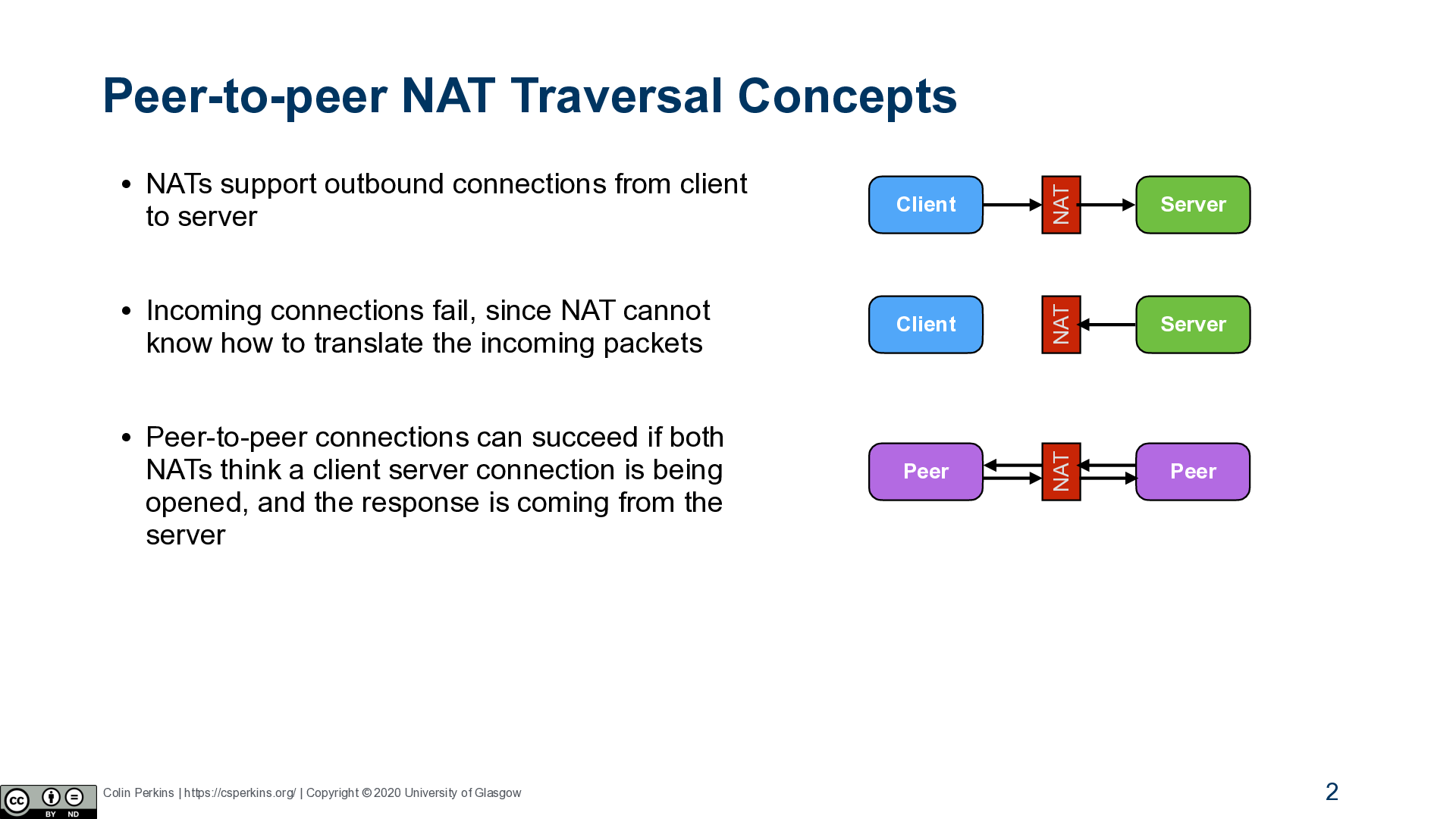
00:00:13.000
As I described in the previous part,
00:00:15.625
NATs are designed to support outbound connections
00:00:18.250
from a client in the private network
00:00:20.917
to a server on the public Internet,
00:00:23.041
and this use case works well.
00:00:25.500
Other scenarios are less successful.
00:00:28.208
Incoming connections, to a server located in
00:00:31.291
the private network, will fail. This happens
00:00:34.375
because the NAT can’t know how to
00:00:36.291
translate the incoming packets. There are work
00:00:39.333
arounds for this, that involve manually configuring
00:00:41.792
the NAT to forward incoming connections to
00:00:43.917
the correct device, but this is difficult
00:00:46.250
to do correctly.
00:00:48.083
Similarly, peer-to-peer connections through a NAT will
00:00:50.959
also fail, unless the packets are sent
00:00:53.792
in a way that makes the NAT,
00:00:55.417
or the NATs if there are several
00:00:57.583
peers all located in private networks,
00:00:59.834
think that a client-server connection is being opened,
00:01:02.500
and that the response is coming from the server.
00:01:06.000
In the following,
00:01:07.125
I’ll talk about how this can be arranged.
00:01:11.458
The figure shows an example where two
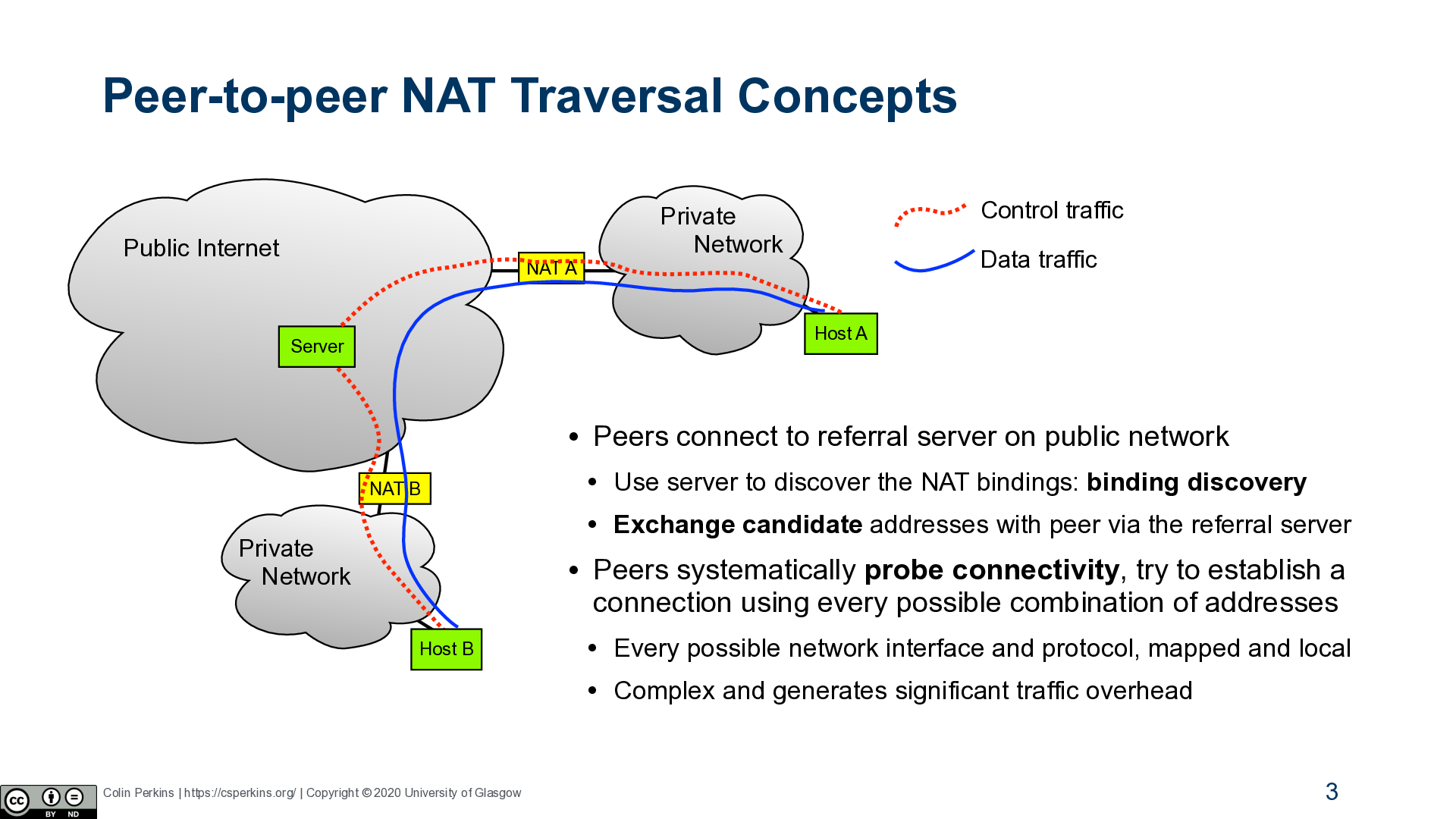
00:01:13.792
hosts, A and B, and trying to
00:01:16.000
establish a direct peer to peer connection.
00:01:19.250
For example, this could be two devices
00:01:21.458
in people’s homes that are trying to
00:01:23.000
setup a video call.
00:01:25.708
Each of these hosts is in a
00:01:27.041
private network, and is connected to the
00:01:29.208
public Internet via a NAT. It’s possible,
00:01:32.583
indeed likely, that if these are home
00:01:35.000
networks, then both of the private networks
00:01:37.375
will be using the IP address range
00:01:39.291
192.168.0.0./16, since that’s the default for most
00:01:45.583
home NAT routers. A consequence is that
00:01:49.166
Host A and Host B could both
00:01:51.291
be using the same private IP address,
00:01:53.834
for example both hosts could be using
00:01:56.291
IP address 192.168.0.2.
00:02:01.000
This isn’t a problem, since Host A
00:02:03.583
and Host B are on different private
00:02:05.500
networks, each hidden behind a different NAT.
00:02:08.542
The two NATs have different public IP
00:02:10.792
address on the external interface of the
00:02:12.667
router, and what’s used internally is not
00:02:15.792
visible to the rest of the network.
00:02:19.000
How do these two hosts go about
00:02:20.708
establishing a connection?
00:02:22.625
Well, Host A can’t send a packet
00:02:25.375
directly to Host B, because it has
00:02:27.792
the same IP address. If it tries,
00:02:30.959
the packet will come straight back to itself!
00:02:33.417
Rather, in order to connect to Host
00:02:35.208
B, Host A will have to discover
00:02:37.917
the external address and port number that
00:02:40.166
NAT B is using for packets sent
00:02:42.250
by Host B. It can then send
00:02:44.834
its packets to NAT B, that will
00:02:46.667
translate and forward them to host B.
00:02:50.250
To do this, the two peers,
00:02:52.250
Host A and Host B, both make
00:02:54.875
connections to a referral server located somewhere
00:02:57.500
on the public Internet. This is shown
00:03:00.333
in the dashed red lines on the
00:03:01.917
slide. They ask that server where their
00:03:04.750
packets appear to be coming from.
00:03:07.291
This process is known as binding discovery,
00:03:09.750
and lets the hosts find out how
00:03:11.917
their NAT is translating packets. The result
00:03:15.458
is a candidate address for each host,
00:03:17.834
that it thinks is the external address
00:03:20.500
of the NAT that will translate incoming
00:03:22.750
packets and forward them to it.
00:03:24.834
The peers then exchange these candidate addresses
00:03:26.917
with each other, via the referral server.
00:03:31.000
Once they’ve received the candidate addresses from
00:03:33.458
their peer, the two hosts systematically send
00:03:35.917
probe packets, to check if any of
00:03:38.041
these candidates actually work to reach the
00:03:40.000
peer. That is, the hosts check if
00:03:43.166
the outgoing probe packets they send will
00:03:45.166
correctly setup translation state in the NAT,
00:03:47.834
so that incoming probes from the peer
00:03:50.125
will be translated and forwarded to them.
00:03:52.542
And they check that there are no
00:03:54.291
firewalls that are blocking the traffic.
00:03:57.417
If the probes are successfully received,
00:03:59.458
in both directions, then the two hosts
00:04:02.333
can switch to using the direct peer-to-peer
00:04:04.208
path, shown as the solid blue line
00:04:06.625
on the slide, and no longer need the server.
00:04:10.083
If the probes fail, then a direct
00:04:12.375
peer-to-peer connection may not be possible,
00:04:14.875
and the hosts may have to relay
00:04:16.583
all traffic via the referral server.
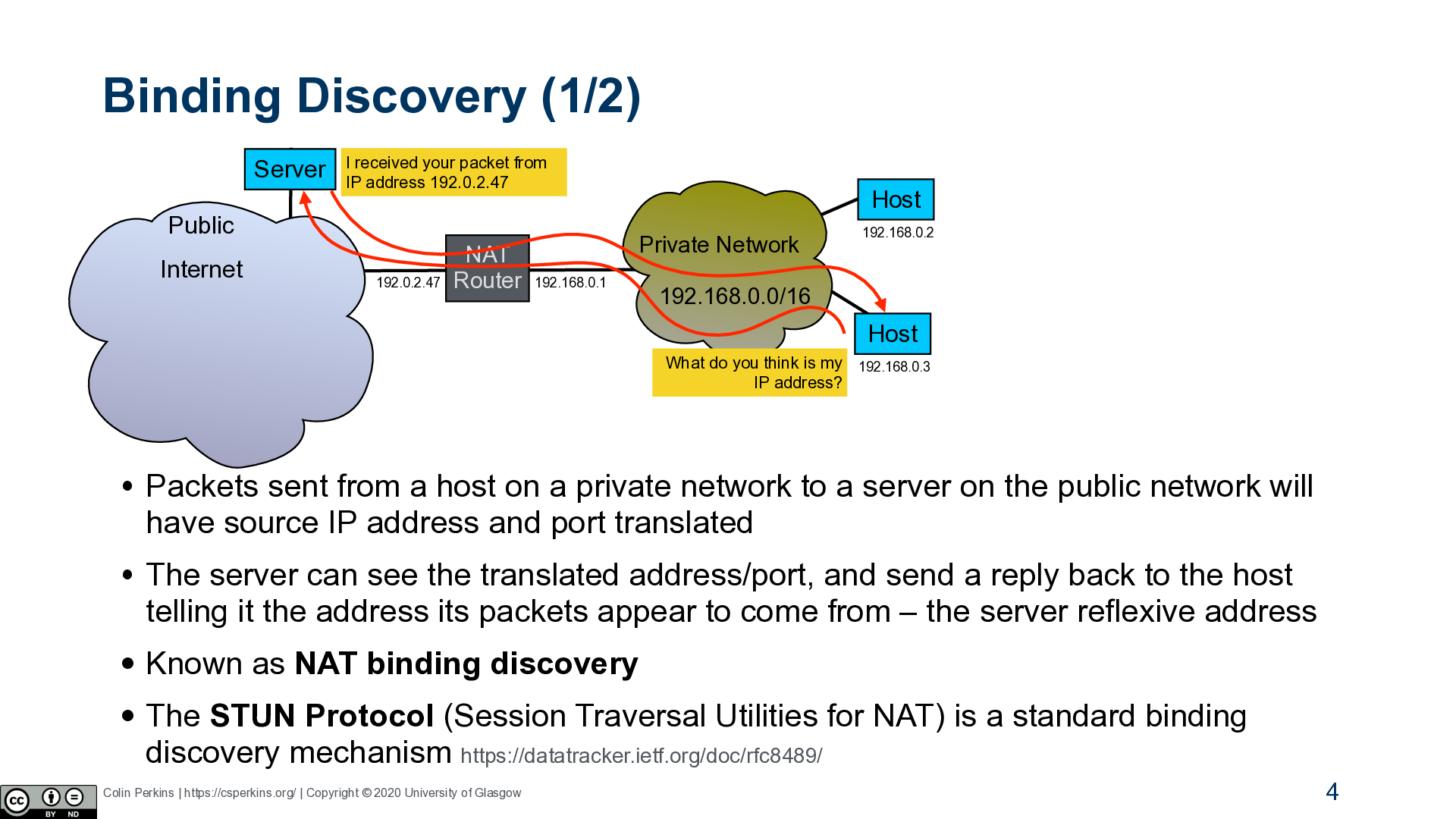
00:04:21.000
The process of finding out what translations
00:04:23.625
a NAT is performing is known as
00:04:25.625
NAT binding discovery.
00:04:27.542
The Session Traversal Utilities for NAT,
00:04:30.208
STUN, is a commonly used protocol that
00:04:32.834
performs NAT binding discovery in the Internet.
00:04:36.750
When a host on a private network
00:04:38.875
sends a packet to a host on
00:04:40.458
the public network, the NAT at the
00:04:42.917
edge of the private network will translate
00:04:44.959
the source IP address and port number
00:04:46.625
in the packet. The host on the
00:04:49.083
private network doesn’t know what translation has
00:04:51.333
been done, but the server that receives
00:04:53.750
the packet can inspect its source address
00:04:56.458
and port, to find out where it came from.
00:04:59.291
For example, when using a UDP socket,
00:05:02.250
an application can use the recvfrom() system
00:05:05.000
call to retrieve both the contents of
00:05:07.041
a UDP packet and its source address.
00:05:10.208
Similarly, for TCP connections, the accept() system
00:05:14.083
call returns the address of the client.
00:05:17.708
The server then replies to the client,
00:05:19.834
telling it where the packet appeared to
00:05:21.458
come from. This is what’s known as
00:05:23.917
a server reflexive address. That is,
00:05:26.917
the address that a server thinks the client has.
00:05:30.417
If there’s a NAT between the client
00:05:32.333
and the server, then the server reflexive
00:05:34.667
address will be different to the address
00:05:36.583
from which the client sent the packet.
00:05:38.750
If the client’s addresses and the server
00:05:40.625
reflexive address are the same, the client
00:05:42.625
knows there’s no NAT between it and the server.
00:05:47.000
You might ask why a host that’s
00:05:48.875
in a private network doesn’t just ask
00:05:50.792
its NAT how it will translate the packets?
00:05:53.583
Two reasons.
00:05:55.291
The first is that by the time
00:05:57.083
we realised that binding discovery was needed,
00:05:59.542
there were already tens of millions of
00:06:01.333
NATs deployed, with no way to upgrade
00:06:03.708
them to add a way to ask how they’ll translate packets.
00:06:07.667
The second is that a host might
00:06:09.667
not know that it’s behind a NAT,
00:06:11.750
or might be behind more than one
00:06:13.500
NAT, and so won’t know what NAT
00:06:16.166
to ask for the binding.
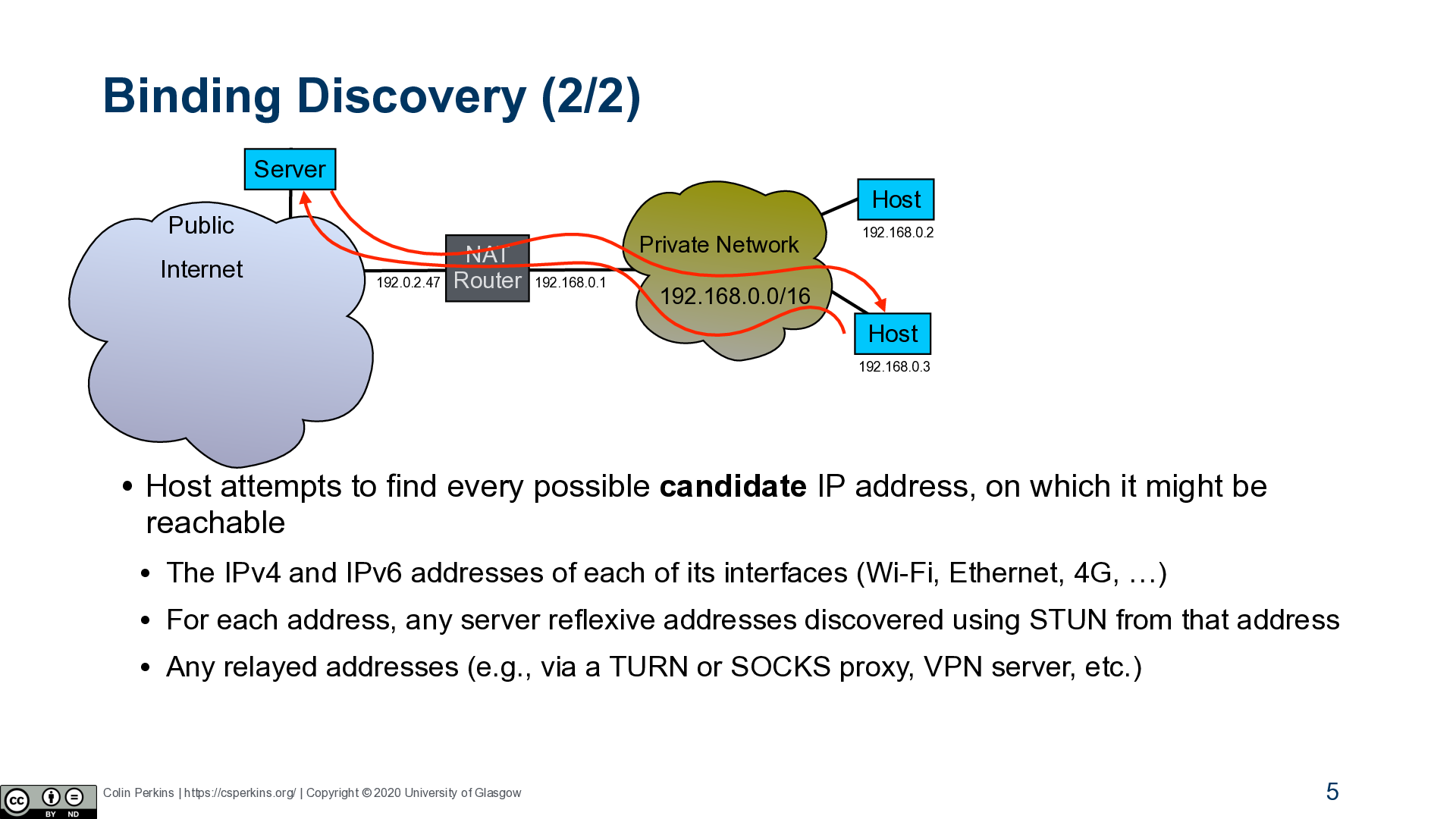
00:06:20.000
When performing binding discovery, it’s important that
00:06:23.125
a host discovers every possible candidate address
00:06:25.708
on which it might be reachable.
00:06:27.917
For example, think about a phone that
00:06:30.125
has both 4G and WiFi interfaces.
00:06:32.959
Each of these interfaces can have an
00:06:35.166
IPv4 address and an IPv6 address,
00:06:37.959
representing the point of attachment to networks
00:06:40.959
it directly connects to. This could be
00:06:44.583
a total of four possible IP addresses for the phone.
00:06:47.708
The phone may be behind IPv4 NAT
00:06:49.917
routers on each of those interfaces,
00:06:51.792
and so each interface might also have
00:06:54.083
a server reflexive address on which it
00:06:56.083
can be reached, that the host can
00:06:58.333
discover using STUN. This can give another
00:07:01.500
two addresses, bringing the total to six.
00:07:04.959
It’s unlikely, but the phone could also
00:07:07.125
be connected via one or more IPv6
00:07:09.875
NATs. This potentially gives two more server
00:07:12.583
reflexive addresses on which it can be reached.
00:07:16.125
In case these server reflexive addresses don’t
00:07:18.750
work, the phone may also be able
00:07:21.417
to use the referral server to relay
00:07:23.458
for it, using a protocol called TURN,
00:07:25.458
acting as a proxy to deliver traffic
00:07:27.542
if a direct connection isn’t possible.
00:07:30.125
This proxy endpoint might be accessible via IPv4 and IPv6.
00:07:35.125
The phone might also have a VPN
00:07:37.166
connection, and be able to send and
00:07:39.166
receive traffic via the VPN, as well
00:07:41.291
as directly. That VPN endpoint could be
00:07:44.417
accessible over IPv4 or IPv6, and might
00:07:47.667
itself be behind a NAT, so it’s
00:07:50.375
necessary to check for server reflexive addresses
00:07:52.625
on the VPN interface.
00:07:55.166
Not all of these will exist for
00:07:57.250
every device, of course, but the point
00:07:59.375
is that a modern networked device is
00:08:01.583
often reachable in many different ways.
00:08:04.208
If it’s to successfully connect to another
00:08:06.458
device, in a peer-to-peer manner, it needs
00:08:09.000
to find as many of these candidate addresses as possible.
00:08:14.458
Having run a binding discovery protocol to
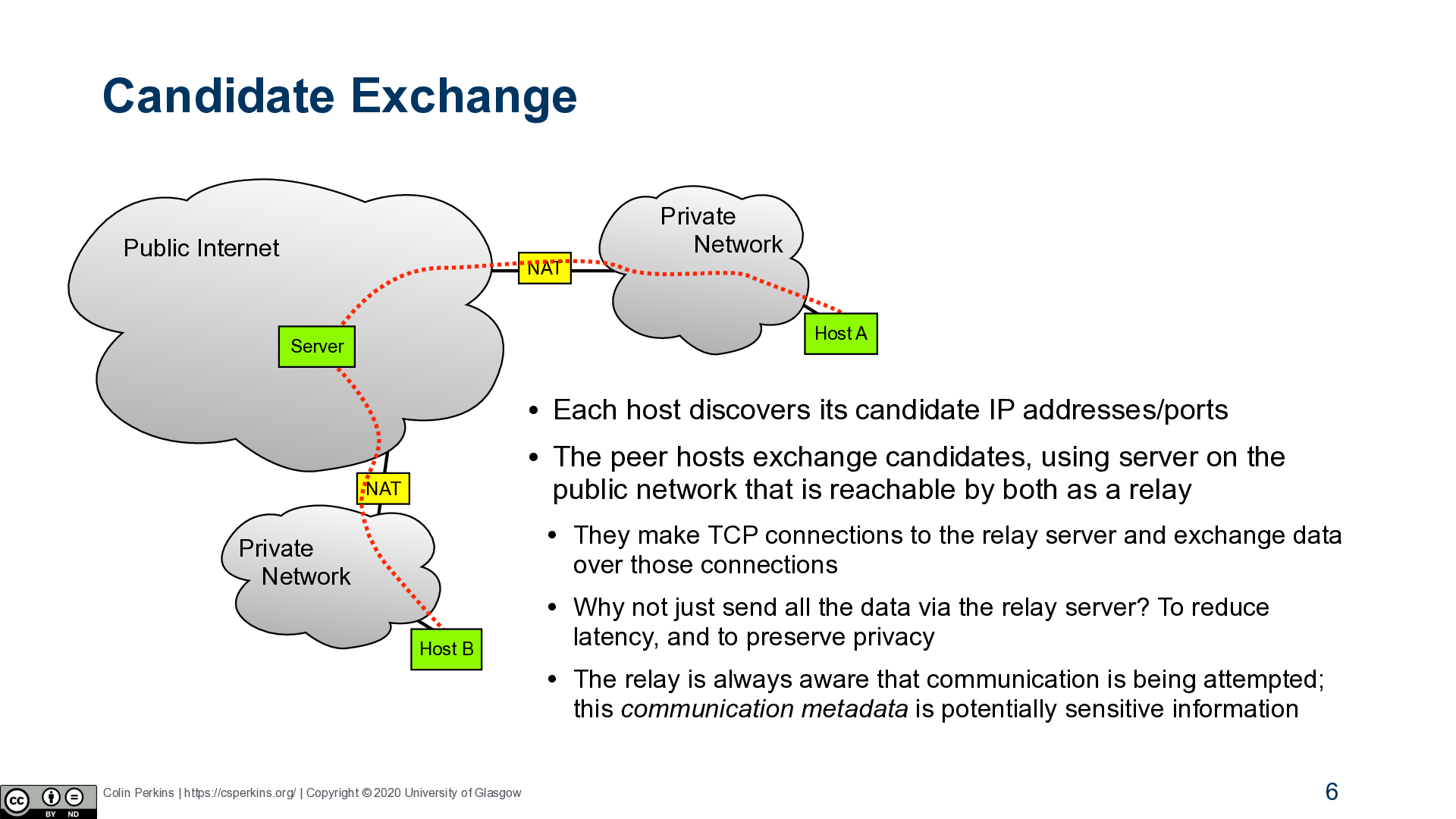
00:08:16.750
find all its possible candidates, a host
00:08:19.708
sends the list of candidates to the
00:08:21.375
referral server, and the referral server sends
00:08:23.792
them on to its peer. Its peer
00:08:26.750
does the same, and the host receives
00:08:28.750
the peer’s candidates via the referral server.
00:08:32.125
At this point, the two hosts know
00:08:34.000
each others candidate addresses, and are ready
00:08:36.834
to check which of the addresses work.
00:08:39.458
Given that the two peers can communicate
00:08:41.542
via the referral server, you might ask
00:08:43.583
why the peers bother to establish a
00:08:45.458
peer-to-peer connection, and don’t instead just keep
00:08:49.000
communicating via the relay?
00:08:52.000
The primary reason is because a direct
00:08:54.291
peer-to-peer connection is usually lower latency than
00:08:56.708
a connection via a relay, and for
00:08:59.583
peer-to-peer applications like video calls, latency matters.
00:09:03.375
The second is that the relay server
00:09:05.959
can eavesdrop on connections that it’s relaying,
00:09:08.458
but not on direct peer-to-peer connections.
00:09:11.708
This is perhaps less of a concern
00:09:13.625
than you might think, since the traffic
00:09:15.834
can be encrypted so it can’t be
00:09:17.208
read by the server. Also, the server
00:09:20.000
knows that the call is happening anyway,
00:09:22.333
and sometimes knowledge that two people are
00:09:24.166
talking is almost as sensitive as knowing
00:09:26.083
what they’re talking about.
00:09:31.166
Once they’ve exchanged candidates, the two hosts
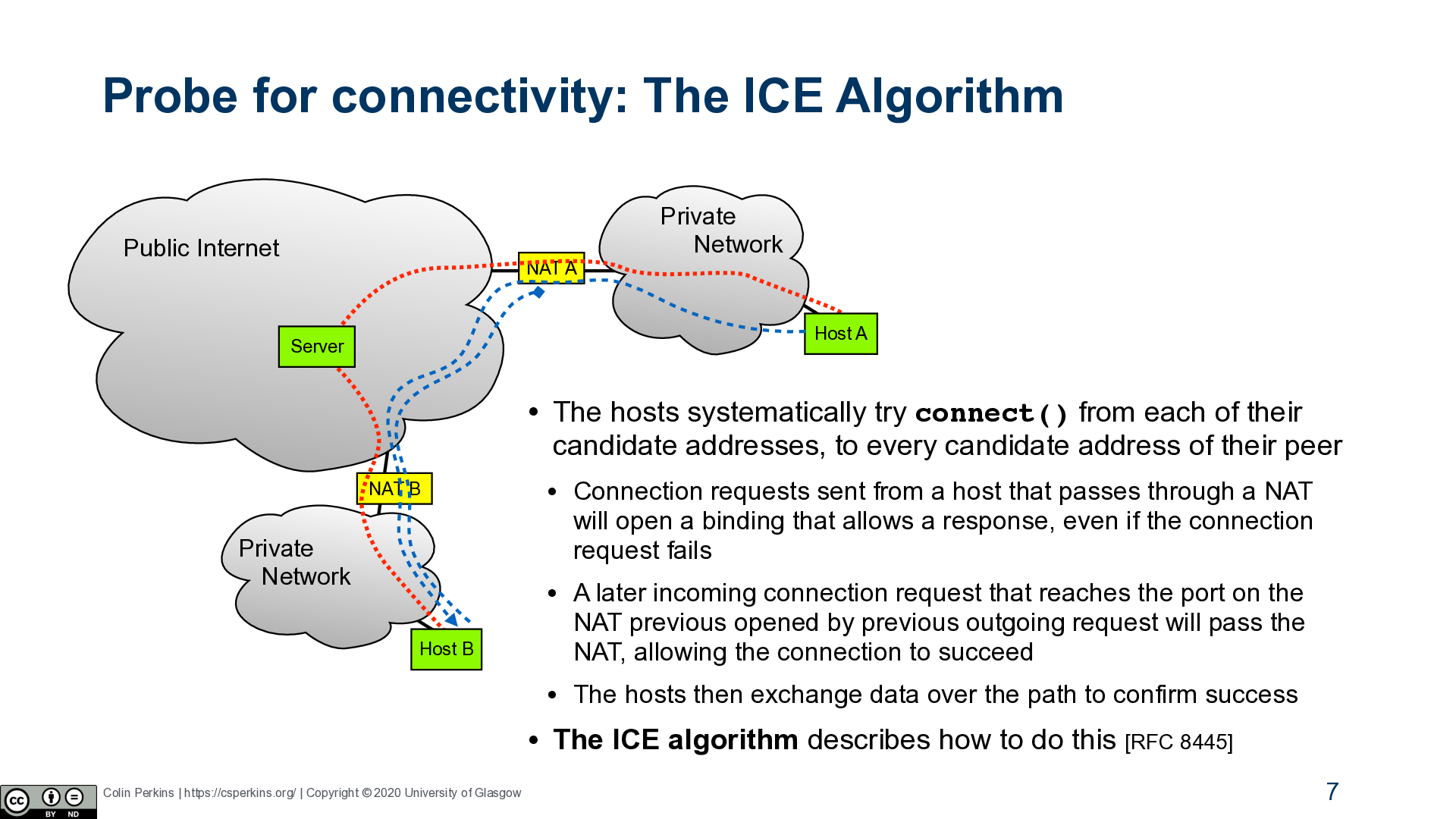
00:09:34.250
systematically send probe packets from every one
00:09:37.250
of their candidate addresses to every one
00:09:39.834
of the peer’s candidate addresses in turn,
00:09:42.542
to see if the can establish a direct connection.
00:09:46.000
The idea is that a probe packet
00:09:47.917
sent, for example, from Host A to
00:09:50.792
a server reflexive address of Host B,
00:09:53.333
will open a binding in NAT A,
00:09:55.875
even if it fails to reach host B.
00:09:58.708
This open binding will allow a
00:10:00.708
later probe from Host B to the
00:10:02.750
server reflexive address of Host A to
00:10:05.291
reach Host A. This will, in turn,
00:10:08.708
trigger Host A to probe again in
00:10:10.583
response, and this time the probe from
00:10:13.375
Host A to the server reflexive address
00:10:15.333
of Host B will succeed because the
00:10:17.583
probe from Host B opened the necessary
00:10:19.417
binding on NAT B. The two hosts
00:10:23.333
then start sending traffic and keep-alive messages
00:10:26.417
on that path to keep the bindings
00:10:28.208
active, while the probing continues on all
00:10:30.291
the other candidates.
00:10:33.166
The probing can take a long time,
00:10:35.458
so candidate addresses are assigned a priority
00:10:37.959
based on how likely the host thinks
00:10:39.917
it is to be reachable on that
00:10:41.291
address, and on its expectation of how
00:10:43.542
well that address will perform. The checks
00:10:46.834
take place in priority order, to quickly
00:10:48.959
try to find a pair of candidates that works.
00:10:52.417
If more than one pair of candidate
00:10:54.250
addresses successfully succeeds, the hosts choose the
00:10:57.125
best path, for example the path with
00:10:59.166
the lowest latency, and drop the other connections.
00:11:03.917
The Interactive Connectivity Establishment algorithm, ICE,
00:11:08.041
described by the IETF in RFC 8445
00:11:11.708
describes this probing process is detail.
00:11:14.959
When making a peer-to-peer phone or video
00:11:17.542
call, the ICE algorithm and the probing
00:11:20.542
usually happens while the phone is ringing,
00:11:22.875
so the connection is ready when the
00:11:24.291
call is answered.
00:11:28.000
What should be clear by now is
00:11:30.083
that NAT binding discovery, and the systematic
00:11:33.125
connection probing needed for NAT traversal,
00:11:35.875
is complex, slow, and generates a lot
00:11:38.291
of traffic. The RFCs that describe how
00:11:41.583
the process works are almost 200 pages
00:11:44.291
long, and are not easy to implement correctly.
00:11:48.417
The result is reasonably effective for UDP traffic.
00:11:52.625
The STUN protocol, and the ICE algorithm,
00:11:55.291
were developed to support voice-over-IP applications,
00:11:58.500
that run over UDP, and the result works well.
00:12:03.458
It’s less effective for peer-to-peer TCP connections.
00:12:07.625
NATs tend to be quite permissive for
00:12:09.708
UDP, translating any incoming UDP packet that
00:12:12.834
reaches the correct address and port,
00:12:15.208
but are often stricter for TCP connections,
00:12:18.417
and check for matching TCP sequence numbers,
00:12:21.667
etc., This makes peer-to-peer TCP connections less
00:12:24.250
likely to be successful.
00:12:29.000
In this lecture, I’ve outlined how client-server
00:12:31.917
connection establishment works, and how the use
00:12:34.542
of TLS and IPv6 can affect connection
00:12:36.875
establishment, and can require connection racing using
00:12:40.542
the “happy eyeballs” technique. I also showed
00:12:44.125
that connection establishment latency is often a
00:12:46.375
critical factor limiting the performance of TCP connections.
00:12:50.708
In the later parts, I outlined how
00:12:53.166
and why NAT routers are used,
00:12:56.417
their advantages and disadvantages, and how NAT
00:12:59.583
traversal techniques work to establish
00:13:01.667
peer-to-peer connections.
00:13:04.083
Establishing a connection used to be a
00:13:06.125
simple task. What I hope to have
00:13:08.667
shown you is that it’s no longer
00:13:10.458
simple, not in the client-server case,
00:13:13.500
and especially not when peer-to-peer connections are needed.
-
M. Petit-Huguenin, G. Salgueiro, J. Rosenberg, D. Wing,
R. Mahy, and P. Matthews,
Session Traversal
Utilities for NAT (STUN),
IRTF, February 2020, RFC 8489.
-
A. Keranen, C. Holmberg, and J. Rosenberg,
Interactive
Connectivity Establishment (ICE): A Protocol for Network Address
Translator (NAT) Traversal, IETF, July 2018, RFC 8445.
-
D. Anderson,
How NAT traversal works, Tailscale blog post, August 2020.
Discussion
Lecture 2 discussed how to establish TCP connections in the fragmented
Internet we have today. It started with a review of the TCP service
model, and how it's supposed to establish client-server connections,
showed some of the factors that affect connection establishment
performance.
One of the key factors that affects performance is network latency, and
the number of round trip exchanges between the client and server needed
to establish the connection. With the aid of an example, I tried to show
that latency, not bandwidth, is often the main limiting factor is performance.
Consider whether the example used to demonstrate this looks
reasonable and, if not, what would a more realistic scenario
look like and would it change the conclusions?
Did the results surprise you?
Given this behaviour, would you be willing to pay your ISP
for a higher bandwidth Internet connection?
The lecture then discussed dual-stack connection establishment for
networks that support both IPv4 and IPv6 hosts. As part of this, it
highlighted that the IPv4 and IPv6 networks are separate, and that
parallel connection establishment is needed.
Consider how does the complexity of parallel connection establishment
compare to the sequential DNS look-up code shown in lab 1? How would
you implement this parallel connection establishment and racing? Do
you think the complexity is worth the effort to speed-up connection
establishment?
Finally, the lecture discussed network address translation and NAT
traversal, allowing several hosts to share an IP address. It showed
how NAT devices work, and discussed some of the problems they cause.
Review when does NAT work well and when is it problematic. Think
about what types of application do NATs break. Given this, why do
people still use NAT devices?
NAT traversal for peer-to-peer applications uses the combination of
binding discovery and
the ICE algorithm to establish connections, using a referral server
to exchange addresses then probing to check if candidate addresses work.
Review this algorithm
(or the
How NAT traversal works blog post from Tailscale)
to determine whether the approach makes sense.
How effectively do you think this approach to NAT traversal works?
How easy do you think it would be to implement?